 Oracle Database Integration Guide
Connect MaestroHub pipelines to Oracle Database instances for data ingestion and orchestration. This guide highlights Oracle specifics such as PL/SQL, service names, and authentication modes so you can configure pipelines with confidence.
Overview
The Oracle Database connector unlocks relational workloads with:
- Bidirectional data flows for reading and writing SQL and PL/SQL queries
- Stored procedure execution with parameter binding and output handling
- Secure connectivity with SSL/TLS encryption and granular connection tuning
The connector is validated with Oracle Database 10g and later versions. Supported Oracle versions: 10g, 11g, 12c, 18c, 19c, 21c+
Connection Configuration
Creating an Oracle Database Connection
Open Connections → New Connection → Oracle and provide the following details:
Oracle Database Connection Creation Fields
1. Profile Information
| Field | Default | Description |
|---|---|---|
| Profile Name | - | A descriptive name for this connection profile (required, max 100 characters) |
| Description | - | Optional description for this Oracle connection |
2. Database Configuration
| Field | Default | Description |
|---|---|---|
| Host | localhost | Server hostname or IP address (required) |
| Port | 1521 | Oracle listener port number (1-65535) |
| Service Name | - | Oracle service name (required, e.g., XEPDB1, ORCLPDB1, FREEPDB1). Modern Oracle databases use service names for connection |
| Connect Timeout (sec) | 30 | Connection timeout in seconds (0-600) - required |
- Supported Oracle Versions: 10g, 11g, 12c, 18c, 19c, 21c+
- Service Name: Oracle databases use service names for connections. This is the modern approach replacing SID
- Pluggable Databases (PDB): For multitenant environments, specify the PDB service name (e.g., ORCLPDB1)
- Container Databases (CDB): To connect to CDB root, use the CDB service name
3. Basic Authentication
| Field | Default | Description |
|---|---|---|
| Username | - | Oracle database username (required, e.g., SYSTEM, HR, APPUSER) |
| Password | - | Oracle user password (required) |
Ensure the user has appropriate privileges:
- SELECT privilege for read operations
- INSERT, UPDATE, DELETE for write operations
- EXECUTE for stored procedures
- CREATE SESSION for establishing connections
4. SSL/TLS Settings
4a. SSL Configuration
| Field | Default | Description |
|---|---|---|
| Enable SSL/TLS | false | Enable encrypted connections to Oracle server |
| Trust Server Certificate | true | Accept all server certificates (required when SSL is enabled - no wallet support) |
When SSL/TLS is enabled:
- All server certificates are automatically trusted
- Oracle Wallet is not supported in the current version
- Suitable for development and testing environments
- For production, ensure your Oracle server has valid certificates
5. Connection Pool Settings
| Field | Default | Description |
|---|---|---|
| Max Open Connections | 100 | Maximum number of simultaneous database connections (1-1000). Higher values increase concurrency but add DB load |
| Max Idle Connections | 25 | Idle connections kept ready for reuse to reduce latency (0-1000). Set 0 to close idle connections immediately |
| Connection Max Lifetime (sec) | 900 | Maximum age of a connection before it is recycled (0-86400 sec, 0 = keep indefinitely) |
| Connection Max Idle Time (sec) | 300 | How long an idle connection may remain unused before being closed (0-86400 sec, 0 = disable idle timeout) |
Connection Pool Best Practices
- Max Open Connections: Balance between concurrency and database load. Default 100 is suitable for most applications
- Max Idle Connections: Keeping idle connections reduces connection establishment latency
- Max Lifetime: Prevents connection leaks and helps with database maintenance windows (default 900 sec = 15 minutes)
- Max Idle Time: Closes unused connections to free up database resources (default 300 sec = 5 minutes)
6. Retry Configuration
| Field | Default | Description |
|---|---|---|
| Retries | 3 | Retries after the first connection attempt fails (0-10, 0 = no retries). Each retry waits the Retry Delay first; the delay grows by the Backoff Multiplier after every retry |
| Retry Delay (ms) | 200 | Initial delay between retry attempts in milliseconds (0-3,600,000 ms = 1 hour max) |
| Retry Backoff Multiplier | 2 | Exponential factor for retry delay growth (1.0-10.0, e.g., 2 means delay doubles each retry) |
Retry Behavior Example
- 1st retry: wait 200ms
- 2nd retry: wait 400ms (200 × 2)
- 3rd retry: wait 800ms (400 × 2)
7. Connection Labels
| Field | Default | Description |
|---|---|---|
| Labels | - | Key-value pairs to categorize and organize this Oracle connection (max 10 labels) |
Example Labels
env: prod- Environment (production, staging, development)team: data- Responsible teamregion: us-east- Geographical regionapplication: erp- Associated application
- Oracle Version Support: This connector supports Oracle Database 10g, 11g, 12c, 18c, 19c, 21c+
- Service Names: Oracle uses service names for modern connection management.
- SSL/TLS Recommendations: Development: Use SSL disabled or trust all certificates for convenience. Production: Use SSL enabled with valid server certificates
- Connection Pooling: The driver uses Go's database/sql connection pool, which efficiently manages connections
- Retry Strategy: Implements exponential backoff for connection failures to handle transient network issues
- Fields marked as required must be filled out before creating/saving the connection
- All timeout values are in seconds unless otherwise specified (Retry Delay is in milliseconds)
Function Builder
Creating Oracle Functions
After the connection is saved, create reusable functions for different operation types:
- Open the connection and go to its Functions tab → New Function
- Select one of the Oracle function types: Query, Execute, or Write
- Configure the function parameters
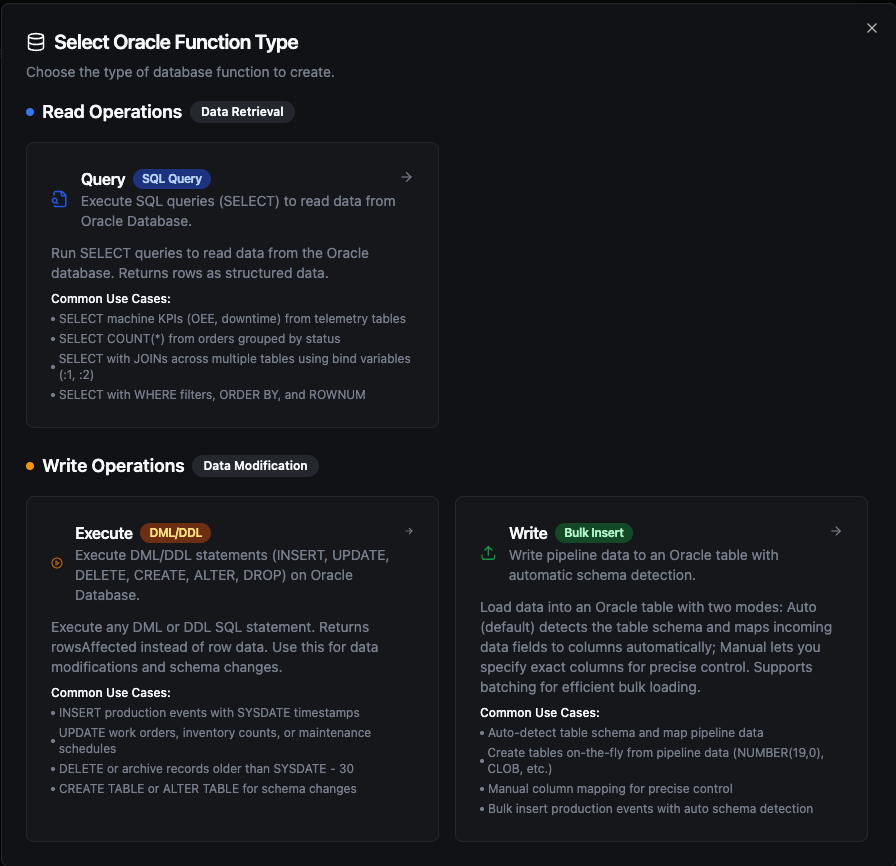
Oracle function creation interface showing available function types: Query, Execute, and Write
Query Function
Purpose: Execute SQL queries (SELECT) to read data from Oracle Database. Returns rows as structured data.
Configuration Fields
| Field | Type | Required | Default | Description |
|---|---|---|---|---|
| SQL Query | String | Yes | - | SQL SELECT statement to execute. Supports parameterized queries with ((param)) syntax. |
| Timeout (seconds) | Number | No | 1800 | Per-execution timeout in seconds (1-3600). |
Use Cases:
- SELECT machine KPIs (OEE, downtime) from telemetry tables
- SELECT COUNT(*) from orders grouped by status
- SELECT with JOINs across multiple tables using bind variables (
:1,:2) - SELECT with WHERE filters, ORDER BY, and ROWNUM
Execute Function
Purpose: Execute DML/DDL statements (INSERT, UPDATE, DELETE, CREATE, ALTER, DROP) on Oracle Database. Returns rowsAffected instead of row data. Use this for data modifications and schema changes.
Configuration Fields
| Field | Type | Required | Default | Description |
|---|---|---|---|---|
| SQL Statement | String | Yes | - | DML/DDL SQL statement to execute. Supports parameterized queries with ((param)) syntax. |
| Timeout (seconds) | Number | No | 1800 | Per-execution timeout in seconds (1-3600). |
Use Cases:
- INSERT production events with
SYSDATEtimestamps - UPDATE work orders, inventory counts, or maintenance schedules
- DELETE or archive records older than
SYSDATE - 30 - CREATE TABLE or ALTER TABLE for schema changes
Write Function
Purpose: Write pipeline data to an Oracle table with automatic schema detection. This is not a SQL editor — it loads structured data (rows/objects) from your pipeline into a target table.
Write reads the table's columns and maps the incoming data fields to them automatically. Supports batching for efficient bulk loading.
Configuration Fields
| Field | Type | Required | Default | Description |
|---|---|---|---|---|
| Table Name | String | Yes | - | Target table to insert data into. |
| Data | JSON | Yes | - | Rows to write: an array of objects or a single object. Use ((data)) to take them from the pipeline, or enter static JSON. |
| Create Table If Not Exists | Boolean | No | false | Create the table if it does not exist, with column types from the Schema or inferred from the data. |
| Allow Schema Evolution | Boolean | No | false | Add a column to an existing table when the data carries a field the table has no column for. When off, such a batch fails instead of dropping the field. See step 5 below. |
| Schema | JSON | No | - | Column definitions (types, primary keys, indexes) for creating the table, set in the Visual Editor or as JSON. Shown when Create Table If Not Exists is on. |
| Batch Size | Number | No | 100 | Number of rows per INSERT batch (1–10,000). |
| Timeout (seconds) | Number | No | 1800 | Per-execution timeout in seconds (1-3600). |
Use Cases:
- Auto-detect table schema and map pipeline data
- Create tables on-the-fly from pipeline data (
NUMBER(19,0),CLOB, etc.) - Bulk insert production events with auto schema detection
How Write Works Step by Step
1. Batching
Oracle uses INSERT ALL INTO ... SELECT 1 FROM DUAL for multi-row inserts. If your pipeline sends 10 rows and Batch Size is 5, exactly 2 INSERT ALL statements are executed (2 batches of 5 rows). If it sends 13 rows, 3 statements are executed (5 + 5 + 3). Single-row inserts use regular INSERT INTO syntax for efficiency.
2. Column Matching
Write uses case-insensitive matching between incoming data field names and table column names. For example, a data field named deviceId will match a table column DEVICEID or DeviceId. The original column casing from the database is preserved in the generated INSERT statement.
3. Table Exists — Normal Flow
- The function first queries
ALL_TABLESto check if the target table exists (scoped toOWNER = USER) - If the table exists, it fetches all column metadata from
ALL_TAB_COLUMNS - If the data carries fields that have no column in the table, Allow Schema Evolution decides: when on, the missing columns are added first (step 5); when off, the write fails and nothing is inserted
- It matches incoming data fields to table columns (case-insensitive)
- Batch INSERT statements are generated and executed using the matched columns
4. Table Does Not Exist
| Create Table If Not Exists | Behavior |
|---|---|
| Disabled (default) | Returns an error immediately: "table 'X' does not exist. Enable 'Create table if not exists' or create it manually". No insert is attempted. |
| Enabled, no schema provided | Types are inferred from all rows in the batch using the rules below. A CREATE TABLE is executed, then all rows are inserted. |
| Enabled, with schema | The provided schema is used for CREATE TABLE with full column definitions (types, primary keys, indexes). After creation, all rows are inserted. |
Data Type Inference — When no schema is provided, the Write function infers each column's type from all rows in the batch. For each field it uses the first row where the field has a non-null value; a field that is null in every row gets the null type below. A row that lacks a field inserts NULL for it.
| Data Value | Inferred Type | Notes |
|---|---|---|
true / false | NUMBER(1,0) | JSON boolean values |
42, -7, 1000 | NUMBER(19,0) | Whole numbers (no fractional part) |
3.14, 0.5 | BINARY_DOUBLE | Numbers with fractional part |
"2024-01-15T10:30:00Z" | TIMESTAMP | Strings matching ISO 8601 / RFC 3339 and other common timestamp formats are automatically detected |
"hello", "sensor-01" | CLOB | All other strings |
null | CLOB | Null values default to text |
JSON has a single number type, so 55.0 arrives as 55 and is typed NUMBER(19,0). When rows disagree, a whole number gives way to a later number with a fractional part: a field that is 38 in one row and 38.5 in a later row gets BINARY_DOUBLE. Any other disagreement keeps the type of the first non-null value, so a field that is a string in the first row stays CLOB even if later rows send numbers. If you need a specific numeric type (e.g., NUMBER(10,0), NUMBER), define it in the schema using the Visual Editor.
5. Schema Evolution (Table Exists + Allow Schema Evolution On)
When Allow Schema Evolution is on and the table already exists, the function adds the missing columns before inserting:
- New columns: If the data contains fields that have no column in the table,
ALTER TABLE ADDis executed for each missing field. If a schema is defined in the Visual Editor, the specified type is used; otherwise, the type is inferred from the batch using the rules above. - After the columns are added, column metadata is re-fetched from the database, then all rows are inserted with the updated column set.
Schema evolution only adds columns — it never changes the type of an existing column. Data that does not fit an existing column's type is not handled by schema evolution: the database rejects or converts it as it would for any INSERT.
The following changes are not made by schema evolution and require manual ALTER TABLE statements:
- Changing the type of an existing column, whether widening or narrowing it
- Changing an already-created column's type by updating the Visual Editor schema alone — the schema definition only affects new columns being added
- Dropping columns — removing a column from the Visual Editor schema does not delete it from the database table. The column remains in the table and receives
NULL(or its default value) for new inserts.
If you need to change an existing column's type or drop a column, use the Execute function to run ALTER TABLE ... MODIFY ... or ALTER TABLE ... DROP COLUMN ... manually.
Allow Schema Evolution off: if the data carries a field that has no column in the table, the write fails before anything is inserted, with an error that names the fields:
"write batch carries field(s) [pressure] with no matching column in table "sensor_readings" and schema evolution is disabled — enable 'Allow schema evolution' on this function, or add the column(s) manually"
Turn the switch on, add the column with the Execute function, or remove the field upstream. The error is marked permanent because the same batch would fail again: with Store & Forward on, the batch is not retried and goes to Failed messages.
Functions saved before the switch existed have no Allow Schema Evolution value. For them, Create Table If Not Exists decides: when on, missing columns are added; when off, fields that have no column are skipped and listed in skippedFields. When you open such a function in the editor, the switch starts in the same position as Create Table If Not Exists, and saving stores it. Once it is saved as off, a batch with an unknown field fails instead of being skipped.
6. Partial Failure
Each batch executes independently — there is no transaction wrapping all batches. If batch 3 of 5 fails, batches 1 and 2 have already been committed. The error response still includes rowsInserted showing how many rows succeeded before the failure.
Response Metadata
On success, the response includes:
| Field | Description |
|---|---|
rowsInserted | Total number of rows successfully inserted |
matchedColumns | Column names that had matching data fields (when the table already existed) |
skippedFields | Data fields that had no matching column and were skipped — only for functions saved before Allow Schema Evolution existed (if any) |
schemaEvolution | Columns added by schema evolution, each with its type (if any) |
tableCreated | true if the table was created during this call |
columns | Columns written to (when the table was created during this call) |
batchSize | Batch size used |
totalRows | Total number of input rows |
Using Parameters
MaestroHub detects the ((parameterName)) syntax and exposes each parameter for validation and runtime binding for Query and Execute functions.
| Configuration | Description | Example |
|---|---|---|
| Type | Enforce data types for incoming values | string, number, boolean, datetime, array |
| Required | Mark parameters as mandatory or optional | Required / Optional |
| Default Value | Fallback value applied when callers omit a parameter | SYSTIMESTAMP, 0, 'Active' |
| Description | Add guidance for downstream users | "UTC start time for the query window" |
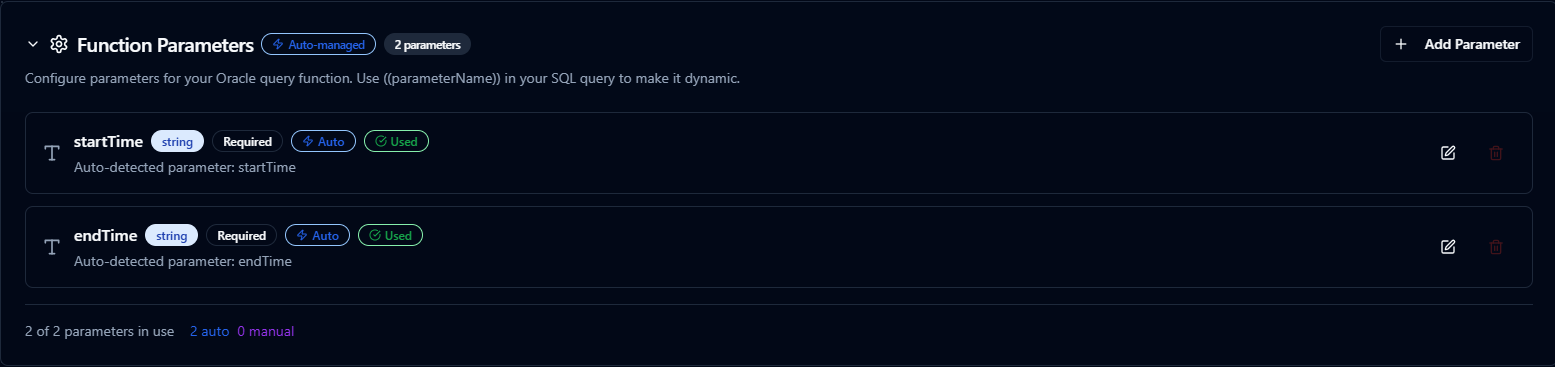
Parameter configuration with validation rules and helper text
Oracle automatically uses bind variables for parameters, which:
- Improves query performance through execution plan reuse
- Prevents SQL injection attacks
- Reduces parsing overhead in the database
Pipeline Integration
Use the Oracle Database functions you publish here as nodes inside the Pipeline Designer to keep plant-floor activity aligned with enterprise data. Drag the appropriate node type into your flow, bind parameters to upstream outputs or constants, and adjust error handling or retry behavior directly on the canvas.
Each function type maps to a dedicated pipeline node — Query, Execute, and Write — so you can clearly separate read, write, and data-loading operations in your flows.
When orchestrating larger workflows, visit the Connector Nodes page for guidance on where Oracle nodes fit within multi-system automation patterns.
Common Use Cases
Query: Production Events
Scenario: Retrieve production events from MES tables for a specific time range and production line.
SELECT
    event_id,
    line_id,
    event_type,
    quantity_produced,
    event_time,
    operator_name
FROM ProductionEvents
WHERE event_time >= TO_DATE('((startDate))', 'YYYY-MM-DD')
  AND event_time < TO_DATE('((endDate))', 'YYYY-MM-DD') + 1
  AND line_id = ((lineId))
ORDER BY event_time DESC;
Pipeline Integration: Feed real-time production data to dashboards, trigger alerts based on thresholds, or sync with ERP systems.
Execute: Updating Work Order Progress
Scenario: Update work order completion details from barcode scanners or PLC events.
UPDATE WorkOrders
SET
    completed_quantity = ((completedQuantity)),
    scrap_quantity = ((scrapQuantity)),
    status = ((newStatus)),
    last_updated_at = SYSTIMESTAMP,
    last_updated_by = ((userId))
WHERE work_order_id = ((workOrderId));
Pipeline Integration: Trigger on event streams to keep ERP and MES systems synchronized in real time.
Execute: Recording Inventory Transactions
Scenario: Record inventory movements from automation equipment into ERP tables.
INSERT INTO InventoryTransactions (
    item_number, location_code, quantity_change,
    transaction_type, transaction_time, operator_id
) VALUES (
    ((itemNumber)), ((locationCode)), ((quantityChange)),
    ((transactionType)), SYSTIMESTAMP, ((operatorId))
);
Pipeline Integration: Combine with Modbus, OPC UA, or REST nodes to maintain accurate inventory records.
Write: Bulk Loading Sensor Data
Scenario: Load real-time sensor readings from IoT devices into an Oracle table.
Configure a Write function with:
- Table Name:
SENSOR_READINGS - Create Table If Not Exists: enabled
- Allow Schema Evolution: enabled, so a new field from the devices becomes a new column instead of failing the batch
Connect it after data collection nodes (MQTT, OPC UA, Modbus, etc.) in your pipeline. The Write function automatically maps incoming fields (sensor_id, temperature, pressure, vibration) to table columns and inserts them in batches using INSERT ALL statements. If the table doesn't exist, it is created automatically with inferred types (NUMBER(19,0), BINARY_DOUBLE, CLOB).