Google Cloud Functions Integration Guide
Connect to Google Cloud Functions (now branded Cloud Run functions) to call your own serverless code from a pipeline — a transform, an enrichment lookup, an inference endpoint, or a side effect the pipeline should not wait for. This guide covers connection setup, function configuration, and pipeline integration.
Overview
The Cloud Functions connector calls a function over its HTTPS trigger and hands the response back to the pipeline. It resolves a function by name through the Cloud Functions Admin API, so a pipeline author names the function rather than pasting a URL that changes when the function is redeployed. The connector provides:
- Synchronous invocation returning the HTTP status and the response body, decoded as JSON when it parses and delivered as text when it does not
- Fire-and-forget dispatch for work that must not hold up the pipeline
- Function discovery through the Admin API, across one region or every region in the project
- OIDC identity tokens minted per function URL, which is what a private function checks
- Invocation by name or by URL — a name resolves in the connection's project and region; a full
https://trigger reaches a function in any project - Flexible authentication with a service account key or Application Default Credentials (GKE Workload Identity,
GOOGLE_APPLICATION_CREDENTIALS, an attached service account) - Custom API endpoint for emulators and private access
- Templatable function name, payload, region and filter, so one function serves many calls
Cloud Functions are invoked by MaestroHub; they do not push events back into it. To have a function start a pipeline, give the pipeline a Webhook Trigger and have the function POST to it, or publish from the function to Pub/Sub and use the Google Pub/Sub trigger.
A 2nd-gen Cloud Function is a Cloud Run service with a build pipeline attached. This connector talks to the Cloud Functions Admin API, so it can resolve a function by name and report its generation, state and runtime. To call a Cloud Run service that was never deployed as a function, use the REST/HTTP connector against its URL.
Connection Configuration
Google Cloud Functions Connection Creation Fields
1. Profile Information
| Field | Default | Description |
|---|---|---|
| Profile Name | - | A descriptive name for this connection profile (required, max 100 characters) |
| Description | - | Optional description for this Cloud Functions connection |
2. Project & Region
| Field | Default | Description |
|---|---|---|
| Project ID | - | The GCP project that owns the functions (required) |
| Region | us-central1 | The region the functions are deployed in (e.g. us-central1, europe-west1). Invoking by name resolves the function in this region. |
A function name is unique within one project and one region. order-router in us-central1 and order-router in europe-west1 are two functions. Create one connection per region you invoke into, or give the invoke node a full trigger URL, which carries its own region.
3. Authentication
| Field | Default | Description |
|---|---|---|
| Service Account JSON Key | - | The whole service account JSON key. Leave empty to use Application Default Credentials. |
| Invocation Auth | oidc | oidc mints a Google-signed identity token for each function's URL. none sends no Authorization header. |
You can authenticate the connector in one of two ways:
Option A — Service account JSON key (explicit)
Paste the key Google issues for the service account — the whole JSON object, not a path to it. Best for self-hosted deployments where the host has no Google identity of its own. MaestroHub stores it encrypted and never returns it to the browser.
Option B — Application Default Credentials (implicit)
Leave the key empty. The Google client library then resolves credentials in its standard order:
- The
GOOGLE_APPLICATION_CREDENTIALSenvironment variable - GKE Workload Identity, when running on GKE
- The attached service account of the Compute Engine / Cloud Run host
gcloud auth application-default logincredentials, in development
This is the recommended path for GCP-hosted MaestroHub deployments — no long-lived key is stored in the connection profile.
Discovery and invocation are granted separately, and it is normal to have one without the other:
| Operation | Required IAM permission | Typical role |
|---|---|---|
| Connect / health probe | cloudfunctions.functions.list | roles/cloudfunctions.viewer |
| Invoke by name (resolving the trigger) | cloudfunctions.functions.get | roles/cloudfunctions.viewer |
| Invoke a 2nd-gen function | run.routes.invoke on the underlying service | roles/run.invoker |
| Invoke a 1st-gen function | cloudfunctions.functions.invoke | roles/cloudfunctions.invoker |
| List Functions | cloudfunctions.functions.list | roles/cloudfunctions.viewer |
cloudfunctions.functions.list is needed for the connection's startup health probe — without it the connection never reaches Connected, even when the identity is allowed to invoke every function in the project.
A Cloud Function requires authentication unless it was deployed with --allow-unauthenticated. Leave Invocation Auth on oidc unless you know the function grants allUsers. none is for public functions and for emulators — it sends no credential at all, and a private function answers 403.
The token's audience is the function's own URL, which is what Cloud Run checks. Nothing else needs configuring; MaestroHub mints one token source per URL and refreshes it as needed.
4. Advanced
| Field | Default | Description |
|---|---|---|
| Custom API Endpoint | - | Custom Cloud Functions Admin API endpoint, for emulators or private access. Leave empty for Google Cloud. |
| Request Timeout | 1m | Default timeout for invocations and Admin API calls (1s–60m). Individual functions may override it. |
A 2nd-gen function's own maximum runtime is 60 minutes, and a 1st-gen function's is 9 minutes. The connection timeout bounds how long MaestroHub waits — it does not extend what Google allows. A function that runs longer than its own deployed timeout is killed by Google regardless of what is set here.
5. Connection Labels
| Field | Default | Description |
|---|---|---|
| Labels | - | Key-value pairs to categorize and organize this connection (max 10 labels) |
Example Labels
env: prod– Environmentproject: acme-prod– GCP projectregion: us-central1– Deployment region
Function Builder
Creating Google Cloud Functions Functions
Once you have a connection established, you can create reusable functions:
- Open the connection and go to its Functions tab → New Function
- Select the desired function type (Invoke, Invoke Async, or List Functions)
- Configure the function parameters
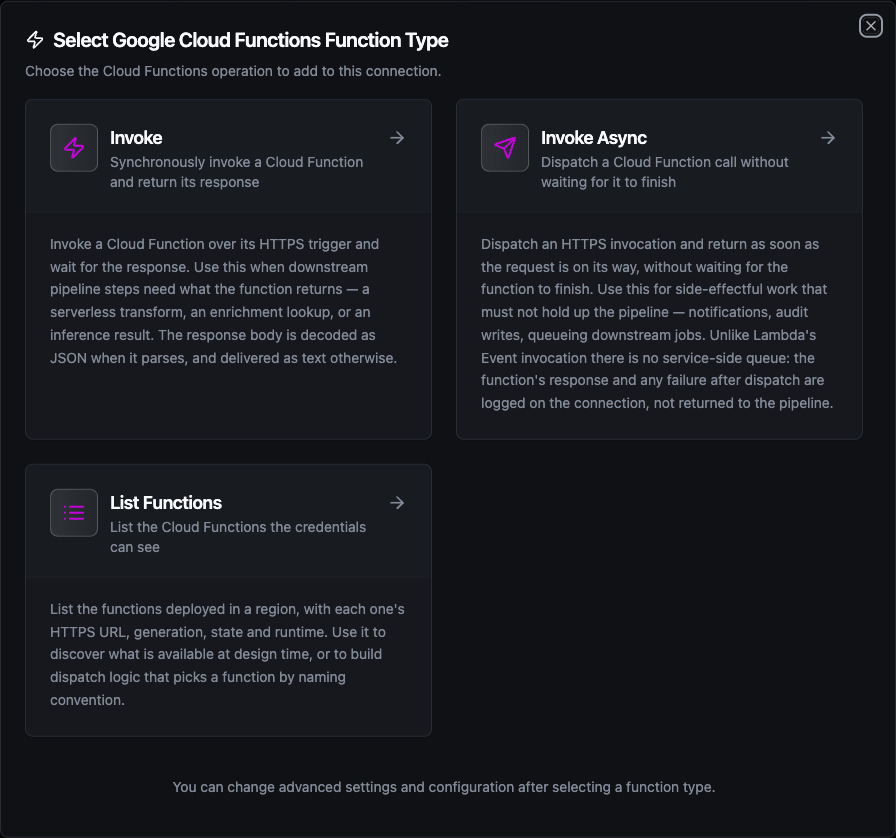
Select from three Cloud Functions function types: two invocation shapes and one discovery operation
Invoke Function
Purpose: Call a function over its HTTPS trigger and wait for the response. Use this when a downstream node needs what the function returns.
Configuration Fields
| Field | Type | Required | Default | Description |
|---|---|---|---|---|
| Function Name or URL | String | Yes | - | Function name (resolved in the connection's project and region), or a full https:// trigger URL, which skips the lookup. Supports ((parameter)) syntax. |
| HTTP Method | Enum | No | POST | POST, GET, PUT, PATCH or DELETE. GET and DELETE send no body. |
| Payload | String | No | {} | Request body. JSON by default; any text is accepted when Content Type says so. Supports ((parameter)) syntax. |
| Content Type | String | No | application/json | Content-Type header for the body. A body sent as application/json is validated before it leaves. |
| Extra Headers | Object | No | - | Additional request headers. Authorization is set by the connection's Invocation Auth and cannot be overridden here. |
| Timeout Override | Duration | No | - | Overrides the connection-level request timeout. A Go duration string between 1s and 60m (e.g. 30s). |
Use Cases:
- Run a serverless transform on incoming pipeline data
- Call an ML inference endpoint deployed as a function
- Look up reference data from a Firestore-backed function
- Call a function in another project by its full trigger URL
A name is resolved once per connection through the Admin API and cached for the life of the connection, so invoking the same function per message costs one lookup, not one per message. It survives a redeployment that changes the URL, and it needs cloudfunctions.functions.get.
A URL skips the lookup entirely. Use it for a function in another project, when the identity has invoke permission but not list/get permission, or when you already hold the URL from a List Functions result.
A function that answers 400 or 500 has run and refused. The node fails, so a pipeline's error branch fires, and the response body is still delivered on result.payload so the branch can read why. A 4xx is treated as permanent (retrying the same body gets the same answer) and a 5xx or 429 as transient.
This is worth knowing if your function signals business outcomes with status codes: a 409 Conflict meaning "already processed" fails the node. Answer 200 with a body the pipeline can branch on instead.
A response is read up to 8 MB. Past that the body is truncated and the result's metadata says so. Large results belong in Cloud Storage with the object name in the response — read them with the Google Cloud Storage connector.
Invoke Async Function
Purpose: Dispatch an invocation and return immediately, without waiting for the function to finish. Use this for side-effectful work that must not hold up the pipeline.
Configuration Fields
| Field | Type | Required | Default | Description |
|---|---|---|---|---|
| Function Name or URL | String | Yes | - | Function name or full https:// trigger URL. Supports ((parameter)) syntax. |
| Payload | String | Yes | {} | Request body POSTed to the function. Supports ((parameter)) syntax. |
| Content Type | String | No | application/json | Content-Type header for the body. |
| Extra Headers | Object | No | - | Additional request headers. Authorization cannot be overridden here. |
| Timeout | Duration | No | - | Bounds the dispatched request. The node returns before the function does, so this caps how long the call may run in the background — not how long the pipeline waits. |
Use Cases:
- Notify a function of an event without blocking the pipeline
- Hand slow post-processing to a function and carry on
- Queue a downstream job from a pipeline step
Unlike AWS Lambda's Event invocation type, Google offers no service-side queue for an HTTPS trigger. MaestroHub sends the request and returns; the function's response and any failure after dispatch are logged on the connection, not returned to the pipeline. The node's result is {"dispatched": true} and nothing more.
Consequences worth planning for:
- A function that is down, slow, or rejects the payload produces a successful node and a warning in the connection's logs.
- The dispatch is bounded by the connection's own lifetime: an in-flight call is given a few seconds to finish when the connection is closed, then cancelled.
- Because delivery cannot be confirmed, this operation is not eligible for store-and-forward. Use the synchronous Invoke when the pipeline must know the work landed.
When a real queue is what you want, publish to Google Pub/Sub and trigger the function from the topic.
List Functions Function
Purpose: List the functions the credentials can see, with each one's HTTPS URL, generation, state and runtime.
Configuration Fields
| Field | Type | Required | Default | Description |
|---|---|---|---|---|
| Region Override | String | No | - | Region to list instead of the connection's. Use - to list every region the project has functions in. Supports ((parameter)) syntax. |
| Page Size | Integer | No | 50 | Maximum functions to return in this page (1–1000). |
| Filter | String | No | - | Admin API filter expression, e.g. state="ACTIVE" or environment="GEN_2". Supports ((parameter)) syntax. |
| Page Token | String | No | - | Token from a previous call, to continue the listing. Supports ((parameter)) syntax. |
| Timeout | Duration | No | 30m | Bound on this single operation (1s–1h). |
Use Cases:
- Discover available functions before invoking one
- Audit the function inventory of a region, or of the whole project with
- - Build a dispatch table that picks a function by naming convention
Page Size is pushed down to the Admin API, so a budget of 10 costs one small page rather than fetching the project's whole inventory and trimming it. When more remain, the result carries a nextPageToken; pass it back as Page Token to continue.
A wildcard (-) listing can also report an unreachable region. Functions in that region are missing from the result — treat a non-empty unreachable as an incomplete inventory, not a clean one.
Function Parameters
Every field marked "supports ((parameter)) syntax" can be templated, and MaestroHub detects the placeholders automatically as you type.
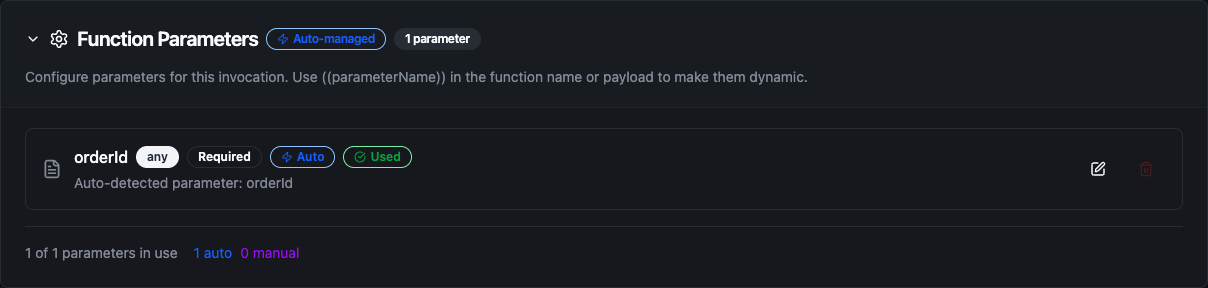
Placeholders written in the function name or payload become parameters the pipeline fills in at run time
A templated payload stays valid JSON: quote a placeholder that stands for a string ("orderId": "((orderId))") and leave one that stands for a number unquoted ("total": ((total))).
Pipeline Integration
Each function type has a matching pipeline node. See the Cloud Functions node reference for the node cards, their output shape, and how to read the result downstream.
Common Use Cases
Serverless Enrichment Mid-Pipeline
Scenario: An order pipeline needs a shipping estimate that a data-science team maintains as a Cloud Function.
Invoke Configuration:
- Function Name or URL:
shipping-estimator - HTTP Method:
POST - Payload:
{
  "orderId": "((orderId))",
  "destination": "((postcode))",
  "weightKg": ((weightKg))
}
Pipeline Integration: Place the Invoke node between the order-parsing node and the write node. Read the estimate downstream with $node["Estimate Shipping"].result.payload.days. If the estimator is unavailable the node fails, so add an error branch that writes the order with a default estimate rather than dropping it.
Fire-and-Forget Audit Trail
Scenario: Every processed batch should be recorded in an audit store, but the recording must never slow the line down or fail the run.
Invoke Async Configuration:
- Function Name or URL:
audit-writer - Payload:
{
  "batchId": "((batchId))",
  "line": "((line))",
  "recordCount": ((recordCount))
}
Pipeline Integration: Connect the Invoke Async node to the end of the processing branch. The node returns immediately and the pipeline finishes without waiting. Remember that a failure after dispatch is only visible in the connection's logs — if the audit trail is a compliance requirement rather than a convenience, use the synchronous Invoke so a failure fails the run.
Dispatch by Naming Convention
Scenario: Each site has its own transform function, named transform-<site>, and the pipeline serves every site.
Invoke Configuration:
- Function Name or URL:
transform-((site)) - Payload:
((payload))
Pipeline Integration: The site comes from the trigger data, so one node serves every site. Each distinct name is resolved once and cached, so a pipeline that sees five sites makes five Admin API lookups for the life of the connection, not one per message.
Inventory Audit Across Regions
Scenario: Compliance requires a periodic inventory of every deployed function, its generation and its runtime.
Function: List Functions with Region Override -
Pipeline Integration: Schedule a daily pipeline that runs List Functions, iterates result.functions with a ForEach node, and writes the rows to an audit table (BigQuery, PostgreSQL, or Cloud Storage). Assert that result.unreachable is absent before treating the inventory as complete.
Troubleshooting
| Symptom | Likely cause | What to do |
|---|---|---|
| Connection never reaches Connected | The identity lacks cloudfunctions.functions.list | Grant roles/cloudfunctions.viewer on the project, or a custom role with that permission. The probe runs regardless of which functions you intend to call. |
googleapi: Error 403: caller has no access to project … | Wrong Project ID, or the key belongs to another project | Check the Project ID field against the key's project_id. |
Invoke answers 403 and the function exists | Invocation Auth is none, or the identity lacks run.invoker | Set Invocation Auth to oidc, and grant roles/run.invoker on the function's underlying Cloud Run service (2nd gen) or roles/cloudfunctions.invoker (1st gen). |
has no HTTPS trigger — it is event-driven | The function is event-driven (Pub/Sub, Storage, Firestore) or still deploying | Only HTTP-triggered functions can be invoked this way. Trigger an event-driven function through its own event source. |
| A redeployed function stops resolving | The cached trigger URL is stale | The cache is dropped automatically when the trigger answers 404. If the function was renamed, update the node's Function Name. |
| Invoke Async reports success but nothing happened | The failure occurred after dispatch | Check the connection's logs for the warning. Switch to the synchronous Invoke if the pipeline must know. |
credentialsJson: must be the service account JSON key itself | A file path or a truncated paste was entered | Paste the whole JSON object, including type, client_email and private_key. |