 SOAP Integration Guide
SOAP is the XML messaging protocol fronting most enterprise systems-of-record — SAP, IBM Maximo, AVEVA/Wonderware MES, Siemens Opcenter, OSIsoft PI Web Services. MaestroHub's SOAP connector imports a WSDL, discovers its operations, and invokes them with typed, template-driven parameters — or bypasses WSDL entirely with a raw-envelope escape hatch for services that don't publish a usable one.
Overview
The SOAP connector supports:
- WSDL-driven operation discovery — point at a WSDL URL, or paste its contents, and browse the operations it declares
- SOAP 1.1 and 1.2 envelopes, selected per connection
- Raw Envelope escape hatch for services with no reachable or parseable WSDL
- Transport authentication: Basic, Bearer Token, API Key, OAuth2 / Web Token, and mutual TLS (client certificates)
- WS-Security UsernameToken (message-level authentication) with plaintext or digest passwords
- MTOM/XOP binary attachments for operations that exchange files or large binary payloads
- SOAP Fault classification that inspects the envelope body, not just the HTTP status code
Use the SOAP connector whenever you need to call an operation on a legacy or enterprise system whose integration surface is a WSDL/XML web service rather than a REST/JSON API. For modern HTTP/JSON APIs, use the REST connector instead.
Connection Configuration
Creating a SOAP Connection
From Connections → New Connection → SOAP, configure the connection. The form is organized into seven tabs: Connection, WSDL, Authentication, Advanced, Functions, Scaling, and Health. The Functions, Scaling, and Health tabs unlock after the connection is saved.
SOAP Connection Creation Fields
1. Profile Information
| Field | Default | Description |
|---|---|---|
| Profile Name | - | A descriptive name for this connection profile (required, max 100 characters) |
| Description | - | Optional description for this SOAP connection |
| Connection Labels | - | Key-value pairs to categorize and organize this connection (max 10 labels) |
2. SOAP Connection Settings (Connection tab)
| Field | Default | Description |
|---|---|---|
| Endpoint URL | - | The SOAP service endpoint that envelopes are POSTed to (e.g., https://host/service.asmx) – required |
| SOAP Version | 1.1 | Envelope namespace and Content-Type: 1.1 or 1.2 – required |
| SOAPAction Mode | from-wsdl | Where the SOAPAction HTTP header comes from – from-wsdl / manual / empty |
| Request Timeout (seconds) | 30 | Maximum time to wait for a response (1-300 s) – required |
| Health Operation | - | Optional WSDL operation name invoked by the soap.ping health check |
SOAPAction Mode Options
- From WSDL: Uses the SOAPAction declared on the operation's binding in the WSDL. Note: WSDLs that declare their binding under the SOAP 1.2 namespace don't carry a SOAPAction in a form MaestroHub's parser can extract — if your service is SOAP 1.2-only and calls fail on a missing/incorrect action, switch to Manual.
- Manual (per-call): Each function supplies its own SOAPAction value.
- Always empty: No SOAPAction header is sent, regardless of the WSDL or function configuration.
3. WSDL Source (WSDL tab)
| Field | Default | Description |
|---|---|---|
| WSDL Source | url | Where the WSDL comes from – url / inline / upload |
| WSDL URL | - | WSDL location, fetched with the same authentication and TLS settings as the endpoint (shown when Source = URL) |
| WSDL Content | - | Pasted WSDL document text (shown when Source = Inline or Upload) |
| WSDL Cache Duration (seconds) | 3600 | How long to trust the parsed WSDL before re-fetching (0 = re-parse on every call) |
Both Inline and Upload paste the WSDL's XML content into the same text box — there's no binary file picker. "Upload" is simply the option to reach for when a vendor or your IT department handed you the .wsdl file rather than a URL; open it in a text editor and paste its contents.
Leaving the WSDL empty entirely is a valid, supported configuration — it just means only the Raw Envelope function will be usable, since there's no WSDL to discover operations from. A single WSDL document is capped at 16 MB; when Source is url, MaestroHub also follows <wsdl:import>, <xsd:import>, and <xsd:include> references to assemble multi-file WSDLs (common with SAP, Maximo, and Salesforce), as long as every imported document is served from the same origin (scheme, host, and port) as the WSDL URL.
4. Authentication (Authentication tab)
4a. Transport Authentication
| Field | Default | Description |
|---|---|---|
| Authentication Type | none | HTTP-level authentication applied to every request, including the WSDL fetch – none / basic / bearer / apiKey / webtoken |
(Only displayed when Authentication Type = "Basic Auth")
| Field | Default | Description |
|---|---|---|
| Username | - | Username for Basic Authentication – required |
| Password | - | Password for Basic Authentication – required |
(Only displayed when Authentication Type = "Bearer Token")
| Field | Default | Description |
|---|---|---|
| Bearer Token | - | Static token sent as Authorization: Bearer <token> – required |
(Only displayed when Authentication Type = "API Key")
| Field | Default | Description |
|---|---|---|
| API Key Location | header | Where to send the API key – header / query |
| Key Name | X-API-Key | Header or query parameter name for the API key |
| API Key Value | - | The actual API key value – required |
(Only displayed when Authentication Type = "OAuth2 / Web Token")
| Field | Default | Description |
|---|---|---|
| Token Endpoint URL | - | URL to fetch the authentication token – required |
| Token Path in Response | - | Dot-notation path to extract the token from the token endpoint's response (e.g., access.token) – required |
| Token Request Encoding | json | How to encode the token request body – json / form / raw |
| Token Request Body | - | Body content sent to the token endpoint (supports parameters). Client credentials, grant type and scope go here, e.g. {"grant_type": "client_credentials", "client_id": "…", "client_secret": "…", "scope": "read"} |
| Attach Token As Header | Authorization | Header name used to attach the token to subsequent SOAP requests |
| Add 'Bearer ' prefix | true | Prepends Bearer to the token value when attaching the header |
| Token Cache Duration (seconds) | 0 | How long to reuse a fetched token before requesting a new one (0 = no caching) |
The SOAP connector supports Basic, Bearer, API Key, OAuth2/Web Token, and mutual TLS at the transport layer, plus WS-Security at the message layer — but not NTLM. If your target service requires NTLM (common on some older IIS/.NET deployments), it currently cannot be reached through this connector.
4b. WS-Security UsernameToken
Message-level authentication: adds a <wsse:UsernameToken> header to every SOAP envelope, independent of any transport authentication configured above.
| Field | Default | Description |
|---|---|---|
| Enable WS-Security UsernameToken | false | Adds a UsernameToken header to every request |
| WS-Security Username | - | Required when enabled |
| WS-Security Password | - | Required when enabled |
| Password Type | Text | Text sends the password as-is; Digest sends Base64(SHA1(Nonce + Created + Password)) |
| Add Nonce | false | Include a Nonce element in the UsernameToken |
| Add Created | false | Include a Created (timestamp) element in the UsernameToken |
When Password Type is set to Digest, the Nonce and Created elements are always included in the header — the digest calculation is defined over both, per the OASIS WS-Security UsernameToken spec — regardless of the Add Nonce / Add Created toggles above.
5. Advanced (Advanced tab)
5a. TLS / mTLS
| Field | Default | Description |
|---|---|---|
| Verify TLS certificates | true | Disable only for self-signed certificates (insecure) |
| CA Certificate (PEM) | - | Custom CA certificate used to verify the server's certificate |
| Client Certificate (PEM) | - | Client certificate for mutual TLS |
| Client Private Key (PEM) | - | Private key matching the client certificate |
CA Certificate, Client Certificate, and Client Private Key can each be pasted directly or uploaded as a file (.crt/.cer/.pem or .key/.pem); all three are treated as secrets and are masked once saved.
5b. Headers
| Field | Default | Description |
|---|---|---|
| HTTP Headers | {} | Static HTTP headers sent with every request (including the WSDL fetch) |
| SOAP Header Elements | {} | Static tag → text elements injected into every envelope's <soap:Header> |
5c. Request Behavior
| Field | Default | Description |
|---|---|---|
| Follow Redirects | true | Follow HTTP redirects |
| Enable Retry | false | Retry, with exponential backoff, a request that never reached the server — the host name did not resolve or the connection was refused. A SOAP call is a POST: after a timeout, a reset or any response the service may already have acted on it, so it is not repeated. A Web Token request follows the same rule, and a token endpoint's refusal is never retried. |
| Retry Count | 3 | Maximum retry attempts (0-10) (shown when Enable Retry is on) |
| Retry Wait Time (seconds) | 1 | Base wait time before the next attempt; doubles on each subsequent retry (0-60 s) (shown when Enable Retry is on) |
| Retry On SOAP Faults | - | Comma-separated SOAP fault codes/subcodes to also retry, e.g. Server, Receiver (shown when Enable Retry is on) |
Authentication Type Validation Rules
| Authentication Type | Required Fields |
|---|---|
| None | No additional fields required |
| Basic Auth | Username AND Password |
| Bearer Token | Bearer Token |
| API Key | API Key Location, Key Name, AND API Key Value |
| OAuth2 / Web Token | Token Endpoint URL AND Token Path in Response |
| WSDL Source | Required Fields |
|---|---|
| URL | No additional fields required (WSDL URL itself is optional — see note above) |
| Inline / Upload | WSDL Content |
WS-Security: when Enable WS-Security UsernameToken is on, WS-Security Username AND WS-Security Password are both required.
- Fault classification: SOAP Faults are inspected regardless of HTTP status code. Client/Sender faults and WS-Security authentication failures (
FailedAuthentication,InvalidSecurityToken,SecurityTokenUnavailable,FailedCheck,InvalidSecurity) are treated as permanent errors; Server/Receiver faults are treated as transient (retryable). Use Retry On SOAP Faults to additionally mark specific fault codes as retryable at the transport layer. - WSDL fetch uses the same credentials: whatever transport authentication and TLS settings you configure apply to fetching the WSDL itself, not only to invoking operations.
- Password/Secret Masking: passwords, tokens, API keys, and all three TLS PEM fields are masked with
********when editing an existing connection, and are only updated if you change them. - Scaling: SOAP connections are stateless over HTTP and are shared across MaestroHub replicas rather than pinned to one instance.
Function Builder
Creating SOAP Functions
Once the connection is saved:
- Go to the connection's Functions tab and start a new function
- Choose Invoke Operation or Raw Envelope as the function type
- For Invoke Operation, use Browse Operations to discover and select a WSDL operation, or type the operation name directly
- Define the request body, SOAPAction, MTOM attachments, and template parameters
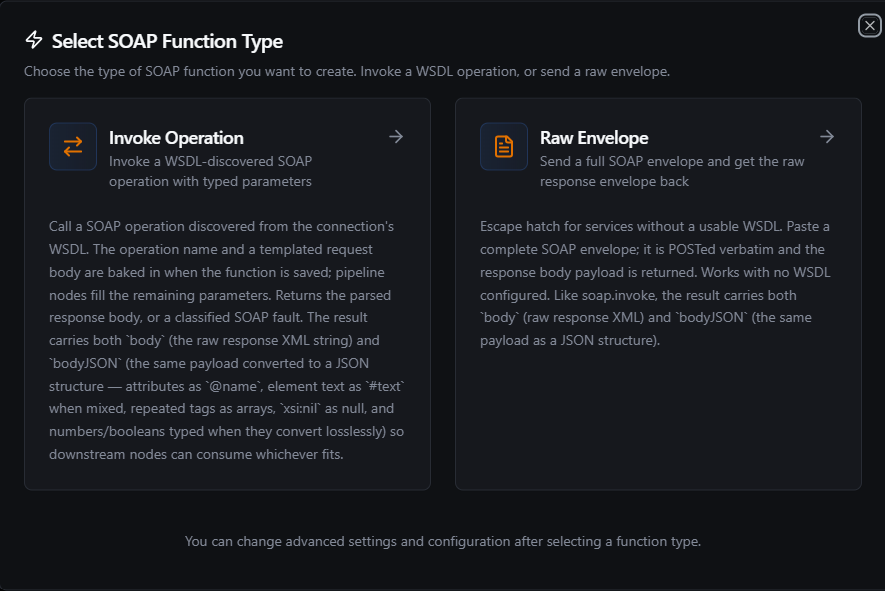
Choose Invoke Operation to call a WSDL-discovered operation, or Raw Envelope to POST a complete envelope
Invoke Operation Function
Purpose: Invoke a single WSDL-discovered SOAP operation with a templated request body. This is the primary way to call most SOAP services.
Configuration Fields
| Field | Type | Required | Default | Description |
|---|---|---|---|---|
| Operation | String | Yes | - | WSDL operation name to invoke (supports parameters). Example: GetWorkOrder |
| Request Body (XML) | String | No | - | Templated XML fragment placed inside <soap:Body> (supports parameters). Example: <GetWorkOrder xmlns="..."><id>((workOrderId))</id></GetWorkOrder> |
| SOAPAction | String | No | - | Overrides the SOAPAction header for this call — only used when the connection's SOAPAction Mode is manual (supports parameters) |
| MTOM Attachments | Array | No | - | Binary parts sent alongside the envelope via MTOM/XOP — see MTOM Attachments below |
| Timeout (ms) | Number | No | 30000 | Bound on this function's requests (1-3600000 ms). The connection's Request Timeout still applies and the shorter one wins. |
Use Cases: Fetch a work order from SAP or Maximo, post a production order, query equipment status from an MES, retrieve historian tag values from OSIsoft PI Web Services
Browse Operations
Once the connection has a reachable WSDL (URL or pasted content), the Invoke Operation function editor shows a Browse Operations panel:
- Click Browse (it becomes Refresh afterward) to fetch and parse the WSDL
- A filterable, searchable list of operations appears, each showing its name, documentation (if the WSDL includes any), and its SOAPAction
- Click an operation to auto-fill Operation and SOAPAction, and to scaffold the Request Body — MaestroHub builds an XML skeleton with one
<field>((field))</field>placeholder per input parameter declared in the operation's schema, recursing into nested structures
Clicking the same operation again preserves any manual edits you've made to the body; clicking a different operation replaces the body with that operation's scaffold. If an operation's parameter tree is unusually large, MaestroHub truncates it at a safety limit and flags the operation so you can complete the request body by hand.
If your WSDL has no usable operations (or none at all), save the connection anyway and use the Raw Envelope function to POST envelopes directly.
MTOM Attachments
MTOM (Message Transmission Optimization Mechanism) lets a SOAP request carry binary data — files, images, certificates — as separate MIME parts instead of Base64-inlined XML. When an Invoke Operation function has one or more attachments, MaestroHub sends the request as multipart/related instead of a flat envelope.
Attachment Fields
| Field | Type | Required | Default | Description |
|---|---|---|---|---|
| Content ID | String | Yes | - | The cid referenced from the request body, e.g. doc1@maestrohub |
| Content Type | String | No | application/octet-stream | MIME type of the attached data, e.g. application/pdf |
| Data (base64) | String | Yes | - | Base64-encoded bytes (supports parameters). Example: ((fileBytes)) |
Each attachment must be referenced from the Request Body via an XOP include element, or the function fails validation:
<xop:Include href="cid:doc1@maestrohub" xmlns:xop="http://www.w3.org/2004/08/xop/include"/>
A response can also come back as multipart/related — MaestroHub decodes it transparently and re-inlines any xop:Include references in the parsed body, while any additional binary parts appear in the function's result under attachments. Response attachments are capped at 64 MB total.
Raw Envelope Function
Purpose: POST a complete, hand-written SOAP envelope and receive the raw response envelope back. Works even when no WSDL is configured on the connection — the escape hatch for services with no usable WSDL, or for calls that need full control over the envelope.
Configuration Fields
| Field | Type | Required | Default | Description |
|---|---|---|---|---|
| SOAP Envelope (XML) | String | Yes | - | The complete envelope, POSTed verbatim (supports parameters). Example: <soap:Envelope xmlns:soap="..."><soap:Body><Add xmlns="..."><a>((a))</a><b>((b))</b></Add></soap:Body></soap:Envelope> |
| SOAPAction | String | No | - | SOAPAction header for this call (supports parameters) |
| Timeout (ms) | Number | No | 30000 | Bound on this function's requests (1-3600000 ms). The connection's Request Timeout still applies and the shorter one wins. |
Use Cases: Calling a service with no reachable WSDL, testing a hand-crafted envelope from vendor documentation, working around a WSDL that MaestroHub's parser can't fully resolve
Raw Envelope always sends the envelope exactly as written — it does not build a multipart/related request the way Invoke Operation does with attachments. A multipart response, however, is still decoded normally.
Ping (Health Operation) Function
A pre-existing Ping function (created before it was hidden from the picker, or via automation) invokes the connection's configured Health Operation with an empty body. It has no additional configuration — set the operation to call on the Connection tab's Health Operation field. If no Health Operation is configured, calling Ping fails immediately with a clear error rather than reporting a false success.
Using Parameters
SOAP functions expose parameters defined with ((parameterName)) syntax inside the Request Body, SOAP Envelope, SOAPAction, and MTOM attachment Data fields, and validate them at runtime.
| Configuration | Description | Example |
|---|---|---|
| Type | Coerce incoming values | string, number, boolean, datetime, json, array |
| Required | Ensure mandatory parameters are set | Required / Optional |
| Default Value | Populate sensible defaults | 'WO-0000', 0, '{}' |
| Description | Provide guidance for callers | "Work order identifier to look up" |
Placeholders must be written tight, as ((fieldName)) — a spaced form like (( fieldName )) is not matched by the backend template engine and silently renders as empty. The Browse Operations scaffolder always generates tight placeholders; if you edit the body by hand, keep that convention.
Understanding the Response
Invoke Operation and Raw Envelope both return the same result shape.
Success — the response parses as a SOAP envelope with no fault:
{
  "statusCode": 200,
  "body": "<GetWorkOrderResult xmlns=\"http://tempuri.org/\"><WorkOrderId>WO-1042</WorkOrderId><Status>Open</Status></GetWorkOrderResult>",
  "bodyJSON": {
    "WorkOrderId": "WO-1042",
    "Status": "Open"
  }
}
bodyis always the raw response XML (the first child element of<soap:Body>) — the authoritative source.bodyJSONis an additive, best-effort JSON projection of the same element: child elements become object keys by local name, a repeated tag becomes an array, attributes appear as@name, andxsi:nil="true"becomesnull. It's convenient for pipeline expressions, but it's lossy by design (cross-namespace name collisions, cardinality, and textual-form-significant numbers can't always round-trip) — fall back tobodywhen you need the exact XML.- A void operation (no meaningful response content) delivers
bodyas an empty string and omitsbodyJSONentirely.
SOAP Fault — the response contains a <soap:Fault>, regardless of HTTP status:
{
  "statusCode": 500,
  "fault": {
    "code": "soap:Server",
    "subcode": "",
    "reason": "Work order WO-9999 not found",
    "detail": "<WorkOrderFault xmlns=\"http://tempuri.org/\"><ErrorCode>404</ErrorCode></WorkOrderFault>",
    "detailJSON": { "ErrorCode": 404 }
  }
}
detailJSON is present only when the fault included a <detail>/<Detail> element. When the fault is classified as a WS-Security authentication failure, the result additionally includes "authError": true.
A fault — and any non-2xx status — marks the call failed, and a failed node writes no output for downstream nodes. So the object above is what you see in this dialog and in Execution History; a pipeline expression cannot read it. Branch on the node's On Error setting instead. (SOAP faults do not currently honour retry settings — see SOAP Nodes.)
MTOM response — when the service replies with multipart/related, the result additionally includes:
{
  "attachments": [
    { "contentId": "report@service", "contentType": "application/pdf", "data": "<base64>", "sizeBytes": 48213 }
  ]
}
Pipeline Integration
Use the SOAP functions you build here as nodes inside the Pipeline Designer to call enterprise systems alongside the rest of your automation logic. Drop in the SOAP Invoke node, bind its parameters to upstream outputs or constants, and shape retries or error branches to suit the target service.
If you are designing larger orchestrations, the Connector Nodes page shows how SOAP nodes complement other connectors in multi-step workflows. For the full field reference and error-handling behavior of the pipeline node itself, see SOAP Nodes.
Common Use Cases
ERP / MES Order Sync
Pull work orders, production schedules, or inventory levels from SAP or IBM Maximo via their WSDL services, and post status updates back after a machine completes a job.
Historian and Quality Data Exchange
Query tag history or asset metadata from OSIsoft PI Web Services or Siemens Opcenter, and combine it with shop-floor data collected through other connectors before writing to a historian or dashboard.
Document and Certificate Exchange
Use MTOM attachments to send quality certificates, drawings, or scanned documents alongside a SOAP operation call — for example, attaching a certificate of analysis when closing out a batch record in an MES.