AWS IoT Core Integration Guide
AWS IoT Core is Amazon's managed MQTT broker and device registry. This connector speaks the same MQTT 3.1.1 wire protocol devices use, so a pipeline can publish telemetry onto any topic, subscribe to commands coming back down, and keep a thing's device shadow in step with what the plant floor actually reports.
Overview
The AWS IoT Core connector provides:
- Publish to any MQTT topic, with Store & Forward buffering across broker outages
- Subscribe to topic filters (
+and#wildcards) as a pipeline trigger - Device shadow reads and writes, on the classic shadow or a named one
- Shadow delta triggers that fire when desired and reported state diverge
- Two authentication methods: an X.509 device certificate over mutual TLS, or IAM credentials over a SigV4-signed WebSocket
- Port 443 with ALPN for networks that block 8883
Pair a subscribe trigger with an OPC UA or Modbus write to apply cloud-issued commands on the shop floor, then close the loop with a shadow update so AWS can see what the device actually did.
Before you start
You need three things from AWS:
-
The data endpoint for your account. Find it under AWS IoT → Settings, or run:
aws iot describe-endpoint --endpoint-type iot:Data-ATSIt looks like
a1b2c3d4e5f6g7-ats.iot.eu-central-1.amazonaws.com. Enter the bare host name — nohttps://, no path. -
A credential. Either a device certificate and private key (created under AWS IoT → Security → Certificates, downloaded once at creation), or an IAM access key pair.
-
An IoT policy attached to that certificate or IAM identity, allowing at minimum
iot:Connecton the client ID, plusiot:Publish,iot:Subscribeandiot:Receiveon the topics the connection will use. A policy that omits a topic does not produce an error on that topic — AWS IoT Core disconnects the whole client.
Connection Configuration
Creating an AWS IoT Core connection
Navigate to Connect → New Connection → AWS IoT Core and configure the fields below.
1. Profile information
| Field | Default | Description |
|---|---|---|
| Profile Name | - | A descriptive name for this connection profile (required, max 100 characters) |
| Description | - | Optional description for this connection |
| Labels | - | Key-value labels for organizing connections |
2. Connection
| Field | Default | Description |
|---|---|---|
| Device Data Endpoint | - | The account's AWS IoT data endpoint, as a bare host name (required) |
| AWS Region | us-east-1 | The region the endpoint belongs to. Used to sign the WebSocket handshake under SigV4 (required) |
| MQTT Client ID | - | The client ID presented in the MQTT CONNECT packet (required, max 128 bytes) |
| Default Thing Name | - | The thing whose shadow the shadow functions read and write when they do not name one themselves |
AWS IoT Core allows a single live connection per client ID. A second connection presenting the same ID disconnects the first, and the two then flap indefinitely. Give every MaestroHub connection profile its own client ID, and do not reuse an ID a device is already using.
3. Authentication
| Field | Default | Description |
|---|---|---|
| Authentication Method | X.509 Device Certificate | X.509 Device Certificate (mutual TLS) or IAM Credentials (SigV4 over WebSocket) |
X.509 device certificate — how a provisioned thing connects:
| Field | Required | Description |
|---|---|---|
| Device Certificate (PEM) | Yes | The certificate AWS IoT Core issued for this thing, and which its policy is attached to |
| Device Private Key (PEM) | Yes | The matching private key. AWS shows it once, at certificate creation |
IAM credentials (SigV4) — how a server-side application connects:
| Field | Required | Description |
|---|---|---|
| Access Key ID | No | Leave both key fields empty to use the AWS SDK default credential chain — environment variables, shared config, an IAM role, or IRSA |
| Secret Access Key | Conditional | Required when Access Key ID is set |
| Session Token | No | Only needed with temporary credentials from AWS STS |
Credentials are encrypted at rest and never logged. Once saved, secret fields show a stored-securely marker; leave them empty on edit to keep the existing value.
4. Advanced
| Field | Default | Description |
|---|---|---|
| CA Certificate (PEM) | - | Leave empty to trust the host's certificate pool, which already carries the Amazon Trust Services roots AWS IoT Core presents |
| Broker Port | 8883 | MQTT port for X.509 connections. Set it to 443 when the network blocks 8883 — the connector then negotiates the x-amzn-mqtt-ca ALPN protocol, which is how AWS IoT Core serves MQTT on the HTTPS port. Ignored under SigV4, which always uses 443 |
| Keep Alive | 30s | MQTT keep-alive interval. AWS IoT Core accepts 30s to 1200s and disconnects a client that misses 1.5 intervals |
| Connection Timeout | 30s | Bound on the TCP dial, TLS handshake and CONNACK wait |
Testing the connection
Test Connection opens a real MQTT session against the endpoint. It fails on a rejected certificate, a denied iot:Connect, a client ID already in use, and an unreachable endpoint — all of which show the broker's own reason.
Health checks
How MaestroHub checks a live connection depends on whether you set a Default Thing Name:
- With a thing name — the health check is a real shadow read: the request leaves, the Device Shadow service answers, and a broker that has stopped answering surfaces as unhealthy. This needs
iot:Subscribeandiot:Receiveon that thing's shadow topics. - Without one — there is no shadow to read, so the check falls back to socket liveness. That still notices a dead link through the MQTT keep-alive, but it cannot tell a live socket from a policy that denies every topic.
The connection log says which of the two is in force at connect time.
Functions
Each function is one operation on the connection. Create them from the Functions tab once the connection is saved.
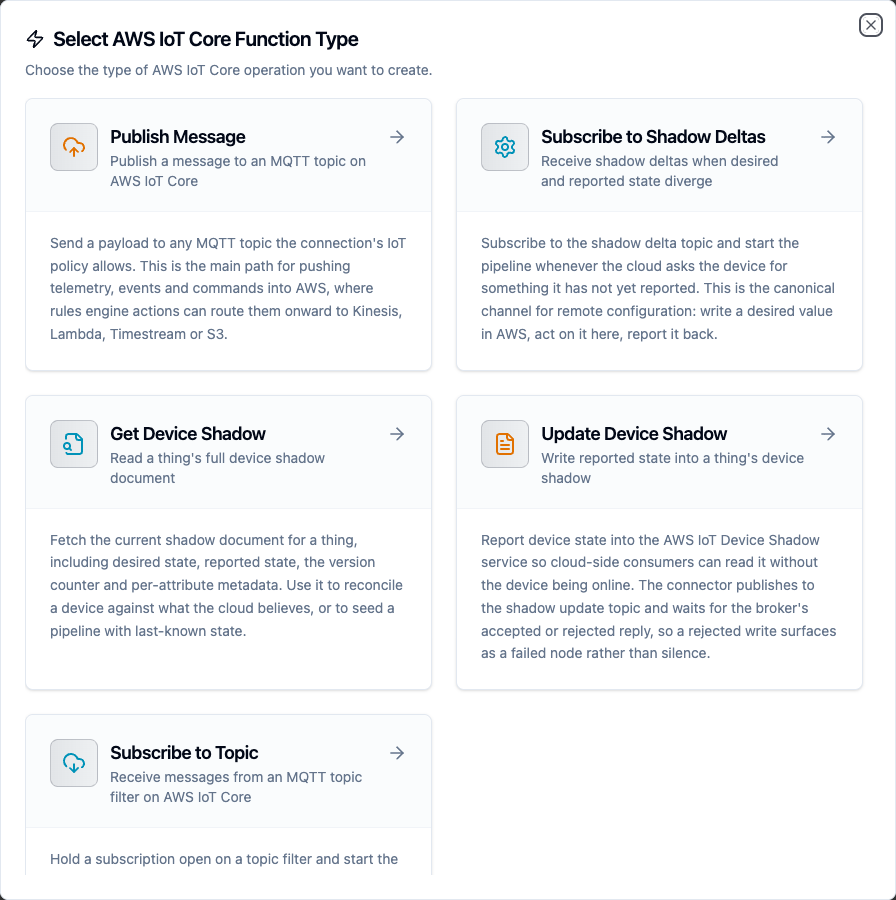
Choosing an AWS IoT Core function type
| Function | Type | Used as | Purpose |
|---|---|---|---|
| Publish Message | awsiot.publish | Pipeline node | Send a payload to an MQTT topic |
| Subscribe to Topic | awsiot.subscribe | Trigger | Start a pipeline on each message matching a topic filter |
| Update Device Shadow | awsiot.shadow.update | Pipeline node | Write reported state into a thing's shadow |
| Get Device Shadow | awsiot.shadow.get | Pipeline node | Read a thing's full shadow document |
| Subscribe to Shadow Deltas | awsiot.shadow.delta | Trigger | Start a pipeline when desired and reported state diverge |
Publish Message
| Parameter | Type | Required | Default | Description |
|---|---|---|---|---|
| Topic | String | Yes | - | The MQTT topic to publish to. At most 256 bytes and 7 forward slashes |
| Payload | String | Yes | - | The message body. Objects are serialized as JSON; strings are sent as-is. At most 128 KB |
| QoS | Number | No | 0 | 0 (at most once) or 1 (at least once). AWS IoT Core does not support QoS 2 |
| Retain | Boolean | No | false | Store the message as the topic's retained message, so the next subscriber receives it immediately on subscribe |
| Timeout | Duration | No | 30m | Bound on this single publish, including the PUBACK wait at QoS 1 |
Topic and payload both accept ((parameterName)) templates, so one function can serve a whole fleet.
Subscribe to Topic
| Parameter | Type | Required | Default | Description |
|---|---|---|---|---|
| Topic Filter | String | Yes | - | The filter to subscribe to. + matches one level, # matches the rest of the topic and must be last |
| QoS | Number | No | 0 | 1 asks the broker to redeliver until the message is acknowledged |
The message body reaches the pipeline as it arrived on the wire. See the Subscribe trigger node for the event shape.
Update Device Shadow
| Parameter | Type | Required | Default | Description |
|---|---|---|---|---|
| Reported State | Object | Yes | - | JSON object written under state.reported. The whole document is capped at 8 KB |
| Thing Name | String | No | Connection default | The thing whose shadow to update |
| Shadow Name | String | No | Classic shadow | The named shadow to update |
| Timeout | Duration | No | 10s | How long to wait for the shadow service's accepted or rejected reply |
The write waits for the service's reply, so a rejected write fails the node with the service's own code and message rather than passing silently.
Get Device Shadow
| Parameter | Type | Required | Default | Description |
|---|---|---|---|---|
| Thing Name | String | No | Connection default | The thing whose shadow to read |
| Shadow Name | String | No | Classic shadow | The named shadow to read |
| Timeout | Duration | No | 10s | How long to wait for the shadow service's accepted or rejected reply |
Subscribe to Shadow Deltas
| Parameter | Type | Required | Default | Description |
|---|---|---|---|---|
| Thing Name | String | No | Connection default | The thing whose shadow deltas to listen for |
| Shadow Name | String | No | Classic shadow | The named shadow to listen on |
Function parameters
Templated fields turn into function parameters automatically. Fill them in the Test dialog to try the function before wiring it into a pipeline.
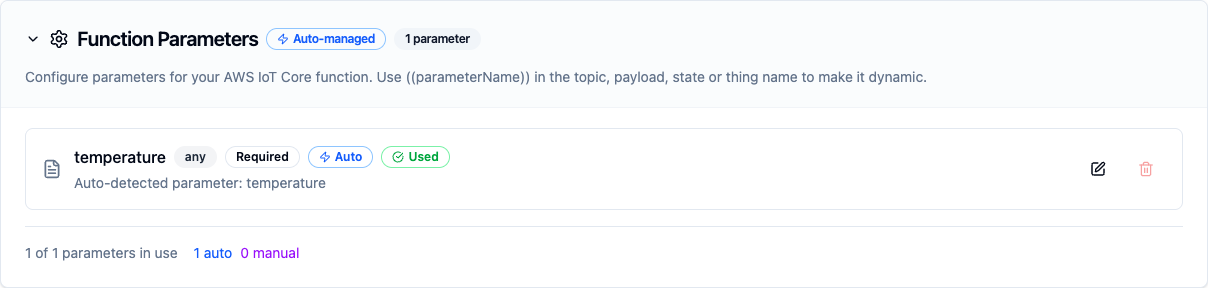
Templated fields become function parameters
Store & Forward
awsiot.publish and awsiot.shadow.update are eligible for Store & Forward: when the broker is unreachable, the payload is buffered durably and replayed once the connection recovers.
Store & Forward is not a per-connection switch on this form. Turn it on for the connection under Orchestrate → Store & Forward, then pick a delivery mode on each pipeline node that sends to this endpoint.
Shadow writes are buffered with a max-age cap rather than indefinitely: a shadow is last-writer-wins per thing, so replaying a stale report hours later would overwrite a fresher value.
Limits
AWS IoT Core enforces these; the connector refuses an oversized request before it reaches the wire, because the broker's own answer to one is to close the connection with no error payload.
| Limit | Value |
|---|---|
| MQTT message payload | 128 KB |
| Shadow state document | 8 KB |
| Topic name | 256 bytes, at most 7 forward slashes |
| Client ID | 128 bytes |
| Subscriptions per connection | 50 |
| Publish requests per second, per connection | 100 |
Troubleshooting
| Symptom | Cause | Fix |
|---|---|---|
| Test Connection reports "not Authorised" | The IoT policy does not allow iot:Connect for this client ID | Check the policy attached to the certificate or IAM identity; iot:Connect is scoped to client/<clientId> |
| The connection flaps between connected and disconnected | Two clients share one client ID | Give each connection profile its own client ID |
| Test Connection reports a certificate error | The certificate is inactive, revoked, or from another account | Confirm the certificate is ACTIVE under AWS IoT → Security → Certificates |
| The connection is healthy but a publish never arrives | The policy allows iot:Connect but not iot:Publish on that topic | Add the topic to the policy. AWS answers an unauthorized publish by closing the connection, so watch the connection state while testing |
| Shadow functions time out | The policy does not grant iot:Subscribe and iot:Receive on the shadow reply topics | Grant both on $aws/things/<thing>/shadow/* |
| Nothing connects on port 8883 | The network blocks 8883 | Set Broker Port to 443; the connector then uses ALPN, which AWS IoT Core serves MQTT behind on the HTTPS port |
Related
- AWS IoT Core pipeline nodes — publish and shadow nodes
- AWS IoT Core triggers — subscribe and shadow-delta triggers
- Azure IoT Hub — the equivalent connector for Microsoft's managed IoT service