Google Cloud Bigtable Integration Guide
Connect to Google Cloud Bigtable to read and write rows from your pipelines. This guide covers connection setup, the five function types, and pipeline integration.
Overview
Bigtable is GCP's petabyte-scale, low-latency NoSQL wide-column store — the usual home for high-volume industrial time-series. The connector provides:
- Key reads that fetch one row by its exact row key
- Range scans over a key prefix or a start-to-end range, with the row cap applied by Bigtable
- Server-side filters for column families, columns and cell versions
- Row writes — one row, many rows in a bulk call, or a delete
- Explicit cell timestamps, so a buffered write overwrites on replay instead of appending a version
- Text or base64 cell values, so binary columns survive the round trip
- An emulator host for local development against the Bigtable emulator
- Template parameters for dynamic row keys, cells and ranges
One connection, one table
A Bigtable connection addresses exactly one table, named on the connection profile alongside the project and instance. Every function on that connection reads and writes that table.
This is deliberate: the health check samples that table's row keys, which is a data-plane call, so an IAM binding scoped to the single table is enough to run the connection. Nothing here needs table-admin permission. To work with a second table, create a second connection.
How Bigtable stores a row
A Bigtable row is a row key plus a sparse set of cells. Each cell lives at a column family and a column qualifier, carries opaque bytes, and is stamped with a timestamp — so one column can hold several versions of its value, newest first.
The connector addresses a cell as "family:column" and delivers reads as a list of cell objects. With the default Versions Per Cell of 1 that list holds exactly one entry per column, which is what most pipelines want.
Rows are stored sorted by row key, and that is what makes a scan cheap: a prefix reads only the tablets that hold it. A key that puts the device first and the time second — device#line3#2026010112 — gives you "everything for one device" as a prefix and "one day for one device" as a range.
Connection Configuration
Creating a Bigtable Connection
Navigate to Connections → New Connection → Google Cloud Bigtable and configure the following.
1. Profile Information
| Field | Default | Description |
|---|---|---|
| Profile Name | - | A descriptive name for this connection profile (required, max 100 characters) |
| Description | - | Optional description for this Bigtable connection |
2. Instance and Table (Connection tab)
| Field | Default | Description |
|---|---|---|
| Project ID | - | The Google Cloud project that owns the instance – required |
| Instance ID | - | The Bigtable instance this connection talks to. 5–33 characters: a lowercase letter, then lowercase letters, digits or hyphens – required |
| Table | - | The table every function on this connection reads and writes – required |
| App Profile | - | The app profile that decides cluster routing and single-cluster isolation. Leave empty to use the instance's default profile |
3. Google Cloud Credentials (Security tab)
| Field | Default | Description |
|---|---|---|
| Service Account JSON Key | - | The whole service-account key file. Masked on edit; leave empty to keep the stored value. Leave empty on create to use Application Default Credentials |
roles/bigtable.reader covers the reads and the health check; roles/bigtable.user adds the writes and deletes. Bind the role on the table rather than the instance if you want the connection scoped to it.
The health check needs bigtable.tables.sampleRowKeys. Reader, User and Admin all carry it; Viewer does not — it grants no data-plane permission at all, so a connection bound to Viewer alone fails Test Connection with a permission error.
A freshly granted role takes a minute or two to propagate. A Test Connection that fails with "Missing IAM permission: bigtable.tables.sampleRowKeys" seconds after you bound the role is almost always that, not a wrong role — wait and try again before changing anything.
Leaving the key empty uses Application Default Credentials — GKE Workload Identity, or the GOOGLE_APPLICATION_CREDENTIALS environment — which is the right choice when MaestroHub already runs with a GCP identity.
4. Emulator and Timeout (Advanced tab)
| Field | Default | Description |
|---|---|---|
| Emulator Host | - | host:port of a Bigtable emulator. Leave empty to talk to Google Cloud |
| Timeout | 30s | How long the connect probe and each individual health check may take (5s–300s) |
- Required fields: Profile Name, Project ID, Instance ID and Table.
- The emulator host is
host:port, with no scheme. The Bigtable data API is gRPC, sohttp://localhost:8086is rejected at save time — writelocalhost:8086. A URL would otherwise reach the dialler as a hostname containing slashes and fail with a resolver error that names neither the field nor the cause. - Test Connection samples the configured table's row keys. A failure here means the table name, the instance, or the credentials' permission on that table is wrong — in that order of likelihood.
- Scaling: Bigtable requests are stateless gRPC calls, so the connection is shared across replicas with no ceiling.
When Emulator Host is set, the connection talks plain, unencrypted gRPC to that address and sends no credentials — which is what the emulator expects and what makes it usable without a key. Never point it at a real instance.
Local development
Google's Bigtable emulator runs the service in a container, which is enough to build and test a pipeline without a GCP project:
docker run -d --name bigtable-emulator -p 8086:8086 \
  gcr.io/google.com/cloudsdktool/google-cloud-cli:emulators \
  gcloud beta emulators bigtable start --host-port=0.0.0.0:8086

export BIGTABLE_EMULATOR_HOST=localhost:8086
cbt -project mh-demo -instance plant-instance createtable telemetry
cbt -project mh-demo -instance plant-instance createfamily telemetry metrics
cbt -project mh-demo -instance plant-instance createfamily telemetry meta
Then set Emulator Host to localhost:8086 and leave the service-account key empty. The emulator ignores the project and instance ids, so any values work as long as the connection and cbt agree.
cbt ships separately from the emulator image — gcloud components install cbt installs it.
Function Builder
Creating Bigtable Functions
Once the connection is established, create reusable row-operation functions:
- Open the connection and go to the Functions tab → New Function
- Select the function type
- Configure the function's fields
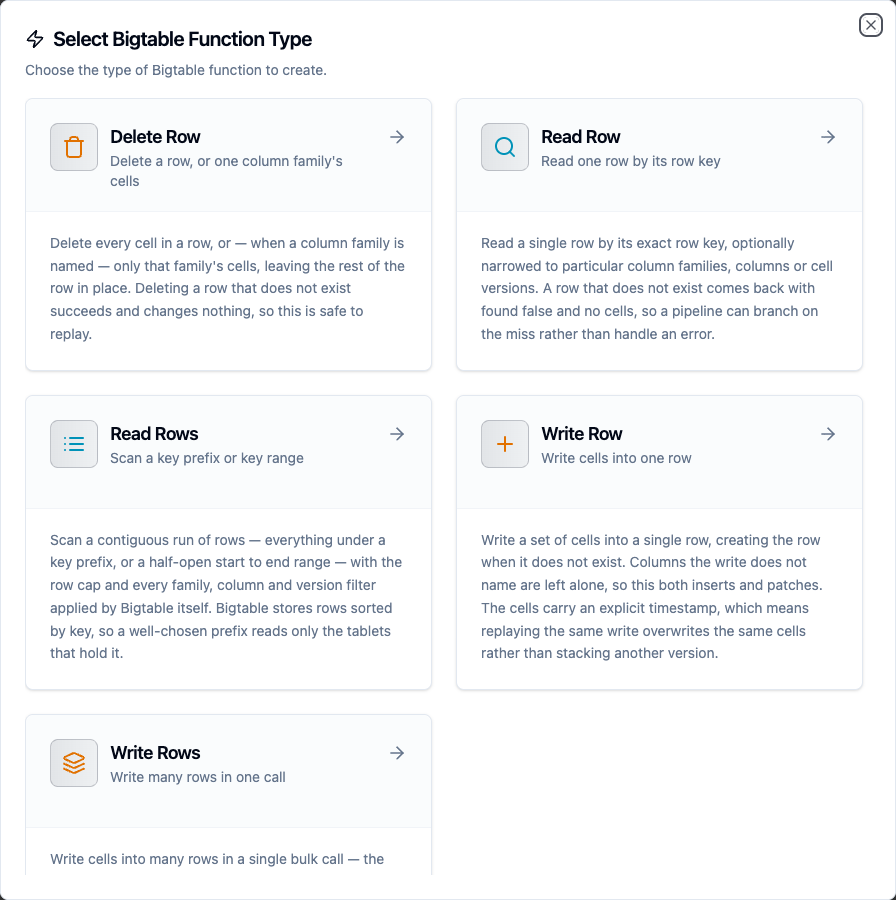
Select from five Bigtable function types: Read Row, Read Rows, Write Row, Write Rows, and Delete Row
Writing cells
Cells are written as a JSON object keyed by "family:column":
{ "metrics:temp": "21.5", "metrics:rpm": "1400", "meta:status": "ok" }
Values are strings, numbers or booleans, and all three are stored as their text form — 21.5 and "21.5" produce the same bytes. Numbers keep every digit, so a 19-digit identifier survives the round trip rather than being rounded the way a JSON parser using 64-bit floats would round it.
A nested object or array is refused rather than silently re-encoded: JSON inside a cell is something to opt into by writing the JSON yourself.
Bigtable rejects a write to a family the table does not declare, and the connector reports it as a permanent error — no retry can fix a missing schema. Create families with cbt createfamily, the gcloud CLI or the Cloud console before a pipeline writes to them.
Value encoding
Bigtable cell values are opaque bytes, which JSON cannot express, so each function declares how to read and write them:
| Value Encoding | Writes | Reads |
|---|---|---|
text (default) | The value's UTF-8 bytes | The cell's bytes decoded as UTF-8 |
base64 | The value decoded from base64 | The cell's raw bytes encoded as base64 |
Use text for strings and for numbers written as text — the common case, and the one that stays readable in cbt and the Cloud console. Use base64 for binary columns and for the big-endian int64 counters Bigtable's own increment API writes, which UTF-8 would corrupt.
Cell timestamps
Every write stamps its cells with an explicit timestamp: the function's Cell Timestamp field when set, otherwise the instant the pipeline produced the data. The field takes RFC 3339 (2026-09-24T10:00:00Z) or epoch milliseconds, and both accept template parameters.
Bigtable stores millisecond granularity, so a finer value is truncated to whole milliseconds before it is sent.
Leaving the field empty is the right default for live data. It also matters for durability — see Store-and-forward and replay safety. Set it explicitly when backfilling history, so each row lands at the time its reading was actually taken rather than at the time the backfill ran.
Read Row
Purpose: Read one row by its exact row key. A key that matches nothing returns found: false rather than failing.
| Field | Type | Required | Default | Description |
|---|---|---|---|---|
| Row Key | String | Yes | - | The exact row key. Bigtable keys are byte strings and are sent as written — nothing is added or escaped. Supports template parameters |
| Column Families | String | No | - | Comma-separated families to return. Empty returns every family |
| Columns | String | No | - | Comma-separated column qualifiers to return. Empty returns every column in the selected families |
| Versions Per Cell | Integer | No | 1 | How many versions of each cell to return, newest first (1–100) |
| Value Encoding | Enum | No | text | text or base64 — see Value encoding |
Read Rows
Purpose: Scan a contiguous run of rows — everything under a key prefix, or a half-open start-to-end range.
| Field | Type | Required | Default | Description |
|---|---|---|---|---|
| Row Key Prefix | String | No | - | Every row whose key starts with this. Mutually exclusive with Start Key / End Key |
| Start Key | String | No | - | First row key of the range, included |
| End Key | String | No | - | Row key the range stops before, excluded |
| Limit | Integer | No | 100 | Maximum rows to return (1–10000). Sent to Bigtable, so the scan stops at the server |
| Column Families | String | No | - | Comma-separated families to return |
| Columns | String | No | - | Comma-separated column qualifiers to return |
| Versions Per Cell | Integer | No | 1 | How many versions of each cell to return, newest first (1–100) |
| Value Encoding | Enum | No | text | text or base64 |
Leave all three range fields empty to scan the table from the beginning, bounded by Limit.
Write Row
Purpose: Write a set of cells into one row, creating the row when it does not exist. Columns the write does not name are left alone, so this both inserts and patches.
| Field | Type | Required | Default | Description |
|---|---|---|---|---|
| Row Key | String | Yes | - | The row key to write to. Supports template parameters |
| Cells | JSON | Yes | - | The cells to write, keyed by "family:column". Supports template parameters |
| Cell Timestamp | String | No | - | RFC 3339 or epoch milliseconds. Empty stamps cells at produce time |
| Value Encoding | Enum | No | text | text or base64 |
Write Rows
Purpose: Write cells into many rows in a single bulk call — the shape a time-series pipeline needs, where one upstream batch becomes hundreds of rows.
| Field | Type | Required | Default | Description |
|---|---|---|---|---|
| Rows | JSON | Yes | - | A JSON array of row objects. Supports template parameters |
| Cell Timestamp | String | No | - | Default timestamp for rows that carry no timestamp of their own |
| Value Encoding | Enum | No | text | text or base64 |
Each element needs a rowKey and a cells object; timestamp is optional per row:
[
  { "rowKey": "device#line3#2026010110", "cells": { "metrics:temp": "20.5" } },
  { "rowKey": "device#line3#2026010111", "cells": { "metrics:temp": "21.0" }, "timestamp": "2026-01-01T11:00:00Z" }
]
Bigtable can refuse individual rows while the bulk call itself succeeds. The connector reports that as a failure naming the refused row keys, rather than as a success with a quiet failure list — a partial success would otherwise be acknowledged and the refused rows lost. Because the writes carry explicit timestamps they are safe to replay, so retrying the whole batch is the right recovery.
Delete Row
Purpose: Delete every cell in a row, or just one column family's cells. Deleting an absent row succeeds and changes nothing, so this is safe to replay.
| Field | Type | Required | Default | Description |
|---|---|---|---|---|
| Row Key | String | Yes | - | The exact row key to delete. Supports template parameters |
| Column Family | String | No | - | Delete only this family's cells. Empty deletes every cell in the row |
Paging through a scan
Limit is sent to Bigtable, so it bounds what the service reads rather than trimming a full result set afterwards. A Bigtable range is routinely millions of rows, which is why this matters more here than on a small table.
The result's truncated flag says the scan stopped at the limit. To continue, set the next run's Start Key just past the last rowKey delivered — appending a \x00 byte, or simply using the next key you expect. There is no opaque cursor to feed back: row keys are the cursor.
truncated is true exactly when a full page came back, so it can be true on the last page of a range that happens to hold exactly Limit rows. A follow-up scan that returns nothing is the definitive end.
Store-and-forward and replay safety
Write Row, Write Rows and Delete Row are eligible for store-and-forward, so a write that cannot reach Bigtable is buffered durably and drained when the connection returns. Buffering is at-least-once: if a write lands but its acknowledgement is lost, the drainer replays it.
Bigtable writes converge under replay, which is why all three are eligible. A cell is addressed by row key, family, qualifier and timestamp, and the connector always sends an explicit timestamp rather than letting the server assign one. Replaying a write therefore lands on the same cells and overwrites them:
- Write Row and Write Rows re-write the same cells with the same values at the same timestamps.
- Delete Row removes a row. Deleting an absent row succeeds and changes nothing.
This is the reason the connector never uses server-assigned timestamps. With one, a replay would stack a second version behind the first, and a garbage-collection policy of "keep 1 version" would be the only thing hiding it.
One thing to watch: a Cell Timestamp bound to a template parameter is only as replay-safe as the value behind it. A timestamp read from the payload replays identically; one generated fresh per attempt does not.
Template Parameters
Row keys, cells, ranges and filters all accept ((parameterName)) placeholders, which turn one function into a reusable one:
{ "metrics:temp": "((celsius))", "meta:status": "((status))" }
Parameters are detected automatically from the fields you fill in, and each can be given a type, a default and a description:
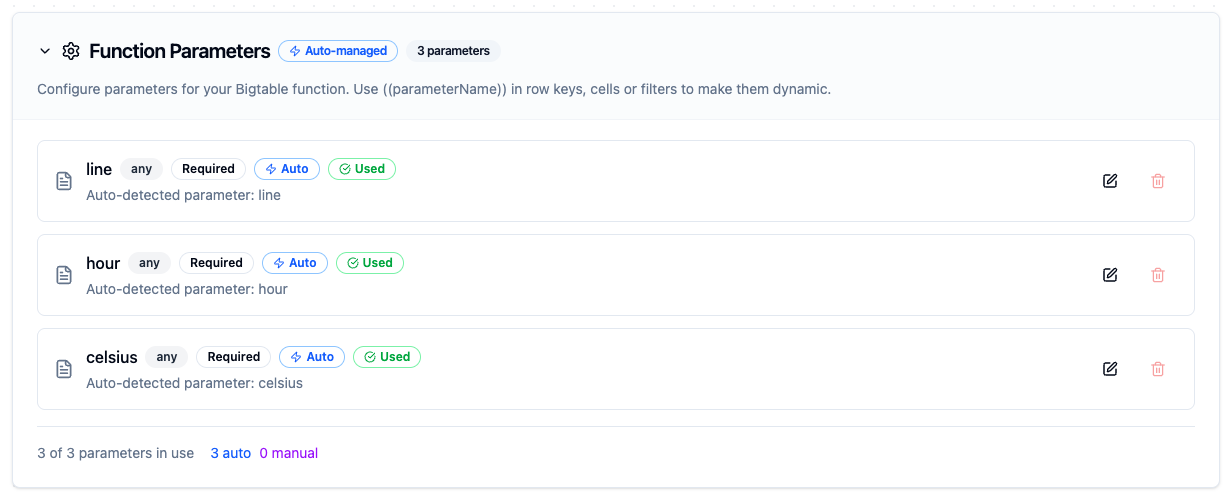
Parameters detected from the Row Key and Cells fields, ready to be bound to upstream node output
Pipeline Integration
Use the functions you create here as nodes in the Pipeline Designer. Drop the node onto the canvas, pick the connection and function, and bind any parameters to upstream output.
Common patterns:
- Collect → Store: read from OPC UA, MQTT or Modbus and write rows into Bigtable
- Batch → Bulk write: buffer a window of readings and land them in one Write Rows call
- Read → Enrich → Write: look a row up by key, merge it with the incoming payload, write the result on
- Scan → Transform → Publish: read a device's recent history and push a summary to another system
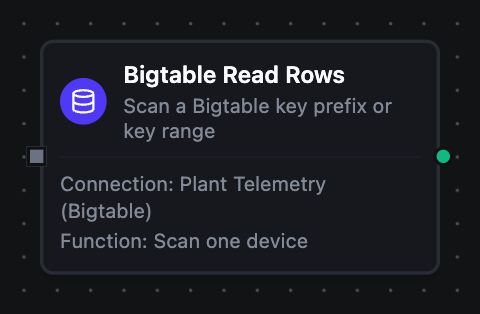
A Bigtable Read Rows node with its connection and function bound, in the pipeline designer
For the exact output shape each node delivers, see Bigtable Nodes.
Common Use Cases
Storing sensor readings
Scenario: write temperature readings from factory equipment into a table keyed by device and time.
Row Key: device#((deviceId))#((hour))
Cells:
{
  "metrics:temp": "((celsius))",
  "metrics:rpm": "((rpm))",
  "meta:status": "ok"
}
Leave Cell Timestamp empty so each cell is stamped at produce time.
Reading a device's recent history
Scenario: fetch the readings for one device inside a time window.
Start Key: device#((deviceId))#((from))
End Key: device#((deviceId))#((to))
The range is half-open, so consecutive windows tile without overlapping — to of one window is from of the next, and no reading is counted twice.
Landing a batch in one call
Scenario: a transform node has produced an array of readings and you want them all written at once.
Rows: ((readings)), where the upstream node emits
[
  { "rowKey": "device#line3#2026010110", "cells": { "metrics:temp": "20.5" } },
  { "rowKey": "device#line3#2026010111", "cells": { "metrics:temp": "21.0" } }
]
One bulk call instead of one call per row: the Go client chunks it into 100-row requests, which is also the batch size the store-and-forward drainer aims for.
Backfilling history
Scenario: load a day of archived readings, each at the time it was actually taken.
Give every row its own timestamp:
[
  { "rowKey": "device#line3#2026010110", "cells": { "metrics:temp": "20.5" }, "timestamp": "2026-01-01T10:00:00Z" }
]
Reading the range back afterwards returns each cell stamped at its reading time, not at the backfill's.
Clearing a staging family
Scenario: a pipeline writes intermediate values into a staging family and clears them once the final value is computed.
Delete Row with Column Family set to staging removes that family's cells and leaves the rest of the row in place.
Troubleshooting
| Symptom | Likely cause |
|---|---|
Use a bare host:port, with no http:// when saving | A URL in Emulator Host. Write localhost:8086, not http://localhost:8086 — the data API is gRPC |
Include the port when saving | Emulator Host names a host only. The emulator's default port is 8086 |
| "Paste the whole service-account key file" when saving | The Service Account JSON Key is not valid JSON. Paste the whole downloaded file, not one field from it |
| Test Connection fails with a not-found error | The table or the instance name is wrong. Both are case-sensitive |
| A write reports a permanent error naming a family | The column family does not exist on the table. Bigtable answers Requested column family not found; create the family before the pipeline writes to it |
| Test Connection fails with "Missing IAM permission: bigtable.tables.sampleRowKeys" | Either the principal holds only roles/bigtable.viewer, which grants no data-plane access, or a just-granted role has not propagated yet. Wait a minute and retry before changing the binding |
A Read Row returns found: false for a row you can see in cbt | The row key does not match byte for byte. Keys are sent as written — a trailing separator or a missing prefix segment is enough |
| A Read Rows returns nothing for a prefix you expect to match | The prefix is a byte prefix, not a pattern. device#line3 matches device#line30 too, and device#line3# does not match a key that has no trailing # |
| A Read Rows is refused saying to pick a prefix or a range | Row Key Prefix and Start Key / End Key select the range two different ways. Set one or the other |
A scan returns fewer rows than Limit but truncated is true | Not possible — truncated is true exactly when a full page came back. A full page that is also the end of the range still reports true; scan again to confirm |
| Cell values read back as mojibake | The column holds binary and the function is using text encoding. Switch that function to base64 |
| A backfilled row is stamped at the time the backfill ran | Cell Timestamp was left empty, so the cells were stamped at produce time. Set it per row in the Rows array |