 CANopen Integration Guide
Communicate with CANopen-compliant PLCs, motor drives, and sensors using MaestroHub's CANopen connector. This guide covers connection setup, function authoring for SDO and NMT operations, event-driven TPDO subscriptions, and pipeline integration.
Overview
The CANopen connector acts as a CANopen Network Master (CiA 301 §4.2) and provides:
- SDO read / write — on-demand Object Dictionary access (CiA 301 upload / download), including segmented transfers
- TPDO push subscriptions — event-driven triggers via the Object Dictionary bridge, no polling required
- NMT state commands — start, stop, reset, and pre-operational transitions for one node or the whole bus
- Heartbeat consumer — automatic online / offline detection (CiA 301 §7.2.8.2)
- Optional EDS support — upload an Electronic Data Sheet for symbolic OD access, or use raw
(index, sub-index)against the default CiA 301 OD - Cross-platform transports — SocketCAN for Linux production, VirtualCAN (TCP) for development on any OS
- Hex or decimal addresses — enter OD indices as
0x6041or24641; both round-trip the same way
v1 supports asynchronous TPDOs only. SYNC-mode PDOs and using EMCY frames as a trigger source are deferred to a follow-up release.
Connection Configuration
Creating a CANopen Connection
Navigate to Connections → New Connection → CANopen and configure the form. The form is organized into six tabs: Connection, EDS, Advanced, Functions, Scaling, and Health. The Functions, Scaling, and Health tabs unlock after the connection is saved.
1. Profile Information
| Field | Default | Description |
|---|---|---|
| Profile Name | — | A descriptive name for this connection profile (required, max 100 characters). Must be unique across all connections. |
| Description | — | Optional description for this CANopen connection |
| Labels | — | Key-value pairs to categorize and organize the connection (max 10 labels) |
Example Labels
env: prod— Deployment environmentvendor: maxon— Device vendorline: line-1— Production linedevice: drive-1— Specific equipment
2. CAN Bus
| Field | Default | Description |
|---|---|---|
| Transport | socketcan | CAN transport backend — socketcan (Linux kernel) or virtualcan (cross-platform development bridge) — required |
| Interface | can0 | For socketcan: device name (can0, vcan0). For virtualcan: host:port (e.g. localhost:18888) — required |
| Bitrate (bps) | 500000 | CAN bitrate (10,000–1,000,000 bps). Ignored by the virtualcan transport but kept for parity. Common values: 125000, 250000, 500000, 1000000 |
| Node ID | 1 | Target remote CANopen node ID (1–127) — required. 0 is reserved for NMT broadcast and is not valid as a connection target. |
- socketcan — Linux-only. Requires a CAN interface (
can0,vcan0,can1, …) that is already brought up (e.g.ip link set can0 up type can bitrate 500000). Use in production. - virtualcan — A TCP bridge that speaks the same CAN frames. Works on Linux, macOS, and Windows. Use during development and testing without physical CAN hardware.
3. EDS (Object Dictionary)
The EDS tab attaches a device-specific Object Dictionary description. Without one, the connector falls back to the default CiA 301 OD — raw (index, sub-index) SDO access still works against any device.
| Field | Default | Description |
|---|---|---|
| EDS Source | none | How to provide the Electronic Data Sheet — none, file, or inline |
| EDS File Path | — | Path to the .eds file on the connector host. Required when EDS Source is file. Example: /etc/canopen/device.eds |
| EDS Contents | — | Full contents of the .eds file pasted into the form. Required when EDS Source is inline. Useful for managed environments without a shared filesystem. |
You must provide an EDS to subscribe to a whole TPDO mapping by number (the pdoNumber field on PDO Subscribe functions). For everything else — raw SDO read/write, NMT, and explicit dataPoints PDO subscriptions — the EDS is optional.
4. Advanced — Timing & Retries
| Field | Default | Description |
|---|---|---|
| SDO Timeout | 1s | Timeout for each SDO read and write, segmented and block transfers alike (100 ms – 60 s) |
| Processing Period (ms) | 10 | gocanopen scheduler tick (1–500 ms). Lower values consume more CPU; the default is appropriate for almost all deployments. |
| Retries | 2 | Number of retries on transient (transport-level) failures (0–10) |
| Retry Delay (ms) | 500 | Delay between retry attempts (0–60,000 ms) |
5. Advanced — NMT & Heartbeat
| Field | Default | Description |
|---|---|---|
| Auto Start | true | On connect, send NMT Enter Operational to the target node so PDOs flow. Disable to leave the node in Pre-Operational and drive NMT manually. |
| Heartbeat (ms) | 1000 | Maximum window without a heartbeat before the node is marked offline (0–60,000 ms). Set to 0 to disable heartbeat consumption. |
6. Advanced — Health Check
These settings choose how the connection's health probe checks the remote node. How often the probe runs, and how long it may take, is set by the platform's connection health checks, not per connection.
| Field | Default | Description |
|---|---|---|
| Method | nmtState | NMT state (no extra traffic; relies on the heartbeat consumer's cached state) or SDO read (issues a real round-trip on every probe) |
| Index | 0x1000 | OD index for the sdoRead probe (1–65,535). Default 0x1000 is the mandatory CiA 301 Device Type object that every compliant node implements. |
| Sub-Index | 0 | OD sub-index for the sdoRead probe (0–255) |
- NMT state is free — it returns whatever the heartbeat consumer most recently cached. Use it when the device sends heartbeats and you've enabled the consumer window.
- SDO read issues a real upload over the bus, so it detects more failure modes (frozen application, slave that stopped responding to SDOs while still emitting heartbeats). Costs one round-trip per probe.
- The form does live name-uniqueness validation as you type — a check appears once the name is accepted.
- Cross-field rules (transport ↔ interface shape, EDS source ↔ payload presence) are validated server-side at the Runtime.Check step.
- All timeout values are in milliseconds (ms). All address values accept either decimal (
24641) or hex (0x6041).
Testing the Connection
Click Test Connection on the connector form. The test attempts to connect with the current configuration, issues a probe according to the configured health-check method, and returns a duration. Use this before saving to catch interface, bitrate, or addressing issues early.
Function Builder
Creating CANopen Functions
After the connection is saved:
- Open the connection and navigate to the Functions tab
- Click New Function to open the function type selection dialog
- Choose SDO Read, SDO Write, NMT Command, or PDO Subscribe
- Fill the Basic tab (name, description, labels) and the Configuration tab (operation-specific parameters)
- Use the Test button to validate the function against the live device (not available for PDO Subscribe — see PDO Subscribe)
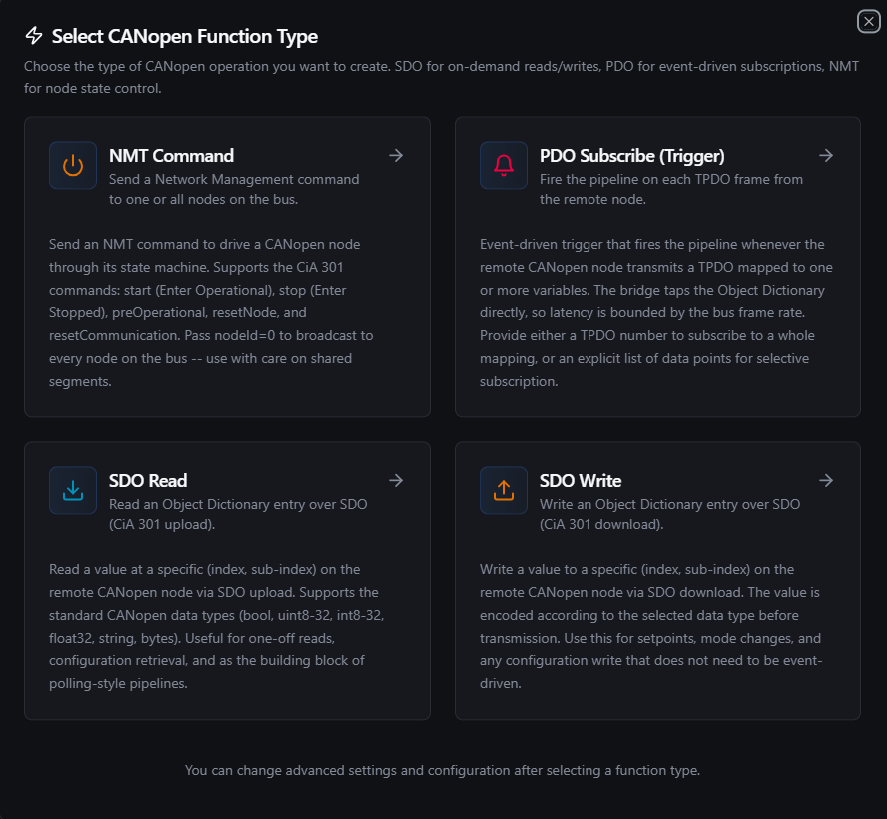
Pick one of four CANopen function types: SDO Read, SDO Write, NMT Command, or PDO Subscribe
Each function has two configuration tabs:
- Basic — Function name (required, max 100 characters, must be unique within the connection), optional description, and labels
- Configuration — Operation-specific parameters (addresses, values, command, data points)
Data Types
CANopen wire data is little-endian per CiA 301. The connector supports the following data types for SDO encoding / decoding and TPDO frame decoding:
| Data Type | Size on the wire | Description |
|---|---|---|
bool | 1 byte | Boolean (true / false). Accepts true/false, 1/0, on/off, yes/no on input. |
uint8 | 1 byte | Unsigned 8-bit integer (0–255) |
uint16 | 2 bytes | Unsigned 16-bit integer (0–65,535) |
uint32 | 4 bytes | Unsigned 32-bit integer (0–4,294,967,295) |
int8 | 1 byte | Signed 8-bit integer (−128 to 127) |
int16 | 2 bytes | Signed 16-bit integer (−32,768 to 32,767) |
int32 | 4 bytes | Signed 32-bit integer (−2,147,483,648 to 2,147,483,647) |
float32 | 4 bytes | IEEE 754 single-precision floating point |
string | variable | UTF-8 text. Trailing NUL bytes are stripped on read. |
bytes | variable | Raw bytes. On input, accepts a hex string (DEADBEEF, 0xDEADBEEF, or de ad be ef). |
The encoded value must be exactly the width of the OD entry on the device — uint16 produces 2 bytes, int32 produces 4 bytes, and so on. Mismatched widths surface as an SDO abort (typically 0x06070010 — data type / length mismatch).
Object Dictionary Addressing
The Index and Sub-Index inputs accept both hex (0x6041) and decimal (24641) — the form auto-formats hex back to its uppercase 0xNNNN form on blur. Internally, both representations resolve to the same uint16 (index) and uint8 (sub-index) values.
Common Object Dictionary entries you'll see frequently:
| Index | Name | Typical Use |
|---|---|---|
0x1000 | Device Type | Mandatory identity object — safe target for sdoRead health checks |
0x1001 | Error Register | Bitmask of active device errors |
0x1018 | Identity Object | Vendor ID, product code, revision, serial |
0x6040 | Controlword | CiA 402 motion control — start/stop/halt |
0x6041 | Statusword | CiA 402 motion status |
0x60FF | Target Velocity | CiA 402 velocity setpoint |
SDO Read (canopen.sdo.read)
Purpose: Read an Object Dictionary entry over SDO (CiA 301 upload). Issues a real SDO transfer against the remote node and decodes the response bytes locally according to the configured data type.
Configuration Fields
| Field | Type | Required | Default | Description |
|---|---|---|---|---|
| Index | Number | Yes | 0x1000 | OD index (1–65,535). Accepts decimal (24641) or hex (0x6041). |
| Sub-Index | Number | Yes | 0 | OD sub-index (0–255) |
| Data Type | Select | Yes | uint16 | How to interpret the bytes returned by the SDO upload (see Data Types) |
Use Cases: One-off configuration reads, polling-style pipelines built around the Schedule trigger, reading statuswords, identity objects, and vendor-specific configuration.
Example Output (success)
{
  "success": true,
  "data": {
    "index": "0x1000",
    "subIndex": 0,
    "dataType": "uint32",
    "value": 401
  },
  "durationMs": 12,
  "timestamp": "2026-05-20T08:30:00Z"
}
Example Output (SDO abort)
{
  "success": false,
  "error": "SDO abort 0x06020000: object does not exist in the object dictionary",
  "durationMs": 18,
  "timestamp": "2026-05-20T08:30:00Z"
}
SDO Write (canopen.sdo.write)
Purpose: Write a value to a specific Object Dictionary entry via SDO download. The connector encodes the value to the wire width implied by the data type, then issues a real SDO transfer.
Configuration Fields
| Field | Type | Required | Default | Description |
|---|---|---|---|---|
| Index | Number | Yes | 0x6040 | OD index (1–65,535). Accepts decimal or hex. |
| Sub-Index | Number | Yes | 0 | OD sub-index (0–255) |
| Data Type | Select | Yes | uint16 | How to encode the value before transmission (see Data Types) |
| Value | Text | Yes | — | Value to write. Coerced according to the selected data type. Supports ((paramName)) templates — see Using Parameters. |
Value Field Examples
| Data Type | Sample Value | Notes |
|---|---|---|
bool | true, false, 1, 0, on, off, yes, no | Case-insensitive; whitespace trimmed |
uint16 | 1234, 0x04D2 | Decimal or hex |
int32 | -200000, ((target)) | Negative integers allowed |
float32 | 3.14, ((setpoint)) | IEEE 754 single precision |
string | Drive 1, setpoint_((mode)) | Templates may appear anywhere in the string |
bytes | DEADBEEF, de ad be ef, 0xDEADBEEF | Spaces and 0x prefix stripped |
Use Cases: Setpoint updates, controlword writes, mode changes, vendor-specific configuration parameters.
Example Output (success)
{
  "success": true,
  "data": {
    "index": "0x6040",
    "subIndex": 0,
    "dataType": "uint16",
    "value": 15
  },
  "durationMs": 14,
  "timestamp": "2026-05-20T08:30:00Z"
}
Always implement validation and safety checks before writing to industrial equipment. CANopen Controlwords and target setpoints can put a motor, valve, or actuator into motion immediately. Use a Condition node upstream to bound the value, or gate the write behind an explicit operator action.
NMT Command (canopen.nmt.command)
Purpose: Send a Network Management command to drive a CANopen node through its CiA 301 state machine. Pass nodeId=0 to broadcast to every node on the bus.
Configuration Fields
| Field | Type | Required | Default | Description |
|---|---|---|---|---|
| Command | Select | Yes | start | NMT command to send (see NMT Commands below) |
| Target Node ID | Number | No | 0 | 0 broadcasts to every node on the bus. 1–127 targets a specific node. |
NMT Commands
| Value | Description |
|---|---|
start | Start (Enter Operational) — drive the node into Operational state so PDOs flow |
stop | Stop (Enter Stopped) — halt all communication except NMT and heartbeat |
preOperational | Pre-Operational — return the node to Pre-Operational state for configuration |
resetNode | Reset Node — full hardware reset of the remote node (CiA 301 §7.2.8.3.1.2) |
resetCommunication | Reset Communication — reset only the communication layer; keeps application state |
Example Output (success)
{
  "success": true,
  "data": {
    "command": "start",
    "nodeId": 16
  },
  "durationMs": 3,
  "timestamp": "2026-05-20T08:30:00Z"
}
Setting Target Node ID to 0 broadcasts the command to every node on the CAN segment. A broadcast resetNode will hard-reset every device on the bus simultaneously. Use with care on shared segments. The form flags nodeId=0 with an inline warning.
PDO Subscribe (canopen.pdo.subscribe)
Purpose: Event-driven trigger that fires the pipeline whenever the remote CANopen node transmits a TPDO mapped to one or more variables. The connector taps the TPDO COB-ID directly and decodes each frame's mapped bytes; latency is bounded by the bus frame rate, not by any polling interval.
Configuration Fields
| Field | Type | Required | Default | Description |
|---|---|---|---|---|
| TPDO Number | Number | No | 0 | 1–512 subscribes to a whole TPDO mapping (requires an EDS). 0 switches to explicit data points. |
| NMT Auto Start | Boolean | No | true | Override the connection-level Auto Start for this subscription. When true, ensures the node is Operational before subscribing. |
| Data Points | Array | When TPDO Number = 0 | — | Explicit {name, index, subIndex, dataType} tuples describing how to decode each mapped variable. At least one entry is required. |
Data Point Fields
When TPDO Number = 0, the function decodes each frame using the configured data points. Each point is one variable in the TPDO mapping, in mapping order.
| Field | Type | Required | Default | Description |
|---|---|---|---|---|
| Name | String | Yes | — | The key under which this variable appears in the trigger payload (e.g. speed_rpm) |
| Index | Number | Yes | — | OD index of the mapped variable (1–65,535) |
| Sub-Index | Number | Yes | 0 | OD sub-index (0–255) |
| Data Type | Select | Yes | — | Wire width of this variable in the TPDO. string / bytes are not supported here (TPDOs have a fixed wire format). |
The two modes are mutually exclusive.
pdoNumber > 0— Subscribe to a whole TPDO mapping declared in the device's EDS. The connector reads the mapping table from the EDS and decodes the frame accordingly. Requires an EDS in the connection configuration.pdoNumber = 0(default) — Use the explicitdataPointslist. The connector subscribes to TPDO 1's default COB-ID (0x180 + nodeID) and decodes the frame body according to your list. Does not require an EDS and works against any compliant CANopen producer.
PDO Subscribe is an event-driven function — there is no synchronous response to a test invocation. The function form hides the Test button for this type. To validate that a subscription works, wire it into a pipeline via the CANopen Trigger node and observe events flowing in.
Use Cases: Motor speed feedback from a drive's TPDO, temperature sensor push, selective subscription to a handful of variables out of a large TPDO mapping, alarm propagation.
Using Parameters
The Value field on SDO Write supports parameter placeholders using ((parameterName)) syntax. Parameters are detected automatically from the field as you type and surface in the Function Parameters block at the top of the Configuration tab. Use parameters to make a single function reusable across multiple pipeline contexts.
| Configuration | Description | Example |
|---|---|---|
| Type | Validate expected value type | number, boolean, string |
| Required | Force critical inputs | Required / Optional |
| Default Value | Provide safe fallbacks at execution | 0, false, 100.0 |
| Description | Document purpose | "Target velocity in RPM", "Controlword bitmask" |
Example
- Function type: SDO Write
- Index:
0x60FF - Data Type:
int32 - Value:
((target_rpm))
At pipeline execution, the runtime substitutes ((target_rpm)) with the value bound on the node and writes it to the drive's target velocity register.
Testing Functions
Every SDO Read, SDO Write, and NMT Command function can be tested before saving using the built-in Test dialog. PDO Subscribe is not testable (see the warning above).
- Click the Test button on the function form
- The dialog shows an Execution Overview with the resolved configuration
- If the function references
((paramName))templates, you'll be prompted for values - Click Execute Test to run the function against the live device
- The result is rendered in the dialog, including any SDO abort codes, decoded values, and execution duration
The test dialog supports two modes:
- Config-only Testing (create mode) — Tests the function configuration before saving
- Function with Overrides (edit mode) — Tests the saved function with the current form modifications
SDO Abort Codes
When an SDO transfer fails on the device side, the connector returns the CiA 301 abort code as part of the error message. The most common codes you'll encounter:
| Code | Meaning |
|---|---|
0x05030000 | Toggle bit not alternated (SDO transfer-level error) |
0x05040000 | SDO protocol timed out |
0x06010000 | Unsupported access to the object |
0x06010001 | Attempt to read a write-only object |
0x06010002 | Attempt to write a read-only object |
0x06020000 | Object does not exist in the object dictionary |
0x06040041 | Object cannot be mapped to PDO |
0x06040042 | Number and length of mapped objects exceed PDO length |
0x06070010 | Data type / length-of-service parameter does not match |
0x06070012 | Data type does not match, length too high |
0x06070013 | Data type does not match, length too low |
0x06090011 | Sub-index does not exist |
0x06090030 | Value range of parameter exceeded |
0x06090031 | Value of parameter written too high |
0x06090032 | Value of parameter written too low |
0x08000000 | General error |
0x08000022 | Data cannot be transferred or stored due to present device state |
Abort messages surface in the function execution result as SDO abort 0xXXXXXXXX: <reason>. Unknown codes are returned as SDO abort 0xXXXXXXXX without a textual hint.
Pipeline Integration
Use the CANopen connection functions you define here as nodes inside the Pipeline Designer. For request-style operations, drop in the CANopen Industrial node; for event-driven TPDO subscriptions, use the CANopen Trigger node.
For orchestration strategies that mix CANopen with other data sources, check the Connector Nodes page to see how these nodes slot into larger automation flows.
Common Use Cases
Drive Commissioning and Control
Read CiA 402 statuswords (0x6041) and identity objects (0x1018) to discover what's on the bus, then sequence controlword writes (0x6040) and setpoint downloads (0x60FF) to move the drive through its state machine.
Sensor Telemetry via TPDO
Subscribe to a sensor's TPDO mapping and forward every frame to a historian, MQTT topic, or UNS without polling. Pair with the Aggregator node to batch frames over a time window before downstream processing.
Recipe Download
Receive recipe parameters from an upstream MES or UI, then issue a batch of SDO Writes to the drive's configuration registers using parameterized functions. Validate every write completes before transitioning the drive into Operational.
Bus-Wide Reset and Restart
Use the broadcast NMT Command (nodeId=0) to perform coordinated state transitions across every node on a segment — for example, a controlled preOperational → reconfigure → start sequence during a maintenance window.
Troubleshooting
Connection Issues
| Symptom | Possible Cause | Solution |
|---|---|---|
interface "can0" not found | SocketCAN interface not brought up | ip link set can0 up type can bitrate 500000 (Linux). Check ip -d link show can0. |
dial tcp localhost:18888: connection refused | VirtualCAN bridge not running | Start the virtualcan broker, or check the host:port in the Interface field. |
nodeId 0 is reserved for NMT broadcast | Tried to use node ID 0 as connection target | Set Node ID to a valid 1–127 value. Use the NMT Command function with broadcast if you need to address all nodes. |
Health check fails (SDO abort 0x06020000) | Default sdoRead probe targets 0x1000 but device doesn't implement it | Most compliant devices do — verify on the device side. Or switch to the nmtState method, which doesn't issue traffic. |
| Connection alternates between Connected and Disconnected | Heartbeat consumer window shorter than the device's producer period | Increase Heartbeat (ms) to at least 2 × device heartbeat period, or disable the consumer (set to 0). |
Function Issues
| Symptom | Possible Cause | Solution |
|---|---|---|
SDO abort 0x06020000: object does not exist | Wrong index / sub-index for the device | Cross-check against the device's manufacturer datasheet or EDS. |
SDO abort 0x06070010: data type / length mismatch | Selected data type is wider or narrower than the device's OD entry | Match the data type to the OD entry's declared width — INTEGER16 on the device must be int16 here. |
SDO abort 0x06010002: attempt to write a read-only object | Tried to SDO Write a read-only entry | Read-only OD entries (most identity, error, and status registers) can only be read. Check the device's OD documentation. |
SDO abort 0x06090030/31/32 | Value out of the device's accepted range | Bound the value upstream (e.g. with a Condition node) or correct the data type. |
| PDO Subscribe never fires | EDS-less subscription against a non-default TPDO COB-ID | The default dataPoints mode targets TPDO 1's COB-ID (0x180 + nodeID). For other TPDOs, supply an EDS and use pdoNumber. |
| PDO frames decode to wrong values | Data point order doesn't match the device's TPDO mapping | TPDOs concatenate mapped variables in declared order; reorder the dataPoints list to match. Use the device's TPDO mapping in 0x1A00–0x1A03 as the source of truth. |
not connected returned by every function | Connection isn't started, or in Disconnected state | Check the connection state in Connect → Connections. Restart if needed; the Health tab shows the last state-change reason. |
Use the Test button in the Function Builder to validate SDO and NMT functions against the live device before using them in pipelines. The test dialog lets you override ((paramName)) values for one-off operations and displays the full response with execution timing and any abort codes.