 Kafka Integration Guide
Connect to Apache Kafka to produce and consume messages in your pipelines. This guide covers connection setup, function configuration, and pipeline integration for Kafka deployments.
Overview
The Kafka connector enables integration with Apache Kafka distributed streaming platforms, commonly used for event streaming, log aggregation, real-time analytics, and microservice communication. It provides:
- Message production with topic targeting, key-based partitioning, custom headers, and explicit partition selection
- Message consumption with consumer group support for load balancing and fault tolerance
- SASL authentication supporting PLAIN, SCRAM-SHA-256, and SCRAM-SHA-512 mechanisms
- TLS encryption with optional certificate verification for secure broker communication
- Consumer group management with configurable session timeouts, heartbeat intervals, and auto-commit control
- Retry and backoff controls for reliable message delivery under transient failures
- Template parameters for dynamic topics, keys, payloads, and headers based on runtime input
Connection Configuration
Creating a Kafka Connection
Navigate to Connections → New Connection → Kafka and configure the following:
Kafka Connection Creation Fields
1. Profile Information
| Field | Default | Description |
|---|---|---|
| Profile Name | - | A descriptive name for this connection profile (required, max 100 characters) |
| Description | - | Optional description for this Kafka connection |
2. Broker Settings
| Field | Default | Description |
|---|---|---|
| Brokers | - | Comma-separated list of bootstrap broker addresses in host:port format (e.g., broker1:9092,broker2:9092) – required |
| Client ID | - | Unique identifier for this client instance (e.g., maestrohub-producer) |
| Consumer Group ID | - | Default consumer group ID for consume functions (e.g., maestrohub-consumers) |
- 9092: Default PLAINTEXT port
- 9093: Default SSL/TLS port
- 9094: Default SASL_PLAINTEXT port
Ensure you use the correct port for your broker's listener configuration.
3. SASL Authentication
| Field | Default | Description |
|---|---|---|
| Enable SASL | false | Enable SASL authentication for the connection |
(Only displayed when Enable SASL is checked)
| Field | Default | Description |
|---|---|---|
| SASL Mechanism | PLAIN | Authentication mechanism: PLAIN, SCRAM-SHA-256, or SCRAM-SHA-512 |
| Username | - | SASL username for authentication |
| Password | - | SASL password. Masked on edit; leave empty to keep stored value |
- PLAIN: Simple username/password authentication. Use with TLS to protect credentials in transit.
- SCRAM-SHA-256: Challenge-response mechanism with SHA-256 hashing. More secure than PLAIN without requiring TLS.
- SCRAM-SHA-512: Same as SCRAM-SHA-256 but with stronger SHA-512 hashing.
4. TLS/Security Settings
| Field | Default | Description |
|---|---|---|
| Enable TLS | false | Enable TLS/SSL encryption for broker communication |
(Only displayed when Enable TLS is checked)
| Field | Default | Description |
|---|---|---|
| Skip Certificate Verification | false | Skip TLS certificate verification (not recommended for production) |
Enabling Skip Certificate Verification disables TLS certificate validation. Use only in trusted development environments, never in production.
5. Advanced Settings
| Field | Default | Description |
|---|---|---|
| Session Timeout (ms) | 30000 | Timeout for detecting consumer failures (1,000–300,000 ms). Should be at least 3x the heartbeat interval |
| Heartbeat Interval (ms) | 3000 | Heartbeat frequency to the group coordinator (500–60,000 ms) |
| Max Retries | 3 | Maximum retry attempts for failed requests (0–100, 0 = no retries) |
| Retry Backoff (ms) | 100 | Wait time between retry attempts (0–60,000 ms) |
6. Connection Labels
| Field | Default | Description |
|---|---|---|
| Labels | - | Key-value pairs to categorize and organize this Kafka connection (max 10 labels) |
Example Labels
env: prod– Environmentcluster: us-east-1– Cluster regionservice: streaming– Service role
- Required Fields: Profile Name and Brokers must be provided.
- Consumer Groups: Consumer group ID can be set at the connection level and optionally overridden per consume function. Consumers in the same group share topic partitions for load balancing.
- Session Timeout: If a consumer does not send a heartbeat within the session timeout, the broker considers it dead and rebalances. Set this to at least 3x the heartbeat interval.
- Retry Logic: Failed produce and consume requests are retried with a fixed backoff delay between attempts.
Function Builder
Creating Kafka Functions
Once you have a connection established, you can create reusable produce and consume functions:
- Open the connection and go to its Functions tab → New Function
- Select the desired function type (Produce or Consume)
- Configure the function parameters
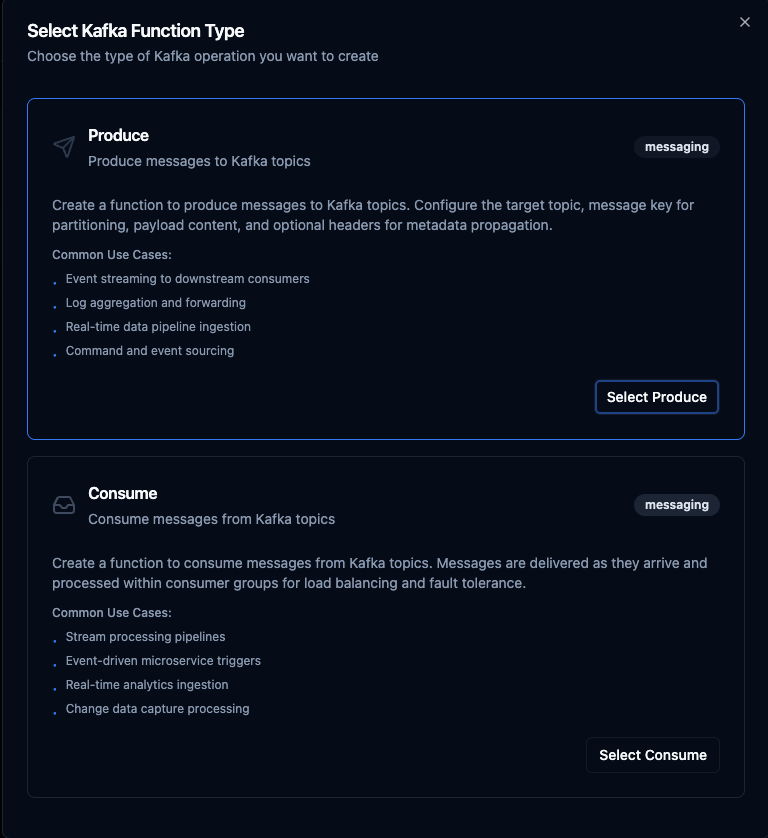
Select from two Kafka function types: Produce for sending messages and Consume for receiving messages
Produce Function
Purpose: Produce messages to Kafka topics with key-based partitioning, custom headers, and dynamic payloads. Use this for event streaming, data ingestion, and inter-service messaging.
Configuration Fields
| Field | Type | Required | Default | Description |
|---|---|---|---|---|
| Topic | String | Yes | - | Kafka topic to produce messages to. Supports template parameters. |
| Key | String | No | - | Message key for topic partitioning. Messages with the same key are sent to the same partition. Supports template parameters. |
| Payload | String | Yes | - | Message payload content (JSON or text). Supports template parameters. |
| Headers | JSON | No | - | Custom message headers for metadata propagation (e.g., {"source": "iot-gateway", "version": "1.0"}). Supports template parameters. |
| Partition | Number | No | auto | Target partition number (0+). Leave empty for automatic partitioning based on message key. |
Example Configuration
// Topic
sensor-events

// Key (for partitioning by device)
((deviceId))

// Payload
{
  "temperature": ((temperature)),
  "humidity": ((humidity)),
  "timestamp": "((timestamp))",
  "source": "((deviceId))"
}

// Headers
{"source": "iot-gateway", "contentType": "application/json"}
Use Cases:
- Stream sensor events to downstream consumers
- Forward logs and audit events for centralized processing
- Ingest real-time data into analytics pipelines
- Publish commands and events for microservice architectures
Consume Function
Purpose: Consume messages from Kafka topics using consumer groups for load balancing and fault tolerance. Subscribe functions are used as pipeline triggers to start execution when messages arrive.
Configuration Fields
| Field | Type | Required | Default | Description |
|---|---|---|---|---|
| Topic | String | Yes | - | Kafka topic to consume messages from. |
| Consumer Group | String | No | Connection default | Override the consumer group ID from connection settings. Leave empty to use the connection-level consumer group. |
| Auto Commit | Boolean | No | false | Automatically commit offsets after processing. Disable for manual offset management (safer for reliability). |
Example Configuration
// Topic
sensor-events

// Consumer Group
sensor-processing-group

// Auto Commit
false
- Disabled (recommended): Offsets are committed after successful pipeline execution, ensuring at-least-once delivery. If processing fails, the message is redelivered.
- Enabled: Offsets are committed immediately upon receipt. Faster but messages may be lost if processing fails.
Use Cases:
- Trigger pipelines on incoming stream events
- Process event-driven microservice messages
- Ingest real-time analytics data
- Handle change data capture (CDC) events
Using Parameters
The ((parameterName)) syntax creates dynamic, reusable functions. Parameters are automatically detected from your configuration fields and can be configured with:
| Configuration | Description | Example |
|---|---|---|
| Type | Data type validation | string, number, boolean, datetime, json, buffer |
| Required | Make parameters mandatory or optional | Required / Optional |
| Default Value | Fallback value if not provided | sensor-events, 0, {} |
| Description | Help text for users | "Target topic name", "Device identifier" |
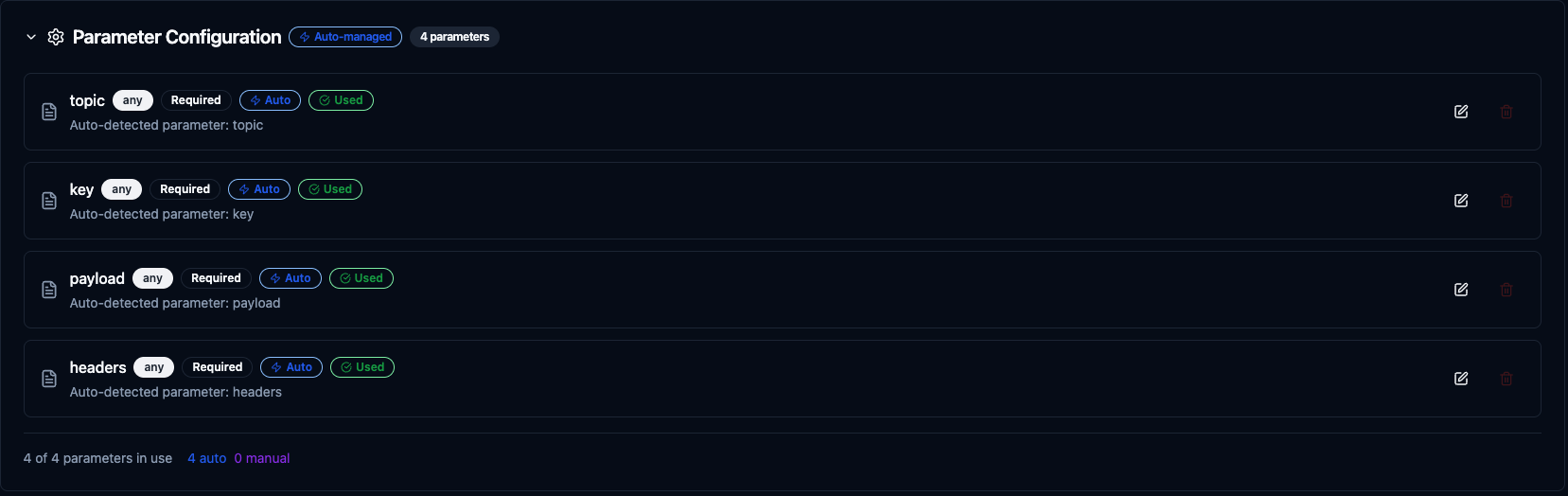
Configure dynamic parameters for Kafka functions with type validation, defaults, and descriptions
Template parameters are available for Produce functions (in topic, key, payload, and headers). Consume functions are event-driven triggers and do not accept runtime parameters.
Pipeline Integration
Use the Kafka functions you create here as nodes inside the Pipeline Designer. Drag the function node onto the canvas, bind its parameters to upstream outputs or constants, and configure error handling as needed.
Common patterns include:
- Collect → Stream: Gather data from OPC UA, Modbus, or MQTT and produce to Kafka topics
- Consume → Process → Produce: Read from one topic, transform data, and write to another
- Consume → Store: Ingest Kafka messages and write to MongoDB, PostgreSQL, or InfluxDB
- Consume → Alert: React to stream events and trigger notifications via SMTP or MS Teams
For broader orchestration patterns that combine Kafka with SQL, REST, MQTT, or other connector steps, see the Connector Nodes page.
Common Use Cases
IoT Event Streaming
Scenario: Collect sensor readings from factory equipment and stream them to Kafka for distributed processing by multiple consumer applications.
Produce Configuration:
- Topic:
factory-telemetry - Key:
((machineId)) - Payload:
{
  "machineId": "((machineId))",
  "temperature": ((temperature)),
  "vibration": ((vibration)),
  "timestamp": "((timestamp))"
}
- Headers:
{"plant": "chicago", "line": "assembly-1"}
Pipeline Integration: Connect after OPC UA or Modbus read nodes to continuously stream equipment telemetry into Kafka.
Real-Time Log Aggregation
Scenario: Forward application and system logs to a centralized Kafka topic for aggregation, search, and analysis.
Produce Configuration:
- Topic:
logs-((service)) - Key:
((hostname)) - Payload:
{
  "level": "((level))",
  "message": "((message))",
  "service": "((service))",
  "timestamp": "((timestamp))"
}
Pipeline Integration: Use with REST webhook triggers to capture log events and forward them to Kafka for downstream consumers like Elasticsearch or Splunk.
Stream Processing Pipeline
Scenario: Consume raw sensor events from Kafka, apply transformations and enrichment, and produce processed results to a new topic.
Consume Configuration:
- Topic:
raw-sensor-events - Consumer Group:
sensor-enrichment - Auto Commit: false
Produce Configuration (downstream):
- Topic:
enriched-sensor-events - Key:
((sensorId)) - Payload: Transformed data from upstream processing
Pipeline Integration: Chain a Kafka consume trigger with transform nodes and a Kafka produce node to build a complete stream processing pipeline.
Event-Driven Notifications
Scenario: Consume alert events from Kafka and route them to appropriate notification channels based on severity.
Consume Configuration:
- Topic:
alerts - Consumer Group:
alert-routing - Auto Commit: false
Pipeline Integration: Connect to condition nodes that route by severity level—critical alerts to MS Teams, warnings to SMTP email, and informational events to MongoDB for audit logging.