 AWS S3 Integration Guide
Use MaestroHub's S3 connector to work with AWS S3 or S3‑compatible object storage (MinIO, Wasabi, DigitalOcean Spaces). This guide covers connection setup, function authoring, and pipeline integration.
Overview
The S3 connector provides:
- AWS S3 and S3‑compatible support with region/endpoint controls and path‑style addressing
- Reusable functions to fetch and write objects with templates and overrides
- Secure credential handling with masked edits and server‑side encryption (SSE‑S3 and SSE‑KMS)
- Operational limits for discovery and maximum file size to protect pipelines
Connection Configuration
Creating an AWS S3 Connection
From Connections → New Connection → AWS S3, configure the fields below.
S3 Connection Creation Fields
1. Profile Information
| Field | Default | Description |
|---|---|---|
| Profile Name | - | A descriptive name for this connection profile (required, max 100 characters) |
| Description | - | Optional description for this S3 connection |
2. S3 Configuration
| Field | Default | Description |
|---|---|---|
| Region | - | AWS region (e.g., us-east-1) or Custom region string for S3‑compatible services – required |
| Bucket | - | Target bucket name (3–63 chars, lowercase, DNS‑compliant; cannot be an IP address) – required |
| Prefix | - | Optional base path prefix used as a security boundary for all operations |
3. AWS Credentials
| Field | Default | Description |
|---|---|---|
| Access Key ID | - | Optional. Leave empty to use the AWS SDK default credential chain (environment variables, shared config, IAM role, IRSA). Masked on edit; leave empty to keep stored value |
| Secret Access Key | - | Required when Access Key ID is set. Masked on edit; leave empty to keep stored value |
| Session Token | - | Optional STS token. Masked on edit; leave empty to keep stored value |
4. Advanced
| Field | Default | Description |
|---|---|---|
| Discovery Limit | 2000 | Maximum objects to list during discovery (1–100000) – required. A pattern fetch fails when the listing holds more |
| Max File Size (MB) | 25 | Maximum allowed object size for functions (1–124) – required |
| Connection Timeout (seconds) | 30 | Timeout for S3 API calls (5–300) – required |
5. Server‑Side Encryption
| Field | Default | Description |
|---|---|---|
| Enable Server‑Side Encryption | true | Enable SSE for all writes by default |
| Encryption Type | AES256 | AES256 (SSE‑S3), aws:kms (SSE‑KMS), or none – required when SSE is enabled |
| KMS Key ID | - | Required when Encryption Type = aws:kms. Masked on edit; leave empty to keep stored value |
6. S3‑Compatible Services
| Field | Default | Description |
|---|---|---|
| Quick Preset | Custom | MinIO, Wasabi, DigitalOcean Spaces, or Custom presets to apply recommended flags |
| Custom Endpoint | - | Optional endpoint URL for S3‑compatible services (e.g., http://localhost:9000). Leave empty for AWS S3 |
| Force Path Style | false | Use path‑style addressing (often required for MinIO) |
| Skip Certificate Verification | false | Skip TLS certificate verification for https:// endpoints (development only) |
| CA Certificate (PEM) | - | PEM of the CA that signed the endpoint's certificate. Only needed for private or self‑signed CAs |
7. Connection Labels
| Field | Default | Description |
|---|---|---|
| Labels | - | Key‑value pairs to categorize and organize this S3 connection (max 10 labels) |
Example Labels
environment: productionteam: data-platformstorage: s3region: us-east-1
- Bucket validation: Must start/end with letter or number; allowed chars are letters, numbers, hyphens, and periods. Disallow sequences
..,.-,-.. - Security: Credentials and KMS Key IDs are stored encrypted and displayed as masked on edit. Leave fields empty to keep stored values.
- S3‑compatible tips: Use Quick Preset; enable Path Style for MinIO. The endpoint URL scheme decides whether TLS is used — use
http://for a plain local MinIO,https://plus the CA Certificate for a self‑hosted MinIO behind a private CA. - Limits: Discovery Limit and Max File Size protect pipelines from large scans/uploads.
Function Builder
Creating S3 Functions
After saving the connection:
- Open the connection and go to its Functions tab → New Function
- Choose Fetch Object or Write Object as the function type
- Configure object keys, limits, and overrides
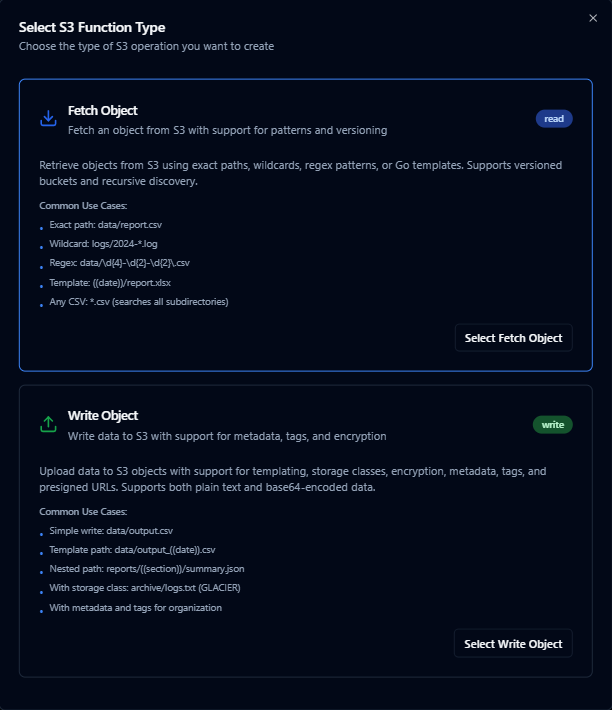
Design reusable S3 fetch and write operations with object key templates and overrides
Fetch Object
Purpose: Retrieve one object from the configured bucket/prefix: the object at an exact key, or the one a wildcard, regex or template pattern selects.
Configuration Fields
| Field | Type | Required | Default | Description |
|---|---|---|---|---|
| Object Key | String | Yes | - | Object path. Supports exact (data/report.csv), wildcards (logs/2024-*.log), regex (data/[0-9]{4}-[0-9]{2}-[0-9]{2}\.csv$), and templates (((date))/report.xlsx) |
| When Several Objects Match | Enum | No | Most recently modified | Which object a pattern returns when it matches more than one: Most recently modified (lastModified) or Last by name (name). See Which object a pattern returns |
| Timeout (ms) | Number | No | 1800000 | Operation timeout (1000–3600000) |
| Max File Size (MB) | Number | No | - | Overrides connection max (1–124) |
| Discovery Limit | Number | No | - | Overrides connection limit (1–100000). The fetch fails when the listing holds more |
| Version ID | String | No | - | Specific object version for versioned buckets |
Use Cases: Retrieve daily reports, collect log partitions, hydrate datasets into pipelines
Which object a pattern returns
The pattern decides which objects are candidates. When Several Objects Match then picks one of them:
| Option | Returns |
|---|---|
| Most recently modified (default) | The object S3 reports as written last. Objects written in the same second fall back to the one whose key sorts last. S3 sets this time when an upload or copy completes; a client cannot set it |
| Last by name | The object whose key sorts last as text. The whole key is compared, prefix included, so a folder name outranks everything after it: T10F/BIW-PAN/127606/x.csv sorts after T10F/BIW-CLOSED/127963/x.csv whatever the numbers are |
To leave objects out, narrow the pattern: an object the pattern does not match is never returned. The result's metadata.selectedBy and metadata.matchCount say which rule picked the object and how many matched.
A pattern is searched by listing the bucket under the part of the key before its first *, ? or [, up to the last / — logs/2024/app-*.log lists logs/2024/. If that listing holds more objects than the Discovery Limit, the fetch fails with discovery limit exceeded instead of answering from part of the listing. Raise the limit, or put more of the fixed path before the first wildcard.
2.6 always returned the match that sorts last by name. Functions created on 2.6 are set to Last by name by the upgrade and keep returning the same object; change the option on the function to get the most recently modified one. 2.6 also stopped listing at the Discovery Limit and answered from what it had listed, without an error.
Write Object
Purpose: Upload objects to the configured bucket/prefix with optional overwrite policy, metadata/tags, storage class, and encryption overrides.
Configuration Fields
| Field | Type | Required | Default | Description |
|---|---|---|---|---|
| Object Key | String | Yes | - | Target path (max 1024). Supports templates e.g., data/output_((date)).csv |
| Data | String | Yes | - | Content to upload. Supports plain text and base64‑encoded content |
| Content Type | String | No | - | MIME type (auto‑detected if omitted) |
| Overwrite Existing | Boolean | No | true | If false and object exists, a timestamped filename is created |
| Storage Class | Enum | No | STANDARD | One of: STANDARD, REDUCED_REDUNDANCY, STANDARD_IA, ONEZONE_IA, INTELLIGENT_TIERING, GLACIER, DEEP_ARCHIVE, GLACIER_IR |
| Server‑Side Encryption | String | No | - | Optional override: AES256, aws:kms, or none (inherits connection if omitted). For aws:kms, provide KMS Key ID |
| Cache Control | String | No | - | Value for HTTP Cache-Control header |
| Metadata | Object | No | {} | User metadata as key/value pairs |
| Tags | Object | No | {} | Tag set as key/value pairs (up to 10 tags) |
| Timeout (ms) | Number | No | 1800000 | Operation timeout (1000–3600000) |
| Max File Size (MB) | Number | No | - | Overrides connection max (1–124) |
| Generate Presigned URL | Boolean | No | false | Return a presigned URL for the uploaded object |
| Presigned URL Expiry (s) | Number | No | 3600 | Expiry time for presigned URL (60–604800) |
Use Cases: Export pipeline results, publish artifacts, archive backups with lifecycle tiers
Using Parameters
Use ((parameterName)) in object keys, content templates, or metadata values to expose parameters for validation and runtime binding.
| Configuration | Description | Example |
|---|---|---|
| Type | Validate incoming values | string, number, boolean, datetime, json, buffer |
| Required | Enforce presence | Required / Optional |
| Default Value | Provide fallbacks | 'reports', '{}', NOW() |
| Description | Document intent | "Object key suffix (YYYY‑MM‑DD)", "Custom metadata JSON" |

Parameter validation, defaults, and helper text for S3 object keys and payloads
Pipeline Integration
Use the S3 connection functions you configure here as nodes inside the Pipeline Designer to move files between systems. Drag in the fetch or write node, bind parameters to upstream outputs or constants, and tune retries or error branches.
For broader orchestration patterns that mix S3 with SQL, REST, or MQTT steps, see the Connector Nodes page.
S3 fetch node with connection, function, and parameter bindings
Common Use Cases
Data Lake Ingestion
Ingest CSV/JSON objects from S3 into analytical stores or trigger downstream normalization pipelines.
Backup and Restore
Store pipeline outputs and model artifacts with versioning; retrieve specific versions for rollback.
Report Distribution
Publish generated reports to S3 and optionally return presigned URLs for external access.