 REST Integration Guide
MaestroHub's REST connector bridges your pipelines with modern web services, business applications, and cloud platforms. Create reusable request templates, manage authentication centrally, and orchestrate API interactions alongside industrial protocols.
Overview
The REST connector supports:
- Multiple HTTP methods (GET, POST, PUT, PATCH) available as reusable functions within the connector
- Flexible authentication including API keys, OAuth 2.0, Basic, and custom headers
- Dynamic payload templating to merge pipeline values into query strings, headers, and bodies
- Secure connections with TLS enforcement, certificate pinning, and per-request overrides
Use REST functions whenever you need to interact with MES, ERP, CMMS, or cloud services that expose HTTP-based APIs.
Connection Configuration
Creating a REST Connection
From Connections → New Connection → REST, configure the connection using the following reference tables.
REST API Connection Creation Fields
1. Profile Information
| Field | Default | Description |
|---|---|---|
| Profile Name | - | A descriptive name for this connection profile (required, max 100 characters) |
| Description | - | Optional description for this REST connection |
2. REST Connection Settings
| Field | Default | Description |
|---|---|---|
| Base URL | - | Base endpoint for the REST API (e.g., https://api.example.com) – required, must be a valid URL with domain or IP/localhost |
| Health Path | - | Optional relative path used for connection health checks (e.g., /health) |
| Request Timeout (ms) | 30000 | Maximum time to wait for a response before failing (0-600000 ms, 10 minutes max) – required |
| Skip Verify TLS | false | Do not verify the server's TLS certificate (insecure, not recommended for production) |
URL Validation
- Must include protocol (
http://orhttps://) - Host must be:
- Valid domain with TLD (e.g.,
example.com) - IP address (IPv4 or IPv6)
localhost
- Valid domain with TLD (e.g.,
3. Authentication
3a. Authentication Type Selection
| Field | Default | Description |
|---|---|---|
| Authentication Type | none | Choose authentication method (None / Basic Auth / Bearer Token / API Key / Web Token) – required |
3b. Basic Auth
(Only displayed when Authentication Type = "basic")
| Field | Default | Description |
|---|---|---|
| Username | - | Username for Basic Authentication – required |
| Password | - | Password for Basic Authentication – required |
3c. Bearer Token
(Only displayed when Authentication Type = "bearer")
| Field | Default | Description |
|---|---|---|
| Bearer Token | - | Token sent as Authorization: Bearer <token> on every request – required |
3d. API Key
(Only displayed when Authentication Type = "apikey")
| Field | Default | Description |
|---|---|---|
| API Key Location | header | Where to send the API key (header / query) – required |
| Key Name | - | Header/query/body field name for the API key (e.g., X-API-Key or api_key) – required |
| API Key Value | - | The actual API key value – required |
API Key Location Options
- Header: Send API key in HTTP header
- Query Param: Send API key as URL query parameter
3e. Web Token (OAuth/JWT)
(Only displayed when Authentication Type = "webtoken")
| Field | Default | Description |
|---|---|---|
| Token Endpoint URL | - | URL to fetch the authentication token (e.g., https://auth.service.com/token) – required, must be valid URL |
| Token Request Headers | - | Optional headers to send with the token request (key-value pairs) |
| Body Encoding | json | How to encode the token request body (json / form / raw) – required |
| Token Request Body | - | Body content to send to token endpoint (JSON format) – optional, supports parameters |
| Attach Token As Header | Authorization | Header name to attach the token to subsequent requests |
| Add 'Bearer ' prefix | true | Prepends Bearer to the token when attaching to the header |
| Token Path in Response | - | Dot-notation path to extract token from response (e.g., access.token or data.authToken) – required |
Body Encoding Options
- JSON:
application/jsoncontent type - Form URL Encoded:
application/x-www-form-urlencodedcontent type - Raw: Plain text or custom encoding
Example Token Request Body
{
  "client_id": "rest-service",
  "client_secret": "((clientSecret))",
  "grant_type": "client_credentials",
  "scope": "api.read"
}
4. Advanced Settings
4a. Default Headers
| Field | Default | Description |
|---|---|---|
| Default Headers | Key-value pairs sent with all REST requests for this connection. Function-level headers override these when keys conflict. | |
| Default Content-Type | application/json | Content-Type sent on requests that carry a body (application/json, application/xml, application/x-www-form-urlencoded, multipart/form-data, or text/plain). A function's Content Type overrides it. |
Header Editor Features
- Add/remove multiple headers
- Validation for header names and values
- Warning when authentication-related headers are detected
Common Headers
Content-Type: application/jsonAccept: application/jsonUser-Agent: MaestroHub/1.0X-Custom-Header: custom-value
4b. Redirects and Retry
| Field | Default | Description |
|---|---|---|
| Follow Redirects | true | Follow 3xx redirects |
| Max Redirects | 10 | Redirects to follow before failing (0 = follow none) |
| Enable Retry | false | Retry failed requests with exponential backoff |
| Retry Count | 3 | Retries after the first attempt (0 = no retries) |
| Retry Wait Time (s) | 1 | Wait before the first retry, doubled on each further retry (0 = retry immediately) |
Which requests are retried. A request is retried only when repeating it is safe.
- GET and PUT are idempotent: sending them twice has the same effect as sending them once. They are retried after any network failure (DNS or connect failure, timeout, connection reset) and after a transient response: 5xx, 408, 425 or 429.
- POST and PATCH are retried only when the connection could not be made — the host name did not resolve or the connection was refused — because then the request never reached the server. After a timeout, a reset or any response, the server may already have applied the request, so it is not repeated.
- A 4xx other than 408/425/429 is the same answer every time and is never retried.
- With Web Token authentication, the token request is a POST and follows the same rule: when the token endpoint cannot be reached (DNS or connect failure) the call is retried; when it was reached and the exchange then failed, it is not.
4c. TLS Certificates
| Field | Default | Description |
|---|---|---|
| CA Certificate (PEM) | - | CA certificate used to verify the server's certificate. Set this for servers with a private or self-signed certificate instead of turning on Skip Verify TLS |
| Client Certificate (PEM) | - | Client certificate for mutual TLS |
| Client Private Key (PEM) | - | Private key for the client certificate (stored as a secret). Mutual TLS needs both the certificate and the key |
5. Connection Labels
| Field | Default | Description |
|---|---|---|
| Labels | - | Key-value pairs to categorize and organize this REST connection (max 10 labels) |
Example Labels
environment: production– Deployment environmentteam: api– Responsible teamprotocol: rest– Connection protocolregion: us-east-1– Geographical region
Authentication Type Validation Rules
| Authentication Type | Required Fields |
|---|---|
| None | No additional fields required |
| Basic Auth | Username AND Password must both be provided |
| Bearer Token | Bearer Token must be provided |
| API Key | API Key Location, Key Name, AND API Key Value must all be provided |
| Web Token | Token Endpoint URL AND Token Path in Response must both be provided |
- TLS Certificate Verification: When "Skip Verify TLS" is enabled, the server's certificate will not be validated. This is insecure and should only be used for development/testing.
- Authentication Priority: The system prevents mixing authentication methods. Only fields for the selected authentication type are sent to the backend.
- Password/Secret Masking: When editing an existing connection, sensitive fields (passwords, API keys, tokens) are masked with
********and only updated if changed. - Default Headers Warning: The system warns you if default headers contain authentication-related keys (
authorization,token,api-key, etc.), suggesting use of the Authentication tab instead. - URL Format: Base URL must include the protocol (
http://orhttps://) and a valid host. - Health Check: If a Health Path is provided, it will be used for connection health monitoring.
- Timeout Range: Request timeout must be between 0 ms (no timeout) and 600000 ms (10 minutes).
- Headers Editor: Provides visual editor for managing key-value pairs with validation.
- Web Token Flow:
- System requests token from Token Endpoint URL with provided headers/body.
- Extracts token using Token Path in Response.
- Attaches token to subsequent requests using specified header name.
- Optionally prepends
Bearerfor OAuth 2.0 compatibility.
- Function-level Overrides: A function's headers override connection-level headers with the same name, and its Content Type overrides the Default Content-Type.
Function Builder
Creating REST Functions
Once the connection is saved:
- Open the connection and go to its Functions tab → New Function
- Select GET Request, POST Request, PUT Request, or PATCH Request as the function type
- Define the path, query parameters, headers, and (for POST, PUT, and PATCH) the request body
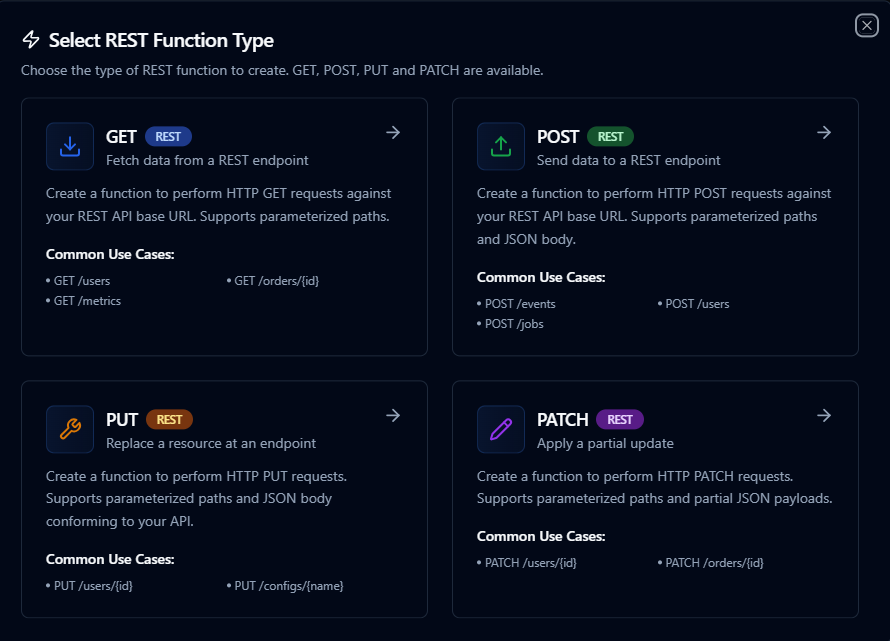
Design reusable REST requests with method, path, and payload templates
GET Request
Purpose: Perform HTTP GET requests to retrieve data from REST APIs. Used for reading data without modifying server state.
Configuration Fields
| Field | Type | Required | Default | Description |
|---|---|---|---|---|
| Path | String | Yes | / | URL path relative to the Base URL, or a full URL (supports parameters). Example: /users/((userId)) |
| Query Parameters | Object | No | {} | URL query parameters (key-value pairs, supports parameters). Kept in sync with the ?query part of the Path; values are URL-encoded when the request is sent. |
| Headers | Object | No | {} | Headers for this function only (key-value pairs, supports parameters). These override connection-level headers when keys conflict. |
| Timeout | Duration | No | Connection's Request Timeout | Bound on this function's requests (1s - 1h). The connection's Request Timeout still applies, and the shorter one wins. |
Use Cases: Fetch user data, retrieve resource lists, get status information, read API endpoints
POST Request
Purpose: Perform HTTP POST requests to create new resources or submit data to REST APIs. Used for creating new data or triggering actions on the server.
Configuration Fields
| Field | Type | Required | Default | Description |
|---|---|---|---|---|
| Path | String | Yes | / | URL path relative to the Base URL, or a full URL (supports parameters). Example: /users |
| Body (JSON) | String | Yes | {} | Request body (supports parameters). Example: {"name": "((name))"} |
| Content Type | String | Yes | application/json | Content-Type of the request body: application/json, text/plain, application/xml, multipart/form-data, application/x-www-form-urlencoded, application/octet-stream, or a custom value. Overrides the connection's Default Content-Type. |
| Query Parameters | Object | No | {} | URL query parameters (key-value pairs, supports parameters). Kept in sync with the ?query part of the Path. |
| Headers | Object | No | {} | Headers for this function only (key-value pairs, supports parameters). These override connection-level headers when keys conflict. |
| Timeout | Duration | No | Connection's Request Timeout | Bound on this function's requests (1s - 1h). The shorter of this and the connection's Request Timeout wins. |
Use Cases: Create new records, submit forms, trigger actions, upload data to API
PUT Request
Purpose: Perform HTTP PUT requests to update existing resources completely. Used for full updates where the entire resource is replaced with new data.
Configuration Fields
| Field | Type | Required | Default | Description |
|---|---|---|---|---|
| Path | String | Yes | / | URL path relative to the Base URL, or a full URL (supports parameters). Example: /users/((userId)) |
| Body (JSON) | String | Yes | {} | Request body (supports parameters). Example: {"name": "((name))"} |
| Content Type | String | Yes | application/json | Content-Type of the request body: application/json, text/plain, application/xml, multipart/form-data, application/x-www-form-urlencoded, application/octet-stream, or a custom value. Overrides the connection's Default Content-Type. |
| Query Parameters | Object | No | {} | URL query parameters (key-value pairs, supports parameters). Kept in sync with the ?query part of the Path. |
| Headers | Object | No | {} | Headers for this function only (key-value pairs, supports parameters). These override connection-level headers when keys conflict. |
| Timeout | Duration | No | Connection's Request Timeout | Bound on this function's requests (1s - 1h). The shorter of this and the connection's Request Timeout wins. |
Use Cases: Replace entire records, update complete resources, overwrite data, full resource updates
PATCH Request
Purpose: Perform HTTP PATCH requests to partially update existing resources. Used for partial updates where only specific fields are modified.
Configuration Fields
| Field | Type | Required | Default | Description |
|---|---|---|---|---|
| Path | String | Yes | / | URL path relative to the Base URL, or a full URL (supports parameters). Example: /users/((userId)) |
| Body (JSON) | String | Yes | {} | Request body (supports parameters). Example: {"status": "((status))"} |
| Content Type | String | Yes | application/json | Content-Type of the request body: application/json, text/plain, application/xml, multipart/form-data, application/x-www-form-urlencoded, application/octet-stream, or a custom value. Overrides the connection's Default Content-Type. |
| Query Parameters | Object | No | {} | URL query parameters (key-value pairs, supports parameters). Kept in sync with the ?query part of the Path. |
| Headers | Object | No | {} | Headers for this function only (key-value pairs, supports parameters). These override connection-level headers when keys conflict. |
| Timeout | Duration | No | Connection's Request Timeout | Bound on this function's requests (1s - 1h). The shorter of this and the connection's Request Timeout wins. |
Use Cases: Update specific fields, partial resource updates, status changes, modify individual properties
Using Parameters
REST functions expose parameters defined with ((parameterName)) syntax and validate them at runtime.
| Configuration | Description | Example |
|---|---|---|
| Type | Coerce incoming values | string, number, boolean, datetime, json, array |
| Required | Ensure mandatory parameters are set | Required / Optional |
| Default Value | Populate sensible defaults | 'open', NOW(), {} |
| Description | Provide guidance for callers | "ISO timestamp for incremental sync" |
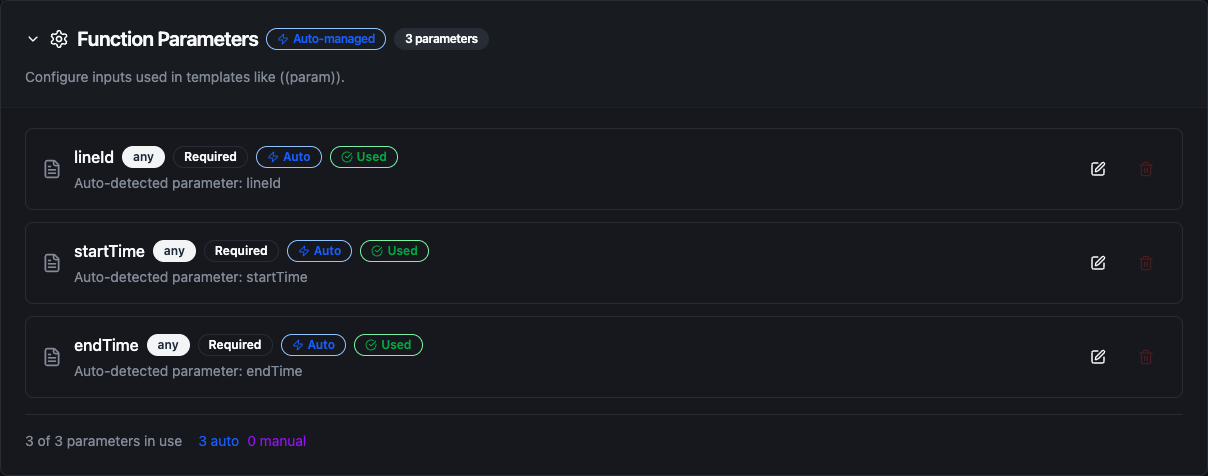
Parameter validation, defaults, and helper text for REST requests
Pipeline Integration
Use the REST connection functions you build here as nodes inside the Pipeline Designer to call external services alongside the rest of your automation logic. Drop in the GET, POST, or other HTTP node, bind parameters to upstream outputs or constants, and shape retries or error branches to suit each API.
If you are designing larger orchestrations, the Connector Nodes page shows how REST nodes complement other connectors in multi-step workflows.
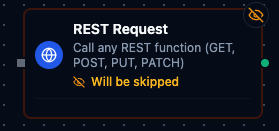
REST node with connection, function, and parameter bindings
Common Use Cases
ERP or MES Sync
Pull schedules, work orders, or inventory levels from enterprise systems and propagate updates back after machine execution.
Notifications and Alerts
Send webhooks to Microsoft Teams, Slack, or custom services when pipeline conditions trigger alarms or thresholds.
Data Enrichment
Augment sensor data with contextual information from REST APIs (equipment metadata, operator rosters, weather feeds) before storing in historians.