Google Cloud Dataflow Integration Guide
Connect to Google Cloud Dataflow to run Apache Beam stream and batch pipelines from MaestroHub. This guide covers connection setup, function configuration, and pipeline integration.
Overview
Dataflow is GCP's managed runner for Apache Beam. The connector covers three things a pipeline needs from it:
- Launching — start a job from a Flex Template or a classic template, with per-launch parameters and worker overrides
- Following — read a job's state and timings, list the jobs in a region, read its metric snapshot, and read the log messages that say why it failed
- Stopping — cancel a job outright, or drain a streaming one so buffered work finishes first
- Flexible authentication — a service-account key, or Application Default Credentials (GKE Workload Identity,
GOOGLE_APPLICATION_CREDENTIALS, the GCE metadata server)
Dataflow jobs run for minutes to hours. Launch Flex Template and Launch Classic Template return as soon as Dataflow accepts the request — they do not block until the pipeline finishes. Pair them with Get Job in a later node to read the state, so a two-hour job never holds a MaestroHub pipeline open.
A job launched in us-central1 is invisible from europe-west1. The region is set on the connection, and every function on that connection addresses jobs in it.
Connection Configuration
Creating a Dataflow Connection
Go to Connect, click New Connection, and choose Google Cloud Dataflow.
1. Profile Information
| Field | Required | Description |
|---|---|---|
| Profile Name | Yes | A descriptive name for this connection |
| Description | No | Free text |
| Labels | No | Key/value labels for organisation |
2. Project & Region
| Field | Required | Description |
|---|---|---|
| Project ID | Yes | The Google Cloud project that owns the Dataflow jobs |
| Region | Yes | The Dataflow regional endpoint holding the jobs, e.g. us-central1. Pick Custom Region… for a region not in the list |
3. Authentication
| Field | Required | Description |
|---|---|---|
| Service Account JSON Key | No | The whole service-account key file. Leave empty to use Application Default Credentials |
Leaving the key empty is the right choice on GKE with Workload Identity, or anywhere GOOGLE_APPLICATION_CREDENTIALS is set. A pasted value that is not a service-account key is refused at save time, naming what is wrong — a console URL and an authorized_user key are the two common mistakes.
4. Advanced
| Field | Required | Description |
|---|---|---|
| Custom Endpoint | No | A different Dataflow API endpoint, for an emulator or a private service endpoint. Leave empty for Google Cloud |
| Request Timeout | No | Default bound on a single Dataflow API call (1s–1h, default 30s) |
Request Timeout bounds the HTTP call to Dataflow. The job it launches runs on Google Cloud and is not bounded by it — a launch returns in under a second whether the job then runs for one minute or four hours.
IAM Permissions
The connection test calls dataflow.jobs.list. The roles/dataflow.developer role covers every function in this connector:
| Operation | Permission |
|---|---|
| Launch Flex Template | dataflow.jobs.create |
| Launch Classic Template | dataflow.jobs.create |
| Get Job | dataflow.jobs.get |
| List Jobs | dataflow.jobs.list |
| Cancel or Drain Job | dataflow.jobs.update |
| Get Job Metrics | dataflow.jobs.get |
| List Job Messages | dataflow.messages.list |
A launch additionally needs:
iam.serviceAccounts.actAson the worker service account — the project's Compute Engine default service account unless the function overrides it- read access to the Cloud Storage bucket holding the template
Testing the Connection
Test Connection issues a one-item jobs.list against the configured project and region. It proves three things at once: the project exists, the region is enabled for Dataflow, and the credentials carry the role. A project with no jobs is still a successful test.
Function Builder
Creating Dataflow Functions
Open a saved connection, go to the Functions tab, and click New Function. The picker shows all seven operations:
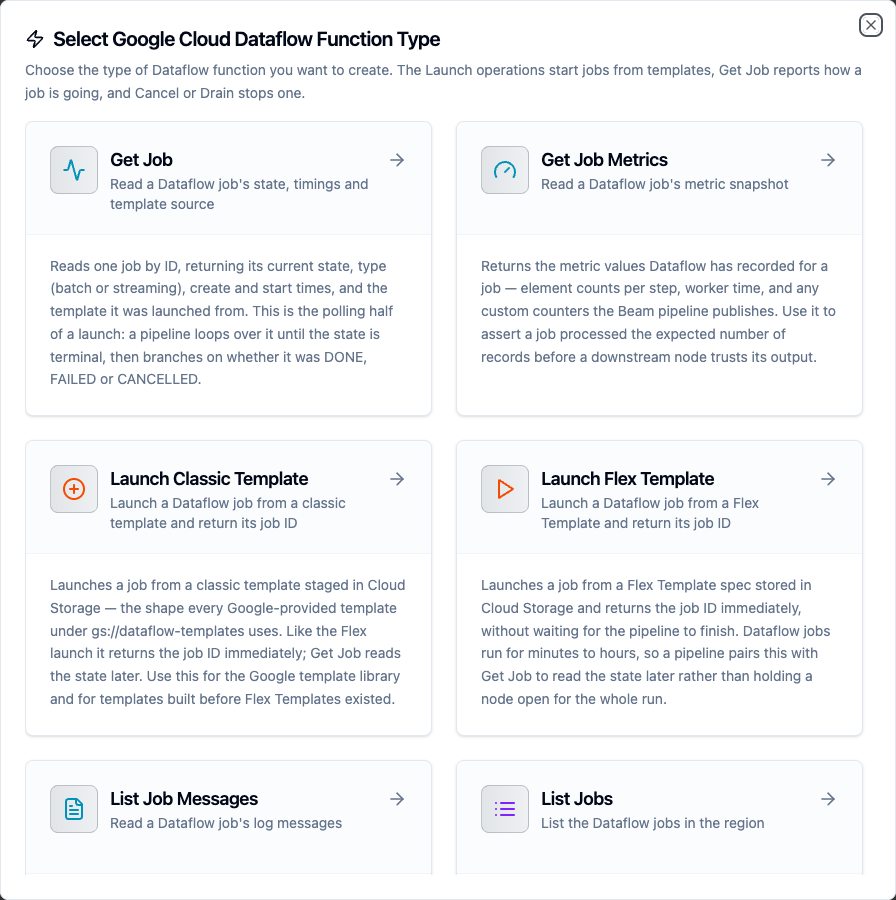
Choosing a Dataflow function type
Launch Flex Template Function
Launches a job from a Flex Template spec in Cloud Storage and returns the job ID.
| Field | Required | Description |
|---|---|---|
| Job Name | Yes | Name for the new job. Must be unique among running jobs in the region, start with a lowercase letter, and contain only lowercase letters, digits and hyphens. Templatable |
| Template Spec Path | Yes | Cloud Storage path of the Flex Template spec file, e.g. gs://my-bucket/templates/aggregate.json. Templatable |
| Template Parameters (JSON object) | No | JSON object of template parameters. Dataflow requires string values, so numbers and booleans must be quoted. Templatable |
| Machine Type | No | Worker machine type for this launch, e.g. n1-standard-4 |
| Max Workers | No | Autoscaling ceiling for this launch (1–1000) |
| Initial Workers | No | Starting worker count (1–1000). Cannot exceed Max Workers |
| Worker Service Account | No | The identity the workers run as. Empty uses the project's Compute Engine default |
| Temp Location | No | Cloud Storage path for temporary files |
| Subnetwork | No | regions/REGION/subnetworks/SUBNETWORK. Empty uses the default network |
| Timeout | No | Bound on the Launch API call itself |
Result:
{
  "jobId": "2026-09-24_03_15_22-1234567890123456789",
  "jobName": "nightly-aggregation",
  "jobType": "JOB_TYPE_BATCH",
  "region": "us-central1",
  "createTime": "2026-09-24T03:15:22Z"
}
jobName is the name Dataflow accepted, which can differ from the one asked for when Dataflow disambiguates. Dataflow reports no state on a launch, so the job's first state — and every one after it — come from Get Job.
{"maxRows": 5000} is rejected: Dataflow's template parameters are a string→string map, so write {"maxRows": "5000"}. The error names the offending key.
gs://, not console URLsA https://console.cloud.google.com/storage/… link is a browser URL, not a Cloud Storage path. Both launch functions refuse it at save time; Dataflow itself would report only a generic "unable to read template".
Launch Classic Template Function
Launches a job from a classic template staged in Cloud Storage — the shape every Google-provided template under gs://dataflow-templates uses.
| Field | Required | Description |
|---|---|---|
| Job Name | Yes | As above. Templatable |
| Template Path | Yes | Cloud Storage path of the staged classic template, e.g. gs://dataflow-templates/latest/PubSub_to_BigQuery. Templatable |
| Template Parameters (JSON object) | No | As above. Templatable |
| Machine Type, Max Workers, Initial Workers, Worker Service Account, Temp Location, Subnetwork | No | As above. Classic templates usually require Temp Location |
| Timeout | No | Bound on the Launch API call itself |
The result shape is identical to the Flex launch.
Get Job Function
Reads one job by ID. This is the polling half of a launch.
| Field | Required | Description |
|---|---|---|
| Job ID | Yes | The job ID returned by a launch. Templatable |
| Timeout | No | Bound on this single operation |
Result:
{
  "jobId": "2026-09-24_03_15_22-1234567890123456789",
  "jobName": "nightly-aggregation",
  "currentState": "JOB_STATE_DONE",
  "currentStateTime": "2026-09-24T03:41:08Z",
  "requestedState": "",
  "jobType": "JOB_TYPE_BATCH",
  "region": "us-central1",
  "createTime": "2026-09-24T03:15:22Z",
  "startTime": "2026-09-24T03:16:40Z",
  "sdkVersion": "2.58.0",
  "labels": {"env": "prod"}
}
Every key is always present. startTime is empty while the job is still queued — that is how a polling loop tells a queued job from a running one without parsing the state string. requestedState is empty on a job nobody has asked to stop.
The job's template path is not returned: it lives in the job's Beam pipeline options, which the summary view Dataflow serves here does not include. Fetching the full view to recover one string would ship the whole serialized pipeline graph on every poll. For a Google-provided template the job's labels name it instead.
List Jobs Function
Returns the jobs in the configured region.
| Field | Required | Description |
|---|---|---|
| Filter | No | ALL, ACTIVE (running and starting) or TERMINATED (done, failed, cancelled, drained). Applied by Dataflow |
| Name Filter | No | Case-sensitive substring the job name must contain. Templatable |
| Max Items | No | Maximum jobs to return (1–1000, default 100) |
| Timeout | No | Bound on this single operation |
Result:
{
  "jobs": [
    {
      "jobId": "2026-09-24_03_15_22-1234567890123456789",
      "jobName": "nightly-aggregation",
      "currentState": "JOB_STATE_DONE",
      "currentStateTime": "2026-09-24T03:41:08Z",
      "jobType": "JOB_TYPE_BATCH",
      "region": "us-central1",
      "createTime": "2026-09-24T03:15:22Z"
    }
  ],
  "jobCount": 1,
  "truncated": false
}
jobs is always a list — empty rather than absent — so a ForEach over a region with no jobs does nothing rather than failing on a missing source.
Dataflow applies Filter itself. It offers no server-side name filter, so Name Filter narrows what the page returned. The connector reads full pages while a name filter is set, so a match further down the region is still found.
Cancel or Drain Job Function
Asks Dataflow to stop a running job.
| Field | Required | Description |
|---|---|---|
| Job ID | Yes | The job to stop. Templatable |
| Requested State | Yes | JOB_STATE_CANCELLED stops at once and discards in-flight data. JOB_STATE_DRAINED stops ingestion and lets buffered work finish — streaming jobs only |
| Timeout | No | Bound on the Update API call itself |
Result:
{
  "jobId": "2026-09-24_03_15_22-1234567890123456789",
  "jobType": "JOB_TYPE_BATCH",
  "requestedState": "JOB_STATE_CANCELLED"
}
Dataflow answers a state change with almost nothing — it reports no state of its own. The result carries the job, its type, and the state that was requested. Use Get Job to watch the job reach JOB_STATE_CANCELLING / JOB_STATE_DRAINING and then its terminal state.
Draining a batch job is refused by Dataflow — only a streaming job can be drained.
Get Job Metrics Function
Returns the metric values Dataflow recorded for a job.
| Field | Required | Description |
|---|---|---|
| Job ID | Yes | The job whose metrics to read. Templatable |
| Since | No | RFC 3339 timestamp; only metrics that changed after this instant are returned. Templatable |
| Max Items | No | Maximum metric entries (1–5000, default 500) |
| Timeout | No | Bound on this single operation |
Result:
{
  "metrics": [
    {
      "name": "ElementCount",
      "origin": "dataflow/v1b3",
      "step": "WriteToBigQuery",
      "kind": "sum",
      "value": 184320,
      "cumulative": true,
      "updateTime": "2026-09-24T03:41:02Z"
    }
  ],
  "metricCount": 1,
  "metricTime": "2026-09-24T03:41:05Z",
  "truncated": false
}
value is whichever of Dataflow's typed value fields this metric's kind populated, so a downstream expression reads one key rather than probing six. Counters the Beam pipeline publishes itself appear with origin: "user".
List Job Messages Function
Returns the messages Dataflow logged for a job.
| Field | Required | Description |
|---|---|---|
| Job ID | Yes | The job whose messages to read. Templatable |
| Minimum Importance | No | JOB_MESSAGE_DEBUG, _DETAILED, _BASIC (default), _WARNING or _ERROR |
| From / Until | No | RFC 3339 window bounds. Templatable |
| Max Items | No | Maximum messages (1–1000, default 100) |
| Timeout | No | Bound on this single operation |
Result:
{
  "messages": [
    {
      "id": "msg-8a1f3c5e",
      "importance": "JOB_MESSAGE_ERROR",
      "text": "Workflow failed. Causes: The template parameters were invalid.",
      "time": "2026-09-24T03:40:11Z"
    }
  ],
  "messageCount": 1,
  "truncated": false
}
A failed job records the cause here and nowhere else in the Dataflow API. JOB_STATE_FAILED from Get Job tells you that it failed; JOB_MESSAGE_ERROR from this function tells you why. An alert that carries both is the one an operator can act on.
Using Parameters
Any field marked templatable accepts ((parameterName)). Parameters are detected as you type and listed in the Function Parameters card:

A parameter detected from ((day)) in the template parameters
A pipeline supplies their values at execution time, so one Launch function can serve every day of a backfill, and one Get Job function can follow whichever job a launch produced.
Pipeline Integration
Each function becomes a node in the pipeline editor under Databases. See the Google Cloud Dataflow node reference for node-level configuration.
The shape that comes up most often is launch → wait → read:
- Launch Flex Template starts the job and emits
jobId - A Delay node waits
- Get Job reads the state using
$node["Launch Flex Template"].result.jobId - A Condition node branches on
currentState— loop back to the delay while it isJOB_STATE_RUNNING, continue onJOB_STATE_DONE, and onJOB_STATE_FAILEDrun List Job Messages to collect the cause
Common Use Cases
Nightly aggregation with a per-day parameter
Launch Flex Template with {"inputDate": "((day))"} runs the same template for whichever day the trigger supplies. The job ID goes into an execution log; Get Job reads the outcome on the next pass.
Blue/green redeploy of a streaming job
Cancel or Drain Job with JOB_STATE_DRAINED stops the old streaming job without losing buffered work, Get Job waits for it to reach JOB_STATE_DRAINED, and Launch Classic Template starts the replacement.
Failure alerts that carry the cause
A pipeline polls Get Job; on JOB_STATE_FAILED it calls List Job Messages with Minimum Importance JOB_MESSAGE_ERROR and posts the text to Slack, so the alert names the failure instead of a bare state.
Asserting a load before trusting it
Get Job Metrics reads the ElementCount for the write step; a Condition node compares it against the expected row count before a downstream node consumes the output.
Troubleshooting
| Symptom | Cause | Fix |
|---|---|---|
Dataflow found nothing at … | Wrong project ID, region, or job ID | Use List Jobs on the same connection to see what exists in that region |
the credentials cannot use Dataflow in project … region … | The service account lacks the Dataflow role | Grant roles/dataflow.developer |
no Google credentials available for … | No key pasted and ADC does not resolve here | Paste a service-account key, or run where Workload Identity / GOOGLE_APPLICATION_CREDENTIALS is available |
Service account key must be valid JSON | A console URL or a partial file was pasted | Paste the whole key file |
This is a "authorized_user" key, not a service-account key | A gcloud user credential was pasted | Download a key for a service account instead |
Job name must start with a lowercase letter… | Uppercase or an invalid character in the job name | Use lowercase letters, digits and hyphens |
Template spec path must be a Cloud Storage path beginning with gs:// | A console URL was pasted | Use the gs:// path |
Value of "x" must be a string | A template parameter is a number or boolean | Quote it: {"x": "5000"} |
Initial Workers cannot exceed Max Workers | The worker override pair is inconsistent | Lower Initial Workers, or raise Max Workers |
Draining is only supported for streaming jobs | Drain was requested on a batch job | Use JOB_STATE_CANCELLED |
requestedState must be JOB_STATE_CANCELLED or JOB_STATE_DRAINED | Another state reached the API | Dataflow treats other states as a silent no-op; the connector refuses them instead |
| Listing looks short | The Max Items budget stopped it | Raise Max Items; truncated in the result says the cut happened |
| A launched job has no template parameters | The parameters JSON was empty or its placeholders were unresolved | Supply values for every ((name)) the field uses — an unresolved placeholder resolves to an empty string |