 OSIsoft / AVEVA PI Web API Integration Guide
Read from and write to an OSIsoft / AVEVA PI System using MaestroHub's PI Web API connector. It speaks the PI Web API REST interface over HTTPS — no PI SDK, no .NET side-car, no Windows host required. This guide covers connection setup and authentication, the PI stream-path model, the Asset Framework (AF) browser, PI time expressions, authoring read / write / subscribe functions with accurate input and output examples, and how the matching nodes slot into the Pipeline Designer.
Overview
The PI Web API connector provides:
- Current-value reads — the most recent value of any PI Point or AF attribute
- Historical reads — raw recorded (compressed) archive events, interpolated values on a fixed grid, and aggregated summaries (average, min, max, total, range, standard deviation, …)
- Bulk streamset reads — snapshot or historicals for many streams in a single call, for dashboards and fan-out
- Writes — push a value (with optional timestamp and units) to a PI Point or AF attribute
- Asset Framework browsing — walk asset servers → databases → elements → attributes, and data servers → PI Points, from a built-in tree picker
- Event-driven triggers — start a pipeline on every value change via PI Web API Stream Updates polling
- Four authentication modes — anonymous, HTTP Basic, static bearer token, and Kerberos / SPNEGO (keytab-based, no domain join)
- Transparent CSRF defense — the default-on CSRF header (PI Web API 2017+) is handled for you
The connector targets PI Web API 2017 and later over HTTP(S). HTTPS is strongly recommended in production. The transport is pure Go (net/http + jcmturner/gokrb5 for Kerberos), so it runs anywhere MaestroHub runs — Linux, containers, and Windows alike — with no PI AF SDK or .NET runtime on the host.
How PI Web API Connections Work
Unlike a raw socket protocol, PI Web API is a REST service rooted at a base URL (for example https://piserver.contoso.com/piwebapi). Every stream — a PI Point or an AF attribute — is addressed by a path, which the connector resolves to a durable WebID before reading or writing.
Two ideas are worth understanding up front:
-
Paths and WebIDs. You always work in terms of a human-readable path (
\\PISERVER\Production\Boiler1|Temperature). Internally the connector resolves that path to a WebID — PI's opaque handle for the stream — and caches it (24-hour TTL) so repeated reads skip the resolution round-trip. Cache entries are invalidated automatically on anHTTP 404, so a renamed or recreated stream re-resolves on the next call. -
CSRF defense. PI Web API enables cross-site-request-forgery protection by default (since the 2017 release). Every request the connector sends carries the required header (
X-Requested-Withby default) transparently — you don't configure anything unless your host expects a non-standard header name.
PI resolves a path to a WebID via its /system/getbypath endpoint. Some PI Web API installations return a generic server-side exception for every getbypath call regardless of input. When the connector detects this, it latches the fact and transparently switches to resolving paths by tree navigation (walking the AF hierarchy) instead — you get the same result without the wasted round-trip. The latch resets each time the connection reconnects, so a server that gets fixed recovers on its own.
Connection Configuration
Creating a PI Web API Connection
Navigate to Connections → New Connection → OSIsoft / AVEVA PI Web API and configure the form. The form is organized into seven tabs: Connection, Authentication, Advanced, Functions, AF Browser, Scaling, and Health. The Functions, AF Browser, Scaling, and Health tabs unlock after the connection is saved.
1. Profile Information
| Field | Default | Description |
|---|---|---|
| Profile Name | — | A descriptive name for this connection profile (required, max 100 characters). Must be unique across all connections. |
| Description | — | Optional description for this PI Web API connection |
| Labels | — | Key-value pairs to categorize and organize the connection (max 10 labels) |
Example Labels
env: prod— Deployment environmentsite: plant-1— Plant or sitesystem: pi— Source system
2. PI Web API Server
| Field | Default | Description |
|---|---|---|
| Base URL | — | Base URL of the PI Web API host (required), e.g. https://piserver.contoso.com/piwebapi. Must start with http:// or https://. For Kerberos, prefer the FQDN — it must match a registered HTTP/ SPN on the PI Web API service account. |
| Request Timeout (seconds) | 60 | Per-request timeout for PI Web API calls (1–3600). Hard ceiling is 3600s; chunk long historical reads by time window rather than raising this. |
| Verify TLS | true | Verify the server's TLS certificate. Disable only for self-signed development PI installs. |
3. Authentication
Select the Authentication Mode on the Authentication tab; the fields below change to match.
| Mode | When to use | Required fields |
|---|---|---|
| Anonymous | The PI Web API host permits anonymous reads. No credentials are sent. | — |
| Basic | HTTP Basic authentication with a username and password. | Username, Password |
| Bearer Token | A static bearer token — typically when PI Web API is fronted by an OAuth2 / OIDC proxy. | Bearer Token |
| Kerberos / SPNEGO | Windows-integrated auth without joining the domain. Uses a keytab; Linux- and container-friendly. | Keytab Path, Service Principal, krb5.conf Path |
Basic
| Field | Description |
|---|---|
| Username | Username for HTTP Basic (e.g. domain\user or user@DOMAIN). |
| Password | Password for HTTP Basic. Stored encrypted. On edit, leave empty to keep the existing password. |
Bearer Token
| Field | Description |
|---|---|
| Bearer Token | Sent as Authorization: Bearer <token>. PI Web API requires a JWT issued by its configured trusted issuer (ADFS / OAuth2 / OIDC) — an arbitrary token is rejected. Acquire and refresh the token externally; the connector only forwards it. Stored encrypted. |
Kerberos / SPNEGO
| Field | Description |
|---|---|
| Keytab Path | Filesystem path to the Kerberos keytab on the MaestroHub host (e.g. /etc/krb5.keytab). |
| Service Principal | Service principal to authenticate as (e.g. HTTP/piserver.contoso.com@CONTOSO.COM). |
| krb5.conf Path | Filesystem path to krb5.conf describing the realm + KDC (e.g. /etc/krb5.conf). |
Kerberos authentication is implemented in pure Go (jcmturner/gokrb5), so the MaestroHub host does not need to be joined to the Windows domain. It only needs read access to the keytab and krb5.conf files you reference, and network reach to the KDC. The base URL should be the FQDN that matches the PI Web API service's HTTP/ SPN.
4. Advanced
| Field | Default | Description |
|---|---|---|
| CSRF Header Name | X-Requested-With | Header sent on every request to satisfy PI Web API's default-on CSRF defense (since 2017). Override only if your PI host expects a different header name. |
Testing the Connection
Click Test Connection at the bottom of the form. The probe issues GET /system against the base URL and reports round-trip latency in milliseconds. It surfaces specific, actionable errors:
- HTTP 401 — the credentials were rejected. Verify the auth mode and username/password or token.
- HTTP 403 — the credentials are valid but lack permission, or the CSRF header is missing/wrong.
- DNS / TCP / TLS failure — the base URL is unreachable, or the TLS certificate failed verification (see Verify TLS).
Use this before saving to catch a wrong base URL, bad credentials, or a TLS problem early.
The Stream Path Model
Every read, write, and subscribe function targets a stream path. There are two path shapes:
| Path shape | Refers to | Example |
|---|---|---|
| AF attribute | An attribute of an Asset Framework element | `\PISERVER\Production\Boiler1 |
| PI Point | A raw PI tag on a data server | \\PISERVER\SINUSOID |
The AF form uses a pipe (|) to separate the element path from the attribute name. The PI Point form is \\Server\tagname. Both resolve to a WebID internally; you never manage WebIDs yourself.
Stream Path Input
Every function form uses the same Stream Path field. It is templatable (you can interpolate a parameter, e.g. \\PISERVER\Production\((asset))|Temperature) and is accompanied by a Browse… button that opens the AF Browser tree in a modal — click a leaf node to drop its path straight into the field.
The Subscribe (Stream Updates) function's path field does not accept ((paramName)) templates — a subscription registers against one concrete stream when the pipeline is enabled, so the path must be fully specified. Read and Write function paths are fully templatable.
AF Browser
The AF Browser tab (available after the connection is saved) is a live tree view of the PI System:
- Asset servers → AF databases → elements (expandable) → attributes (leaves)
- Data servers → PI Points (leaves)
From a stream leaf (an attribute or a PI Point) you can create functions in place — a Get Current read, a Write, or a Subscribe trigger — without leaving the browser, and batch-create read functions across many selected streams at once (each proposed function name is shown for review and can be edited inline before creation). The browser is powered by the connector's internal browse operations (piwebapi.browse, piwebapi.list_elements, piwebapi.list_attributes); these are invoked programmatically and are not selectable as standalone function types.
PI Time Expressions
Time fields (start time, end time, timestamp) and duration fields (interval, summary duration) accept PI time syntax, which the PI server parses natively. The form provides clickable shortcuts, and you can always type an expression or a ((paramName)) template.
Time points
| Shortcut | Value | Meaning |
|---|---|---|
| Now | * | Current server time |
| 1h ago | *-1h | One hour before now |
| 6h ago | *-6h | Six hours before now |
| 24h ago | *-24h | Twenty-four hours before now |
| Today | t | Midnight today (local server time) |
| Yesterday | y | Midnight yesterday |
You can also pass an absolute ISO 8601 timestamp, e.g. 2026-05-21T08:00:00Z.
Durations (interval / summary duration)
| Shortcut | Value |
|---|---|
| 10s | 10s |
| 1m | 1m |
| 5m | 5m |
| 1h | 1h |
| 1d | 1d |
Function Builder
Creating PI Functions
After the connection is saved:
- Open the connection and navigate to the Functions tab
- Click New Function to open the function type selection dialog
- Choose a function type (grouped into Read, Write, and Trigger)
- Fill the Basic fields (name, description, labels) and the Configuration fields, using Browse… to pick paths and the time shortcuts for time fields
- Use the Test Function button to validate the function against the live PI server before saving (except for Subscribe, which is validated by enabling its pipeline)
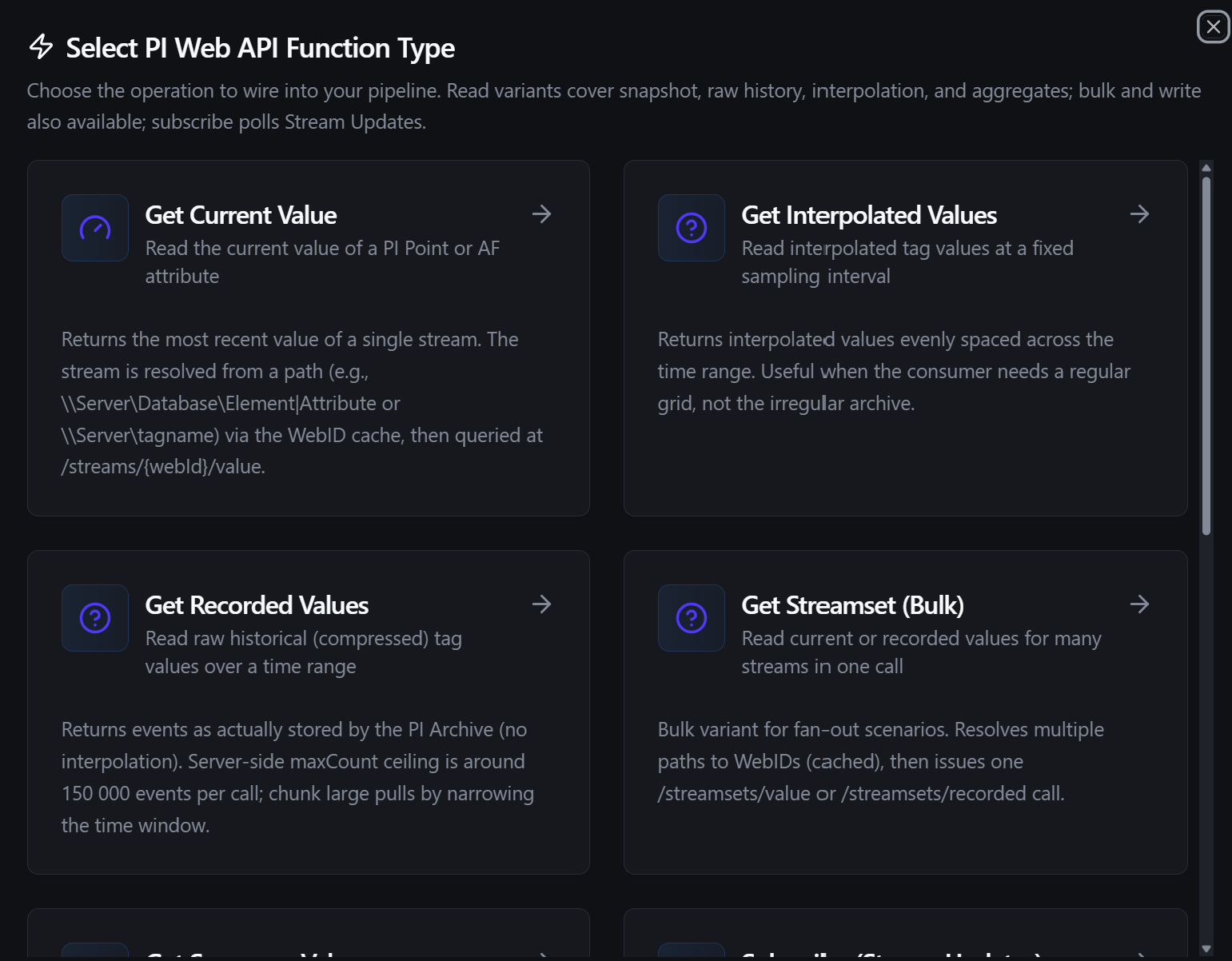
Pick a PI function type: Get Current, Get Recorded, Get Interpolated, Get Summary, Get Streamset, Write Value, or Subscribe
There are seven selectable function types:
| Function | Type ID | Category |
|---|---|---|
| Get Current Value | piwebapi.get_current | Read |
| Get Recorded Values | piwebapi.get_recorded | Read |
| Get Interpolated Values | piwebapi.get_interpolated | Read |
| Get Summary Values | piwebapi.get_summary | Read |
| Get Streamset (Bulk) | piwebapi.get_streamset | Read |
| Write Value | piwebapi.write_value | Write |
| Subscribe (Stream Updates) | piwebapi.subscribe | Trigger |
Every value PI returns carries quality flags alongside the timestamp and value: good, questionable, substituted, and annotated, plus a unitsAbbreviation. Reads surface these so downstream logic can gate on data quality — for example, ignore a reading where good is false. Each value also carries quality, the platform's canonical band derived from those flags (good when Good, uncertain when Questionable, bad when not Good) — the same value the PI Web API trigger puts on its events, so a read and a stream of the same point never disagree about trust.
Get Current Value (piwebapi.get_current)
Purpose: Read the single most recent value of a PI Point or AF attribute.
Configuration Fields
| Field | Type | Required | Default | Description |
|---|---|---|---|---|
| Stream Path | String | Yes | — | Full stream path. AF attribute: `\Server\Database\Element |
| Time | String | No | (now) | PI time expression. Empty = now. Examples: *, *-1h, 2026-05-21T08:00:00Z. Supports templates. |
Use Cases: Display the latest temperature on a dashboard; poll a setpoint before deciding whether to write.
Example Output (the function's data)
{
  "timestamp": "2026-05-21T08:00:00Z",
  "value": 72.5,
  "unitsAbbreviation": "°C",
  "good": true,
  "questionable": false,
  "substituted": false,
  "annotated": false
}
Get Recorded Values (piwebapi.get_recorded)
Purpose: Read raw historical events exactly as stored by the PI Archive (compressed, no interpolation) over a time range.
Configuration Fields
| Field | Type | Required | Default | Description |
|---|---|---|---|---|
| Stream Path | String | Yes | — | Full stream path (AF attribute or PI Point). Supports templates. |
| Start Time | String | Yes | — | PI time expression for the window start (e.g. *-1h, 2026-05-21T00:00:00Z). |
| End Time | String | Yes | — | PI time expression for the window end (e.g. *, 2026-05-21T23:59:59Z). |
| Max Count | Integer | No | 1000 | Maximum events per call (1–150,000). |
| Boundary Type | Select | No | Inside | How to treat events exactly at the boundaries: Inside, Outside, or Interpolated. |
PI clamps a single recorded read at roughly 150,000 events. Setting Max Count above that ceiling returns a clear error rather than silently truncating — narrow the time window and issue multiple reads for large backfills.
Use Cases: Pull every event for a quality investigation; backfill a downstream sink with raw archive data.
Example Output
{
  "items": [
    { "timestamp": "2026-05-21T08:00:03Z", "value": 72.4, "unitsAbbreviation": "°C", "good": true, "questionable": false, "substituted": false, "annotated": false },
    { "timestamp": "2026-05-21T08:00:11Z", "value": 72.6, "unitsAbbreviation": "°C", "good": true, "questionable": false, "substituted": false, "annotated": false },
    { "timestamp": "2026-05-21T08:00:26Z", "value": 72.5, "unitsAbbreviation": "°C", "good": true, "questionable": false, "substituted": false, "annotated": false }
  ],
  "count": 3
}
Get Interpolated Values (piwebapi.get_interpolated)
Purpose: Read interpolated values on a fixed, evenly-spaced grid across a time range — the right shape when a consumer needs a regular cadence rather than the irregular archive.
Configuration Fields
| Field | Type | Required | Default | Description |
|---|---|---|---|---|
| Stream Path | String | Yes | — | Full stream path. Supports templates. |
| Start Time | String | Yes | — | PI time expression for the window start. |
| End Time | String | Yes | — | PI time expression for the window end. |
| Sampling Interval | String | Yes | 1m | Sampling step in PI time-span syntax (e.g. 1s, 1m, 1h). Supports templates. |
Use Cases: Build a 1-minute-resolution chart from compressed archive data; feed a fixed-rate downstream sink.
Example Output
{
  "items": [
    { "timestamp": "2026-05-21T08:00:00Z", "value": 72.4, "unitsAbbreviation": "°C", "good": true, "questionable": false, "substituted": false, "annotated": false },
    { "timestamp": "2026-05-21T08:01:00Z", "value": 72.5, "unitsAbbreviation": "°C", "good": true, "questionable": false, "substituted": false, "annotated": false },
    { "timestamp": "2026-05-21T08:02:00Z", "value": 72.6, "unitsAbbreviation": "°C", "good": true, "questionable": false, "substituted": false, "annotated": false }
  ],
  "count": 3
}
Get Summary Values (piwebapi.get_summary)
Purpose: Read one or more aggregated values (average, total, min, max, …) over a time range, optionally bucketed by an interval.
Configuration Fields
| Field | Type | Required | Default | Description |
|---|---|---|---|---|
| Stream Path | String | Yes | — | Full stream path. Supports templates. |
| Start Time | String | Yes | — | PI time expression for the window start. |
| End Time | String | Yes | — | PI time expression for the window end. |
| Summary Type | Select | Yes | Average | Aggregation applied within each bucket: Total, Average, Minimum, Maximum, Range, StdDev, PercentGood, Count. |
| Summary Duration | String | No | (single bucket) | Bucket size (e.g. 1h, 1d). Empty = one bucket spanning the whole range. Supports templates. |
| Calculation Basis | Select | No | TimeWeighted | How PI weights events within a bucket: TimeWeighted, EventWeighted, and the time-/event-weighted variants. |
A summary read is capped at 10,000 buckets. If the combination of range and Summary Duration would exceed that, the read returns an error — increase the bucket size or split the window.
Use Cases: Hourly averages for shift reporting; daily totalised throughput per asset.
Example Output — a single-bucket hourly average:
{
  "items": [
    { "type": "Average", "timestamp": "2026-05-21T08:00:00Z", "value": 72.48, "unitsAbbreviation": "°C", "good": true }
  ],
  "count": 1
}
With a Summary Duration of 1h over a longer window, one item is returned per bucket (each with its own bucket-start timestamp).
goodSummary items expose type, timestamp, value, unitsAbbreviation, and good — they do not carry the questionable / substituted / annotated flags of raw reads, because an aggregate isn't a stored event.
Get Streamset (Bulk) (piwebapi.get_streamset)
Purpose: Read many streams in one call — a snapshot of each (current mode), or historical events per stream over a window (recorded mode). This is the fan-out primitive for dashboards and for reading every attribute under one element without a per-stream loop.
Configuration Fields
| Field | Type | Required | Default | Description |
|---|---|---|---|---|
| Stream Paths | String | Yes | — | Newline- or comma-separated list of stream paths. Duplicates are removed. Supports templates. |
| Mode | Select | Yes | current | current = one snapshot value per stream. recorded = historical events per stream over the window. |
| Start Time | String | When recorded | — | Window start (required when mode = recorded). |
| End Time | String | When recorded | — | Window end (required when mode = recorded). |
| Max Count | Integer | No | 1000 | Per-stream event ceiling when mode = recorded (1–150,000). |
Use Cases: Snapshot 200 tags for a single dashboard refresh; pull historicals for every attribute under one element.
Example Output — current mode over three paths, one of which failed to resolve:
{
  "items": [
    { "path": "\\\\PISERVER\\Production\\Boiler1|Temperature", "webId": "F1AbE... ", "name": "Temperature", "value": 72.5, "timestamp": "2026-05-21T08:00:00Z", "good": true, "questionable": false, "substituted": false, "annotated": false, "unitsAbbreviation": "°C" },
    { "path": "\\\\PISERVER\\Production\\Boiler1|Pressure", "webId": "F1AbCd...", "name": "Pressure", "value": 4.1, "timestamp": "2026-05-21T08:00:00Z", "good": true, "questionable": false, "substituted": false, "annotated": false, "unitsAbbreviation": "bar" },
    { "path": "\\\\PISERVER\\Production\\Boiler1|Flow", "error": "stream \"\\\\PISERVER\\Production\\Boiler1|Flow\" not found" }
  ],
  "streams": {
    "\\\\PISERVER\\Production\\Boiler1|Temperature": { "webId": "F1AbEx...", "path": "\\\\PISERVER\\Production\\Boiler1|Temperature", "name": "Temperature", "items": [ { "timestamp": "2026-05-21T08:00:00Z", "value": 72.5, "unitsAbbreviation": "°C", "good": true, "questionable": false, "substituted": false, "annotated": false } ], "count": 1 }
  },
  "failures": {
    "\\\\PISERVER\\Production\\Boiler1|Flow": "stream \"\\\\PISERVER\\Production\\Boiler1|Flow\" not found"
  },
  "mode": "current"
}
| Field | Description |
|---|---|
items | Flat per-stream array in requested-path order — the convenient shape for most consumers. Each entry carries the latest value/timestamp/quality (or an error if that path failed to resolve). |
streams | Map keyed by path, each with the full items list and count — useful for programmatic access by path. |
failures | Map of path → error for any path that could not be resolved. Empty when all paths resolved. |
mode | Echoes current or recorded. |
A path that fails to resolve does not fail the whole call — it surfaces in items (as an entry with an error) and in failures, while every other stream returns normally. This mirrors how a dashboard should behave: one bad tag shouldn't blank the panel.
Write Value (piwebapi.write_value)
Purpose: Write a single value — with an optional timestamp and units — to a PI Point or AF attribute.
Configuration Fields
| Field | Type | Required | Default | Description |
|---|---|---|---|---|
| Stream Path | String | Yes | — | Full stream path of the target. Supports templates. |
| Value | String | Yes | — | Value to write. Numeric and boolean strings are converted to real JSON types before sending (PI rejects "42" for a numeric tag). Supports templates. |
| Timestamp | String | No | (server now) | PI time expression. Empty = server-side now. Supports templates. |
| Units | String | No | — | Optional units-of-measure abbreviation to validate against the stream definition. Supports templates. |
Value typing
| Input | Sent as |
|---|---|
42, 42.5 | number |
true / false | boolean |
| anything else | string (PI coerces to the tag's PointType server-side) |
Use Cases: Push a calculated setpoint back to a PI Point; annotate an AF attribute with a downstream-computed value.
Example Output
{
  "path": "\\\\PISERVER\\Production\\Boiler1|Setpoint",
  "webId": "F1AbSp...",
  "value": 42.5,
  "timestamp": ""
}
(timestamp echoes the value you supplied; empty means the server stamped it with its current time.)
Writing to a PI Point or AF attribute can drive downstream control and reporting. Gate writes behind a Condition node that bounds the value, or behind an explicit operator action, before the write reaches PI. A type mismatch or a bad unit is rejected by PI as an HTTP 400 and surfaced as a failed result with PI's own message.
Subscribe (Stream Updates) (piwebapi.subscribe)
Purpose: Start a pipeline on every new value of a stream, using PI Web API Stream Updates. The connector registers the stream once, then polls a marker URL on a configurable interval; each poll returns the events since the previous marker. When PI expires the marker (default ~30 min), the connector re-registers transparently. This function type is a pipeline trigger — see Pipeline Integration and the PI Web API Trigger node.
Configuration Fields
| Field | Type | Required | Default | Description |
|---|---|---|---|---|
| Stream Path | String | Yes | — | Full stream path (AF attribute or PI Point). Not templatable — a subscription binds one concrete stream. |
| Poll Interval (seconds) | Integer | No | 1 | How often to fetch new events (1–60). Lower = lower latency but more load on the PI Web API host. |
Use Cases: Event-driven pipelines that react to every tag change; latency-sensitive control loops; change-driven telemetry without running a read loop yourself.
Stream Updates is a poll-based subscription, not a server push. Between polls the connector holds a marker; each poll returns any events that arrived since. A poll that returns nothing new is normal and emits no trigger. If MaestroHub is disconnected when PI later evicts the marker's update cache, the connector re-registers and resumes from the current marker — events that occurred entirely within a disconnection window are not replayed (PI keeps only a bounded update cache). For gap-critical signals, complement the trigger with a periodic Get Recorded read.
Using Parameters
Path, value, and time fields on read and write functions support parameter placeholders using ((parameterName)) syntax. Parameters are detected automatically as you type and surface in the Function Parameters block, so a single function can be reused across many pipeline contexts.
| Configuration | Description | Example |
|---|---|---|
| Type | Validate the expected value type | number, boolean, string |
| Required | Force critical inputs | Required / Optional |
| Default Value | Provide safe fallbacks for unattended runs | *-1h, 0 |
| Description | Document the parameter's purpose | "Asset element name" |
Example
- Function type: Get Current Value
- Stream Path:
\\PISERVER\Production\((asset))|Temperature - Time:
((at))
At pipeline execution the runtime substitutes ((asset)) and ((at)) with the values bound on the node before resolving the path and reading.
Testing Functions
Read and Write functions can be tested before saving using the Test Function button:
- Click Test Function on the function form
- The dialog shows an execution overview with the resolved configuration
- If the function references
((paramName))templates, you are prompted for values - Click Execute Test to run the function against the live PI server
- The result — the decoded value(s), any PI error, and execution timing — renders in the dialog
You do not need to save the function to test it. Subscribe functions are not tested this way — they are validated by enabling the pipeline that uses them.
Pipeline Integration
Use the PI functions you configure here as nodes inside the Pipeline Designer. Reads and writes are exposed as matching connector nodes, and Subscribe functions drive the PI Web API trigger node:
- PI Get Current Value (
connected.piwebapi.get_current) - PI Get Recorded Values (
connected.piwebapi.get_recorded) - PI Get Interpolated Values (
connected.piwebapi.get_interpolated) - PI Get Summary Values (
connected.piwebapi.get_summary) - PI Get Streamset (Bulk) (
connected.piwebapi.get_streamset) - PI Write Value (
connected.piwebapi.write_value) - PI Web API Trigger (
trigger.piwebapi) — starts a pipeline on each Stream Updates event from apiwebapi.subscribefunction
For node-level details (full parameter reference, input/output schema, execution settings), see the PI Web API Nodes and PI Web API Trigger pages.
For orchestration strategies that mix PI with other data sources, see the Connector Nodes page.
Common Use Cases
Historian-to-UNS Snapshot
Author a Get Streamset function listing a line's key attributes, drive it from a Schedule trigger, and route the flat items array to the Unified Namespace or an MQTT topic. One bulk call refreshes the whole panel regardless of tag count.
Shift & Daily Reporting
Author a Get Summary function (Summary Type: Average, Summary Duration: 1h) over a shift window and forward the per-bucket items to a reporting sink or database node — no client-side aggregation required.
Event-Driven Reaction
Author a Subscribe function on a status or alarm attribute, then use the PI Web API Trigger node to start a pipeline on each value change and act on $trigger.result.value.
Setpoint Writeback
Compute a setpoint upstream, validate it with a Condition node, then issue a parameterized Write Value (Value: ((setpoint))) back to a PI Point.
Troubleshooting
Connection Issues
| Symptom | Possible Cause | Solution |
|---|---|---|
| Test Connection returns HTTP 401 | Wrong auth mode or bad credentials | Verify the Authentication Mode and the username/password, bearer token, or Kerberos keytab/principal. |
| Test Connection returns HTTP 403 | Valid credentials but no permission, or wrong CSRF header | Confirm the account's PI Web API permissions; if your host uses a custom CSRF header, set it on the Advanced tab. |
| TLS / certificate error | Self-signed or untrusted certificate | Install a trusted certificate on the PI host, or (dev only) disable Verify TLS. |
| DNS / connection refused / timeout | Wrong base URL, host unreachable, or firewall | Confirm the base URL (including /piwebapi) and that the host is reachable from the MaestroHub host. |
| Kerberos fails with a KRB / SPN error | SPN mismatch or unreadable keytab / krb5.conf | Use the FQDN in the base URL matching the service's HTTP/ SPN; confirm the keytab and krb5.conf paths are readable on the MaestroHub host and the KDC is reachable. |
Read / Write Issues
| Symptom | Possible Cause | Solution |
|---|---|---|
stream "…" not found | Wrong path, or the stream was renamed/recreated | Use Browse… / the AF Browser to confirm the exact path. The WebID cache invalidates on a 404, so a corrected path resolves on the next call. |
max_count … exceeds PI server ceiling 150000 | Recorded window too large | Narrow the time window and issue multiple reads; the ceiling is a PI limit. |
summary returned … buckets, exceeding the 10000 ceiling | Bucket size too small for the range | Increase Summary Duration or split the window. |
| Write rejected with HTTP 400 | Type mismatch or bad units | Confirm the value parses for the tag's PointType and the Units match the stream definition. |
| Browsing or reads are slower than expected on first use | The server rejects /getbypath, so paths resolve by tree navigation | This is handled automatically (see Path resolution is self-healing); the latch resets on reconnect. |
Use Test Function to validate every read and write against the live PI server before wiring it into a pipeline — it's the fastest way to catch a wrong path, a bad time expression, or a write-type mismatch. Use the AF Browser to confirm exact paths and to create functions in place.