Amazon DynamoDB Integration Guide
Connect to Amazon DynamoDB to read and write items from your pipelines. This guide covers connection setup, the six function types, and pipeline integration.
Overview
DynamoDB is AWS's serverless NoSQL key-value and document database. The connector provides:
- Key-based reads that fetch a single item by its primary key
- Partition reads with key conditions, secondary indexes and descending order
- Table scans with filter expressions and cursor-based paging
- Item writes — put, update and delete — each guardable by a condition expression
- Plain JSON in and out, so you never hand-write DynamoDB's
AttributeValuewire format - Full numeric precision, so a 19-digit identifier survives the round trip exactly
- Custom endpoints for DynamoDB Local and LocalStack
- Template parameters for dynamic keys, items and expressions
One connection, one table
A DynamoDB connection addresses exactly one table, named on the connection profile. Every function on that connection reads and writes that table, and the health check calls DescribeTable on it.
This is deliberate: it means an IAM policy scoped to a single table's ARN is enough to run the connection, including its health check. To work with a second table, create a second connection.
Connection Configuration
Creating a DynamoDB Connection
Navigate to Connections → New Connection → Amazon DynamoDB and configure the following.
1. Profile Information
| Field | Default | Description |
|---|---|---|
| Profile Name | - | A descriptive name for this connection profile (required, max 100 characters) |
| Description | - | Optional description for this DynamoDB connection |
2. Table (Connection tab)
| Field | Default | Description |
|---|---|---|
| AWS Region | us-east-1 | The region the table lives in. Pick Custom Region… to type a region code the list does not carry yet – required |
| Table Name | - | The table every function on this connection operates on. 3–255 characters of letters, numbers, dot, dash or underscore – required |
3. AWS Credentials (Security tab)
| Field | Default | Description |
|---|---|---|
| Access Key ID | - | AWS Access Key ID. Leave empty to use the AWS SDK default credential chain (environment variables, shared config, IAM role, IRSA). Masked on edit; leave empty to keep the stored value |
| Secret Access Key | - | AWS Secret Access Key. Required when Access Key ID is set. Masked on edit; leave empty to keep the stored value |
| Session Token | - | Only needed when the credentials above come from AWS STS |
The IAM policy needs dynamodb:DescribeTable for the health check, plus the actions your functions use: GetItem, Query, Scan, PutItem, UpdateItem, DeleteItem. Scope it to the table's ARN.
If any function names a secondary index, the policy needs that index's ARN too. It is a separate resource: arn:aws:dynamodb:REGION:ACCOUNT:table/TABLE/index/* alongside arn:aws:dynamodb:REGION:ACCOUNT:table/TABLE. A policy with only the table ARN passes the connection test and then fails every indexed query with an access-denied error, which reads like a credentials problem and is not.
4. Endpoint and Timeout (Advanced tab)
| Field | Default | Description |
|---|---|---|
| Custom Endpoint | - | Endpoint URL for DynamoDB Local or LocalStack. Leave empty to talk to AWS. Must include the scheme (http:// or https://) |
| Timeout | 30s | How long the connect probe and each individual health check may take (5s–300s) |
- Required fields: Profile Name, AWS Region and Table Name. Secret Access Key is required only when Access Key ID is set.
- Test Connection calls
DescribeTableon the configured table. A failure here means the table name, the region, or the credentials' permission on that table is wrong — in that order of likelihood. - Custom endpoints are rejected at save time when they have no scheme, because the AWS SDK cannot resolve a bare host and the error it produces names neither the field nor the cause.
- Scaling: DynamoDB requests are stateless HTTPS calls, so the connection is shared across replicas with no ceiling.
Local development
DynamoDB Local runs the service in a container, which is enough to build and test a pipeline without an AWS account:
docker run -d --name dynamodb-local -p 8000:8000 amazon/dynamodb-local:2.5.2

aws dynamodb create-table --endpoint-url http://localhost:8000 \
  --table-name plant-readings \
  --attribute-definitions AttributeName=deviceId,AttributeType=S AttributeName=ts,AttributeType=N \
  --key-schema AttributeName=deviceId,KeyType=HASH AttributeName=ts,KeyType=RANGE \
  --billing-mode PAY_PER_REQUEST
Then set Custom Endpoint to http://localhost:8000. DynamoDB Local accepts any credentials, but the SDK still requires some — test / test works.
Function Builder
Creating DynamoDB Functions
Once the connection is established, create reusable item-operation functions:
- Open the connection and go to the Functions tab → New Function
- Select the function type
- Configure the function's fields
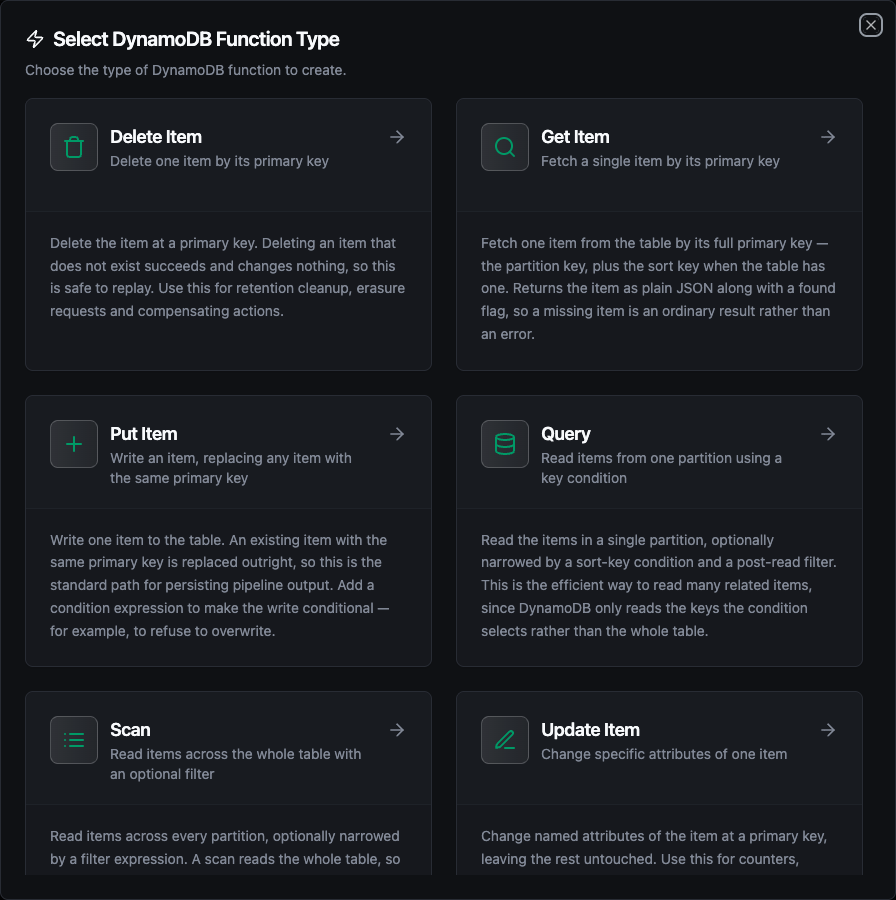
Select from six DynamoDB function types: Get Item, Query, Scan, Put Item, Update Item, and Delete Item
Writing keys, items and expression values
Several fields take a JSON object, written as plain JSON:
{ "deviceId": "line3", "ts": 1700003600 }
Numbers, strings, booleans, lists, maps and null are converted to DynamoDB types for you. You never write {"deviceId": {"S": "line3"}}.
Expression placeholders resolve from Expression Attribute Values, and reserved attribute names are aliased through Expression Attribute Names:
{ ":device": "line3", ":since": 1700000000 }
{ "#s": "status" }
The second example aliases status, which DynamoDB reserves — an expression that names it directly is rejected.
Trailing commas are tolerated, so a hand-edited {"deviceId": "line3",} still parses.
How JSON maps to DynamoDB types
| You write | DynamoDB stores | Reads back as |
|---|---|---|
"line3" | String (S) | "line3" |
1700003600, 21.5 | Number (N) | the same digits, unquoted |
true | Boolean (BOOL) | true |
null | Null (NULL) | null |
[1, 2] | List (L) | [1, 2] |
{"a": 1} | Map (M) | {"a": 1} |
Numbers keep every digit in both directions. A 19-digit identifier or an epoch-nanosecond timestamp comes back exactly as it went in, rather than being rounded the way a JSON parser using 64-bit floats would round it.
DynamoDB has three types plain JSON cannot express: number sets (NS), string sets (SS) and binary (B). The connector reads them for you, so a number set arrives as [20, 21.5], a string set as ["a", "b"], and binary as a base64 string. JSON gives it no way to tell those apart from an ordinary list or string on the way back in.
So a read-then-write round trip changes their type: a set becomes a list, binary becomes a string. If a table holds sets or binary attributes, write them with UpdateItem expressions rather than by reading an item and putting it back.
Get Item
Purpose: Fetch a single item by its full primary key. A key that matches nothing returns found: false rather than failing.
| Field | Type | Required | Default | Description |
|---|---|---|---|---|
| Key | JSON | Yes | - | The item's full primary key — partition key, plus sort key when the table has one. Supports template parameters |
| Projection Expression | String | No | - | Comma-separated attributes to return. Omit to return the whole item |
| Expression Attribute Names | JSON | No | - | Aliases for reserved attribute names used in the projection |
| Strongly Consistent Read | Boolean | No | false | Read the latest committed value instead of a possibly stale replica. Costs twice the read capacity |
Query
Purpose: Read the items in one partition, narrowed by a sort-key condition and an optional filter.
| Field | Type | Required | Default | Description |
|---|---|---|---|---|
| Key Condition Expression | String | Yes | - | Partition-key equality plus an optional sort-key condition, e.g. deviceId = :device AND ts > :since |
| Expression Attribute Values | JSON | No | - | Binds the :placeholders to plain JSON values |
| Expression Attribute Names | JSON | No | - | Aliases for reserved attribute names |
| Filter Expression | String | No | - | Applied after the items are read and before Limit — see Paging |
| Projection Expression | String | No | - | Comma-separated attributes to return |
| Index Name | String | No | - | Secondary index to query instead of the base table |
| Ascending Sort Order | Boolean | No | true | Turn off to read newest-first when the sort key is a timestamp |
| Limit | Integer | No | 100 | Maximum items DynamoDB evaluates (1–10000). Sent to the service, not applied afterwards |
| Exclusive Start Key | JSON | No | - | Cursor to resume from — the lastEvaluatedKey a previous run returned |
| Strongly Consistent Read | Boolean | No | false | Works on the base table and on a local secondary index. A global secondary index cannot serve one, and DynamoDB rejects the request rather than returning stale data |
Scan
Purpose: Read items across every partition, optionally narrowed by a filter. Prefer Query when the partition key is known — a scan reads the whole table.
Scan takes the same fields as Query, minus the key condition and the sort-order toggle, with Filter Expression as the primary way to narrow results.
Put Item
Purpose: Write one item, replacing any existing item with the same primary key.
| Field | Type | Required | Default | Description |
|---|---|---|---|---|
| Item | JSON | Yes | - | The item to write. Must include every primary-key attribute. Supports template parameters |
| Condition Expression | String | No | - | The write only happens when this holds, e.g. attribute_not_exists(deviceId) to insert rather than replace |
| Expression Attribute Values | JSON | No | - | Binds the :placeholders in the condition |
| Expression Attribute Names | JSON | No | - | Aliases for reserved attribute names |
| Return Values | Enum | No | NONE | ALL_OLD returns the item as it was before the write |
Update Item
Purpose: Change named attributes of one item, leaving the rest untouched. DynamoDB creates the item when it does not exist, unless a condition forbids it.
| Field | Type | Required | Default | Description |
|---|---|---|---|---|
| Key | JSON | Yes | - | The item's full primary key |
| Update Expression | String | Yes | - | What to change: SET #s = :s, updatedAt = :now, ADD hits :one, REMOVE draft |
| Expression Attribute Values | JSON | No | - | Binds the :placeholders |
| Expression Attribute Names | JSON | No | - | Aliases for reserved attribute names |
| Condition Expression | String | No | - | e.g. attribute_exists(deviceId) to refuse to create a new item |
| Return Values | Enum | No | ALL_NEW | NONE, ALL_OLD, UPDATED_OLD, ALL_NEW or UPDATED_NEW |
Delete Item
Purpose: Delete the item at a primary key. Deleting an absent item succeeds and changes nothing, so this is safe to replay.
| Field | Type | Required | Default | Description |
|---|---|---|---|---|
| Key | JSON | Yes | - | The item's full primary key |
| Condition Expression | String | No | - | The delete only happens when this holds |
| Expression Attribute Values | JSON | No | - | Binds the :placeholders in the condition |
| Expression Attribute Names | JSON | No | - | Aliases for reserved attribute names |
| Return Values | Enum | No | NONE | ALL_OLD returns the item as it was before the delete |
When a condition expression rejects a write, the connector classifies it as a permanent failure. The pipeline's error path runs immediately, instead of the operation being retried against state that will reject it every time.
Paging through a Query or Scan
Limit is sent to DynamoDB, so it bounds what the service reads rather than trimming a full result set afterwards. The order the two steps run in is worth getting right, because it is the opposite of what most people assume.
Limit caps how many items DynamoDB evaluates. The filter expression then discards from that page. So Limit: 100 with a filter means "look at up to 100 items and return whichever of them match", not "return up to 100 matches". Two consequences follow:
- A selective filter can return far fewer items than
Limit, including zero, while plenty of matching items remain further on. - An empty
itemslist is therefore not the end of the data.lastEvaluatedKeyis: it is present exactly while more items remain.
To read a whole table, feed lastEvaluatedKey back in as the next run's Exclusive Start Key and stop when it is absent. To find a fixed number of matches, raise Limit and keep paging until you have enough; there is no setting that makes DynamoDB keep reading until N items match.
Store-and-forward and replay safety
Put Item, Update Item and Delete Item are eligible for store-and-forward, so a write that cannot reach DynamoDB is buffered durably and drained when the connection returns. Buffering is at-least-once: if a write lands but its acknowledgement is lost, the drainer replays it.
Most writes do not care. The item's primary key addresses the same row every time, so a replay converges:
- Put Item replaces the item. Writing it twice leaves the same item.
- Delete Item removes it. Deleting an absent item succeeds and changes nothing.
- Update Item with
SETorREMOVEre-applies the same values.
Two shapes do not converge, and are worth knowing before you buffer them:
| Shape | What a replay does |
|---|---|
ADD counter :n, SET list = list_append(list, :x) | Accumulates. A replayed increment counts twice |
Put Item guarded by attribute_not_exists(pk) | Fails its condition and dead-letters, even though the first attempt stored the item |
Where a buffered write has to be exact, SET with an absolute value converges and ADD does not. Computing the new count upstream and writing SET faultCount = :count costs a read but survives replay.
Template Parameters
Keys, items and expressions all accept ((parameterName)) placeholders, which turn one function into a reusable one:
{ "deviceId": "((deviceId))", "ts": ((timestamp)), "celsius": ((celsius)) }
Parameters are detected automatically from the fields you fill in, and each can be given a type, a default and a description:
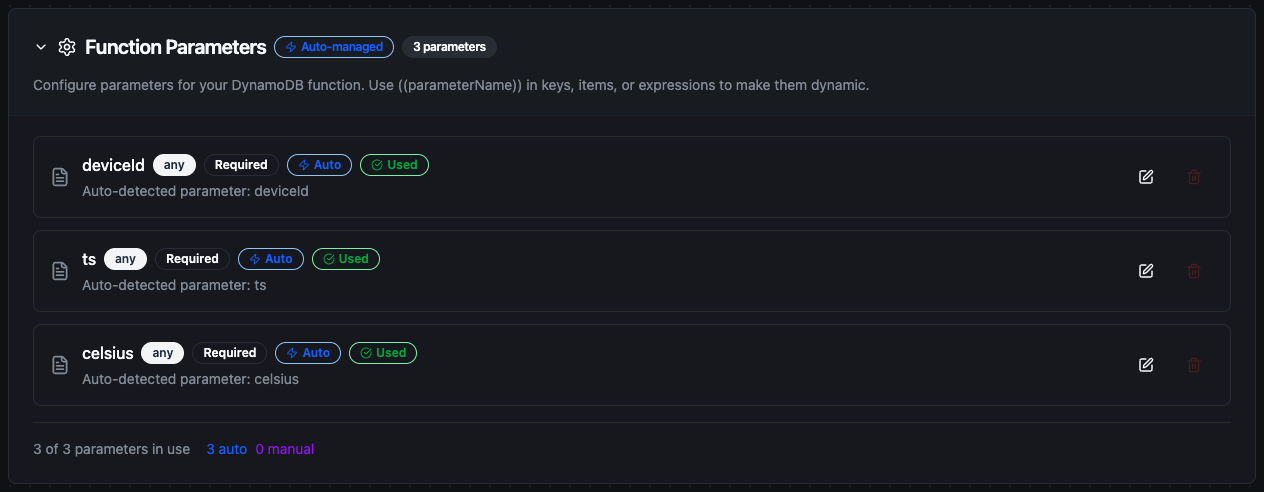
Parameters detected from the Item field, ready to be bound to upstream node output
Pipeline Integration
Use the functions you create here as nodes in the Pipeline Designer. Drop the node onto the canvas, pick the connection and function, and bind any parameters to upstream output.
Common patterns:
- Collect → Store: read from OPC UA, MQTT or Modbus and put items into DynamoDB
- Get → Enrich → Write: look a record up by key, merge it with the incoming payload, write the result on
- Query → Transform → Publish: read a device's recent history and push a summary to another system
- Event → Update: react to a pipeline event by flipping a status flag or incrementing a counter
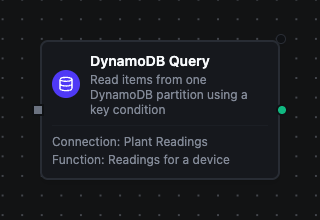
A DynamoDB Query node with its connection and function bound, in the pipeline designer
For the exact output shape each node delivers, see DynamoDB Nodes.
Common Use Cases
Storing sensor readings
Scenario: write temperature readings from factory equipment into a table partitioned by device and sorted by time.
Put Item configuration:
{
  "deviceId": "((deviceId))",
  "ts": ((timestamp)),
  "celsius": ((celsius)),
  "status": "ok"
}
Reading a device's recent history
Scenario: fetch the readings for one device inside a time window.
Key Condition Expression: deviceId = :device AND ts BETWEEN :from AND :to
Expression Attribute Values:
{ ":device": "((deviceId))", ":from": ((from)), ":to": ((to)) }
Turn Ascending Sort Order off to get the newest readings first.
Incrementing a counter
Scenario: count how often a device reported a fault, without reading the current value first.
Update Expression: ADD faultCount :one SET lastFaultAt = :now
Expression Attribute Values:
{ ":one": 1, ":now": ((timestamp)) }
ADD is atomic, so concurrent pipeline runs each contribute rather than overwriting one another.
It is not replay-safe, though. If this write is buffered by store-and-forward and its acknowledgement is lost, the replay increments a second time. See Store-and-forward and replay safety.
Insert-only writes
Scenario: store a processed event exactly once, and route duplicates to the error path instead of overwriting.
Condition Expression: attribute_not_exists(deviceId)
A duplicate fails the condition and is reported as a permanent error, so the pipeline's error branch runs.
Troubleshooting
| Symptom | Likely cause |
|---|---|
| Test Connection fails with a not-found error | The table name or the region is wrong. DynamoDB table names are case-sensitive |
| Test Connection fails with an access-denied error | The IAM policy lacks dynamodb:DescribeTable on this table's ARN |
| "Endpoint must start with http:// or https://" when saving | The custom endpoint has no scheme. Write http://localhost:8000, not localhost:8000 |
A Get Item returns found: false for an item you can see in the console | The key is partial. DynamoDB needs the sort key too when the table has one |
| A validation error naming the Key field | The Key is not a JSON object, or it names attributes that are not the table's primary key |
| A Query or Scan returns no items but reports a cursor | The filter expression rejected everything on that page. Continue from lastEvaluatedKey — see Paging |
| A conditional write reports a permanent error | The condition expression evaluated false. That is the condition doing its job; handle it on the pipeline's error path |
| A Query or Scan fails saying consistent reads are not supported on this index | Strongly Consistent Read is on and the function names a global secondary index, which cannot serve one. Untick it, or read the base table. A local secondary index does support it and needs no change |
| A buffered counter update applied twice | Store-and-forward replays a write whose acknowledgement was lost. ADD accumulates, so it counts twice. See Store-and-forward |