 Snowflake Streaming Integration Guide
Stream rows from your pipelines into Snowflake tables continuously. Rows are queryable within seconds, billing follows throughput, and no virtual warehouse has to run. This guide covers setting up Snowflake, the connection, the two functions, and pipeline recipes.
Overview
The Snowflake Streaming connector uses Snowflake's Snowpipe Streaming REST API (the high-performance architecture). Use it to land machine telemetry, production counts, quality results and events in Snowflake as they happen.
- Continuous ingestion, no warehouse — rows go straight into the table through Snowflake's serverless ingest service.
- Exactly once — every write carries an offset token the connector owns. A retry, a reconnect, or a store-and-forward replay after a network outage is recognised and never written twice.
- One bad batch never stops the line — a batch Snowflake refuses is set aside in Failed messages with the reason; later rows keep flowing.
- Rejected rows are reported — Snowflake silently skips a row that does not fit the table (for example a missing
NOT NULLcolumn). The connector watches for this, logs it, reports it in Channel Status, and with Wait for Commit fails the call. - Table picker and column preview — see which payload fields match a column before you send anything.
- Key-pair authentication, including encrypted private keys; HTTP / HTTPS / SOCKS5 proxy support.
Use Snowflake Streaming to load rows continuously. Use the Snowflake connector to query, run DML/DDL, or create tables — it runs SQL through a warehouse.
Set up Snowflake
Snowpipe Streaming authenticates with a key pair. You need a Snowflake user with an RSA public key and a role that can insert into the target tables.
1. Create a key pair (on any machine with OpenSSL):
# Unencrypted private key (PKCS#8)
openssl genrsa 2048 | openssl pkcs8 -topk8 -inform PEM -out rsa_key.p8 -nocrypt
# …or an encrypted one (you will enter its passphrase in MaestroHub)
openssl genrsa 2048 | openssl pkcs8 -topk8 -v2 des3 -inform PEM -out rsa_key.p8

# The public half, for Snowflake
openssl rsa -in rsa_key.p8 -pubout -out rsa_key.pub
2. Create the user, role and grants (as a role that can manage users, for example SECURITYADMIN):
CREATE ROLE IF NOT EXISTS MAESTROHUB_STREAMING;
GRANT USAGE ON DATABASE FACTORY TO ROLE MAESTROHUB_STREAMING;
GRANT USAGE ON SCHEMA FACTORY.RAW TO ROLE MAESTROHUB_STREAMING;
GRANT INSERT, SELECT ON ALL TABLES IN SCHEMA FACTORY.RAW TO ROLE MAESTROHUB_STREAMING;
GRANT INSERT, SELECT ON FUTURE TABLES IN SCHEMA FACTORY.RAW TO ROLE MAESTROHUB_STREAMING;

CREATE USER IF NOT EXISTS MAESTROHUB_SVC TYPE = SERVICE DEFAULT_ROLE = MAESTROHUB_STREAMING;
GRANT ROLE MAESTROHUB_STREAMING TO USER MAESTROHUB_SVC;

-- Paste the contents of rsa_key.pub without the BEGIN/END lines
ALTER USER MAESTROHUB_SVC SET RSA_PUBLIC_KEY = 'MIIBIjANBgkqh...';
The connector always acts with the user's default role — there is no field to pick another role. Grant everything below to that role. Only grant the optional ones for the features you use:
| Grant | Needed for |
|---|---|
USAGE on the database and the schema | Always |
INSERT (and SELECT) on the target tables | Always |
OPERATE on a custom pipe | Functions that set Pipe |
CREATE TABLE on the schema | Functions with Create Table If Not Exists on |
EVOLVE SCHEMA on an existing table | Functions with Allow Schema Evolution on, writing to a table the connector did not create |
On the connection's Security tab, Set up Snowflake shows these commands with your own user, database and schema filled in, ready to copy — including the optional grants, commented out.
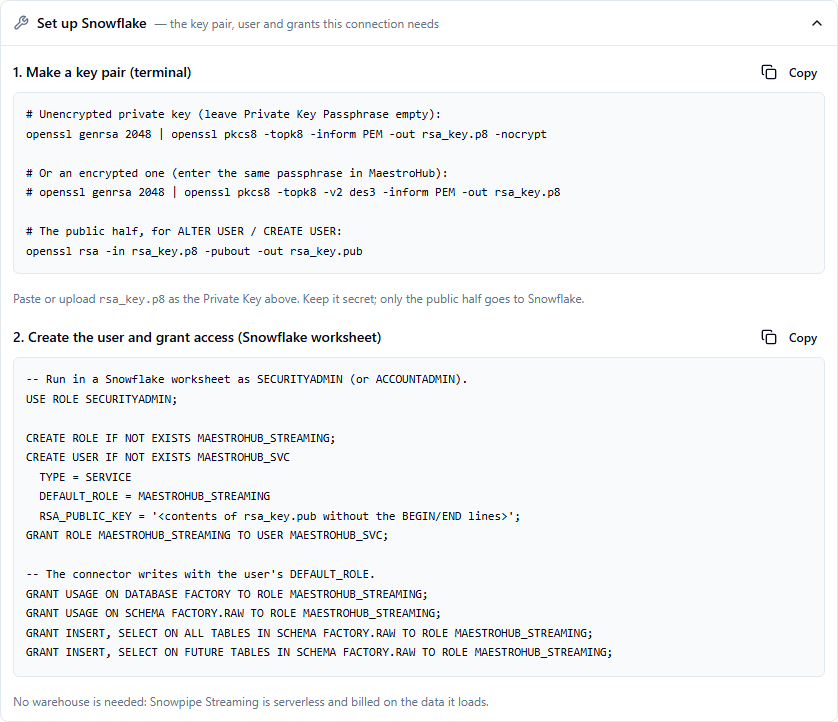
Set up Snowflake: the key pair, the service user and its grants, with the form's own names
3. (Recommended) Keep rejected rows. Snowflake skips rows that do not fit the table. Turn on error logging so they are kept for inspection:
ALTER TABLE FACTORY.RAW.TELEMETRY SET ERROR_LOGGING = TRUE;
-- later:
SELECT * FROM ERROR_TABLE(FACTORY.RAW.TELEMETRY) ORDER BY timestamp DESC;
Connection Configuration
Navigate to Connections → New Connection → Snowflake Streaming. The form has three tabs to fill in — Connection, Security and Advanced — followed by Functions, Scaling and Health once the connection is saved. A tab holding an error shows a red count, so a refused save tells you where to look.
Connection tab
Profile Information
| Field | Default | Rules | Description |
|---|---|---|---|
| Profile Name | - | Required, at most 100 characters, unique | A descriptive name for this connection profile |
| Description | - | Optional | Free text |
| Labels | - | Up to 10 key/value pairs, both parts required | Tags for finding and grouping connections, for example site = plant-7 |
Snowflake Account
| Field | Default | Rules | Description |
|---|---|---|---|
| Account Identifier | - | Required | Your account identifier: myorg-myaccount, or an account locator with its region such as xy12345.us-east-1. In Snowsight: your profile → Account → Copy account identifier. A pasted account URL (https://myorg-myaccount.snowflakecomputing.com) also works — it is reduced to the identifier |
| Database | - | Required | The database holding the target tables |
| Schema | PUBLIC | Optional | The schema holding the target tables. Empty means PUBLIC |
Every table a function writes lives in this database and schema. To write to tables in another schema, create a second connection.
The same rule applies to Database, Schema, and a function's Table and Pipe:
- A name made of letters, digits,
_and$(not starting with a digit) is not case-sensitive:telemetry,TelemetryandTELEMETRYall mean the tableTELEMETRY. - A name that was created with double quotes and holds lower-case letters must be typed with its double quotes: a table created as
"telemetry"is typed"telemetry". Without the quotes it would meanTELEMETRY, a different table. - A name with other characters (spaces, hyphens, dots) can only exist quoted, so it is used exactly as typed:
Line 1 Datameans the table"Line 1 Data".
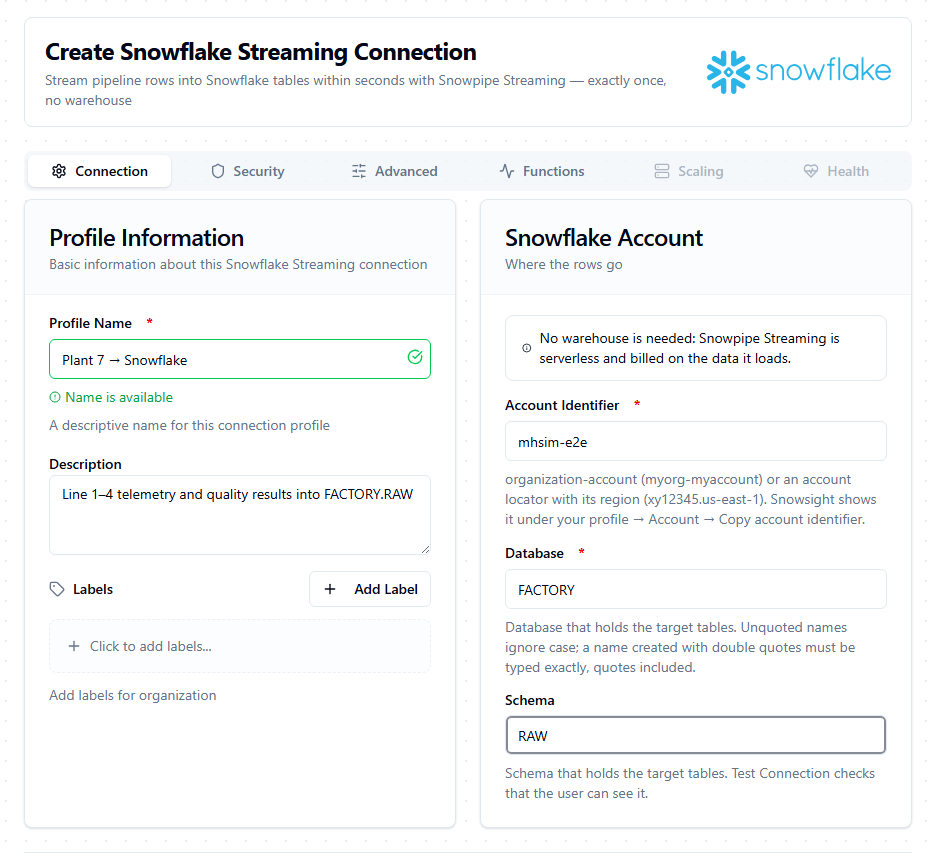
The Connection tab: no warehouse field — Snowpipe Streaming does not use one
Security tab
| Field | Default | Rules | Description |
|---|---|---|---|
| User | - | Required | The Snowflake user whose RSA public key is registered. Its default role is used |
| Private Key | - | Required | The PEM private key — the contents of rsa_key.p8. Paste it, drop the file on the field, or use Upload Key File. Stored encrypted and never shown again after saving; choose Replace to change it |
| Private Key Passphrase | - | Only for an encrypted key | The passphrase of a key that starts with -----BEGIN ENCRYPTED PRIVATE KEY-----. Leave it empty for an unencrypted key. Empty the field to remove a stored passphrase |
The key is checked when you save. Accepted:
-----BEGIN PRIVATE KEY-----(PKCS#8) and-----BEGIN RSA PRIVATE KEY-----(PKCS#1) — with no passphrase.-----BEGIN ENCRYPTED PRIVATE KEY-----(encrypted PKCS#8) — with its passphrase.- A key pasted with Windows line endings, surrounding blank space, or with its line breaks written as
\n(copied out of a JSON file or an environment variable).
Refused, with a message that says what was pasted instead:
- The public key (
rsa_key.pub), a certificate, an EC or OpenSSH key — Snowflake needs the RSA private key. - A passphrase entered for a key that is not encrypted.
- An older encrypted PEM (
RSA PRIVATE KEYwith aDEK-Infoline). Convert it first:openssl pkcs8 -topk8 -in key.pem -out key.p8. - More than one key in the field.
Set up Snowflake, below the fields, shows the key-pair commands and the SQL from Set up Snowflake with this form's user, database and schema filled in.
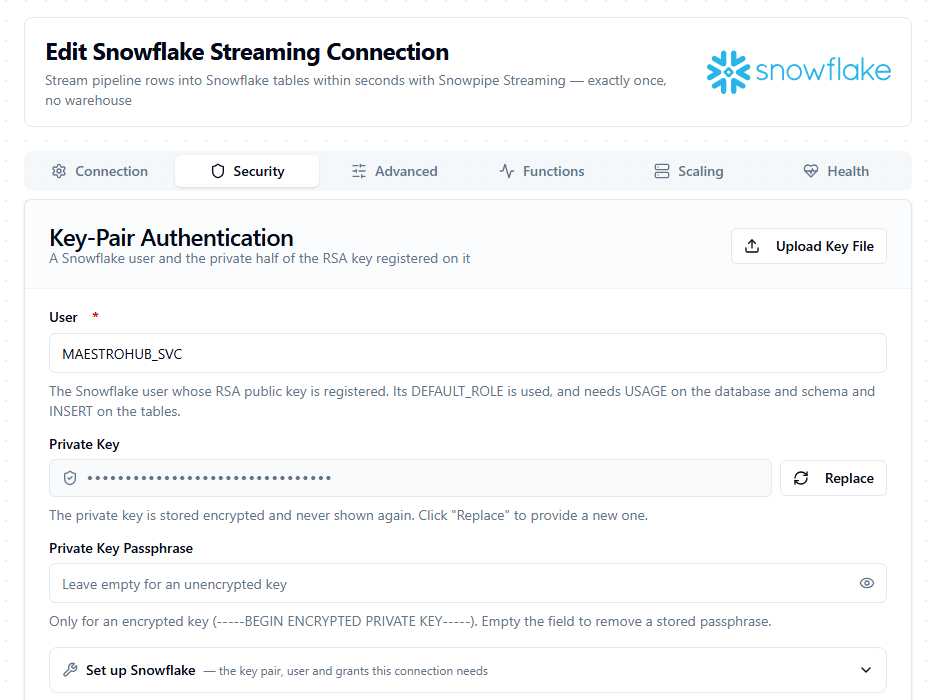
A saved connection: the private key is stored encrypted and never shown again — Replace provides a new one
Advanced tab
| Field | Default | Rules | Description |
|---|---|---|---|
| Account URL | - | An absolute http:// or https:// URL with no path or query | Overrides the endpoint derived from the account identifier — for AWS/Azure PrivateLink (https://<account>.privatelink.snowflakecomputing.com) or an egress gateway. Leave empty for the public endpoint |
| Connection Timeout | 30s | Between 1s and 5m | Time allowed to authenticate and reach Snowflake |
| Proxy URL | - | http://, https:// or socks5:// followed by host:port; no path, and no user name or password in the URL | A proxy for every request to Snowflake, for example http://proxy.plant.local:3128. Leave empty to use the HTTPS_PROXY / NO_PROXY environment variables, if set |
| Proxy Username / Password | - | Only together with a Proxy URL | Credentials for a proxy that requires Basic authentication. The password is stored encrypted. NTLM and Kerberos proxies are not supported |
Test Connection signs in with the key pair, finds your account's ingest host, and checks that the database and schema are visible to the user's default role. If Snowflake refuses the key, the message shows the key's fingerprint (SHA256:…): compare it with RSA_PUBLIC_KEY_FP from DESC USER <user>.
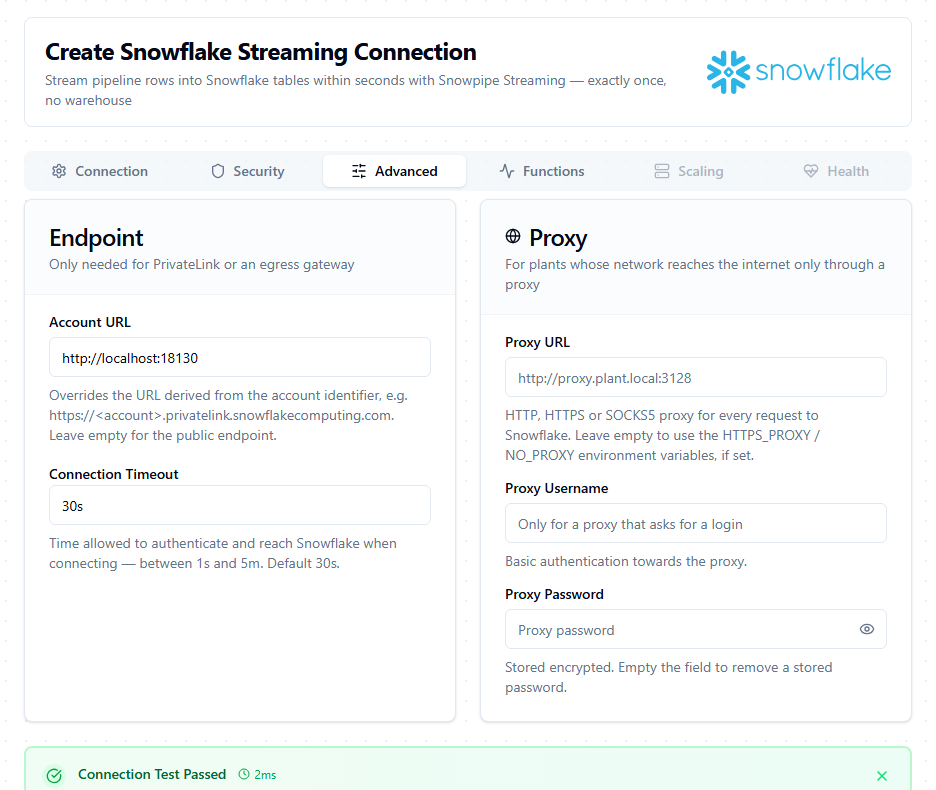
Advanced: Account URL only for PrivateLink or a gateway; a proxy for plants that reach the internet through one
A Snowpipe Streaming channel accepts one writer, so each connection runs on a single MaestroHub instance at a time. After a failover the new instance continues from the position Snowflake committed (see Delivery guarantees for the two narrow exceptions).
Functions
Both functions share the Basic tab: Name (required, at most 100 characters, unique within the connection), Description and Labels. A tab holding an error shows a red count, and Save or Test opens the tab with the first error.
Stream Rows
Appends one row or a batch of rows to a table.
| Tab | Field | Default | Rules | Description |
|---|---|---|---|---|
| Configuration | Table | - | Required. A table name only — see Table | The target table, in the connection's database and schema. Pick from the list or type a name; supports ((parameter)) placeholders |
| Configuration | Rows | - | Required. A JSON object, an array of objects, or a ((parameter)) — see Rows | The rows to write. Usually ((data)), filled from the pipeline |
| Table & Schema | Create Table If Not Exists | Off | Only with an empty Pipe | Create the table on the first write if it is missing. See Creating the table |
| Table & Schema | Allow Schema Evolution | Off | - | Let Snowflake add a column for each new field. See Creating the table |
| Table & Schema | Schema | (from the rows) | Shown and used only with Create Table If Not Exists on | The columns of a table the function creates |
| Delivery | Wait for Commit | Off | - | Return only once Snowflake has committed the rows, and fail the call if Snowflake rejected any of them. See the tip below |
| Delivery | Channel | maestrohub-<connection id> | Letters, digits and _ $ . : - only, at most 256 characters | The channel name. See Channels |
| Advanced | Pipe | (default pipe) | Same naming rules as Table | A custom pipe to load through, for column mapping or transformations. Empty uses the table's default pipe <TABLE>-STREAMING |
| Advanced | Timeout | 30m | Between 1s and 1h | Time allowed for the call, including the commit wait |
Function Parameters — at the top of the Configuration tab — lists every ((parameter)) used in Table, Rows, Pipe and Schema; the node that runs the function supplies each value.
Table
Type the table's name only, not DATABASE.SCHEMA.TABLE: the database and schema come from the connection. RAW.TELEMETRY is not read as schema RAW, table TELEMETRY — it names a table called RAW.TELEMETRY.
| You type | Snowflake table |
|---|---|
telemetry or TELEMETRY | TELEMETRY |
"telemetry" | "telemetry" (created with quotes, lower-case) |
Line 1 Data | "Line 1 Data" |
((table)) | Filled in per run by the node |
Rows
Rows takes one row or a batch:
{"ts": "2026-09-23T08:00:00Z", "asset": "LINE1-PRESS", "tag": "temperature", "value": 71.4}
[
  {"ts": "2026-09-23T08:00:00Z", "asset": "LINE1-PRESS", "tag": "temperature", "value": 71.4},
  {"ts": "2026-09-23T08:00:00Z", "asset": "LINE1-PRESS", "tag": "pressure", "value": 3.2}
]
In a pipeline, set Rows to ((data)) and give the data parameter its value on the node — for example {{ $node["Buffer"].result }} (see Pipeline recipes). The node may pass a JSON object, an array of objects, or the same as JSON text.
The form refuses Rows that are neither JSON nor hold a ((parameter)). At run time, the call fails without sending anything if the rows:
- are empty, or an empty array
[]; - are not an object or an array of objects — for example
"text",42, or[1, 2](the message names the first row that is not an object); - hold more than one JSON value side by side instead of an array;
- carry
NaNorInfinity— JSON cannot hold them; sendnullor a string; - carry text that is not valid UTF-8;
- hold a single row larger than 4 MB after compression.
Such a call fails the same way every time it is retried, so it goes straight to Failed messages (see Delivery guarantees).
How rows map to columns
Each JSON key is matched to a column name, ignoring case: value, Value and VALUE all fill the column VALUE. Keys with no matching column are ignored — unless schema evolution is on, see Creating the table. A column the row does not mention gets its default, or NULL. A row that leaves a NOT NULL column empty, or whose value cannot be converted to the column type, is rejected.
The column preview beside Rows on the Configuration tab lists the table's columns, with their types and NOT NULL. When Rows holds literal JSON, it checks the rows against them:
- ✓ next to a column the rows fill;
- ✗ next to a
NOT NULLcolumn without a default that the rows leave empty — Snowflake will reject those rows; - an amber note listing the keys that match no column — they will be ignored;
- a warning for a number sent to a
DATEorTIMESTAMPcolumn, which Snowflake misreads (see below).
The preview cannot check anything filled in at run time: with ((…)) in Table it shows no columns, and with ((…)) in Rows it shows the columns without marks. For a table that does not exist yet, with Create Table If Not Exists on, it explains which columns the first write will create.
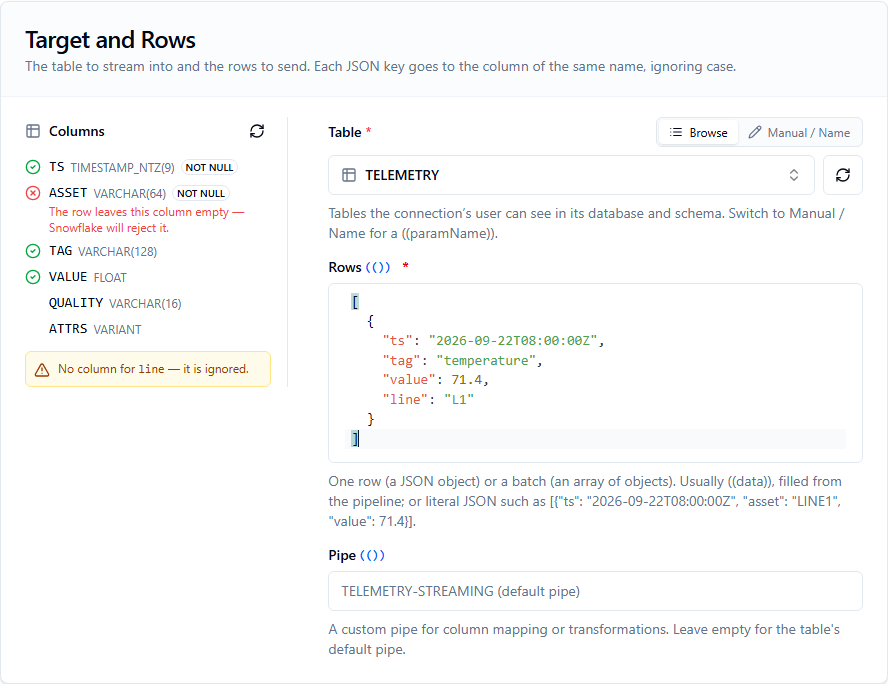
The column preview before anything is sent: ASSET is NOT NULL and missing from the row, so Snowflake would reject it; `line` has no column and would be ignored
Value conversions follow Snowflake's rules:
- Numbers and numeric strings go into
NUMBERandFLOAT;truebecomes1. - ISO-8601 text goes into
TIMESTAMP_*andDATE. An epoch works too — send it as a string ("1790150400"or"1790150400123"), and Snowflake reads seconds or milliseconds by its size, in UTC. true/falseand the wordsyes/no/on/offgo intoBOOLEAN. The numbers0and1are rejected.- Objects go into
VARIANTandOBJECT, arrays intoARRAY(a single value becomes a one-element array). Send them as JSON, not as a string. - Base64 text goes into
BINARY.
Snowflake reads a timestamp sent as a JSON number as epoch seconds, whatever its size, and does not reject it. {"ts": 1790150400123} — milliseconds, the form most devices and MQTT payloads use — is stored in the year ~57,700 with no error. Send it as a string ("ts": "1790150400123") or as ISO-8601 text. A DATE column rejects a JSON number outright.
Into a TIMESTAMP_LTZ or TIMESTAMP_TZ column, Snowflake does not read a timestamp written without a zone (2026-09-23T08:00:00) as UTC. It reads it in the account's time zone, America/Los_Angeles by default. TIMESTAMP_NTZ stores the wall-clock time as written. Machine data is almost always UTC, so send the zone with the value: 2026-09-23T08:00:00Z.
Result
{
  "table": "FACTORY.RAW.TELEMETRY",
  "pipe": "TELEMETRY-STREAMING",
  "channel": "maestrohub-3f1c…",
  "rowsSent": 50,
  "requests": 1,
  "bytesSent": 3812,
  "offsetToken": "mh1.418.0.9f2c4b1a7d03.1-1",
  "deduplicated": false,
  "committed": true,
  "rowsInserted": 49,
  "rowsRejected": 1,
  "lastError": "Failed to cast variant value <redacted> to <redacted>"
}
committedappears only when Wait for Commit is on. So dorowsInsertedandrowsRejected, unless the call was deduplicated.lastErrorappears only when rows were rejected. It is Snowflake's own message, and Snowflake hides the offending value and names no column in it. Turn on error logging on the table to see both:ERROR_TABLE(<table>)keeps the rejected row, the exact reason, and the column (error_source).deduplicated: truemeans the rows were already in Snowflake from an earlier attempt of the same call and were not written again. Such a call measured nothing, so it carries no counts, andrequestsis0.tableCreated: trueappears when this call created the table, andwarningwhen an option could not take effect (see Creating the table).
The node page lists every field: Snowflake Streaming nodes → Output.
Off (default), a call returns as soon as Snowflake has safely received the rows, and rejected rows are reported afterwards in the logs and in Channel Status. On, the call waits for the commit — typically 5 to 10 seconds, and about 20 seconds for the first write to a new table — and fails if any row was rejected. Use it for records where a rejected row must not go unnoticed: quality results, batch records, genealogy.
What happens to a failed call depends on the node's Delivery mode (store-and-forward). With the default, Buffer only on failure, the node completes and the call is set aside in Failed messages with Snowflake's message, while later writes keep flowing. With Do not buffer, the node fails and the pipeline's error handling runs.
The accepted rows of that call are already in the table. Fix the cause, then recover the rejected rows from the table's error table (SELECT * FROM ERROR_TABLE(<table>), with error logging on). A replay soon after the failure is recognised and answered with the same rejection; after a restart, or a day later, it writes the accepted rows a second time.
Test Function writes real rows to the table, always waits for the commit — whatever Wait for Commit says — and shows how many rows Snowflake accepted and rejected. It is the quickest way to find a mismatch between your payload and the table. With Create Table If Not Exists on, the test allows at least two minutes, because Snowflake's first commit into a new table is slow; the saved function keeps its own Timeout.
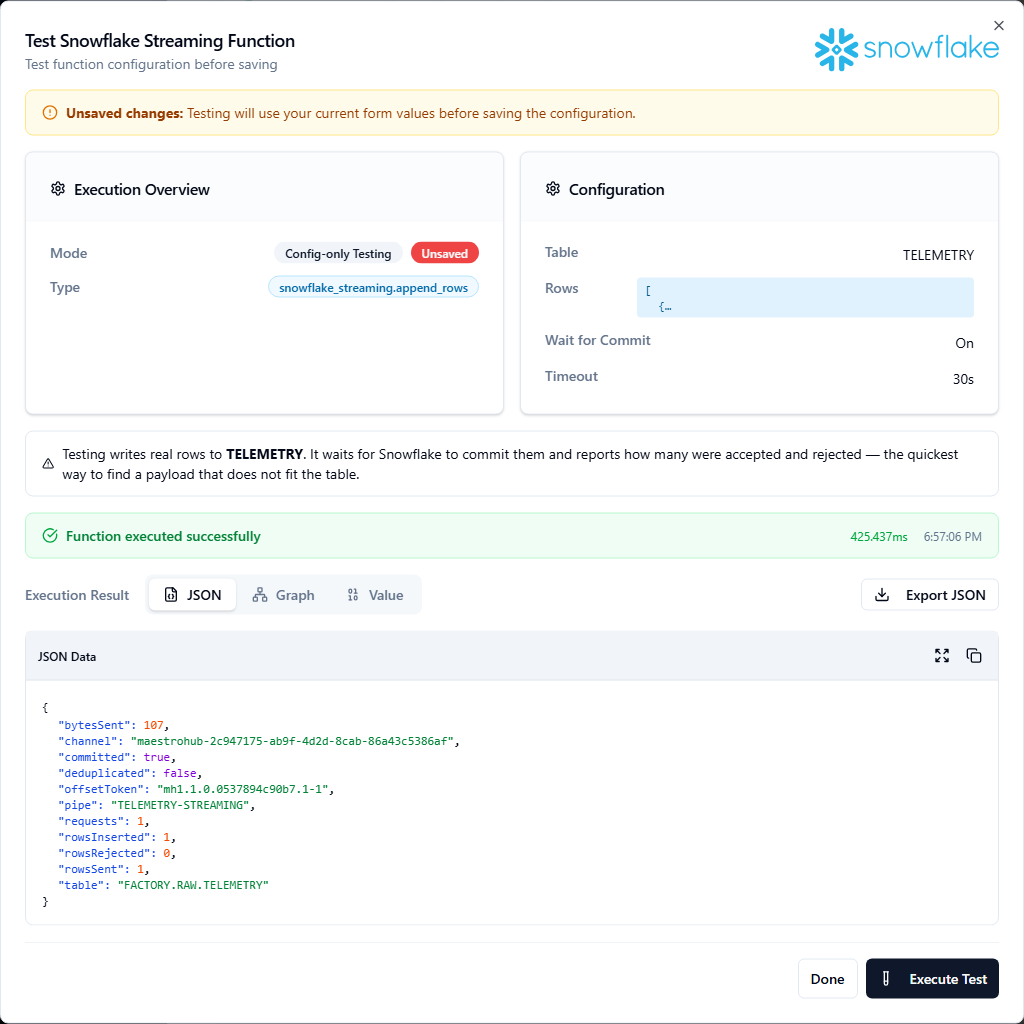
Testing always waits for the commit, so the result says what Snowflake kept
Creating the table and new columns
Both options are on the Table & Schema tab.
Create Table If Not Exists. When the table is missing, the first write creates it and then writes the rows. No warehouse is used. It needs:
CREATE TABLEon the schema for the connection's role (Set up Snowflake includes the grant, commented out);- an empty Pipe — a custom pipe names a pipe, not a table. While Pipe is set, the switch is disabled and says so.
A table that already exists is never replaced or changed: if the role cannot write to it, the call fails and says so.
Without a Schema, the table gets one column per field found in the first batch — in every row, not just the first:
| Field value | Column type |
|---|---|
| Any number | FLOAT — so a first value of 7 and a later 7.5 both land exactly |
A date with a time in ISO-8601 (2026-09-23T08:00:00Z, 2026-09-23 08:00) | TIMESTAMP_TZ — the offset the device sent is kept |
true / false | BOOLEAN |
| An object / an array | VARIANT / ARRAY |
Any other text — including a date alone (2026-09-23) — or only null so far | VARCHAR |
A field whose values disagree becomes VARCHAR, or VARIANT when an object or array is among them. A field name made of letters, digits and _ becomes an upper-case column (temp → TEMP); any other name keeps its exact spelling as a quoted column (temp-c → "temp-c").
Schema lets you choose the columns yourself, in one of two ways:
-
The column editor — one line per column: name (required), type (empty means
VARCHAR), length and precision,NOT NULL, primary key, unique, auto-increment, a default, and a comment. The table gets exactly these columns. Index, CHECK constraints and foreign keys are refused — a Snowflake standard table has none — and a default may not contain;. -
Type hints — JSON naming the type of some fields; every other field is typed from the rows as above. For example
{"serial": "Int64", "temp": "Float64", "ts": "DateTime"}:Hint Column type Int8…Int64,UInt8…UInt64NUMBER(38,0)Float32,Float64FLOATDateTimeTIMESTAMP_TZBooleanBOOLEANStringVARCHARAnyVARIANT
Schema is used only when the function creates the table; it is ignored for a table that exists. It supports ((parameter)) placeholders.
Allow Schema Evolution. Snowflake itself adds a column for each new field and drops NOT NULL from a column a row leaves empty (ENABLE_SCHEMA_EVOLUTION). With both options on, the table the connector creates has evolution switched on. For a table that already exists, the connector does not change it — it only checks the table's setting. When evolution is off there, the call's result carries a warning (once per table, until the connection restarts) with the statements the table's owner runs:
ALTER TABLE FACTORY.RAW.TELEMETRY SET ENABLE_SCHEMA_EVOLUTION = TRUE;
GRANT EVOLVE SCHEMA ON TABLE FACTORY.RAW.TELEMETRY TO ROLE MAESTROHUB_STREAMING;
If the first value of a new field is 21.5, Snowflake creates NUMBER(38,1), and a later 22.25 is stored as 22.3. A first value of 7 makes NUMBER(38,0), and a later 7.5 becomes 8. Text in a numeric column is rejected. For fields whose precision matters, create the column yourself (or use Schema when the connector creates the table) instead of leaving it to evolution.
With Allow Schema Evolution off (the default), a field with no column is ignored.
Snowflake takes about 20–40 seconds to commit the first rows of a new table. With Wait for Commit on, raise Timeout for that first call, or let store-and-forward retry it — the retry is recognised and never writes twice.
Channel Status
Reports each channel's state for a table: committed position, rows inserted, rows rejected, the last error Snowflake recorded, and one healthy flag. It only reads — it writes nothing.
| Tab | Field | Default | Rules | Description |
|---|---|---|---|---|
| Configuration | Table | - | Required. Same rules as Stream Rows' Table | The table whose channels to report. Supports ((parameter)) placeholders |
| Configuration | Error Window | 1h | Between 1m and 720h (30 days) | A channel is unhealthy if Snowflake rejected a row within this window |
| Advanced | Pipe | (default pipe) | Same naming rules as Table | The custom pipe, if rows are loaded through one |
| Advanced | Channel | - | Letters, digits and _ $ . : - only, at most 256 characters | One channel to report |
| Advanced | Timeout | 30m | Between 1s and 1h | Time allowed for the call |
Which channels are reported. With Channel set, only that one. Empty, the connection's own channel (maestrohub-<connection id>) plus every other channel this MaestroHub instance has written to the table through since it last started. To watch a function's own Channel after a restart, before it has written again, name it here.
{
  "table": "FACTORY.RAW.TELEMETRY",
  "pipe": "TELEMETRY-STREAMING",
  "healthy": false,
  "channels": [{
    "channel": "maestrohub-3f1c…",
    "exists": true,
    "statusCode": "SUCCESS",
    "rowsInserted": 182044,
    "rowsErrorCount": 12,
    "lastErrorMessage": "NULL result in a non-nullable column",
    "lastErrorAt": "2026-09-22T10:41:07Z",
    "pendingRows": 0,
    "healthy": false,
    "reason": "Snowflake rejected rows within the last 1h0m0s"
  }]
}
- A channel is unhealthy when Snowflake reports it must be reopened (any status other than
SUCCESSorACTIVE) or when it rejected a row within the Error Window. The top-levelhealthyisfalsewhen any channel is unhealthy. - A channel Snowflake does not know — never written, or dropped after 30 idle days — is listed with
"exists": falseand nohealthyfield, and does not make the result unhealthy. - On a table nothing has been streamed to yet, the call fails with
ERR_PIPE_DOES_NOT_EXIST_OR_NOT_AUTHORIZED: Snowflake creates the table's default pipe on the first write.
Delivery guarantees
- Exactly once. A call that fails in a way that leaves its outcome unknown (a lost network answer) is resolved by reopening the channel and reading Snowflake's committed offset token: rows that landed are not sent again, rows that did not are. With store-and-forward enabled on the node, a write buffered during an outage and replayed later is recognised the same way.
- A bad batch does not stop the line. A call Snowflake refuses outright — rows that are not valid JSON, a value like
NaN, rejected rows under Wait for Commit — is set aside in Failed messages, and later writes keep flowing. Rows are not delivered in a fixed order behind a failure; a table does not need one, and each row carries its own timestamp. A node that must deliver in order can set Delivery order to In order, below its Delivery mode. - What exactly-once cannot cover: if MaestroHub stops abruptly in the one-second window between Snowflake acknowledging a batch and committing it, and Snowflake invalidates the channel in that same window, that batch is lost — the same guarantee Snowflake's own SDKs give. A call whose network answer was lost, followed by a restart of MaestroHub before the call is retried, can write that one batch twice.
Channels
A channel is Snowflake's ordered stream into one table. By default every function of a connection writes a table through one channel, maestrohub-<connection id>, which stays the same across restarts and failovers — that is how the connector continues exactly where Snowflake left off.
Give a function its own Channel (on the Delivery tab) when:
- it uses Wait for Commit and shares a table with a high-rate function (a waiting call holds the channel until Snowflake commits — typically 5 to 10 seconds);
- you copied a connection to another MaestroHub instance — two instances must never write with the same channel name. The connector detects it ("another client keeps reopening channel …") and stops instead of fighting.
A channel name uses letters, digits and _ $ . : - only, at most 256 characters — for example quality-line1 or plant7.press:01.
Throughput
Snowflake accepts about 10 requests per second and up to 4 MB per request (after compression). Each call is at least one request, so for high-rate data (one message per tag per second) batch upstream: put a Buffer or Aggregator node before Stream Rows and send an array of rows per call. The connector splits a batch larger than 4 MB into several requests automatically; only a single row that is larger than 4 MB on its own is refused.
Pipeline recipes
In each recipe, the Stream Rows function has Rows set to ((data)), and the node sets the data parameter (under Function Parameters).
Telemetry into Snowflake. MQTT trigger (one row object per message) → Buffer with Wait For Flush on → Stream Rows with data = {{ $node["Buffer"].result }} — the Buffer's result is the array of buffered messages, one row each. The Buffer flushes on a count, so size Max Count to the message rate: at ten messages a second, 100 writes every ten seconds. Keep Wait For Flush on: off, Stream Rows also runs for every message that does not flush, with no rows, and each of those calls fails. The default Delivery mode buffers a WAN outage and replays it without duplicates.
Quality records that must not be lost silently. Inspection trigger → Stream Rows with Wait for Commit on, default Delivery mode. An outage is buffered and replayed; a record Snowflake rejects is set aside in Failed messages with the reason instead of being skipped quietly. Add the data-quality alarm below to be told when it happens.
Data-quality alarm. Schedule (every 15 min) → Channel Status (Error Window 15m) → Condition {{ $node["Channel Status"].result.healthy == false }} → Microsoft Teams / Slack / e-mail with {{ $node["Channel Status"].result.channels[0].lastErrorMessage }}. Catches a PLC program change that renamed a tag before a week of rows goes missing. Channels are listed in name order; with only the connection's own channel, channels[0] is that channel.
Troubleshooting
| Message | Cause and fix |
|---|---|
Snowflake refused the key pair for user … | The public key registered on the user is not the half of this private key. Compare RSA_PUBLIC_KEY_FP (DESC USER …) with the fingerprint in the message; re-run ALTER USER … SET RSA_PUBLIC_KEY. |
the private key is encrypted; enter its passphrase / cannot decrypt the private key | Fill in or correct Private Key Passphrase. |
a passphrase was given but the private key is not encrypted | Clear Private Key Passphrase, or paste the encrypted key. |
this is the PUBLIC key | You pasted rsa_key.pub; paste rsa_key.p8. |
legacy encrypted PEM (DEK-Info) is not supported | Convert the key: openssl pkcs8 -topk8 -in key.pem -out key.p8, and use its passphrase. |
schema … is not visible to the user's default role | Check the database/schema names and GRANT USAGE on both to the user's default role. |
HTTP 404 ERR_TABLE_DOES_NOT_EXIST_NOT_AUTHORIZED | The table does not exist, or the role cannot see it: check the name (see Typing Snowflake names) and INSERT on the table. Or turn on Create Table If Not Exists. |
HTTP 404 ERR_PIPE_DOES_NOT_EXIST_OR_NOT_AUTHORIZED | With a custom Pipe: the pipe name is wrong, or the role lacks OPERATE on it. In Channel Status with the default pipe: nothing has been streamed to the table yet. |
data is not valid JSON / row N is …, not a JSON object / no rows: data is empty | Rows did not hold an object or an array of objects — see Rows. |
row N, field …: NaN and Infinity are not JSON | Send null or a string for that value. |
Snowflake rejected N of M rows | The rows do not fit the table. See lastError; with error logging on, SELECT * FROM ERROR_TABLE(<table>). |
Create Table If Not Exists: could not create … | The role lacks CREATE TABLE on the schema, or the schema name is wrong. Snowflake's own message says only "Object does not exist, or operation cannot be performed". |
schema: column … asks for an index / has a CHECK constraint / has a foreign key | A Snowflake standard table cannot have these — clear the option in the column editor. |
table … exists but the user's default role cannot write to it | The table is there but the role has no INSERT on it. Create Table If Not Exists never replaces an existing table — grant INSERT. |
warning: Allow Schema Evolution is on, but table … has schema evolution switched off | Run the ALTER TABLE … SET ENABLE_SCHEMA_EVOLUTION = TRUE and GRANT EVOLVE SCHEMA it shows, as the table's owner. |
channel "…" may hold only letters, digits and _ $ . : - | Rename the Channel — see Channels. |
another client keeps reopening channel … | Two connections or instances use the same channel name. Give each its own Channel. |
| HTTP 429 | Too many requests: batch upstream (see Throughput). The call is retried by store-and-forward. |