Amazon EventBridge Integration Guide
Connect to Amazon EventBridge to put custom events onto an event bus, where the bus's rules match them and route them to Lambda functions, SQS queues, SNS topics, Step Functions state machines, API destinations, and buses in other accounts. This guide covers connection setup, function configuration, and pipeline integration.
Overview
The Amazon EventBridge connector publishes into AWS's serverless event router. Where SNS fans one message out to everyone subscribed to a topic, EventBridge evaluates every event against the bus's rules and delivers it only to the targets whose patterns match. That makes it the right choice when routing should be a property of the bus rather than of the publisher. The connector provides:
- Event publishing to the default bus, a custom bus, or a partner bus, with the three fields rules match on — source, detail type, and a JSON detail body
- Partial-failure detection — EventBridge answers a rejected event with HTTP 200 and a per-entry error, and this connector reports that as a node failure instead of a delivered event
- Event bus discovery via the List Event Buses operation, so a pipeline can see which buses exist
- Rule discovery via the List Rules operation, which answers "where will the event I publish actually go?"
- Flexible authentication with IAM access keys or the AWS SDK default credential chain (environment variables, shared config, IRSA, instance profile)
- Custom endpoint support for LocalStack and other AWS-compatible services
- Templatable bus, source, detail type, and detail body, so one function serves many events
EventBridge delivers events to AWS-native targets, not back to MaestroHub — the connector puts events onto a bus, it does not consume from one. To react to EventBridge events in a pipeline, add a rule whose target is an SQS queue and use the Amazon SQS trigger node; or point a rule at an API destination and use the Webhook Trigger.
Both publish one message to many consumers, but they decide who gets it in different places.
- SNS — the subscriber decides. Everything subscribed to the topic receives the message (optionally narrowed by a subscription filter policy the subscriber owns).
- EventBridge — the bus decides. Rules on the bus match on source, detail type, and the contents of the detail, and route to targets. Adding a consumer means adding a rule, with no change to the publisher.
Publish to EventBridge when routing logic belongs to the platform; publish to SNS when fan-out is simple and the subscriber list is the routing.
Connection Configuration
Amazon EventBridge Connection Creation Fields
1. Profile Information
| Field | Default | Description |
|---|---|---|
| Profile Name | - | A descriptive name for this connection profile (required, max 100 characters) |
| Description | - | Optional description for this EventBridge connection |
2. AWS Region
| Field | Default | Description |
|---|---|---|
| AWS Region | us-east-1 | AWS region where the event buses live (e.g., us-east-1, eu-central-1). |
A bus exists in one region, and a rule only ever matches events put onto a bus in its own region. Publishing to orders from a us-east-1 connection reaches the us-east-1 orders bus, never a same-named bus in eu-central-1. Create one connection per region you publish into.
3. Authentication
| Field | Default | Description |
|---|---|---|
| Access Key ID | - | AWS Access Key ID. Leave empty to use the AWS SDK default credential chain (env vars, shared config, IAM role, IRSA). |
| Secret Access Key | - | AWS Secret Access Key. Required when Access Key ID is set; leave empty to use the default credential chain. |
| Session Token | - | Session token for temporary credentials (optional, used with AWS STS). |
You can authenticate the connector in one of two ways:
Option A — Static IAM access keys (explicit)
Provide an Access Key ID and Secret Access Key (and optionally a Session Token for STS-based temporary credentials). Best for self-hosted deployments where the host has no AWS identity of its own.
Option B — AWS SDK default credential chain (implicit)
Leave both Access Key ID and Secret Access Key empty. The connector then resolves credentials in the standard AWS SDK order:
- Environment variables (
AWS_ACCESS_KEY_ID,AWS_SECRET_ACCESS_KEY,AWS_SESSION_TOKEN) - Shared credentials file (
~/.aws/credentials) - IAM Roles for Service Accounts (IRSA) when running on EKS
- EC2 instance profile / ECS task role
This is the recommended path for AWS-hosted MaestroHub deployments — no long-lived keys need to be stored in the connection profile.
The Access Key ID and Secret Access Key must be set together. Setting only one is rejected at validation time. Session Token is optional and only used alongside static keys.
The IAM principal used by the connector must have:
| Operation | Required IAM Action | Scope |
|---|---|---|
| Connect / health probe | events:ListEventBuses | Region-level |
| Put Event | events:PutEvents | The specific event bus ARN(s) you publish to |
| List Event Buses function | events:ListEventBuses | Region-level |
| List Rules function | events:ListRules | The bus whose rules you list |
The events:ListEventBuses permission is needed for the connection's startup health probe — without it, the connection will not reach Connected state, even if events:PutEvents is granted.
4. Custom Endpoint
| Field | Default | Description |
|---|---|---|
| Custom Endpoint | - | Custom EventBridge endpoint URL for LocalStack or other AWS-compatible services. Leave empty for AWS EventBridge. |
For local development with LocalStack, set the custom endpoint to http://localhost:4566 (or wherever LocalStack is running) and start it with the events service enabled. Supply an AWS Region and any non-empty credentials — LocalStack does not validate them, but the AWS SDK needs some keys or it falls through to the host credential chain and fails.
5. Advanced
| Field | Default | Description |
|---|---|---|
| Request Timeout | 30s | Upper bound on every EventBridge API call on this connection, including the connect check (1s–1h). A function's Timeout Override can shorten it, not extend it. |
| Max Retries | 3 | Retries after the first attempt for transient failures (0 = no retries, up to 10). The AWS SDK applies exponential backoff with jitter between attempts. |
6. Connection Labels
| Field | Default | Description |
|---|---|---|
| Labels | - | Key-value pairs to categorize and organize this EventBridge connection (max 10 labels) |
Example Labels
env: prod– Environmentdomain: orders– Event domainaccount: 123456789012– AWS account ID
Function Builder
Creating Amazon EventBridge Functions
Once you have a connection established, you can create reusable functions:
- Open the connection and go to its Functions tab → New Function
- Select the desired function type (Put Event, List Event Buses, or List Rules)
- Configure the function parameters
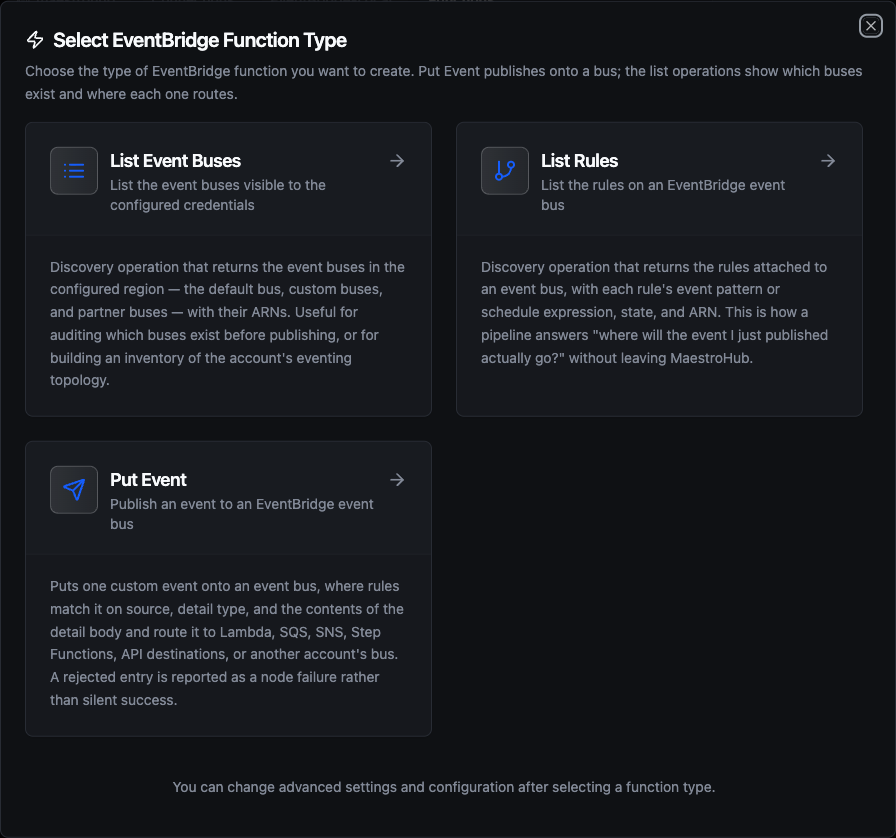
Select from three Amazon EventBridge function types: Put Event for publishing, and two discovery operations for buses and rules
Put Event Function
Purpose: Put one custom event onto an event bus. Use this for domain events, alarms, workflow starts, and any message whose routing should be decided by the bus rather than by the publisher.
Configuration Fields
| Field | Type | Required | Default | Description |
|---|---|---|---|---|
| Event Bus | String | No | default | Name or ARN of the target event bus. Leave as default for the account's default bus. Supports ((parameter)) syntax. |
| Source | String | Yes | - | Event source, matched by rules. Use reverse-DNS naming (e.g., com.mycompany.orders). The aws. prefix is reserved by AWS and is rejected. Supports ((parameter)) syntax. |
| Detail Type | String | Yes | - | Free-form event name, matched by rules alongside source (e.g., Order Placed). Supports ((parameter)) syntax. |
| Detail | String | Yes | - | Event body as a JSON object. Rules match on its fields, so a bare string, number, or array is rejected. Supports ((parameter)) syntax. |
| Resources (JSON array) | String | No | - | JSON array of ARNs the event concerns. Rules can match on it. Supports ((parameter)) syntax. |
| Event Time | String | No | - | RFC3339 timestamp for the event (e.g., 2026-01-31T14:05:00Z). Leave empty to let EventBridge stamp the ingestion time. Supports ((parameter)) syntax. |
| Timeout Override | Duration | No | - | Bound on this function's calls; the connection's Request Timeout still applies and the shorter one wins. A Go duration string between 1s and 1h (e.g. 30s). Leave empty to use only the connection's bound; 0 is not accepted. |
Use Cases:
- Emit a domain event that fans out to Lambda and SQS through the bus's rules
- Raise a production alarm onto a shared ops bus owned by another team
- Forward line telemetry summaries to a cross-account analytics bus
- Start a Step Functions workflow without coupling the pipeline to the workflow's ARN
A rule's event pattern matches on source, detail type, and the contents of detail. A rule like
{
  "source": ["com.mycompany.orders"],
  "detail-type": ["Order Placed"],
  "detail": { "total": [{ "numeric": [">", 1000] }] }
}
only fires for high-value orders. Design source and detail type as a stable contract — consumers write rules against them, so renaming one silently stops every matching rule.
{"orderId":"o-1"} is valid. "o-1", 42, and [{"orderId":"o-1"}] are not — a rule has no fields to match against them, and EventBridge fails the entry. MaestroHub rejects a non-object detail when you save the function, so the problem surfaces in the form rather than at pipeline runtime.
EventBridge reports a bad entry as a successful HTTP call with a non-zero FailedEntryCount and a per-entry error code. A naive client reads "200" and reports success, and the pipeline carries on with an empty event ID. This connector inspects the entry and fails the node instead, with the AWS error code in the message — for example NotAuthorizedForSourceException when the bus policy refuses your source.
Retry behavior follows the entry's own code: InternalFailure and ThrottlingException are retried, and everything else goes straight to the dead-letter path rather than burning the retry budget on an event AWS will keep refusing.
An event's total size is capped at 256 KB, counted across detail, detail type, source, resources, and time. Large payloads belong in S3 with the object key in the detail — the pattern AWS calls the claim check. See calculating event size.
List Event Buses Function
Purpose: List the event buses visible to the connection's IAM principal in the configured region — the default bus, custom buses, and partner buses. Useful for auditing the account's eventing topology and validating a bus name before a deployment.
Configuration Fields
| Field | Type | Required | Default | Description |
|---|---|---|---|---|
| Name Prefix | String | No | - | Return only buses whose name starts with this prefix. Leave empty for all. |
| Max Items | Number | No | 100 | Maximum number of buses to return (1–1000). |
| Timeout | Duration | No | 30m | Bound on this single operation (1s–1h). |
Use Cases:
- Discover the custom buses available before publishing
- Audit the eventing topology of a region
- Build a dynamic bus dispatch table for a multi-tenant pipeline
List Rules Function
Purpose: List the rules attached to an event bus, with each rule's event pattern or schedule expression, state, and ARN. This is how a pipeline answers "where will the event I just published actually go?" without leaving MaestroHub.
Configuration Fields
| Field | Type | Required | Default | Description |
|---|---|---|---|---|
| Event Bus | String | No | default | Name or ARN of the bus whose rules to list. Leave as default for the account's default bus. |
| Name Prefix | String | No | - | Return only rules whose name starts with this prefix. Leave empty for all. |
| Max Items | Number | No | 100 | Maximum number of rules to return (1–1000). |
| Timeout | Duration | No | 30m | Bound on this single operation (1s–1h). |
Use Cases:
- Check which rules will match an event before publishing it
- Audit disabled rules on a shared bus — a
DISABLEDrule matches nothing, and is the usual reason a published event appears to vanish - Report where a bus routes its events, as part of a change review
A rule is driven by either an event pattern (it matches published events) or a schedule expression (it fires on a cron or rate). Both fields are always returned; whichever is empty tells you which kind of rule you are looking at.
Both list functions push Max Items down to AWS as the request limit rather than fetching everything and trimming afterwards — a budget of 10 costs one small page, not a full listing thrown away. AWS caps a single page at 100, so a larger budget is fetched across pages. If more items exist than the budget allows, the call's metadata says so (_metadata.truncated is true) and result.nextToken records where the listing stopped.
Using Parameters
The ((parameterName)) syntax creates dynamic, reusable functions. Parameters are automatically detected from your configuration fields and can be configured with:
| Configuration | Description | Example |
|---|---|---|
| Type | Data type validation | string, number, boolean, datetime, json, buffer |
| Required | Make parameters mandatory or optional | Required / Optional |
| Default Value | Fallback value if not provided | default, com.mycompany.orders, {} |
| Description | Help text for users | "Target event bus", "Order identifier" |
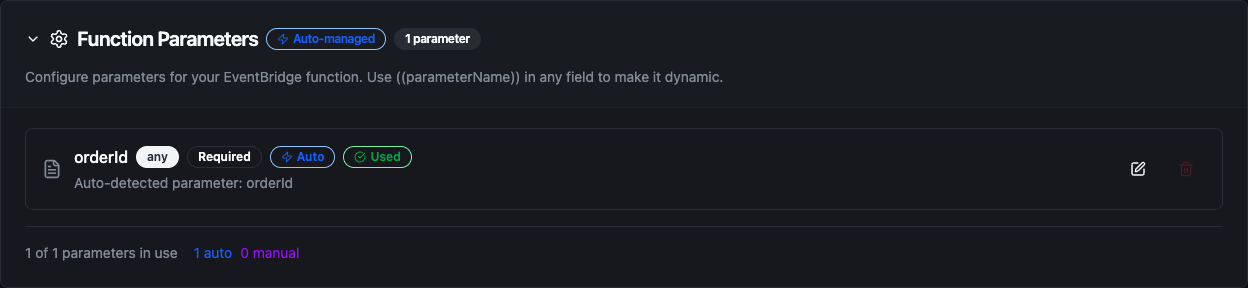
Configure dynamic parameters for Put Event functions with type validation, defaults, and descriptions
Template parameters are available for Put Event functions (Event Bus, Source, Detail Type, Detail, Resources, Event Time). The two list functions take static values — their scope is fixed at configuration time.
Pipeline Integration
Use the Amazon EventBridge functions you create here as nodes inside the Pipeline Designer. Drag them onto the canvas, bind parameters to upstream outputs or constants, and publish events without leaving the designer.
- Amazon EventBridge Nodes — Put Event, List Event Buses, and List Rules as steps within a running pipeline
For broader orchestration patterns that combine EventBridge with databases, REST, MQTT, or other connector steps, see the Connector Nodes page.
Common Use Cases
Domain Events From a Processing Pipeline
Scenario: A pipeline that processes orders should announce each completed order so other teams can react without the pipeline knowing who they are.
Put Event Configuration:
- Event Bus:
orders - Source:
com.mycompany.orders - Detail Type:
Order Placed - Detail:
{
  "orderId": "((orderId))",
  "customerId": "((customerId))",
  "total": ((total)),
  "currency": "((currency))"
}
Pipeline Integration: Place the Put Event node at the end of the order-processing branch. Downstream teams add rules on the orders bus — fulfilment matches every Order Placed, fraud review matches only detail.total > 1000 — and the pipeline never changes.
Cross-Account Alarm Routing
Scenario: Plant pipelines run in a workload account, but alarms must reach the central ops account's incident tooling.
Put Event Configuration:
- Event Bus:
arn:aws:events:eu-central-1:999999999999:event-bus/ops-alarms(the ops account's bus, by ARN) - Source:
com.mycompany.plant.((site)) - Detail Type:
Equipment Fault - Detail:
{
  "machineId": "((machineId))",
  "fault": "((faultType))",
  "value": ((value)),
  "severity": "((severity))"
}
- Resources:
["((machineArn))"]
Pipeline Integration: Connect downstream of a threshold or anomaly-detection node. The ops account's bus policy must allow events:PutEvents from the workload account; without it, EventBridge answers HTTP 200 with NotAuthorizedForSourceException, and the node reports that as a failure rather than a delivered alarm.
Pre-Publish Routing Check
Scenario: Before a release adds a new event type, confirm that a rule exists to consume it — and that the rule is enabled.
Function: List Rules on the orders bus, with Name Prefix fulfilment-
Pipeline Integration: Run List Rules in a pre-deploy pipeline, then assert in a condition node that the expected rule is present and its state is ENABLED. A disabled rule silently matches nothing, so this check catches the failure mode that is hardest to spot after the fact.
Eventing Topology Audit
Scenario: Compliance requires a periodic inventory of every event bus and its rules, per region, for review.
Functions: List Event Buses, then List Rules per bus
Pipeline Integration: Schedule a daily pipeline that runs List Event Buses across each regional connection, iterates the result with a ForEach node, and runs List Rules for each bus. Write the combined result to an audit table (PostgreSQL, BigQuery, or S3) for review.