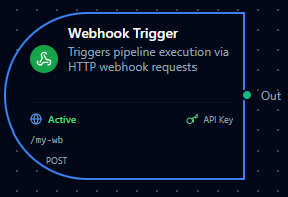
Webhook trigger node
Webhook Trigger Node
Overview
The Webhook Trigger Node starts a pipeline execution when an HTTP request is received at a unique webhook URL. It supports custom authentication headers (or an explicit public mode for unauthenticated endpoints), optional IP allowlists, and a raw-body mode for signature verification (e.g., Stripe). The public endpoint is protected by a request-size cap and per-client rate limiting. Use it to connect external systems and SaaS apps to MaestroHub pipelines.
Core Functionality
What It Does
1. Event Ingestion via HTTP Start pipelines from any system capable of sending HTTP requests to a secure URL.
2. Custom Header Authentication Require one or more custom authentication headers (key-value pairs) for all webhook calls to prevent unauthorized access — or deliberately opt in to a public, unauthenticated endpoint.
3. Network Access Controls Restrict access by source IP/CIDR. A request-size cap and per-client rate limiting protect the public endpoint from abuse.
4. Structured Output with Metadata Pass request metadata (method, headers, query parameters, client IP) and the parsed body to downstream nodes for routing, filtering, and processing.
5. Raw Body Preservation Optionally preserve the exact raw request body to support third-party signature verification flows.
Endpoint Format
- Node type:
trigger.webhook - Manual execution: Not supported (
supportsExecution: false) - URL format:
{CORE_API_URL}/scheduler/webhooks/{path}CORE_API_URLincludes the API version prefix (e.g.,http://localhost:8080/api/v1)- Example: if
CORE_API_URL = https://api.example.com/api/v1, the webhook URL becomeshttps://api.example.com/api/v1/scheduler/webhooks/{path}
Configuration Options
Basic Information
| Field | Type | Description |
|---|---|---|
| Node Label | String (Required) | Display name for the node in your pipeline. Must be non-empty (trimmed). |
| Description | String (Optional) | Explains how/why this webhook starts the workflow. |
Parameters
The webhook configuration is organized across six tabs in the UI: Basic, Authentication, Security, Response, Advanced, and Settings.
| Parameter | Tab | Type | Default | Required | Constraints | Description |
|---|---|---|---|---|---|---|
| Enabled | Basic | boolean | true | Yes | -- | Enable/disable the webhook. When disabled, requests to it are rejected. |
| Path | Basic | string | Auto-generated | Yes | ^[a-zA-Z0-9_-]+$ | URL path segment for the webhook endpoint. |
| HTTP Methods | Basic | string[] | ["POST"] | Yes | GET, POST, PUT, PATCH, DELETE | HTTP methods accepted by the webhook. |
| Public Webhook | Authentication | boolean | false | No | -- | When enabled (allowUnauthenticated), the webhook accepts requests with no authentication header — a deliberately public endpoint. When off (default), at least one auth header is required. |
| Auth Headers | Authentication | object | {} | Conditional | At least 1 non-empty key-value pair, unless Public Webhook is on | Custom authentication headers required in every request (exact key-value match). |
| IP Whitelist | Security | string[] | [] | No | Valid IPv4/IPv6 or CIDR notation | Restrict access to specific client IPs. Empty = allow all. See the note on client IP resolution below. |
| Success Status Code | Response | number | 200 | No | 100--599 | HTTP status code returned when a single pipeline fires. The UI is fixed at 200; other values are set via the API/MCP. |
| Success Message | Response | string | "Pipeline execution started" | No | -- | Response body message on success. |
| Include Request ID | Response | boolean | true | No | -- | Include the unique request ID in the response. |
| Raw Body Mode | Advanced | boolean | false | No | -- | Preserve the raw request body in _metadata.raw_body for signature verification. |
Multiple pipelines in the same organization can share one webhook path. A request fires every matching pipeline whose HTTP method, IP allowlist, and authentication checks it satisfies; the response lists which pipelines were triggered and which were skipped (with the reason). Paths are unique per organization and cannot be reused by a different organization.
The IP allowlist (and _metadata.remoteIp) match the IP that MaestroHub resolves as the client. By default only the direct TCP peer is trusted, and any inbound X-Forwarded-For header is ignored. If MaestroHub runs behind a reverse proxy or gateway, set the server-level http.trustedProxies config to your proxy's network — otherwise the allowlist matches the proxy's address and legitimate clients may be blocked. Only listed proxy ranges are trusted (loopback/link-local/private are not implicit).
Settings
Description
A free-text area for documenting the node's purpose and behavior. Notes entered here are saved with the pipeline and visible to all team members.
Execution Settings
| Setting | Options | Default | Description |
|---|---|---|---|
| Timeout (seconds) | number | Pipeline default | Maximum execution time for this node (1--600). Leave empty for pipeline default. |
| Retry on Timeout | Pipeline Default / Enabled / Disabled | Pipeline Default | Whether to retry the node if it times out. |
| Retry on Fail | Pipeline Default / Enabled / Disabled | Pipeline Default | Whether to retry on failure. When Enabled, shows Advanced Retry Configuration. |
| On Error | Pipeline Default / Stop Pipeline / Continue Execution | Pipeline Default | Behavior when node fails after all retries. |
Advanced Retry Configuration (visible when Retry on Fail = Enabled)
| Field | Type | Default | Range | Description |
|---|---|---|---|---|
| Max Attempts | number | 3 | 1--10 | Maximum retry attempts. |
| Initial Delay (ms) | number | 1000 | 100--30,000 | Wait before first retry. |
| Max Delay (ms) | number | 120000 | 1,000--300,000 | Upper bound for backoff delay. |
| Multiplier | number | 2.0 | 1.0--5.0 | Exponential backoff multiplier. |
| Jitter Factor | number | 0.1 | 0--0.5 | Random jitter (+-percentage). |
Output Data Structure
When a webhook fires, the trigger node produces a structured output with two top-level keys: _metadata and result.
_metadata Object
| Field | Type | Description |
|---|---|---|
type | string | Always "webhook_trigger". |
method | string | HTTP method of the incoming request (e.g., "POST"). |
path | string | Full request URL path (e.g., "/api/v1/scheduler/webhooks/abc123"). |
headers | object | All request headers (first value per key). Credential headers are masked: the header(s) this node authenticates on and the well-known credential headers (Authorization, Proxy-Authorization, Cookie, X-Api-Key, X-Auth-Token, X-Access-Token, X-Amz-Security-Token) keep their key and carry the value "***". See Credential headers are masked. |
query | object | Query string parameters (first value per key). |
remoteIp | string | Client IP address. |
requestId | string | Auto-generated UUID for traceability. |
raw_body | string | (Only when Raw Body Mode is enabled) The original unparsed request body. |
result Object
The parsed request body. If the body is valid JSON it is parsed into an object. If it is not valid JSON, it is stored as {"raw": "<original string>"}. If no body is sent, this is an empty object {}.
Example Output
{
  "_metadata": {
    "type": "webhook_trigger",
    "method": "POST",
    "path": "/api/v1/scheduler/webhooks/abc123",
    "headers": {
      "Content-Type": "application/json",
      "Authorization": "***",
      "User-Agent": "MyApp/1.0"
    },
    "query": {
      "source": "erp"
    },
    "remoteIp": "203.0.113.42",
    "requestId": "a1b2c3d4-e5f6-7890-abcd-ef1234567890"
  },
  "result": {
    "orderId": "PO-9921",
    "status": "approved",
    "items": [
      { "sku": "WIDGET-A", "qty": 100 }
    ]
  }
}
Referencing in Downstream Nodes
Use expressions to access webhook data in subsequent nodes:
$trigger._metadata.method-- HTTP method$trigger._metadata.headers["User-Agent"]-- a specific request header (a credential header such asAuthorizationreads as"***")$trigger._metadata.query.source-- a query parameter$trigger._metadata.requestId-- the auto-generated request ID$trigger.result.orderId-- a field from the parsed request body
Testing with the Fire Button
The designer's Fire action (the rocket on the node) starts a real run without an HTTP request, and it delivers the same shape a request does, so an expression that reads $trigger._metadata.headers[...] behaves the same from the rocket, from Test Node, and from a live call:
_metadata.typeis"webhook_trigger";methodis the first entry of HTTP Methods (POSTwhen the list is empty);pathis the webhook's full request path;headersis{"Content-Type": "application/json"}plus each authentication header the node requires with the value"***"-- the same masked shape a real request records, so the secret itself is never written into the run;queryis{};remoteIpis"";requestIdis a fresh UUID.- The run also carries the manual fire's provenance --
nodeId,nodeType,userId,triggeredAt-- so a downstream node can tell a Fire run from a request by itsuserId. resultis the node's Test Data, or{}when none is configured. The Fire button never invents a sample body: it is a real run that writes to real destinations.
The execution itself is recorded with trigger type manual, like every run started from the designer.
Validation Rules
Node Configuration Validation
Label Requirements
- Must not be empty
- Must not consist only of whitespace
- Error: "Node name is required."
HTTP Methods
- Must include at least one method
- Each value must be one of:
GET,POST,PUT,PATCH,DELETE - Errors: "At least one HTTP method must be specified"; "Invalid HTTP method: {value}"
Path
- If provided, must match
^[a-zA-Z0-9_-]+$ - Error: "Path must contain only alphanumeric characters, hyphens, and underscores."
Auth Headers
- At least one header with a non-empty key and non-empty value is required — unless Public Webhook (
allowUnauthenticated) is enabled - Every configured header must have a non-empty name and value
- Error: "At least one authentication header is required, or enable "Public webhook" to create a public endpoint"
- This rule is enforced at every layer — the UI, the pipeline validator, and the runtime request handler — so a webhook created via the API/MCP with neither auth headers nor the public flag is rejected on save
IP Whitelist
- Each entry must be a valid IPv4/IPv6 address or CIDR notation (IPv4/0-32, IPv6/0-128)
- Error: "Invalid IP address or CIDR notation"
Success Status Code
- If set, must be a number in
100–599 - Error: "Invalid success status code: {value} (must be between 100 and 599)"
Calling the Webhook
- Method: Any of the methods selected in the node configuration (default
POST) - URL:
{CORE_API_URL}/scheduler/webhooks/{path} - Headers: Include all configured authentication headers as-is (exact key-value match required). Not required when Public Webhook is enabled.
- Body: Free-form (JSON recommended). If
rawBodyModeis enabled, the raw body is preserved in_metadata.raw_bodyfor signature verification. The request body is capped (default 1 MiB); larger bodies are rejected with 413 Payload Too Large.
The public webhook endpoint applies a request-size cap and per-client rate limiting. Requests over the size cap return 413; a client that exceeds the rate limit receives 429 Too Many Requests. Both limits are server-level configuration.
Example curl Command
curl -X POST \
  https://api.example.com/api/v1/scheduler/webhooks/abc123 \
  -H "Content-Type: application/json" \
  -H "Authorization: Bearer my-secret-token" \
  -d '{
    "orderId": "PO-9921",
    "status": "approved",
    "items": [{"sku": "WIDGET-A", "qty": 100}]
  }'
Example Response
The response always reports which pipelines the request triggered. When a single pipeline fires, the response also mirrors that pipeline's configured Success Message and request ID for backward compatibility:
{
  "status": "triggered",
  "triggered": [
    {
      "pipeline_id": "pl_9f2c...",
      "pipeline_name": "Order Intake",
      "node_id": "node-1",
      "execution_id": "ex_5a1b..."
    }
  ],
  "message": "Pipeline execution started",
  "request_id": "a1b2c3d4-e5f6-7890-abcd-ef1234567890"
}
When a path is shared by several pipelines (fan-out), triggered lists every pipeline that fired, and a skipped array lists any that matched the path but did not run, each with a reason (auth, ip, method, pipeline_disabled, maintenance, or error):
{
  "status": "triggered",
  "triggered": [
    { "pipeline_id": "pl_a...", "pipeline_name": "Order Intake", "node_id": "node-1", "execution_id": "ex_1..." }
  ],
  "skipped": [
    { "pipeline_id": "pl_b...", "pipeline_name": "Audit Log", "node_id": "node-1", "reason": "ip" }
  ],
  "request_id": "a1b2c3d4-e5f6-7890-abcd-ef1234567890"
}
The request_id field is included when Include Request ID is enabled (default: on), and always when more than one pipeline fires. The message field carries the configured Success Message (single-pipeline only).
Status codes
| Code | Meaning |
|---|---|
| 200 OK | At least one pipeline fired (or matched but was skipped for a server-side reason such as a disabled pipeline). |
| 401 Unauthorized | Authentication failed (missing/incorrect header, or no auth on a non-public webhook). |
| 403 Forbidden | Client IP is not in the allowlist. |
| 405 Method Not Allowed | HTTP method is not in the webhook's allowed methods. |
| 404 Not Found | No webhook matches the path. |
| 413 Payload Too Large | Request body exceeds the size cap. |
| 429 Too Many Requests | Per-client rate limit exceeded. |
| 500 Internal Server Error | Dispatch failed. |
A custom Success Status Code (100–599), when set via the API, is honored only when exactly one pipeline fires; multi-pipeline fan-out always returns 200.
Usage Examples
IoT Device Telemetry Ingestion
Key configuration
- Label: IoT Telemetry Receiver
- Description: Receives sensor readings from edge gateways
- Parameters: path
iot-telemetry, methodsPOST, auth headerX-Device-Key: gw-secret-2024 - Security: IP whitelist
10.0.0.0/8(factory network only) - Advanced: raw body mode off
- Settings: retry enabled, on error
stop
Downstream usage: $trigger.result.temperature to read sensor value, $trigger._metadata.remoteIp to identify the gateway.
Third-Party Webhook Relay (Stripe)
Key configuration
- Label: Stripe Payment Webhook
- Description: Receives Stripe payment events with signature verification
- Parameters: path
stripe-payments, methodsPOST, auth headerStripe-Signature: whsec_... - Security: IP whitelist with Stripe IP ranges
- Advanced: raw body mode on (required for
Stripe-SignatureHMAC verification) - Settings: retry enabled, on error
stop
Downstream usage: $trigger._metadata.raw_body for signature verification, $trigger.result.type to route by event type (e.g., payment_intent.succeeded).
Multi-Method REST API Gateway
Key configuration
- Label: Order API Gateway
- Description: Accepts GET (status check) and POST (new order) requests
- Parameters: path
orders, methodsGETandPOST, auth headerX-API-Key: orders-secret - Security: IP whitelist scoped to the calling service's egress range
- Settings: retry disabled, on error
continue
Downstream usage: Branch on $trigger._metadata.method — route GET requests to a lookup node and POST requests to an order-creation flow.
For a webhook called directly from a browser (cross-origin), allow the calling origin in the server-level http.corsOrigins config. There is no per-webhook CORS setting — CORS is a browser-enforced, deployment-wide concern, so it is configured once for the whole instance.
CI/CD Pipeline Trigger
Key configuration
- Label: GitHub Deploy Hook
- Description: Triggers deployment pipeline on push to main
- Parameters: path
github-deploy, methodsPOST, auth headerX-Hub-Signature-256: sha256=... - Advanced: raw body mode on (for GitHub signature verification)
- Settings: retry enabled, on error
stop
Downstream usage: $trigger.result.ref to verify the branch, $trigger.result.head_commit.message for commit info.
Best Practices
Authentication
- Prefer an authentication header — a webhook with neither a header nor Public Webhook enabled is rejected by validation
- Only enable Public Webhook when the caller genuinely cannot send a secret; pair it with an IP Whitelist to limit exposure, and treat anyone who knows the URL as able to trigger the pipeline
- Use strong, random header values (e.g.,
X-Webhook-Secret: <random 64-char hex>) - Rotate secrets periodically and update both the sender and the webhook configuration
- For services that sign payloads (Stripe, GitHub), enable Raw Body Mode and verify signatures in a downstream node
Credential headers are masked
The secret a caller sends is used to authenticate the request and is then masked before the request reaches the run. In _metadata.headers the header keeps its key and carries the value "***", everywhere the run is visible: execution history at every persistence level, live execution events, $trigger in downstream nodes, and exports. Two sets of headers are masked:
- the header(s) configured under Authentication for every webhook node registered on the path -- so when several pipelines share a path, one pipeline's secret is masked in the others' runs too
- the well-known credential headers, whether or not a node authenticates on them:
Authorization,Proxy-Authorization,Cookie,X-Api-Key,X-Auth-Token,X-Access-Token,X-Amz-Security-Token. This covers a gateway that forwards a bearer token to a Public Webhook
Matching ignores case, so x-api-key in the node and X-API-KEY on the wire are the same header. Every other header is delivered verbatim, including signature headers such as X-Hub-Signature-256 and Stripe-Signature: a signature is bound to one request body and reveals nothing about the key, and Raw Body Mode exists so a downstream node can verify it. A downstream node that reads a credential header therefore sees "***"; a pipeline must not depend on forwarding the caller's credential.
Security
- Use IP Whitelist when the caller's IP range is known (e.g., cloud provider CIDR blocks, internal networks)
- Keep the whitelist empty only when callers are behind unpredictable NAT or CDN IPs
- Behind a reverse proxy? The allowlist matches the real client IP only when the server's
http.trustedProxiesconfig lists your proxy's network. Otherwise it matches the proxy's address and legitimate callers may be blocked — configure it, or expect to allowlist the proxy IP instead - Cross-origin browser access is governed by the deployment-wide
http.corsOriginsconfig, not a per-webhook setting
Path Design
- Use descriptive, stable paths (e.g.,
stripe-payments,iot-telemetry) rather than auto-generated ones - Paths are globally unique across pipelines — avoid collisions by including a service or domain prefix
- Paths support alphanumeric characters, hyphens, and underscores only
Response
- Keep the default Success Message or customize it to help callers confirm which pipeline was triggered
- Enable Include Request ID to correlate webhook calls with pipeline executions in logs
- When a path is shared by several pipelines, inspect the
triggeredandskippedarrays in the response to confirm which ones ran
Raw Body Mode
- Enable only when you need the original request body for signature verification
- When enabled, the raw body string is available at
$trigger._metadata.raw_body - JSON parsing still occurs normally — raw body mode adds the original string alongside the parsed payload
Configuration reference
The fields below are generated from the node's config contract, so they match what the pipeline validator enforces and what the designer's form offers.
trigger.webhook
| Field | Type | Required | Default | Values | Description |
|---|---|---|---|---|---|
enabled | boolean | no | true | — | false pauses this webhook without deleting it: the scheduler does not register the path and requests to it are rejected. Default true |
path | string | yes | — | — | The URL segment the webhook listens on: the request goes to {api}/scheduler/webhooks/{path}. One segment of letters, digits, hyphens and underscores, e.g. order-created or abc123 — no slashes. Unique within the organisation |
httpMethods | string[] | no | — | GET, POST, PUT, PATCH, DELETE | HTTP methods the webhook accepts, e.g. ["POST"]; a request with any other method is rejected. Empty accepts every method |
authHeaders | object | no | — | — | Headers every request must carry, as an object of header name to expected value, e.g. {"X-Api-Key": "s3cret"}; each is matched exactly. At least one non-blank entry is required unless allowUnauthenticated is true |
allowUnauthenticated | boolean | no | false | — | true makes this a deliberately public endpoint that accepts requests with no authHeaders. Default false: without it a webhook with no authHeaders is refused so an endpoint cannot become public by omission |
ipWhitelist | string[] | no | — | — | Client addresses allowed to call the webhook, each an IPv4/IPv6 address or a CIDR range such as 10.0.0.0/8; a request from any other address is rejected. Empty allows every address |
successStatusCode | integer | no | 200 | 100–599 | HTTP status returned to the caller when the webhook fires exactly one pipeline, 100–599; default 200 |
successMessage | string | no | — | — | Text returned as "message" in the response body when the webhook fires exactly one pipeline, e.g. "Pipeline execution started". Empty returns no message field |
includeRequestId | boolean | no | false | — | true adds the request's correlation id as "request_id" to a single-pipeline response so the caller can find the execution later. Default false |
rawBodyMode | boolean | no | false | — | true keeps the raw request body in $trigger._metadata.raw_body so a signature (Stripe, GitHub) can be verified byte-for-byte. Default false |
testData | any | no | — | — | Request body the designer's sandbox (Test) run pretends to receive, read downstream as $trigger.result exactly as a real body would be. Unused in production |