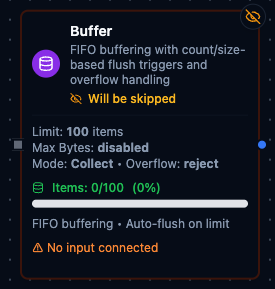
Buffer node configuration
Buffer Node
Overview
The Buffer Node accumulates incoming payloads in a FIFO queue and automatically flushes them when either the item count or the serialized byte footprint crosses a configured threshold. Because the node persists its state between executions, it is well suited for batch processing, load smoothing, and integrating with downstream systems that expect grouped payloads instead of single records.
Core Functionality
What It Does
Buffer brings structure and resiliency to high-throughput pipelines by enabling:
1. Dual Flush Thresholds
Define Max Count and Max Bytes limits. When either capacity is reached, the node emits the buffered collection through the out output port and resets its internal state.
2. Smart Overflow Handling
Choose how to respond when a single item exceeds Max Bytes: reject it, emit it immediately as a single-item batch, or use the Emit Solo alias for Passthrough behavior.
3. Automatic Item Normalization
Scalar values are wrapped into batches of one, while arrays are flattened into individual entries. Each item is serialized to JSON to determine its byte cost, ensuring predictable sizing regardless of the original payload shape.
4. Quality of the Batch
Every message carries a quality verdict in _metadata.quality (good, uncertain or bad — the device's statement on a connector trigger, or whatever a node upstream stated). Buffer keeps each row's verdict beside the row and, on flush, emits the worst of the window as _metadata.quality (and qualityReason beside it when the deciding verdict gave one). A batch of 500 rows that held one bad reading is a bad batch — it does not take the verdict of the firing that happened to flush it. A UNS Publish node downstream reads the batch's verdict automatically. In sliding mode a verdict leaves the window with its row.
5. Stateful Execution
Buffer contents (buffer) and byte totals (total_bytes) persist between runs. Internal locking protects the queue during concurrent executions so multiple workers can interact safely.
Configuration Reference
Parameters
| Parameter | Type | Default | Required | Constraints | Description |
|---|---|---|---|---|---|
| Max Count | number | 100 | No | 1--10,000 | Item count threshold for auto-flush. |
| Max Bytes | number | 0 | No | 0--25 MB (0 = disabled) | Size threshold in bytes. |
| Overflow | select | "reject" | No | reject / passthrough / emitSolo | What happens when a single item exceeds maxBytes. |
| Mode | select | "collect" | No | collect / sliding | collect: Flush and start fresh. sliding: Sliding window. |
| Size Field | string | "" | No | Expression that returns a number | Dynamic batch size from input data. |
| Max Size | number | 500 | No | 1--500 | Safety cap for dynamic size. |
Settings
| Setting | Options | Default | Description |
|---|---|---|---|
| Timeout (seconds) | number | Pipeline default | Maximum execution time for this node (1--600). |
| Retry on Timeout | Pipeline Default / Enabled / Disabled | Pipeline Default | Whether to retry on timeout. |
| Retry on Fail | Pipeline Default / Enabled / Disabled | Pipeline Default | Whether to retry on failure. When Enabled, shows Advanced Retry Configuration. |
| On Error | Pipeline Default / Stop Pipeline / Continue Execution | Pipeline Default | Behavior when node fails after all retries. |
Advanced Retry Configuration
Only visible when Retry on Fail is set to Enabled.
| Field | Type | Default | Range | Description |
|---|---|---|---|---|
| Max Attempts | number | 3 | 1--10 | Maximum retry attempts. |
| Initial Delay (ms) | number | 1000 | 100--30,000 | Wait before first retry. |
| Max Delay (ms) | number | 120000 | 1,000--300,000 | Upper bound for backoff delay. |
| Multiplier | number | 2.0 | 1.0--5.0 | Exponential backoff multiplier. |
| Jitter Factor | number | 0.1 | 0--0.5 | Random jitter. |
Usage Examples
Example 1: Flush 50 Sensor Readings or 256 KB
| Field | Value |
|---|---|
| Max Count | 50 |
| Max Bytes | 262144 |
| Overflow Mode | reject |
| Retry on Fail | Enabled |
| On Error | Continue Execution |
The buffer emits as soon as it holds 50 sensor readings or their serialized size exceeds roughly 256 KB, keeping downstream batch APIs within limits.
Example 2: Pass Through Oversized Alerts
| Field | Value |
|---|---|
| Max Count | 200 |
| Max Bytes | 524288 |
| Overflow Mode | Passthrough |
| Description | Large alerts must bypass batching. |
Any alert larger than 512 KB is forwarded immediately as a one-item batch, while other payloads continue accumulating until thresholds are met.
Example 3: Inspect Buffer State During a Run
| Field | Value |
|---|---|
| Manual Action | get |
| Example Response | { "bufferCount": 37, "totalBytes": 81234, "overflowMode": "reject" } |
Triggering get lets operators view queued orders (e.g., {"id":"A-100","amount":125.4}) without flushing them, confirming that thresholds are tuned correctly.
Configuration reference
The fields below are generated from the node's config contract, so they match what the pipeline validator enforces and what the designer's form offers.
transform.buffer
| Field | Type | Required | Default | Values | Description |
|---|---|---|---|---|---|
maxCount | integer | no | 100 | 1–10000 | Number of buffered items that triggers a flush — one item per execution, so this is a count, not a duration. Capped by maxSize |
maxBytes | integer | no | 0 | 0–2.62144e+07 | Total serialized size in bytes that triggers a flush; 0 disables the byte trigger. At most 25 MiB. One item larger than this on its own is handled by overflow |
itemField | string | no | result | accepts an expression | What to buffer out of each input — a dot-path such as result or result.reading, or an expression such as {{ $node["Read"].result.reading }}. Every node output is {result, _metadata}, so the default result buffers the predecessor's value and drops the envelope; the execution fails when the path is missing. When the input is not an object (several predecessors) the input itself is buffered and the path is ignored |
sizeField | string | no | — | accepts an expression | Optional dot-path in the input (result.batch_total; a leading $input. is stripped) or an expression such as {{ $node["Fetch"].result.batch_total }}, read from the first item of a window to set that window's flush count instead of maxCount. When it resolves to nothing the window falls back to maxCount and reports sizeSource static_fallback |
maxSize | integer | no | 500 | 1–500 | Safety cap on the flush count whether it came from sizeField or from maxCount — a maxCount above maxSize flushes at maxSize |
overflow | string | no | reject | reject, passthrough, emitSolo | What to do with a single item larger than maxBytes: reject drops it, passthrough and emitSolo (aliases) emit it immediately as a one-item batch |
mode | string | no | collect | collect, sliding | collect empties the buffer on every flush; sliding keeps the newest items so each flush is a rolling window |
waitForFlush | boolean | no | false | — | true holds downstream nodes until a flush; false runs them on every execution with an empty result and _metadata.buffering=true |