Modbus Nodes
Modbus is the most widely deployed protocol in industrial automation. MaestroHub supports all three variants: TCP, RTU, and ASCII so you can communicate with PLCs, sensors, meters, and supervisory systems from a single node set.
Configuration Quick Reference
| Field | What you choose | Details |
|---|---|---|
| Parameters | Connection, Function, Function Parameters, Timeout Override | Select the connection profile, function, configure function parameters with expression support, and optionally override timeout. |
| Settings | Description, Timeout (seconds), Retry on Timeout, Retry on Fail, On Error | Node description, maximum execution time, retry behavior on timeout or failure, and error handling strategy. All execution settings default to pipeline-level values. |

Modbus Read Node
Modbus Read Node
Read data from PLCs, sensors, meters, and industrial devices.
Supported Function Types:
| Function Name | Purpose | Common Use Cases |
|---|---|---|
| Read Coils (0x01) | Read digital outputs | Motor status, valve positions |
| Read Discrete Inputs (0x02) | Read digital inputs | Limit switches, sensors |
| Read Holding Registers (0x03) | Read holding registers | Setpoints, configuration |
| Read Input Registers (0x04) | Read input registers | Temperature, pressure, flow |
Node Configuration
| Parameter | Type | Required | Description |
|---|---|---|---|
| Connection | Selection | Yes | Modbus connection profile to use |
| Function | Selection | Yes | Read function from the selected connection |
| Function Parameters | Dynamic | Varies | Auto-populated from the function schema (e.g., address, quantity, dataType). See your Modbus connection functions for full parameter details. |
| Timeout Override | Number (seconds) | No | Override the default function timeout |
All function parameters support expression syntax ({{ expression }}) for dynamic values from the pipeline context.
Input
The node receives the output of the previous node as input. Input data can be referenced in function parameter expressions using $input.
Output Structure
On success the node delivers the read under result and execution facts under _metadata:
{
  "result": {
    "address": 0,
    "quantity": 1,
    "registers": [215],
    "value": 21.5,
    "dataType": "float32",
    "raw": "AAE="
  },
  "_metadata": {
    "success": true,
    "functionId": "<function-id>",
    "durationMs": 42,
    "timestamp": "2026-01-15T08:30:00Z"
  }
}
| Field | Type | Description |
|---|---|---|
result.address | number | The start address that was read |
result.quantity | number | How many coils, inputs or registers were read |
result.raw | string | The raw response bytes, base64-encoded |
result.coils | boolean[] | FC01 only — one boolean per coil, in address order |
result.inputs | boolean[] | FC02 only — one boolean per discrete input, in address order |
result.registers | number[] | FC03/FC04 only — the raw 16-bit register values |
result.value | any | FC03/FC04 only — the registers decoded as the configured dataType. This is the reading: $node["Name"].result.value |
result.dataType | string | FC03/FC04 only — the data type the registers were decoded as |
_metadata.success | boolean | true when the function executed without errors |
_metadata.functionId | string | ID of the executed function |
_metadata.durationMs | number | Execution time in milliseconds |
_metadata.timestamp | string | ISO 8601 / RFC 3339 UTC timestamp |
Which keys are present depends on the function the node is bound to: a coil read has coils, a discrete-input read has inputs, a register read has registers, value and dataType. address, quantity and raw are always there.

Modbus Write Node
Modbus Write Node
Write control values, setpoints, and configuration to devices.
Supported Function Types:
| Function Name | Purpose | Common Use Cases |
|---|---|---|
| Write Single Coil (0x05) | Write single digital output | Start/stop motor |
| Write Single Register (0x06) | Write single register | Update setpoint |
| Write Multiple Coils (0x0F) | Write multiple digital outputs | Batch control |
| Write Multiple Registers (0x10) | Write multiple registers | Configuration update |
Node Configuration
| Parameter | Type | Required | Description |
|---|---|---|---|
| Connection | Selection | Yes | Modbus connection profile to use |
| Function | Selection | Yes | Write function from the selected connection |
| Function Parameters | Dynamic | Varies | Auto-populated from the function schema (e.g., address, value, values). See your Modbus connection functions for full parameter details. |
| Timeout Override | Number (seconds) | No | Override the default function timeout |
All function parameters support expression syntax ({{ expression }}) for dynamic values.
Input
The node receives the output of the previous node as input. Use expressions like {{ $input[0].result.value }} to pass dynamic values to write parameters.
Output Structure
The write node delivers a confirmation of what was written under result, with the same _metadata as the read node:
{
  "result": {
    "address": 0,
    "quantity": 2,
    "values": [100, 200],
    "raw": "AAE="
  },
  "_metadata": {
    "success": true,
    "functionId": "<function-id>",
    "durationMs": 15,
    "timestamp": "2026-01-15T08:30:00Z"
  }
}
| Field | Type | Description |
|---|---|---|
result.address | number | The address that was written |
result.raw | string | The raw response bytes, base64-encoded |
result.value | any | FC05/FC06 only — the single value that was written, as sent |
result.quantity | number | FC15/FC16 only — how many coils or registers were written |
result.values | any[] | FC15/FC16 only — the values that were written, as sent |
Always implement validation and safety checks before writing to industrial equipment. Consider adding condition nodes to verify values are within safe ranges.
Modbus Read Group Node
The Modbus Read Group node executes multiple Modbus read operations in a single node. It supports selective function lists, an All Functions mode for complete device snapshots, and parallel or sequential execution.
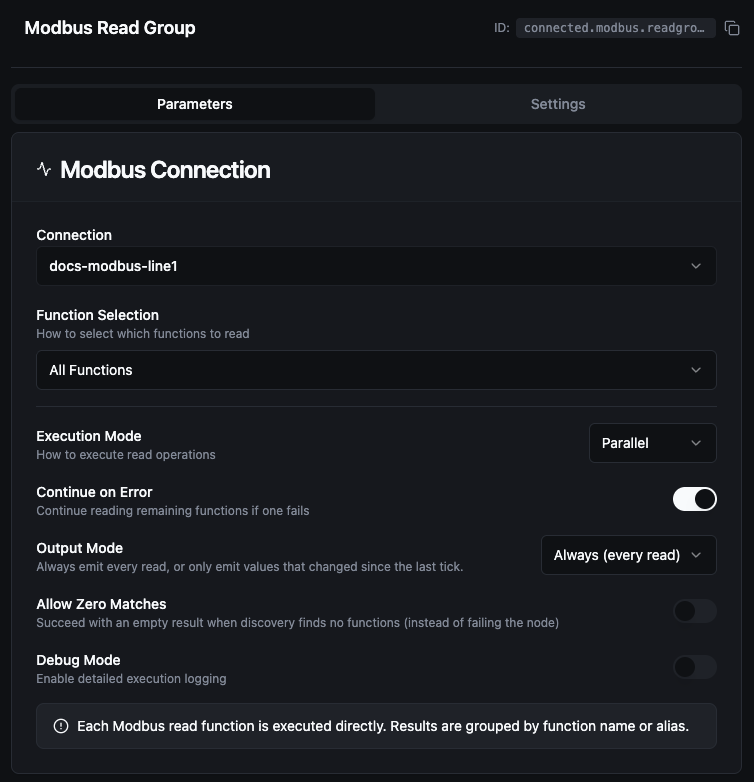
Modbus Read Group Node
Node Configuration
| Parameter | Type | Required | Default | Description |
|---|---|---|---|---|
| Connection | Selection | Yes | — | Modbus connection profile |
| Function Selection | Selection | No | Select Functions | Select Functions reads the functions you list. All Functions reads every read function on the connection. By Labels reads every function whose labels match the labels you pick. |
| Functions | Array of {functionId, alias} | When Function Selection is Select Functions | [] | List of specific functions to execute. Each entry requires a functionId; alias is optional. |
| Execution Mode | Selection | No | parallel | parallel — all functions run concurrently. sequential — functions run one after another. |
| Continue on Error | Toggle | No | true | When enabled, the node continues executing remaining functions even if one fails |
| Debug Mode | Toggle | No | false | Enable detailed logging for troubleshooting |
All Functions Mode
When Function Selection is All Functions, the function list is ignored. The node automatically discovers and executes every read function defined on the selected connection.
Read function types that All Functions runs:
| Function Type | Function Code |
|---|---|
modbus.read.coils | FC01 |
modbus.read.discreteInputs | FC02 |
modbus.read.holdingRegisters | FC03 |
modbus.read.inputRegisters | FC04 |
Input
The node receives the output of the previous node as input.
Output Structure
The node output is the canonical {result, _metadata} envelope: result holds one entry per function read, keyed by the function's output key; _metadata holds the group's accounting.
{
  "result": {
    "Temperature Sensor": {
      "value": 22.5,
      "success": true,
      "error": "",
      "duration": 45,
      "timestamp": "2026-09-07T08:30:00Z"
    },
    "Coil Bank": {
      "value": { "address": 0, "quantity": 8, "raw": "AQ==", "coils": [true, false, false, true, false, false, false, false] },
      "success": true,
      "error": "",
      "duration": 38,
      "timestamp": "2026-09-07T08:30:00Z"
    }
  },
  "_metadata": {
    "connectionId": "conn-123",
    "connectionName": "PLC-01",
    "total": 2,
    "successful": 2,
    "failed": 0,
    "totalDuration": 83,
    "executionMode": "parallel",
    "originalRequests": 2
  }
}
Each entry under result is one function's read — keyed by the function's alias, else its name, else its id (see Output Key Resolution):
| Field | Type | Description |
|---|---|---|
result.<alias>.value | any | What the function read — its own result.value when it has one (the registers decoded as the configured dataType for a register read; the whole {coils} or {inputs} object for a coil or discrete-input read), otherwise its whole result. null when the read failed |
result.<alias>.success | boolean | true when this function's read succeeded |
result.<alias>.error | string | Why the read failed; empty when it succeeded — always present |
result.<alias>.duration | number | How long this function's read took, in milliseconds |
result.<alias>.timestamp | string | When the read was issued, RFC 3339 UTC |
The _metadata object is the group's execution summary:
| Field | Type | Description |
|---|---|---|
_metadata.connectionId | string | The connection every function was read on |
_metadata.connectionName | string | That connection's display name |
_metadata.total | number | How many functions the group ran |
_metadata.successful | number | How many read successfully — including the ones onChange then suppressed |
_metadata.failed | number | How many failed; successful + failed = total |
_metadata.totalDuration | number | Wall-clock time of the whole group, in milliseconds |
_metadata.executionMode | string | parallel or sequential |
_metadata.originalRequests | number | How many functions were selected to run |
_metadata.coalescedRequests | number | Parallel mode only, when coalescing merged adjacent register reads — how many protocol requests the batch issued; compare with originalRequests to see the saving. See Coalescing |
_metadata.keyCollisions | string[] | Output keys that two or more functions resolved to — the later read overwrote the earlier under that key. Present only when it happened |
_metadata.configWarnings | string[] | Non-fatal problems in the node's config, each saying what was ignored. Present only when there were any |
_metadata.outputMode | string | onChange — present only in that mode |
_metadata.suppressedCount | number | onChange mode: how many successful reads were unchanged since the last run and left out of result |
_metadata.emittedCount | number | onChange mode: how many entries result carries — total − suppressedCount |
_metadata.suppressedKeys | string[] | onChange mode: the output keys left out as unchanged. Present only when at least one was |
_metadata.reason | string | onChange mode, when every successful read was unchanged: why result is empty — the node buffers instead of waking downstream |
Output Key Resolution
Each function result is keyed in the output map using the first available value:
- Alias — the custom alias set in the function entry
- Function Name — the name defined on the connection function
- Function ID — the unique function identifier (fallback)
Use aliases to give results predictable, human-readable keys, especially when the same function type is read from multiple address ranges.
Execution Modes
Parallel (Recommended) (default)
- Adjacent function reads are merged into batched Modbus requests via register coalescing (see Coalescing below).
- Fewest TCP roundtrips, lowest total execution time on most devices.
- Best when functions cluster in nearby address ranges.
Sequential
- Each function is sent as its own Modbus request, in list order.
- No coalescing — every function reads exactly its own configured range.
- More predictable timing and lower peak load on the device.
- Use this mode if your slave has a sparse register map and a parallel read would batch across unmapped addresses.
- When Continue on Error is off, execution stops at the first failure.
Coalescing
In parallel mode, the Read Group node merges adjacent register reads into a single broader Modbus request to reduce TCP roundtrips. For example, three Read Holding Register functions at addresses 100, 102, and 104 (each reading 2 registers) become one ReadHolding(100, 6) instead of three separate requests.
The merging behavior is controlled by the Coalesce Max Register Gap setting on the Modbus connection — not on this node. This is intentional: the safe gap value depends on the slave's register layout, which is a property of the device, not of the pipeline.
Trade-off
| Coalesce Max Register Gap | Effect |
|---|---|
0 (default) | Only strictly adjacent or overlapping reads merge. Safe on every slave; the executor never requests a register you didn't configure. |
| Higher values | More aggressive batching. The executor may request registers between your functions; if those registers are unmapped on the slave, the entire batch fails with illegal data address. |
When parallel mode fails for one connection but works for another
The Modbus spec requires the slave to reject a Read Holding Registers request if any register in the requested range is unmapped — not just the ones you care about. So a coalesced batch can fail entirely on a sparse register map even when each individual function would succeed. If you see every function in a Read Group return exception '2' (illegal data address) only in parallel mode, lower the connection's Coalesce Max Register Gap value (or use sequential mode).
The _metadata.coalescedRequests field on the node output tells you how many actual Modbus requests were issued. Comparing it to originalRequests shows the optimization gain — for instance, originalRequests: 31, coalescedRequests: 8 means 31 user-defined functions were served by 8 protocol-level requests.
Error Handling
| Continue on Error | Behavior |
|---|---|
true (default) | The node completes even if individual functions fail. Failed functions include an error field in their result. The node output remains successful. |
false | The node fails as soon as any function fails. In sequential mode, remaining functions are skipped. The node result is marked as failed. |
Validation Rules
connectionIdis required.executionModemust beparallelorsequential.- With Select Functions, at least one function entry is required; with By Labels, at least one label is required.
- Duplicate
functionIdvalues are not allowed. - Duplicate
aliasvalues are not allowed. - The connection type must be
modbus.
Best Practices
- Use All Functions for device commissioning, complete state backups, and monitoring dashboards where you need every data point.
- Use specific functions in production pipelines with known data requirements for better performance and clarity.
- Assign aliases when reading multiple functions of the same type to keep output keys readable.
- Prefer parallel mode unless the target device has limited concurrent request handling.
- Enable Continue on Error for monitoring scenarios where partial data is still valuable.
Settings Tab
All three Modbus node types share the same Settings tab:
| Setting | Type | Default | Description |
|---|---|---|---|
| Description | Text | — | Optional description displayed on the node |
| Timeout (seconds) | Number | Pipeline default | Maximum time the node may run before timing out |
| Retry on Timeout | Toggle | Pipeline default | Automatically retry the node if it times out |
| Retry on Fail | Toggle | Pipeline default | Automatically retry the node if it fails |
| On Error | Selection | Pipeline default | Error strategy: Pipeline Default (the pipeline's Error Handling setting), Stop Pipeline or Continue Execution |
When left at their defaults, these settings inherit from the pipeline-level execution configuration.