Modbus Nodes
Modbus is the most widely deployed protocol in industrial automation. MaestroHub supports all three variants: TCP, RTU, and ASCII so you can communicate with PLCs, sensors, meters, and supervisory systems from a single node set.
Configuration Quick Reference
| Field | What you choose | Details |
|---|---|---|
| Parameters | Connection, Function, Function Parameters, Timeout Override | Select the connection profile, function, configure function parameters with expression support, and optionally override timeout. |
| Settings | Description, Timeout (seconds), Retry on Timeout, Retry on Fail, On Error | Node description, maximum execution time, retry behavior on timeout or failure, and error handling strategy. All execution settings default to pipeline-level values. |

Modbus Read Node
Modbus Read Node
Read data from PLCs, sensors, meters, and industrial devices.
Supported Function Types:
| Function Name | Purpose | Common Use Cases |
|---|---|---|
| Read Coils (0x01) | Read digital outputs | Motor status, valve positions |
| Read Discrete Inputs (0x02) | Read digital inputs | Limit switches, sensors |
| Read Holding Registers (0x03) | Read holding registers | Setpoints, configuration |
| Read Input Registers (0x04) | Read input registers | Temperature, pressure, flow |
| Read FIFO Queue (0x18) | Read FIFO queue | Event logs, alarm history |
Node Configuration
| Parameter | Type | Required | Description |
|---|---|---|---|
| Connection | Selection | Yes | Modbus connection profile to use |
| Function | Selection | Yes | Read function from the selected connection |
| Function Parameters | Dynamic | Varies | Auto-populated from the function schema (e.g., address, quantity, dataType). See your Modbus connection functions for full parameter details. |
| Timeout Override | Number (seconds) | No | Override the default function timeout |
All function parameters support expression syntax ({{ expression }}) for dynamic values from the pipeline context.
Input
The node receives the output of the previous node as input. Input data can be referenced in function parameter expressions using $input.
Output Structure
On success the node produces:
{
  "success": true,
  "functionId": "<function-id>",
  "data": { ... },
  "durationMs": 42,
  "timestamp": "2026-01-15T08:30:00Z"
}
| Field | Type | Description |
|---|---|---|
success | boolean | true when the function executed without errors |
functionId | string | ID of the executed function |
data | any | Function-specific result data (see below) |
durationMs | number | Execution time in milliseconds |
timestamp | string | ISO 8601 / RFC 3339 UTC timestamp |
Function-Specific Output Data
The shape of data depends on the function code:
| Function Code | data Contents |
|---|---|
| FC01 Read Coils | Array of boolean values, one per coil |
| FC02 Read Discrete Inputs | Array of boolean values, one per input |
| FC03 Read Holding Registers | Converted values based on the configured dataType (e.g., int16, float32, raw) |
| FC04 Read Input Registers | Converted values based on the configured dataType |
| FC24 Read FIFO Queue | FIFO queue contents from the target address |

Modbus Write Node
Modbus Write Node
Write control values, setpoints, and configuration to devices.
Supported Function Types:
| Function Name | Purpose | Common Use Cases |
|---|---|---|
| Write Single Coil (0x05) | Write single digital output | Start/stop motor |
| Write Single Register (0x06) | Write single register | Update setpoint |
| Write Multiple Coils (0x0F) | Write multiple digital outputs | Batch control |
| Write Multiple Registers (0x10) | Write multiple registers | Configuration update |
| Write Masked Register (0x16) | Masked register write | Bit manipulation |
| Read/Write Multiple Registers (0x17) | Atomic read+write | Synchronized operations |
Node Configuration
| Parameter | Type | Required | Description |
|---|---|---|---|
| Connection | Selection | Yes | Modbus connection profile to use |
| Function | Selection | Yes | Write function from the selected connection |
| Function Parameters | Dynamic | Varies | Auto-populated from the function schema (e.g., address, value, values). See your Modbus connection functions for full parameter details. |
| Timeout Override | Number (seconds) | No | Override the default function timeout |
All function parameters support expression syntax ({{ expression }}) for dynamic values.
Input
The node receives the output of the previous node as input. Use expressions like {{ $input.payload.value }} to pass dynamic values to write parameters.
Output Structure
The write node uses the same output envelope as the read node:
{
  "success": true,
  "functionId": "<function-id>",
  "data": { ... },
  "durationMs": 15,
  "timestamp": "2026-01-15T08:30:00Z"
}
Function-Specific Output Data
| Function Code | data Contents |
|---|---|
| FC05 Write Single Coil | Confirmation of the written coil address and value |
| FC06 Write Single Register | Confirmation of the written register address and value |
| FC0F Write Multiple Coils | Address and quantity of coils written |
| FC10 Write Multiple Registers | Address and quantity of registers written |
| FC16 Write Masked Register | Address, AND mask, and OR mask applied |
| FC17 Read/Write Multiple Registers | Read results from the combined operation |
Always implement validation and safety checks before writing to industrial equipment. Consider adding condition nodes to verify values are within safe ranges.
Modbus Read Group Node
The Modbus Read Group node executes multiple Modbus read operations in a single node. It supports selective function lists, a Read All mode for complete device snapshots, and parallel or sequential execution.
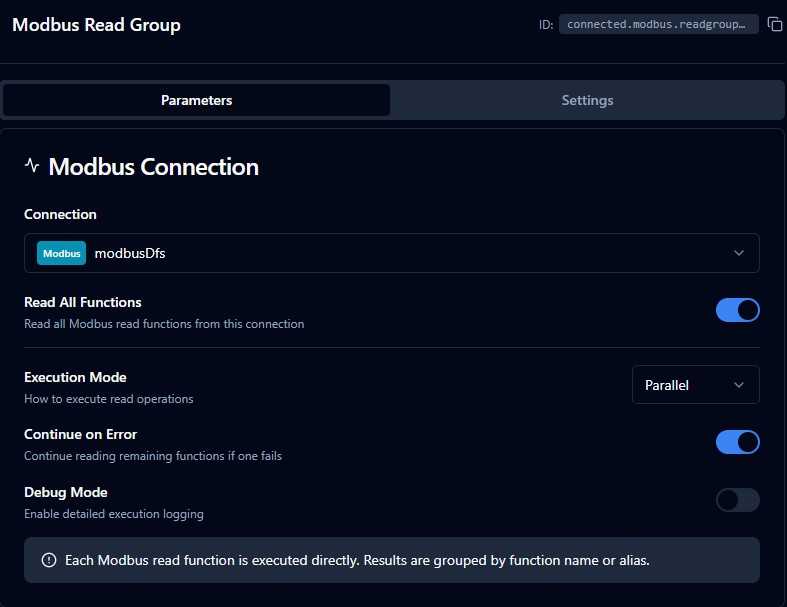
Modbus Read Group Node
Node Configuration
| Parameter | Type | Required | Default | Description |
|---|---|---|---|---|
| Connection | Selection | Yes | — | Modbus connection profile |
| Read All | Toggle | No | false | When enabled, executes all read functions (FC01–FC04, FC24) from the connection |
| Functions | Array of {functionId, alias} | When Read All is off | [] | List of specific functions to execute. Each entry requires a functionId; alias is optional. |
| Execution Mode | Selection | No | parallel | parallel — all functions run concurrently. sequential — functions run one after another. |
| Continue on Error | Toggle | No | true | When enabled, the node continues executing remaining functions even if one fails |
| Debug Mode | Toggle | No | false | Enable detailed logging for troubleshooting |
Read All Mode
When Read All is enabled the function list is ignored. The node automatically discovers and executes every read function defined on the selected connection.
Supported read function types for Read All:
| Function Type | Function Code |
|---|---|
modbus.read.coils | FC01 |
modbus.read.discreteInputs | FC02 |
modbus.read.holdingRegisters | FC03 |
modbus.read.inputRegisters | FC04 |
modbus.read.fifoQueue | FC24 |
Input
The node receives the output of the previous node as input.
Output Structure
{
  "results": {
    "Temperature Sensor": {
      "value": [22.5, 23.1],
      "success": true,
      "duration": 45,
      "timestamp": "2026-01-15T08:30:00Z"
    },
    "Pressure Gauge": {
      "value": [1013],
      "success": true,
      "duration": 38,
      "timestamp": "2026-01-15T08:30:00Z"
    }
  },
  "_metadata": {
    "connectionId": "conn-123",
    "connectionName": "PLC-01",
    "total": 2,
    "successful": 2,
    "failed": 0,
    "totalDuration": 83,
    "executionMode": "parallel",
    "originalRequests": 2
  }
}
Each function result contains:
| Field | Type | Description |
|---|---|---|
value | any | The function's return data |
success | boolean | Whether this function succeeded |
error | string | Error message (present only on failure) |
duration | number | Execution time in milliseconds |
timestamp | string | ISO 8601 / RFC 3339 UTC timestamp |
The _metadata object provides execution summary:
| Field | Type | Description |
|---|---|---|
connectionId | string | Connection profile ID |
connectionName | string | Connection profile display name |
total | number | Total functions executed |
successful | number | Count of successful executions |
failed | number | Count of failed executions |
totalDuration | number | Wall-clock time for the entire group (ms) |
executionMode | string | parallel or sequential |
originalRequests | number | Number of function configs submitted |
coalescedRequests | number | Actual number of Modbus protocol requests issued after register coalescing (only emitted in parallel mode when below originalRequests). See Coalescing for details. |
keyCollisions | string[] | Output keys that appeared more than once (omitted when empty) |
Output Key Resolution
Each function result is keyed in the output map using the first available value:
- Alias — the custom alias set in the function entry
- Function Name — the name defined on the connection function
- Function ID — the unique function identifier (fallback)
Use aliases to give results predictable, human-readable keys, especially when the same function type is read from multiple address ranges.
Execution Modes
Parallel (Recommended) (default)
- Adjacent function reads are merged into batched Modbus requests via register coalescing (see Coalescing below).
- Fewest TCP roundtrips, lowest total execution time on most devices.
- Best when functions cluster in nearby address ranges.
Sequential
- Each function is sent as its own Modbus request, in list order.
- No coalescing — every function reads exactly its own configured range.
- More predictable timing and lower peak load on the device.
- Use this mode if your slave has a sparse register map and a parallel read would batch across unmapped addresses.
- When Continue on Error is off, execution stops at the first failure.
Coalescing
In parallel mode, the Read Group node merges adjacent register reads into a single broader Modbus request to reduce TCP roundtrips. For example, three Read Holding Register functions at addresses 100, 102, and 104 (each reading 2 registers) become one ReadHolding(100, 6) instead of three separate requests.
The merging behavior is controlled by the Coalesce Max Register Gap setting on the Modbus connection — not on this node. This is intentional: the safe gap value depends on the slave's register layout, which is a property of the device, not of the pipeline.
Trade-off
| Coalesce Max Register Gap | Effect |
|---|---|
0 (default) | Only strictly adjacent or overlapping reads merge. Safe on every slave; the executor never requests a register you didn't configure. |
| Higher values | More aggressive batching. The executor may request registers between your functions; if those registers are unmapped on the slave, the entire batch fails with illegal data address. |
When parallel mode fails for one connection but works for another
The Modbus spec requires the slave to reject a Read Holding Registers request if any register in the requested range is unmapped — not just the ones you care about. So a coalesced batch can fail entirely on a sparse register map even when each individual function would succeed. If you see every function in a Read Group return exception '2' (illegal data address) only in parallel mode, lower the connection's Coalesce Max Register Gap value (or use sequential mode).
The _metadata.coalescedRequests field on the node output tells you how many actual Modbus requests were issued. Comparing it to originalRequests shows the optimization gain — for instance, originalRequests: 31, coalescedRequests: 8 means 31 user-defined functions were served by 8 protocol-level requests.
Error Handling
| Continue on Error | Behavior |
|---|---|
true (default) | The node completes even if individual functions fail. Failed functions include an error field in their result. The node output remains successful. |
false | The node fails as soon as any function fails. In sequential mode, remaining functions are skipped. The node result is marked as failed. |
Validation Rules
connectionIdis required.executionModemust beparallelorsequential.- When Read All is off, at least one function entry is required.
- Duplicate
functionIdvalues are not allowed. - Duplicate
aliasvalues are not allowed. - The connection type must be
modbus.
Best Practices
- Use Read All for device commissioning, complete state backups, and monitoring dashboards where you need every data point.
- Use specific functions in production pipelines with known data requirements for better performance and clarity.
- Assign aliases when reading multiple functions of the same type to keep output keys readable.
- Prefer parallel mode unless the target device has limited concurrent request handling.
- Enable Continue on Error for monitoring scenarios where partial data is still valuable.
Settings Tab
All three Modbus node types share the same Settings tab:
| Setting | Type | Default | Description |
|---|---|---|---|
| Description | Text | — | Optional description displayed on the node |
| Timeout (seconds) | Number | Pipeline default | Maximum time the node may run before timing out |
| Retry on Timeout | Toggle | Pipeline default | Automatically retry the node if it times out |
| Retry on Fail | Toggle | Pipeline default | Automatically retry the node if it fails |
| On Error | Selection | Pipeline default | Error strategy: stop the pipeline, continue to the next node, or follow the error output path |
When left at their defaults, these settings inherit from the pipeline-level execution configuration.