MTConnect Nodes
MTConnect is the open, royalty-free standard for monitoring manufacturing equipment. MaestroHub provides a single MTConnect Request node that supports all four standard MTConnect operations: Probe, Current, Sample, and Assets.
MTConnect is a read-only protocol by design. All operations retrieve data from the MTConnect agent — there are no write nodes.
Configuration Quick Reference
| Field | What you choose | Details |
|---|---|---|
| Parameters | Connection, Function, Function Parameters, Timeout Override | Select the connection profile, function, configure function parameters with expression support, and optionally override timeout. |
| Settings | Description, Timeout (seconds), Retry on Timeout, Retry on Fail, On Error | Node description, maximum execution time, retry behavior on timeout or failure, and error handling strategy. All execution settings default to pipeline-level values. |
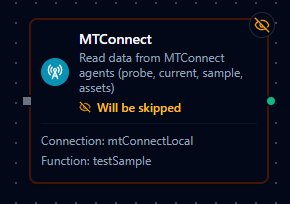
MTConnect Request Node
MTConnect Request Node
Query MTConnect agents for device data, capabilities, and assets.
Supported Function Types:
| Function Name | Purpose | Common Use Cases |
|---|---|---|
Probe (mtconnect.probe) | Discover device capabilities and structure | Device commissioning, tag discovery, building data catalogs |
Current (mtconnect.current) | Get latest data item values | Real-time dashboards, current machine state, alarm monitoring |
Sample (mtconnect.sample) | Retrieve historical time-series data | Trend analysis, data export, quality correlation |
Assets (mtconnect.assets) | Query asset information | Tool life tracking, fixture inventory, asset management |
Node Configuration
| Parameter | Type | Required | Description |
|---|---|---|---|
| Connection | Selection | Yes | MTConnect connection profile to use |
| Function | Selection | Yes | Function from the selected connection |
| Function Parameters | Dynamic | Varies | Auto-populated from the function schema. See your MTConnect connection functions for full parameter details. |
| Timeout Override | Number (seconds) | No | Override the default function timeout |
All function parameters support expression syntax ({{ expression }}) for dynamic values from the pipeline context.
Input
The node receives the output of the previous node as input. Input data can be referenced in function parameter expressions using $input.
Output Structure
On success the node produces:
{
  "success": true,
  "functionId": "<function-id>",
  "data": { ... },
  "durationMs": 120,
  "timestamp": "2026-01-15T08:30:00Z"
}
| Field | Type | Description |
|---|---|---|
success | boolean | true when the function executed without errors |
functionId | string | ID of the executed function |
data | object | MTConnect response data — structure varies by function type (see below) |
durationMs | number | Execution time in milliseconds |
timestamp | string | ISO 8601 / RFC 3339 UTC timestamp |
Function Types
Probe
Discover the capabilities and structure of devices connected to an MTConnect agent. Returns device metadata, component hierarchy, and available data items.
Parameters:
| Parameter | Type | Required | Description |
|---|---|---|---|
device | String | No | Device name to probe. Omit to probe all devices. |
path | String | No | XPath filter for device components (e.g., //Axes) |
timeout | Number | No | Timeout override in milliseconds (1000–300000) |
Output data:
{
  "Header": {
    "@version": "2.0",
    "@instanceId": "12345",
    "@sender": "agent",
    "@bufferSize": "131072",
    "@creationTime": "2026-01-15T08:30:00Z"
  },
  "Devices": [
    {
      "@id": "mill-1",
      "@name": "Mill-001",
      "@uuid": "...",
      "Description": {
        "@manufacturer": "Haas",
        "#text": "VF-2SS CNC Mill"
      },
      "Components": {
        "Axes": { ... },
        "Controller": { ... },
        "Systems": { ... }
      },
      "DataItems": { ... }
    }
  ]
}
| Field | Type | Description |
|---|---|---|
Header | object | Agent metadata — version, instance ID, buffer size, creation time |
Devices | array | List of device structures, each with components and data items |
Current
Get the most recent values of all data items from one or more devices. Returns a snapshot of the current device state.
Parameters:
| Parameter | Type | Required | Description |
|---|---|---|---|
device | String | No | Device name to query. Omit for all devices. |
path | String | No | XPath filter for data items (e.g., //DataItem[@type='POSITION']) |
at | Number | No | Retrieve data at a specific sequence number (>= 0) |
timeout | Number | No | Timeout override in milliseconds (1000–300000) |
Output data:
{
  "Header": {
    "@version": "2.0",
    "@instanceId": "12345",
    "@sender": "agent",
    "@bufferSize": "131072",
    "@creationTime": "2026-01-15T08:30:00Z",
    "@firstSequence": "1000",
    "@lastSequence": "5000",
    "@nextSequence": "5001"
  },
  "Streams": [
    {
      "@name": "Mill-001",
      "@uuid": "...",
      "ComponentStream": [
        {
          "@component": "Linear",
          "@name": "X",
          "Samples": {
            "Position": {
              "@dataItemId": "x_pos",
              "@timestamp": "2026-01-15T08:30:00Z",
              "#text": "125.500"
            }
          },
          "Events": {
            "Execution": {
              "@dataItemId": "exec",
              "@timestamp": "2026-01-15T08:30:00Z",
              "#text": "ACTIVE"
            }
          }
        }
      ]
    }
  ]
}
| Field | Type | Description |
|---|---|---|
Header | object | Response metadata including sequence numbers for pagination |
Streams | array | Device streams, each containing component streams with their latest data values |
The Header includes sequence tracking fields:
| Field | Description |
|---|---|
@firstSequence | Oldest sequence number in the agent buffer |
@lastSequence | Most recent sequence number |
@nextSequence | Next expected sequence number (use as from in Sample calls) |
Sample
Retrieve historical time-series data from the agent's buffer. Returns multiple data values over time, useful for trend analysis and data export.
Parameters:
| Parameter | Type | Required | Default | Description |
|---|---|---|---|---|
device | String | No | — | Device name to sample. Omit for all devices. |
path | String | No | — | XPath filter for data items (e.g., //DataItem[@category='SAMPLE']) |
from | Number | No | — | Starting sequence number (>= 0) |
count | Number | No | 100 | Maximum samples to return (1–10000) |
timeout | Number | No | — | Timeout override in milliseconds (1000–300000) |
Output data:
{
  "Header": {
    "@version": "2.0",
    "@instanceId": "12345",
    "@sender": "agent",
    "@bufferSize": "131072",
    "@creationTime": "2026-01-15T08:30:00Z",
    "@firstSequence": "1000",
    "@lastSequence": "5000",
    "@nextSequence": "1100"
  },
  "Streams": [
    {
      "@name": "Mill-001",
      "@uuid": "...",
      "ComponentStream": [
        {
          "@component": "Linear",
          "@name": "X",
          "Samples": {
            "Position": [
              {
                "@dataItemId": "x_pos",
                "@timestamp": "2026-01-15T08:29:55Z",
                "@sequence": "1050",
                "#text": "124.200"
              },
              {
                "@dataItemId": "x_pos",
                "@timestamp": "2026-01-15T08:30:00Z",
                "@sequence": "1075",
                "#text": "125.500"
              }
            ]
          }
        }
      ]
    }
  ]
}
| Field | Type | Description |
|---|---|---|
Header | object | Response metadata. @nextSequence points to the next batch for pagination. |
Streams | array | Device streams with multiple sample values per data item |
Use the @nextSequence value from the Header as the from parameter in the next Sample call to page through historical data.
Assets
Query asset information such as cutting tools, fixtures, and other tracked assets.
Parameters:
| Parameter | Type | Required | Default | Description |
|---|---|---|---|---|
assetId | String | No | — | Specific asset ID to retrieve. When set, returns that single asset. |
assetType | String | No | — | Filter by asset type (e.g., CuttingTool, Fixture) |
count | Number | No | 100 | Maximum assets to return (1–1000) |
timeout | Number | No | — | Timeout override in milliseconds (1000–300000) |
Output data:
{
  "Header": {
    "@version": "2.0",
    "@instanceId": "12345",
    "@sender": "agent",
    "@assetBufferSize": "1024",
    "@assetCount": "15",
    "@creationTime": "2026-01-15T08:30:00Z"
  },
  "Assets": [
    {
      "@assetId": "TOOL-001",
      "@deviceUuid": "...",
      "@timestamp": "2026-01-15T08:00:00Z",
      "CuttingTool": {
        "@toolId": "T1",
        "@serialNumber": "SN-12345",
        "CuttingToolLifeCycle": {
          "ToolLife": {
            "@type": "MINUTES",
            "@countDirection": "DOWN",
            "@limit": "120",
            "#text": "85"
          }
        }
      }
    }
  ]
}
| Field | Type | Description |
|---|---|---|
Header | object | Response metadata including asset buffer size and total asset count |
Assets | array | List of asset objects. Structure varies by asset type. |
Response Format
The shape of the data object depends on the Response Format configured on the MTConnect connection profile:
| Format | Behavior |
|---|---|
| XML (default) | The agent's XML response is parsed into a structured map. XML attributes are prefixed with @, text content uses #text. Single child elements become objects; repeated elements become arrays. |
| JSON | The agent's JSON response is returned as-is. Structure follows the MTConnect JSON specification. |
Not all MTConnect agents support JSON responses. XML is universally supported and is the default.
Settings Tab
The MTConnect Request node uses the standard Settings tab:
| Setting | Type | Default | Description |
|---|---|---|---|
| Description | Text | — | Optional description displayed on the node |
| Timeout (seconds) | Number | Pipeline default | Maximum time the node may run before timing out |
| Retry on Timeout | Toggle | Pipeline default | Automatically retry the node if it times out |
| Retry on Fail | Toggle | Pipeline default | Automatically retry the node if it fails |
| On Error | Selection | Pipeline default | Error strategy: stop the pipeline, continue to the next node, or follow the error output path |
When left at their defaults, these settings inherit from the pipeline-level execution configuration.