AWS IoT SiteWise Nodes
AWS IoT SiteWise is an AWS managed service for collecting, organizing, and analyzing industrial equipment data at scale. MaestroHub provides write, read, and browse nodes to interact with SiteWise asset models and properties from within pipelines.
Configuration Quick Reference
| Field | What you choose | Details |
|---|---|---|
| Parameters | Connection, Function, Function Parameters, Timeout Override | Select the connection profile, function, configure function parameters with expression support, and optionally override timeout. |
| Settings | Description, Timeout (seconds), Retry on Timeout, Retry on Fail, On Error | Node description, maximum execution time, retry behavior on timeout or failure, and error handling strategy. All execution settings default to pipeline-level values. |
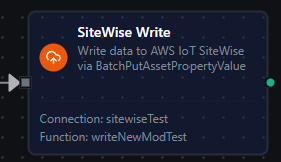
SiteWise Write Node
SiteWise Write Node
Batch ingest data into AWS IoT SiteWise via BatchPutAssetPropertyValue.
Supported Function Types:
| Function Name | Purpose | Common Use Cases |
|---|---|---|
Write (sitewise.write) | Push VQT entries to asset properties | Sensor data ingestion, telemetry upload, auto-provisioned modeling |
Node Configuration
| Parameter | Type | Required | Description |
|---|---|---|---|
| Connection | Selection | Yes | SiteWise connection profile to use |
| Function | Selection | Yes | Write function from the selected connection |
| Function Parameters | Dynamic | Varies | Auto-populated from the function schema. See your SiteWise connection functions for full parameter details. |
| Timeout Override | Number (seconds) | No | Override the default function timeout |
Function parameters for Write:
| Parameter | Type | Required | Default | Description |
|---|---|---|---|---|
propertyAlias | String | Yes | - | Property alias prefix. Each data field is appended as /{fieldName}. Example: /factory/motor-001 |
data | String (JSON) | Yes | - | JSON payload to write. Each key becomes a separate VQT entry. Example: {"temperature": 25.5, "rpm": 1200} |
batchSize | Number | No | 10 | Entries per BatchPutAssetPropertyValue API call (1-10, AWS hard limit) |
quality | String | No | GOOD | Data quality flag: GOOD, BAD, or UNCERTAIN |
createModelIfNotExists | Boolean | No | false | Auto-create the asset model and asset if they don't exist |
schema | Object | No | - | Type hints to override auto-inference. Example: {"temperature": "DOUBLE"} |
enablePartialEntryProcessing | Boolean | No | true | Continue processing when some entries in a batch fail |
All function parameters support expression syntax ({{ expression }}) for dynamic values from the pipeline context.
Input
The node receives the output of the previous node as input. If the data parameter is not set in the function configuration, the node uses the pipeline input directly as the data payload. Use expressions like {{ $input[0].result }} to pass dynamic data.
Output Structure
On success the node produces:
{
  "result": {
    "entriesWritten": 3,
    "entriesFailed": 0,
    "totalEntries": 3,
    "propertyAlias": "/factory/motor-001"
  },
  "_metadata": { "success": true, "functionId": "<function-id>", "durationMs": 125, "timestamp": "2026-03-11T08:30:00Z" }
}
| Field | Type | Description |
|---|---|---|
_metadata.success | boolean | true when the function executed without errors |
_metadata.functionId | string | ID of the executed function |
result | object | Write result details (see below) |
_metadata.durationMs | number | Execution time in milliseconds |
_metadata.timestamp | string | ISO 8601 / RFC 3339 UTC timestamp |
result fields:
| Field | Type | Description |
|---|---|---|
result.entriesWritten | number | Count of successfully written VQT entries |
result.entriesFailed | number | Count of entries that failed (partial failures) |
result.totalEntries | number | Total entries sent to the API |
result.propertyAlias | string | The property alias prefix used for the write |
Partial Failures
When enablePartialEntryProcessing is true (the default), the write operation continues even if some entries within a batch fail validation. The output reports both entriesWritten and entriesFailed counts, allowing downstream nodes to handle partial failures gracefully.
When enablePartialEntryProcessing is false, any per-entry failure causes the entire batch to fail.
Store & Forward Behavior
When Store & Forward is enabled on the connection and a write batch fails completely (network error, authentication failure), the failed entries are automatically buffered in a local queue. The queue drains every 30 seconds when connectivity is restored. Entries have a 7-day TTL matching the SiteWise timestamp acceptance window.
Always validate data before writing to industrial equipment. Consider adding condition nodes to verify values are within safe ranges before the SiteWise Write node.
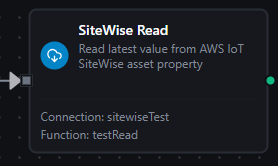
SiteWise Read Node
SiteWise Read Node
Read the latest value from a SiteWise asset property.
Supported Function Types:
| Function Name | Purpose | Common Use Cases |
|---|---|---|
Read Latest Value (sitewise.read) | Fetch the most recent VQT data point | Equipment monitoring, threshold checks, status polling |
Node Configuration
| Parameter | Type | Required | Description |
|---|---|---|---|
| Connection | Selection | Yes | SiteWise connection profile to use |
| Function | Selection | Yes | Read function from the selected connection |
| Function Parameters | Dynamic | Varies | Auto-populated from the function schema. See your SiteWise connection functions for full parameter details. |
| Timeout Override | Number (seconds) | No | Override the default function timeout |
Function parameters for Read:
| Parameter | Type | Required | Default | Description |
|---|---|---|---|---|
propertyAlias | String | Conditional | - | Property alias (e.g., /factory/motor-001/temperature). Either this OR both assetId + propertyId must be provided. |
assetId | String | Conditional | - | SiteWise asset UUID. Must be paired with propertyId. |
propertyId | String | Conditional | - | SiteWise property UUID. Must be paired with assetId. |
All function parameters support expression syntax ({{ expression }}) for dynamic values.
Input
The node receives the output of the previous node as input. Use expressions like {{ $node["SiteWise Browse"].result.children[0].identifier }} to dynamically select which property to read.
Output Structure
{
  "result": {
    "value": 72.5,
    "quality": "GOOD",
    "timestamp": "2026-03-11T08:29:55.000000000Z",
    "dataType": "DOUBLE"
  },
  "_metadata": { "success": true, "functionId": "<function-id>", "durationMs": 42, "timestamp": "2026-03-11T08:30:00Z" }
}
result fields:
| Field | Type | Description |
|---|---|---|
result.value | any | The property value. Type depends on the SiteWise data type: number (DOUBLE/INTEGER), boolean (BOOLEAN), string (STRING), or null if no value exists. |
result.quality | string | Data quality: GOOD, BAD, UNCERTAIN, or empty string if no value exists |
result.timestamp | string | RFC 3339 timestamp with nanosecond precision from the SiteWise data point |
result.dataType | string | SiteWise data type: DOUBLE, INTEGER, STRING, BOOLEAN, or empty string |
No Value Scenario
If a property has never been written to, the read returns:
{
  "value": null,
  "quality": "",
  "timestamp": "",
  "dataType": ""
}
SiteWise Browse Node
Discover asset models, assets, and properties in the SiteWise hierarchy.
Supported Function Types:
| Function Name | Purpose | Common Use Cases |
|---|---|---|
Browse Asset Hierarchy (sitewise.browse) | Navigate the asset hierarchy to discover resources | Build tag catalogs, validate asset setup, find property aliases |
Node Configuration
| Parameter | Type | Required | Description |
|---|---|---|---|
| Connection | Selection | Yes | SiteWise connection profile to use |
| Function | Selection | Yes | Browse function from the selected connection |
| Function Parameters | Dynamic | Varies | Auto-populated from the function schema. See your SiteWise connection functions for full parameter details. |
| Timeout Override | Number (seconds) | No | Override the default function timeout |
Function parameters for Browse:
| Parameter | Type | Required | Default | Description |
|---|---|---|---|---|
nodeType | String | No | root | Level to browse: root (list models), model (list assets), asset (list properties and children) |
identifier | String | Conditional | - | Required when nodeType is model (model ID) or asset (asset ID). Not required for root. |
maxResults | Number | No | 50 | Maximum results per page (1-250) |
continuationPoint | String | No | - | Opaque pagination token from a previous browse response |
All function parameters support expression syntax ({{ expression }}) for dynamic values.
Input
The node receives the output of the previous node as input.
Output Structure
{
  "result": {
    "nodeType": "asset",
    "identifier": "a1b2c3d4-5678-90ab-cdef-111111111111",
    "browseName": "Motor-001",
    "nodeClass": "Asset",
    "children": [
      {
        "identifier": "p1p2p3p4-5678-90ab-cdef-222222222222",
        "browseName": "temperature",
        "nodeClass": "Property",
        "description": "/factory/motor-001/temperature",
        "hasChildren": false,
        "dataType": "DOUBLE"
      },
      {
        "identifier": "p5p6p7p8-5678-90ab-cdef-333333333333",
        "browseName": "rpm",
        "nodeClass": "Property",
        "description": "/factory/motor-001/rpm",
        "hasChildren": false,
        "dataType": "INTEGER"
      }
    ],
    "continuationPoint": "",
    "hasMore": false
  },
  "_metadata": { "success": true, "functionId": "<function-id>", "durationMs": 85, "timestamp": "2026-03-11T08:30:00Z" }
}
result fields:
| Field | Type | Description |
|---|---|---|
result.nodeType | string | The browse level: root, model, or asset |
result.identifier | string | ID of the browsed node (model ID, asset ID, or empty for root) |
result.browseName | string | Display name of the browsed node |
result.nodeClass | string | Node class: Root, AssetModel, Asset, or Property |
result.children | array | Child nodes (see child fields below) |
result.continuationPoint | string | Pagination token. Pass this back to fetch the next page. Empty when all results have been returned. |
result.hasMore | boolean | true if more results are available via continuationPoint |
Child node fields:
| Field | Type | Description |
|---|---|---|
identifier | string | Resource ID (model ID, asset ID, or property ID) |
browseName | string | Display name |
nodeClass | string | AssetModel, Asset, or Property |
description | string | Description or property alias (for Property nodes) |
hasChildren | boolean | Whether this node can be expanded further. All Asset and AssetModel nodes return true; Property nodes return false. |
dataType | string | SiteWise data type for Property nodes: DOUBLE, INTEGER, STRING, BOOLEAN. Empty for non-property nodes. |
Browse Levels
| nodeType | What it returns | Next step |
|---|---|---|
root | All asset models in the SiteWise environment | Browse a model to see its assets |
model | All assets instantiated from a specific model | Browse an asset to see its properties |
asset | All properties of the asset plus any child assets (via hierarchies) | Properties are leaf nodes |
Pagination
For hierarchies with many nodes, use maxResults and continuationPoint:
- First call:
nodeType: "root",maxResults: 10 - If
hasMoreistrue, make another call with the returnedcontinuationPoint - Continue until
hasMoreisfalse
Browse results (without continuation points) are cached in memory to avoid redundant API calls. The cache is cleared when the connection is disconnected.
Settings Tab
All SiteWise node types share the same Settings tab:
| Setting | Type | Default | Description |
|---|---|---|---|
| Description | Text | - | Optional description displayed on the node |
| Timeout (seconds) | Number | Pipeline default | Maximum time the node may run before timing out |
| Retry on Timeout | Toggle | Pipeline default | Automatically retry the node if it times out |
| Retry on Fail | Toggle | Pipeline default | Automatically retry the node if it fails |
| On Error | Selection | Pipeline default | Error strategy: Pipeline Default (the pipeline's Error Handling setting), Stop Pipeline or Continue Execution |
When left at their defaults, these settings inherit from the pipeline-level execution configuration.