EtherNet/IP Nodes
EtherNet/IP is the industrial Ethernet protocol used by Allen-Bradley PLCs (ControlLogix, CompactLogix, Micro820). MaestroHub provides two node types for EtherNet/IP integration: the standard EtherNet/IP Node for executing individual functions, and the EtherNet/IP Read Group Node for batch read operations.
EtherNet/IP Node
The EtherNet/IP node executes a single function from your EtherNet/IP connection. The function you select determines whether the node performs a read, write, browse, or batch operation.
Configuration
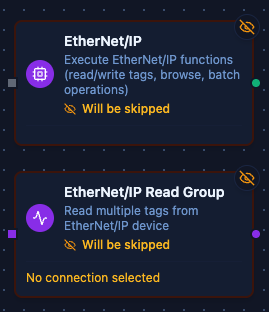
EtherNet/IP and Read Group Nodes
The node configuration has two tabs: Parameters and Settings.
Parameters Tab
| Field | Description |
|---|---|
| Connection | Select the EtherNet/IP connection profile to use |
| Function | Choose a saved function from the connection (read, write, browse, or batch operation) |
| Function Parameters | Fill in any parameters defined in the function. Accepts literal values or Maestro expressions (e.g., $input, $.payload.id) |
| Timeout Override (seconds) | Optional. Override the default function timeout for this node |
Settings Tab
| Field | Description |
|---|---|
| Description | Optional description displayed on the node |
| Timeout (seconds) | Maximum time the node may run before timing out. Empty uses the pipeline default |
| Retry on Timeout | Pipeline Default, Enabled or Disabled: whether the node is retried when it times out |
| Retry on Fail | Pipeline Default, Enabled or Disabled: whether the node is retried when it fails. When Enabled, Advanced Retry Configuration sets the maximum attempts and the delay between them |
| On Error | Pipeline Default (the pipeline's Error Handling setting), Stop Pipeline or Continue Execution |
Quality on reads
Every read result carries the canonical quality band. A single-tag read is good when the controller answered (CIP reports a failed read as an error, never as a value with a status). A multi-tag read carries quality per tag — good when answered, bad with an error when the tag was missing from the response — and a top-level quality, worst-of across the tags, for a UNS Publish node's Quality parameter.
Supported Function Types
| Function Type | Purpose | Common Use Cases |
|---|---|---|
| Read Tag | Read a single tag value (scalar or array) | Temperature readings, motor status, setpoint verification |
| Write Tag | Write a single value to a tag | Update setpoint, change mode, trigger action |
| Read Multiple Tags | Batch read multiple tags in one operation | Dashboard updates, process snapshots, historian logging |
| Write Multiple Tags | Batch write to multiple tags | Recipe download, coordinated updates, batch configuration |
| Browse Tags | List all available tags with optional filtering | Tag discovery, documentation, setup validation |
Output
Every function of this node delivers its data under result, and execution facts (success, functionId, durationMs, timestamp) under _metadata. The shape depends on the function:
Read Tag (ethernetip.read):
{
  "result": { "tagName": "Temperature", "dataType": "real", "value": 75.5, "quality": "good" },
  "_metadata": { "success": true, "functionId": "<function-id>", "durationMs": 12, "timestamp": "2026-09-07T10:30:00Z" }
}
| Expression | Description |
|---|---|
$node["Name"].result.value | The decoded value |
$node["Name"].result.tagName, $node["Name"].result.dataType | The tag and its CIP type — with data type auto, the type the controller gave (udt for a structure) |
$node["Name"].result.quality | good — a refused read fails the node instead |
$node["Name"].result.length, $node["Name"].result.isArray | Present for an array tag: the element count and true |
$node["Name"].result.udtName | Present when the function reads a whole UDT (data type udt): the structure's name. result.value is then an object keyed by member name — $node["Name"].result.value.Speed — or a list of them for an array |
Write Tag (ethernetip.write): result.tagName, result.dataType, result.value (the typed value written), and result.length + result.isArray for an array tag.
Read Multiple Tags (ethernetip.read_tags):
{
  "result": {
    "tags": [
      { "tagName": "Temperature", "dataType": "real", "success": true, "value": 75.5, "quality": "good" },
      { "tagName": "Missing", "dataType": "dint", "success": false, "error": "tag not found in response", "quality": "bad" }
    ],
    "count": 2,
    "quality": "bad"
  },
  "_metadata": { "success": true, "functionId": "<function-id>", "durationMs": 18, "timestamp": "2026-09-07T10:30:00Z" }
}
result.tags carries one object per tag, with udtName too when the tag was read as a whole UDT (data type udt, or auto that found a structure); result.count how many; result.quality is the worst-of — bad when any tag was missing.
Write Multiple Tags (ethernetip.write_tags): result.tags (one object per tag — tagName, dataType, success, and error when refused), result.count, result.successCount, result.failureCount.
Browse Tags (ethernetip.browse):
{
  "result": {
    "tags": [
      { "name": "Temperature", "address": "Temperature", "dataType": "REAL", "dimensions": [], "isArray": false, "isStruct": false },
      { "name": "Motor1", "address": "Motor1", "dataType": "UDT", "udtName": "MotorUDT", "dimensions": [], "isArray": false, "isStruct": true },
      { "name": "program:Main.LocalVar", "address": "Program:Main.LocalVar", "dataType": "INT", "dimensions": [], "isArray": false, "isStruct": false, "program": "Main" }
    ],
    "tagCount": 3,
    "types": {
      "MotorUDT": [
        { "name": "Running", "dataType": "BOOL", "dimensions": [], "isArray": false, "isStruct": false },
        { "name": "Speed", "dataType": "REAL", "dimensions": [], "isArray": false, "isStruct": false },
        { "name": "Label", "dataType": "STRING", "dimensions": [], "isArray": false, "isStruct": true }
      ]
    }
  },
  "_metadata": { "success": true, "functionId": "<function-id>", "durationMs": 240, "timestamp": "2026-09-07T10:30:00Z" }
}
result.tags carries one object per tag — name, address (the tag name a read takes), dataType (STRING for a string tag, UDT for a structure), dimensions, isArray, isStruct, program for a program-scoped tag, and udtName for a UDT; result.tagCount how many. result.types lists the members of every UDT those tags hold — nested UDTs included — by the structure's name: each member's name, dataType, dimensions, isArray, isStruct, and udtName when the member is a UDT itself. A member is read by its tag's address and its name: Motor1.Speed.
Always implement validation and safety checks before writing to industrial equipment. Consider adding condition nodes to verify values are within safe ranges.
EtherNet/IP Read Group Node
The EtherNet/IP Read Group node runs several read functions from one EtherNet/IP connection in a single node and returns their results together.
When to Use Read Group vs. Standard Node
| Approach | Use Case |
|---|---|
| EtherNet/IP Node | Execute a single function (read, write, browse, or batch operation) |
| Read Group Node | Execute several read functions from one connection in a single node |
Configuration
| Parameter | Description | Options |
|---|---|---|
| Connection | The EtherNet/IP connection whose functions are read. Every function in the group comes from this connection | — |
| Function Selection | Which functions the node reads | Select Functions (default): the functions you list. All Functions: every Read Tag and Read Multiple Tags function on the connection. By Labels: every function whose labels match the labels you pick |
| Functions | With Select Functions: the read functions to run, each with an optional Alias that becomes its output key | Read Tag (ethernetip.read), Read Multiple Tags (ethernetip.read_tags) |
| Execution Mode | How the functions are run | parallel (default), sequential |
| Continue on Error | Whether the other functions still run when one fails | On (default), Off |
| Output Mode | Whether every read is emitted, or only reads whose value changed since the last run | Always (default), On Change |
| Allow Zero Matches | With All Functions or By Labels: succeed with an empty result when no function matches, instead of failing the node | Off (default), On |
Output Structure
The node output is the canonical {result, _metadata} envelope: result holds one entry per function read, keyed by the function's output key; _metadata holds the group's accounting.
{
  "result": {
    "Motor Speed": {
      "value": 1450.0,
      "success": true,
      "error": "",
      "duration": 12,
      "timestamp": "2026-09-07T08:30:00Z"
    },
    "Line Tags": {
      "value": { "tags": [{ "tagName": "Temperature", "dataType": "REAL", "value": 75.5, "quality": "good" }], "count": 1, "success": true, "quality": "good" },
      "success": true,
      "error": "",
      "duration": 31,
      "timestamp": "2026-09-07T08:30:00Z"
    }
  },
  "_metadata": {
    "connectionId": "conn-123",
    "connectionName": "CompactLogix L33",
    "total": 2,
    "successful": 2,
    "failed": 0,
    "totalDuration": 83,
    "executionMode": "parallel",
    "originalRequests": 2
  }
}
Each entry under result is one function's read — keyed by the function's alias, else its name, else its id (see Output Key Resolution):
| Field | Type | Description |
|---|---|---|
result.<alias>.value | any | What the function read — its own result.value when it has one (the decoded tag value for ethernetip.read, since its result carries value; the whole {tags, count, success, quality} object for ethernetip.read_tags), otherwise its whole result. null when the read failed |
result.<alias>.success | boolean | true when this function's read succeeded |
result.<alias>.error | string | Why the read failed; empty when it succeeded — always present |
result.<alias>.duration | number | How long this function's read took, in milliseconds |
result.<alias>.timestamp | string | When the read was issued, RFC 3339 UTC |
The _metadata object is the group's execution summary:
| Field | Type | Description |
|---|---|---|
_metadata.connectionId | string | The connection every function was read on |
_metadata.connectionName | string | That connection's display name |
_metadata.total | number | How many functions the group ran |
_metadata.successful | number | How many read successfully — including the ones onChange then suppressed |
_metadata.failed | number | How many failed; successful + failed = total |
_metadata.totalDuration | number | Wall-clock time of the whole group, in milliseconds |
_metadata.executionMode | string | parallel or sequential |
_metadata.originalRequests | number | How many functions were selected to run |
_metadata.keyCollisions | string[] | Output keys that two or more functions resolved to — the later read overwrote the earlier under that key. Present only when it happened |
_metadata.configWarnings | string[] | Non-fatal problems in the node's config, each saying what was ignored. Present only when there were any |
_metadata.outputMode | string | onChange — present only in that mode |
_metadata.suppressedCount | number | onChange mode: how many successful reads were unchanged since the last run and left out of result |
_metadata.emittedCount | number | onChange mode: how many entries result carries — total − suppressedCount |
_metadata.suppressedKeys | string[] | onChange mode: the output keys left out as unchanged. Present only when at least one was |
_metadata.reason | string | onChange mode, when every successful read was unchanged: why result is empty — the node buffers instead of waking downstream |
Execution Modes
Parallel Execution (Default)
- All functions execute concurrently
- Faster total execution time
- Best for independent read operations
- Use when accessing different tags
Sequential Execution
- Functions execute one after another
- More predictable timing
- Better for PLCs with limited concurrent request handling
- Use when PLC performance is a concern
Output Key Resolution
Each function's result is keyed in the output using the first available value:
- Alias: the alias set on the function entry
- Function Name: the name of the function on the connection
- Function ID: the function's ID
Use aliases to give results predictable keys.
Error Handling
Continue on Error = On (Default)
- A failed read is recorded in the output with its
error, and the other functions still run - Successful function results are still available in the output
- Best for monitoring scenarios where partial data is valuable
Continue on Error = Off
- The node fails as soon as any function fails
- Best for critical operations where partial data is not acceptable
Best Practices
- Use All Functions for commissioning, diagnostics and snapshots of every read function on a connection.
- Use Select Functions in production pipelines with known data requirements.
- Use By Labels when the set of functions grows over time: new functions that carry the label are read without editing the node.
- Assign aliases to keep output keys readable.
- Use sequential mode when the PLC handles concurrent requests poorly.
Supported Data Types
EtherNet/IP nodes support all standard CIP data types:
| Data Type | Description | Example Values |
|---|---|---|
bool | Boolean | true, false |
sint | Signed 8-bit integer | -128 to 127 |
int | Signed 16-bit integer | -32768 to 32767 |
dint | Signed 32-bit integer | -2147483648 to 2147483647 |
lint | Signed 64-bit integer | Full 64-bit range |
usint | Unsigned 8-bit integer | 0 to 255 |
uint | Unsigned 16-bit integer | 0 to 65535 |
udint | Unsigned 32-bit integer | 0 to 4294967295 |
ulint | Unsigned 64-bit integer | Full 64-bit range |
real | 32-bit float | 75.5, -3.14159 |
lreal | 64-bit float | High-precision decimals |
string | Character string | "Hello World" |
Tag Naming Reference
| Tag Type | Format | Example |
|---|---|---|
| Controller-scoped | TagName | Temperature, Motor1_Speed |
| Program-scoped | Program:ProgramName.TagName | Program:Main.LocalVar |
| Array element | TagName[index] | DataArray[0], Temps[5] |
| Structure member | TagName.Member | Motor.Speed, Pump_Data.Pressure |