Telemetry
MaestroHub includes an optional telemetry system that collects anonymous usage statistics to help us improve the platform. This page explains what data we collect, why we collect it, and how you can control it.
Privacy First
No Sensitive Data
We never collect passwords, API keys, or workflow content.
Anonymous Location
Geographic info is approximate (city-level), derived from your public IP.
Transparent
Every field is documented on this page, and you can preview the exact payload before it is sent.
Full Control
Turn telemetry, or any category of it, off from Admin › Privacy & Telemetry, or disable it in the configuration.
What We Collect
Every report contains only aggregate counts and system metadata — never workflow content, credentials, or personal data beyond the first admin's email. The fields are grouped the same way as on the Privacy & Telemetry page, so each group below can be turned off on its own.
| Group | What it sends | Can be turned off |
|---|---|---|
| Installation identity | License ID and state (trial, active, expired); the issue and expiry dates of an active license; the MaestroHub version | Only with the master switch |
| Anonymous usage stats | Connection count and breakdown by type; total and enabled pipeline counts; node counts by type; UNS topic count, MQTT mode, MQTT client count and storage mode; organization count; execution totals, success and failure counts, success rate and uptime; user count; number of active personal access tokens and of MCP requests since the last start | Yes |
| System info | OS, CPU architecture, hostname, public IP, and the country, region, city and ISP derived from that IP | Yes |
| Identifying info | The email of the first admin who set up the installation | Yes |
Geographic information is derived from your server's public IP address. It is approximate and used solely for understanding the global distribution of MaestroHub installations.
When Reports Are Sent
Reports are sent automatically at these points during the lifecycle of a MaestroHub instance:
- On startup — an initial report is sent shortly after MaestroHub starts
- On first user creation — a one-time report when the first admin is created
- On license change — a report when the license state changes, for example when a trial ends or a license is applied
- Hourly — usage statistics are sent every 60 minutes
Privacy & Telemetry Page
Platform administrators control telemetry at runtime from Admin › Privacy & Telemetry. The page needs the telemetry:update permission, which platform administrators (System.Admin) hold; the menu entry is hidden from everyone else. The settings apply to the whole installation, not to one organization.
- Master switch — turns all telemetry on or off. When it is off, nothing is sent, not even the installation identity. Expand Installation Identity to see the fields that are always sent while the master switch is on.
- Category switches — Anonymous usage stats, System info, and Identifying info each turn one group of fields from the table above on or off. They apply only while the master switch is on. Each category's Show … fields link lists the fields it covers.
- View sample payload — shows the exact JSON that would be sent right now with your current settings. Opening the preview sends nothing.
- Send now — sends a report immediately, with your current settings, so you can confirm your network lets it through.
All switches are on by default. A change applies to the next report.
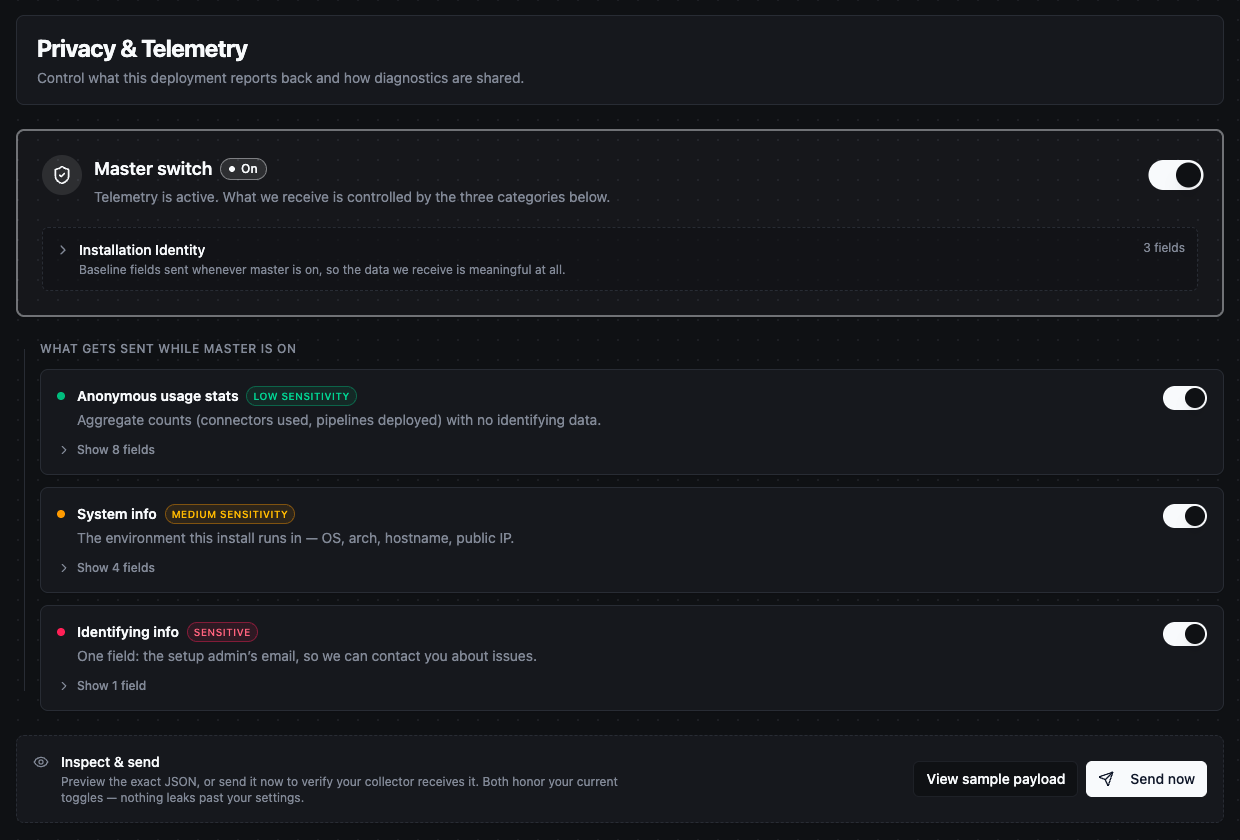
Admin › Privacy & Telemetry: the master switch, installation identity and the three categories
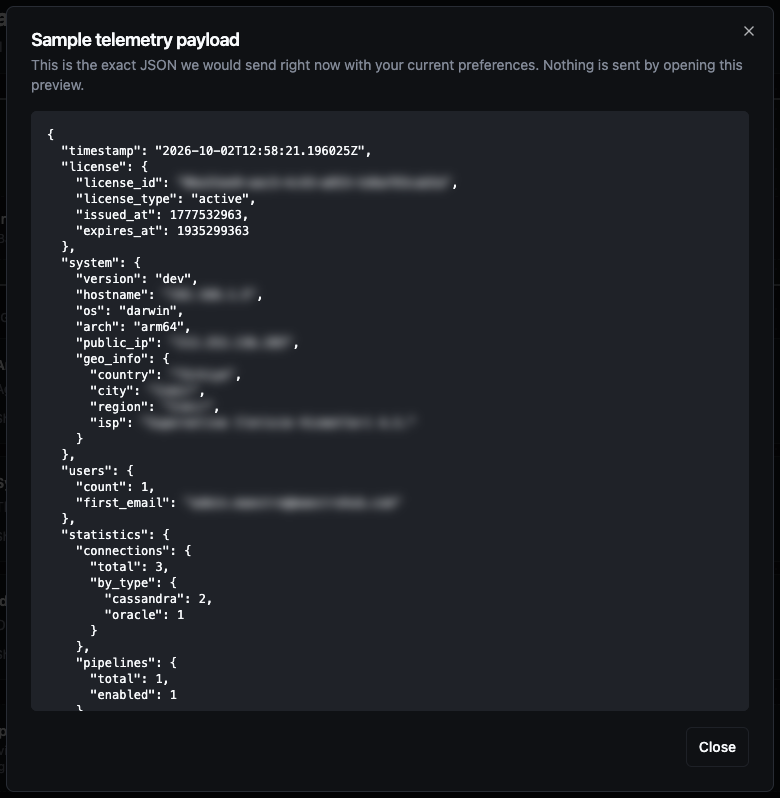
View sample payload shows the exact JSON a report would send (identifying values blurred here)
Disabling Telemetry
Telemetry is enabled by default. To turn it off without a restart, use the master switch on Admin › Privacy & Telemetry. To make sure it can never be turned on from the UI — for example on an air-gapped site — disable it in the configuration as shown below.
The configuration setting wins over the page. When telemetry is disabled in the configuration, nothing is sent, and the Privacy & Telemetry page shows a Telemetry is disabled by configuration notice with every switch and button read-only. To manage telemetry from the page again, set the value back to true and restart.
- Binary
- Docker
- Kubernetes (Helm)
Edit config.yaml in the MaestroHub directory:
modules:
  phonehome:
    enabled: false
Then restart MaestroHub.
Pass the setting as an environment variable:
docker run -d \
  --name maestrohub \
  -e MAESTROHUB_MODULES_PHONEHOME_ENABLED=false \
  -p 8080:8080 \
  -p 1883:1883 \
  -p 8083:8083 \
  -v maestrohub-data:/data \
  maestrohub/context-engine:latest
Set the value in your Helm values file:
phonehome:
  enabled: false
Then upgrade the release:
helm upgrade maestrohub ./maestrohub -f values.yaml
To re-enable telemetry, set the value back to true and restart. The switches on the Privacy & Telemetry page then decide what is sent.