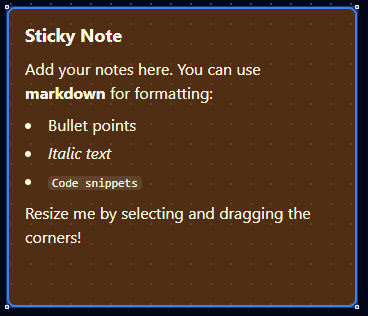
Sticky Note node
Sticky Note Node
Overview
The Sticky Note Node is an informational element you can drop onto the pipeline canvas to leave rich, Markdown-supported documentation. It never runs, has no ports, and exists purely to communicate intent, instructions, or troubleshooting tips to collaborators. Treat it as an in-line knowledge base that travels with the pipeline definition.
Core Functionality
1. Markdown Content
- Author notes using GitHub-flavoured Markdown—headings, emphasis, code blocks, lists, links, and more.
- Markdown renders directly on the canvas with a themed “sticky note” style.
- Store Markdown inside
parameters.content; documentation settings remain separate for system metadata.
2. Color Themes
- Built-in palettes (
yellow,blue,green,pink,purple, etc.) help classify notes (warnings vs. reminders). - Both light and dark UI themes are supported with consistent foreground/background contrast.
3. Resizable Canvas Element
- Configure
widthandheightnumerically or drag the note’s resize handles when selected. - Dimensions persist with the pipeline definition so every viewer sees the same layout.
4. Zero Execution Footprint
- No input or output ports; the node never participates in runtime execution.
- Pipelines validate and deploy regardless of sticky notes—executors ignore them.
- A note is not a step: the execution history's node count (
N/M nodes) leaves it out, so a trigger with a note beside it reads1/1after a successful run, and the orphan check never reports a note as unreachable. - Because a note cannot run, an edge into or out of one is refused when the pipeline is saved—whether through the designer, the API, or an import—with a
VALIDATION_ERRORof codeANNOTATION_CONNECTEDnaming the edge and the note. Remove the edge, or put a node that runs in the note's place.
Configuration Reference
| Parameter | Type | Default | Required | Constraints | Description |
|---|---|---|---|---|---|
| Content | string | Markdown template | No | -- | Note content with markdown support. |
| Color | select | "yellow" | Yes | yellow / blue / green / pink / purple | Background color. |
| Width | number | 350 | No | 120-800 px | Note width. |
| Height | number | 300 | No | 80-600 px | Note height. |
Sticky Note does not have a Settings tab. It is a purely visual element with no execution behavior.
Usage Examples
Example 1: QA Checklist Reminder
| Field | Value |
|---|---|
| Content | "### QA Checklist\n- [ ] Update staging webhook\n- [ ] Regenerate API tokens\n- [ ] Notify release channel" |
| Color | yellow |
| Width | 380 |
| Height | 220 |
Place this note beside QA-related branches so everyone follows the same release checklist.
Example 2: Highlight Pending Connector Swap
| Field | Value |
|---|---|
| Content | "**TODO:** Replace the mock HTTP call with the production connector once credentials arrive." |
| Color | pink |
| Width | 420 |
| Height | 180 |
Use a bright color to flag action items that must be resolved before go-live.
Example 3: Document Shift Handoff
| Field | Value |
|---|---|
| Content | "**Shift Notes (Night):** Review torque anomalies logged at 02:15. See ticket OPS-482." |
| Color | blue |
| Width | 360 |
| Height | 200 |
The visible content guides on-call staff, while the display option shows supplementary metadata directly on the canvas tooltip.
Configuration reference
The fields below are generated from the node's config contract, so they match what the pipeline validator enforces and what the designer's form offers.
ui.stickyNote
| Field | Type | Required | Default | Values | Description |
|---|---|---|---|---|---|
content | string | no | — | — | The note's text, markdown; shown on the canvas for whoever reads the pipeline. Empty shows an empty note |
color | string | no | yellow | yellow, blue, green, pink, purple | Background colour of the note — yellow, blue, green, pink or purple; default yellow |
width | integer | no | 350 | 120–800 | Width of the note on the canvas in pixels, 120 to 800; default 350. The designer updates it when the note is resized |
height | integer | no | 300 | 80–600 | Height of the note on the canvas in pixels, 80 to 600; default 300. The designer updates it when the note is resized |