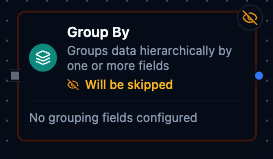
Group By Node
Group By Node
Overview
The Group By Node takes an array of items and builds a hierarchical object by grouping records on one or more fields.
It is useful when you need to pivot or aggregate data by equipment, line, product, or any other dimension before sending it to dashboards, reports, or downstream logic.
The node:
- Accepts an array (from an upstream node via
$node["NodeName"]or other expression). - Groups data by an ordered list of fields (supporting dot notation).
- Produces a nested object where each level corresponds to a grouping field.
- Optionally removes grouping keys from the final items for cleaner output.
Configuration Reference
Parameters
| Parameter | Type | Default | Required | Constraints | Description |
|---|---|---|---|---|---|
| Group By Fields | string[] | [] | Yes | At least 1 field | Field names to group by. |
| Input Field | string | "" | No | Expression | Input data source expression. |
| Support Dot Notation | boolean | true | No | -- | Enable nested field access. |
| Missing Field Behavior | select | "empty" | No | empty / null / skip | What to do when a grouping field is missing. |
| Include Grouping Fields | boolean | false | No | -- | Include grouping fields in each group's output. |
Grouping Field Examples
fieldNameuser.department(with dot notation enabled)equipment.line
Input Field Examples
{{ $node["Fetch Data"] }}-- Use the entire output of "Fetch Data" as the array.{{ $node["Fetch Data"].result }}-- Usedataproperty from "Fetch Data".{{ $node["Aggregate"].result }}-- Use the results from a specific upstream node named "Aggregate".
Settings
| Setting | Options | Default | Description |
|---|---|---|---|
| Timeout (seconds) | number | Pipeline default | Maximum execution time for this node (1--600). |
| Retry on Timeout | Pipeline Default / Enabled / Disabled | Pipeline Default | Whether to retry on timeout. |
| Retry on Fail | Pipeline Default / Enabled / Disabled | Pipeline Default | Whether to retry on failure. When Enabled, shows Advanced Retry Configuration. |
| On Error | Pipeline Default / Stop Pipeline / Continue Execution | Pipeline Default | Behavior when node fails after all retries. |
Advanced Retry Configuration
Only visible when Retry on Fail is set to Enabled.
| Field | Type | Default | Range | Description |
|---|---|---|---|---|
| Max Attempts | number | 3 | 1--10 | Maximum retry attempts. |
| Initial Delay (ms) | number | 1000 | 100--30,000 | Wait before first retry. |
| Max Delay (ms) | number | 120000 | 1,000--300,000 | Upper bound for backoff delay. |
| Multiplier | number | 2.0 | 1.0--5.0 | Exponential backoff multiplier. |
| Jitter Factor | number | 0.1 | 0--0.5 | Random jitter. |
Usage Examples
Example 1: Group Production Events by Line
Input array:
[
  { "line": "Line-A", "event": "start", "timestamp": 1700000000000 },
  { "line": "Line-A", "event": "stop", "timestamp": 1700000100000 },
  { "line": "Line-B", "event": "start", "timestamp": 1700000200000 }
]
Configuration:
| Field | Value |
|---|---|
| Group By Fields | ["line"] |
| Input Field | {{ $node["Read Events"] }} |
| Support Dot Notation | false |
| Missing Field Behavior | "empty" |
| Include Grouping Fields | false |
Output:
{
  "Line-A": [
    { "event": "start", "timestamp": 1700000000000 },
    { "event": "stop", "timestamp": 1700000100000 }
  ],
  "Line-B": [
    { "event": "start", "timestamp": 1700000200000 }
  ]
}
Example 2: Group by Line and Station with Dot Notation
Input array:
[
  { "meta": { "line": "Line-A", "station": "Station-1" }, "value": 10 },
  { "meta": { "line": "Line-A", "station": "Station-1" }, "value": 12 },
  { "meta": { "line": "Line-A", "station": "Station-2" }, "value": 9 }
]
Configuration:
| Field | Value |
|---|---|
| Group By Fields | ["meta.line", "meta.station"] |
| Input Field | {{ $node["Read Sensors"] }} |
| Support Dot Notation | true |
| Missing Field Behavior | "skip" |
| Include Grouping Fields | false |
Output:
{
  "Line-A": {
    "Station-1": [
      { "value": 10 },
      { "value": 12 }
    ],
    "Station-2": [
      { "value": 9 }
    ]
  }
}
Example 3: Using a Nested Input Field
Upstream node produces:
{
  "data": [
    { "product": "Widget-A", "status": "pass" },
    { "product": "Widget-A", "status": "fail" },
    { "product": "Widget-B", "status": "pass" }
  ]
}
Configuration:
| Field | Value |
|---|---|
| Group By Fields | ["product", "status"] |
| Input Field | {{ $node["Quality Check"].result }} |
| Support Dot Notation | false |
| Missing Field Behavior | "empty" |
| Include Grouping Fields | true |
Result groups the nested data array by product and status while keeping those fields in each leaf item.
When to Use Group By
Use the Group By node when:
- You need to pivot or aggregate arrays into hierarchical structures for dashboards or reports.
- You want a declarative configuration for grouping (field list, dot notation, missing-field strategy) instead of custom scripting.
- You are preparing data for downstream nodes that expect structured groupings (e.g., summary functions, Smart Connector calls, or UNS publishing).
Configuration reference
The fields below are generated from the node's config contract, so they match what the pipeline validator enforces and what the designer's form offers.
transform.groupby
| Field | Type | Required | Default | Values | Description |
|---|---|---|---|---|---|
groupByFields | string[] | yes | — | — | Field names to group by, in nesting order — the first is the top-level group key, each further one nests inside it. With supportDotNotation a name like site.line reads a nested field. At least one; none empty |
inputField | string | no | result | accepts an expression | The array to group — a dot-path such as result or result.rows, or an expression such as {{ $node["Fetch"].result.rows }}. Every node output is {result, _metadata}, so the default result groups the predecessor's value; the execution fails when the path is missing. An object is grouped as a single item |
supportDotNotation | boolean | no | true | — | true reads a grouping field like a.b.c as a nested path; false treats the whole name as one top-level key |
missingFieldBehavior | string | no | empty | empty, null, skip | What to do with an item that lacks a grouping field: empty groups it under the key "", null under "<null>", skip drops it and counts it in _metadata.skipped |
includeGroupingFields | boolean | no | false | — | true keeps the grouping fields inside each grouped item; false strips them, since the group key already carries their value |