AWS IoT Greengrass Integration Guide
Overview
AWS IoT Greengrass runs a local MQTT broker on every core device, so machines, gateways and Greengrass components on the plant floor can exchange messages without a round trip to AWS. MaestroHub joins that broker as a Greengrass client device: it authenticates with an AWS IoT thing certificate, publishes to local topics, and starts pipelines on the messages that arrive.
- Publish to any local topic the core's client device auth policy allows. Local components receive the message directly, and the core's MQTT bridge can relay it to AWS IoT Core.
- Subscribe to local topic filters (
+and#wildcards) as a pipeline trigger. - Find the core through the Greengrass cloud discovery API, or enter its address yourself for a site that has to start with no internet access.
- Keep working offline. Once discovery has answered, a reconnect that cannot reach AWS reuses the core endpoints it already knows.
- Store & Forward: a publish that fails while the core is unreachable is buffered and replayed when it comes back.
A Greengrass client device is an AWS IoT thing that connects to a core device's local broker instead of to AWS IoT Core. Before MaestroHub can connect, the core must run the Client device auth and MQTT broker (Moquette or EMQX) components, and the thing must be associated with the core device. The core's MQTT bridge component decides which local topics are relayed to AWS IoT Core or to local components' IPC.
Connection Configuration
Creating a Greengrass Connection
Navigate to Connections → New Connection → AWS IoT Greengrass and fill in the form below.
1. Profile Information
| Field | Default | Description |
|---|---|---|
| Profile Name | - | A descriptive name for this connection profile (required, max 100 characters) |
| Description | - | Optional description for this Greengrass connection |
2. Connection
| Field | Default | Description |
|---|---|---|
| Client Device Thing Name | - | AWS IoT thing name of this client device (required). It is also the MQTT client ID: the client device auth component identifies a device by its client ID, so the two must match. |
| Core Discovery | cloud | cloud asks the Greengrass discovery API which core devices this thing is associated with. manual connects to the host and port you enter and never contacts AWS. |
Cloud discovery (Only displayed when Core Discovery is cloud)
| Field | Default | Description |
|---|---|---|
| AWS Region | us-east-1 | Region the core device is registered in (required). |
| Core Device Thing Name | - | Which core to connect to when the thing is associated with more than one. Leave empty to use the first core discovery returns. |
Manual (Only displayed when Core Discovery is manual)
| Field | Default | Description |
|---|---|---|
| Core Device Host | - | Host name or IP address of the core device's broker (required). It must appear in the broker certificate's subject alternative names. |
| Core Device Port | 8883 | MQTT port of the core device's broker. |
3. Authentication
| Field | Default | Description |
|---|---|---|
| Device Certificate (PEM) | - | The X.509 certificate AWS IoT issued for this thing (required). The same certificate authenticates to the discovery API and to the core's broker. |
| Device Private Key (PEM) | - | The private key matching the certificate (required). Stored encrypted. |
| Core Device CA Certificate (PEM) | - | The CA that signed the core's broker certificate. Required for manual discovery. Leave it empty for cloud discovery: the discovery answer carries the core's CA. |
The broker keeps one session per client ID, and the client ID is the thing name. Two connections with the same thing name, on this instance or anywhere else on the plant network, take the session from each other and reconnect in a loop. Register a separate client device thing for every connection.
Greengrass signs its broker certificate with a CA of its own, which no host trusts by default. With cloud discovery the connector receives that CA in the discovery answer. For manual discovery, copy it once while the site is online, for example from the CAs array of a discovery call made with the device certificate:
curl --cert device.pem.crt --key private.pem.key https://greengrass-ats.iot.<region>.amazonaws.com:8443/greengrass/discover/thing/<thingName>
4. Advanced
| Field | Default | Description |
|---|---|---|
| Discovery Endpoint | - | Base URL of the discovery API. Leave empty to use https://greengrass-ats.iot.<region>.amazonaws.com:8443. Set it for AWS GovCloud or China regions. |
| Keep Alive | 60s | MQTT keep-alive interval. A core that misses one and a half intervals is treated as gone. |
| Connection Timeout | 30s | Bound on the discovery request, and on each core endpoint's dial, TLS handshake and CONNACK. |
How the connector finds and trusts the core
- Discovery (cloud mode):
GET /greengrass/discover/thing/<thingName>over mutual TLS with the device certificate. The answer lists the core's connectivity addresses and its CA. - Connect: the connector tries each address in the order the core reports them and uses the first one that accepts. Many cores report an unreachable address first, such as a Docker bridge or a second network interface.
- Verify: the broker certificate is checked against the core's CA, never against the host's public roots. The broker checks the device certificate and that the MQTT client ID equals the thing name.
If the discovery API cannot be reached on a later reconnect (the uplink is down, or AWS answers 429 or 5xx), the connector reuses the endpoints and CA from the last successful discovery and logs a warning saying how old they are. It does not reuse them when discovery refuses the device (401, 403 or 404): a thing that was disassociated from its core stays disconnected. The cache lives in memory, so a MaestroHub restart with no uplink needs one successful discovery first. Sites that must start offline should use manual discovery.
Troubleshooting
| Message | Cause | Fix |
|---|---|---|
discovery answered HTTP 404: the thing is not associated with any core device | The thing is not a client device of any core | Associate it under the core device's Client devices in the Greengrass console |
discovery answered HTTP 403 | The thing's IoT policy lacks greengrass:Discover, or the certificate is inactive | Attach a policy that allows greengrass:Discover on the thing |
The core closes the connection during CONNECT (EOF, connection reset, or not Authorized) | The certificate is not attached to a thing named like the Client Device Thing Name, or no device group grants mqtt:connect to it | Check the thing name matches the certificate's thing, and add the thing to a device group whose policy grants mqtt:connect |
refused the subscription to <filter> | The device group's policy does not grant mqtt:subscribe on the filter | Extend the policy's resources to cover the filter |
x509: certificate signed by unknown authority | Manual mode with the wrong CA, or a core whose CA rotated | Paste the core's current CA |
Function Builder
After the connection is saved, create functions for it in the Functions tab.
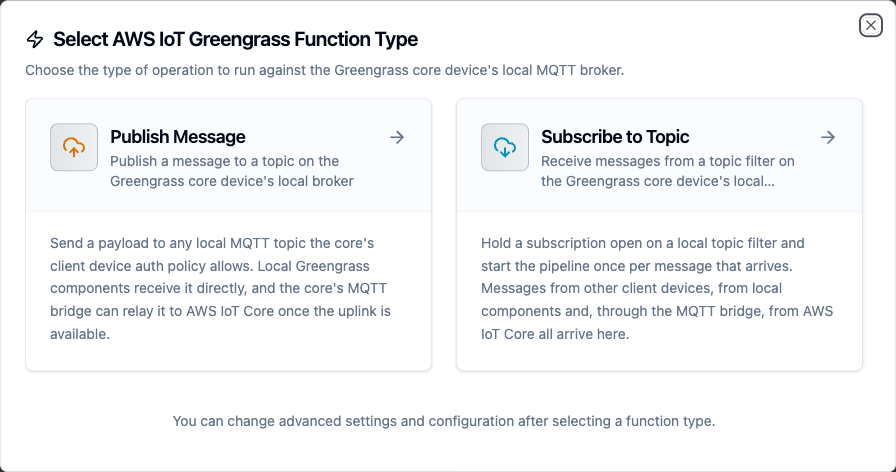
Greengrass function types
Publish Message Function
Purpose: send a message to a topic on the core device's local broker.
Configuration Fields
| Field | Type | Required | Default | Description |
|---|---|---|---|---|
| Topic | String | Yes | - | Local MQTT topic. Wildcards (+, #) are not allowed in a published topic. Supports ((parameters)). |
| Payload | String | Yes | - | Message body. Objects are sent as JSON, strings as-is. Supports ((parameters)). |
| QoS | Integer | No | 1 | 0 (at most once) or 1 (at least once). QoS 2 is not offered: AWS IoT Core has none, and the MQTT bridge relays to it at QoS 1. |
| Retain | Boolean | No | false | Keep the message as the topic's retained message. |
| Timeout | Duration | No | 30m | Bound on this publish, including the PUBACK wait at QoS 1. |
Example Configuration
topic: factory/((line))/oee
payload: '{"line": "((line))", "oee": ((oee))}'
qos: 1
retain: false
Use Cases
- Hand a computed KPI to a local Greengrass component for edge processing
- Publish an alarm on a topic the core's MQTT bridge forwards to AWS IoT Core
Subscribe to Topic Function
Purpose: receive messages from a local topic filter. Used by the Greengrass Trigger node to start a pipeline per message.
Configuration Fields
| Field | Type | Required | Default | Description |
|---|---|---|---|---|
| Topic Filter | String | Yes | - | + matches one level, # matches the rest and must be last. |
| QoS | Integer | No | 1 | Subscription quality of service. |
Example Configuration
topicFilter: factory/+/telemetry
qos: 1
Use Cases
- Start a pipeline on every reading other client devices publish under
factory/+/telemetry - React to commands a local component, or AWS IoT Core through the bridge, sends to
line3/commands
Using Parameters
Wrap a name in double parentheses, ((name)), in the Topic or Payload of a Publish function, and it becomes a parameter the pipeline fills at run time.
| Syntax | Example | Filled from |
|---|---|---|
((name)) | factory/((line))/oee | The node's Function Parameters, which accept expressions such as {{ $trigger.result.line }} |
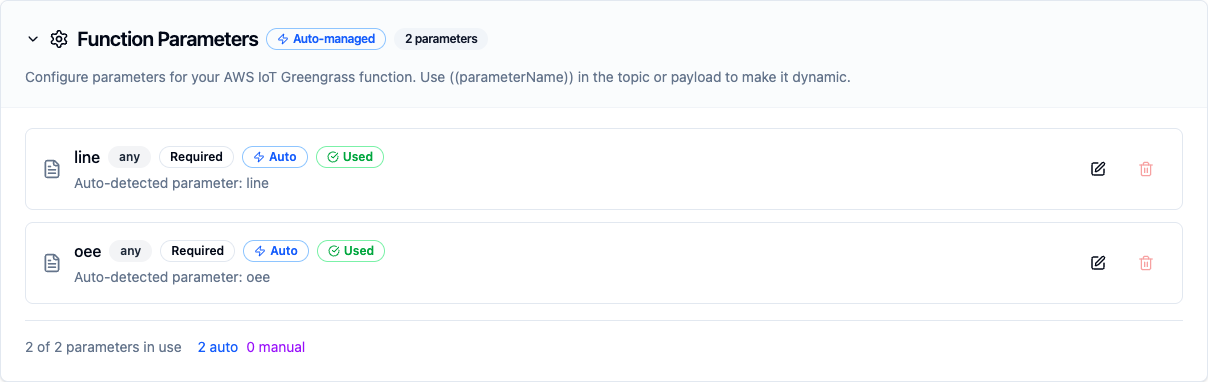
Parameters detected from a templated topic and payload
Only Publish Message accepts parameters. Subscribe to Topic backs a trigger, which is the first node of a pipeline and has no upstream data to fill a parameter from.
Pipeline Integration
Use the Greengrass Publish node to send data to the core from any point in a pipeline, and the Greengrass Trigger node to start a pipeline from local messages.
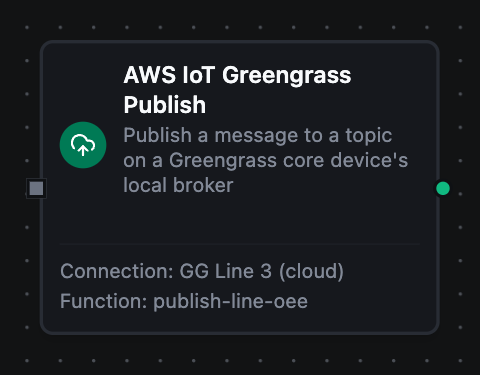
Greengrass Publish node
Common Use Cases
Edge KPIs that survive an outage
Read OPC UA tags, compute OEE in a pipeline, and publish it to the core with QoS 1. A local component consumes it at once, and the MQTT bridge forwards it to AWS IoT Core when the uplink is up. If the core restarts during a deployment, Store & Forward holds the messages and replays them.
Commands from the cloud to the line
Subscribe to line3/commands with a Greengrass Trigger. An AWS IoT rule or operator publishes the command in the cloud, the core's bridge relays it to the local broker, and the pipeline writes the setpoint to the PLC.
Offline-first sites
Configure manual discovery with the core's host and CA. MaestroHub never contacts AWS; everything between the machines, the core and MaestroHub stays on the plant network.