Azure Functions Integration Guide
Connect to Azure Functions to call your own serverless code from a pipeline: a transform, an enrichment lookup, an inference endpoint, scheduled work, or a side effect the pipeline should not wait for. This guide covers connection setup, function configuration, and pipeline integration.
Overview
The Azure Functions connector calls a function over its HTTP trigger and hands the response back to the pipeline. One connection is one function app: you give it the app's URL and a key, and each function names a route in that app. The connector provides:
- Synchronous invocation returning the HTTP status and the response body, decoded as JSON when it parses and delivered as text when it does not
- Fire-and-forget dispatch for work that must not hold up the pipeline
- Invocation by name or custom route, such as
order-routerororders/((orderId)), with query parameters encoded for you - Function keys and host keys, sent as
x-functions-key - Microsoft Entra ID tokens for apps behind App Service Authentication, from a service principal, a managed identity or the default credential chain
- Function discovery through Azure Resource Manager, with each function's trigger type, route, auth level and invoke URL
- Templatable route, payload and query values, so one function serves many calls
Azure Functions are invoked by MaestroHub; they do not push events back into it. To have a function start a pipeline, give the pipeline a Webhook Trigger and have the function POST to it, or send from the function to Event Hubs and use the Azure Event Hubs trigger.
The connector calls a function's HTTP trigger. A function started by a timer, a queue or a blob has no HTTP route to call; List Functions reports it, with its triggerType, but invoking it answers 404. Reach such a function through its own event source.
Connection Configuration
Azure Functions Connection Creation Fields
1. Profile Information
| Field | Default | Description |
|---|---|---|
| Profile Name | - | A descriptive name for this connection profile (required, max 100 characters) |
| Description | - | Optional description for this Azure Functions connection |
2. Function App
| Field | Default | Description |
|---|---|---|
| Function App URL | - | Base URL of the function app, e.g. https://my-app.azurewebsites.net (required). Invoking a function calls <this URL>/<route prefix>/<function name or route>. No query string: a key belongs in Function Key. |
The URL is on the function app's Overview page in the Azure portal as Default domain. A custom domain works too. For the Azure Functions Core Tools running on your own machine, use http://localhost:7071.
3. Authentication
| Field | Default | Description |
|---|---|---|
| Function Key | - | A function key or host key, sent as x-functions-key on every invocation. Leave empty for anonymous functions. |
| Identity | none | The connection's Microsoft Entra ID identity: none, service_principal, managed_identity or default_credential. |
| Tenant ID | - | Entra ID tenant (directory) ID. Required for service_principal. |
| Client ID | - | Application (client) ID. Required for service_principal; for managed_identity, the client ID of a user-assigned identity. |
| Client Secret | - | Client secret of the app registration (service_principal only). |
| App ID URI | - | Only for an app behind App Service Authentication: the Application ID URI of its app registration, e.g. api://00000000-0000-0000-0000-000000000000. |
An Azure Function checks callers in one of two ways, and the connection supports both, alone or together.
Function keys are what an HTTP trigger with authLevel: function checks. Copy one from the portal:
- App keys → Host keys → default covers every function in the app. One host key per connection is the usual setup.
- Function → Function Keys → default covers that one function only. A connection holding it can call that function and gets
401from every other.
MaestroHub stores the key encrypted, never returns it to the browser, and sends it only to the Function App URL: the connection refuses a function target that is a full URL, and it does not follow redirects, so the key cannot be carried to another host.
Microsoft Entra ID does two separate jobs, and you only need it for the ones you use:
- App Service Authentication (Easy Auth). When the app requires Entra ID sign-in, set App ID URI to the audience the app accepts. Every invocation then carries a bearer token for
<App ID URI>/.default. The function sees the caller as the connection's identity (X-MS-CLIENT-PRINCIPAL-ID). If the app restricts which clients may call it, allow the connection's client ID. A function key is still needed forauthLevel: function: the token gets the call past App Service Authentication, the key gets it past the function. - Azure Resource Manager. List Functions, and the connection check when the Management fields are filled in, read the app through Resource Manager with this identity.
With none, no Entra ID token is ever requested.
| Identity | Needs | Best for |
|---|---|---|
service_principal | Tenant ID, Client ID, Client Secret | Self-hosted MaestroHub outside Azure |
managed_identity | Optional Client ID (user-assigned) | MaestroHub running on an Azure VM, AKS or Container Apps |
default_credential | Nothing | Environment variables, workload identity, managed identity or an Azure CLI login, tried in that order |
4. Management
| Field | Default | Description |
|---|---|---|
| Subscription ID | - | The subscription that holds the function app |
| Resource Group | - | The function app's resource group |
| Function App Name | - | The app's resource name, as the portal shows it |
These three go together: fill in all three, or none. Invoking functions works without them. Fill them in to use List Functions, and to let the function form browse the app's functions instead of having you type a name.
The identity on the Authentication tab needs the Reader role on the function app (or its resource group). That covers both reads the connector makes: the app itself (Microsoft.Web/sites/read) and its functions (Microsoft.Web/sites/functions/read). Reader does not include the app's keys, and the connector never asks for them.
- With the Management fields: Test Connection reads the app from Resource Manager, and fails if the identity cannot see it, if it is a plain web app rather than a function app, or if it is stopped.
- Without them: Test Connection requests the app's root URL. Any answer below
500means the Functions host is reachable. A wrong function key cannot be detected this way; it shows up as401on the first invocation, with a message that says so. - With an App ID URI: Test Connection also requests the Entra ID token, so a wrong secret or tenant fails here rather than on the first message.
5. Advanced
| Field | Default | Description |
|---|---|---|
| Route Prefix | api | The app's extensions.http.routePrefix from host.json. Keep api unless host.json changes it; clear it for an app whose prefix is empty. |
| Custom Management Endpoint | - | Custom Azure Resource Manager endpoint, for a local simulator. Leave empty for Azure. With Identity none, Resource Manager is then called without a token. |
| Request Timeout | 1m | Default timeout for invocations and Resource Manager calls (1s–1h). Individual functions may override it. |
Azure's front end closes an HTTP-triggered request after 230 seconds, whatever the function's own functionTimeout. A timeout above that only helps a self-hosted Functions runtime. For work that runs longer, start a Durable Functions orchestration with Invoke Async and have it report back through a webhook.
6. Connection Labels
| Field | Default | Description |
|---|---|---|
| Labels | - | Key-value pairs to categorize and organize this connection (max 10 labels) |
Example Labels
env: prod– Environmentapp: acme-orders– Function appregion: westeurope– Azure region
Function Builder
Creating Azure Functions Functions
Once you have a connection established, you can create reusable functions:
- Open the connection and go to its Functions tab → New Function
- Select the desired function type (Invoke, Invoke Async, or List Functions)
- Configure the function parameters
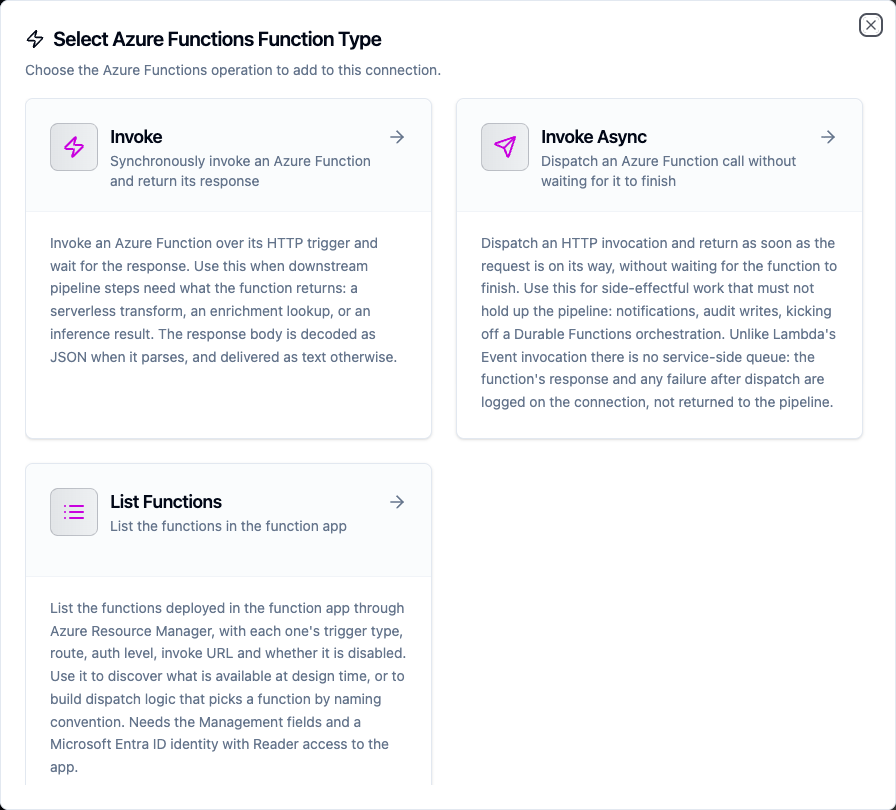
Select from three Azure Functions function types: two invocation shapes and one discovery operation
Invoke Function
Purpose: Call a function over its HTTP trigger and wait for the response. Use this when a downstream node needs what the function returns.
Configuration Fields
| Field | Type | Required | Default | Description |
|---|---|---|---|---|
| Function Name or Route | String | Yes | - | The function's route under the route prefix: its name, or its custom route such as orders/42. Not a full URL. Supports ((parameter)) syntax. |
| HTTP Method | Enum | No | POST | POST, GET, PUT, PATCH or DELETE. GET and DELETE send no body. |
| Payload | String | No | {} | Request body. JSON by default; any text is accepted when Content Type says so. Supports ((parameter)) syntax. |
| Query Parameters | Object | No | - | Query string parameters, URL-encoded on the way out. Values support ((parameter)) syntax. |
| Content Type | String | No | application/json | Content-Type header for the body. A body sent as application/json is validated before it leaves. |
| Extra Headers | Object | No | - | Additional request headers. Authorization and x-functions-key are set by the connection and cannot be overridden here. |
| Timeout Override | Duration | No | - | Overrides the connection-level request timeout. A Go duration string between 1s and 1h (e.g. 30s). |
Use Cases:
- Run a serverless transform on incoming pipeline data
- Call an ML inference endpoint deployed as a function
- Look up reference data from a Cosmos DB-backed function
- Call a function on a custom route with a value from the message, such as
orders/((orderId))
When the connection's Management fields are filled in, the function form lists the app's HTTP-triggered functions, following Resource Manager's pages, and marks the ones Resource Manager reports as disabled. Without them, the form starts in Manual and says what to fill in to browse. A function with a parameterised route (orders/{id}) is listed with its route; switch to Manual to put the value in.
A function that answers 400 or 500 has run and refused. The node fails, so a pipeline's error branch fires, and the response body is still delivered on result.payload so the branch can read why. A 4xx is treated as permanent (retrying the same body gets the same answer) and a 5xx or 429 as transient.
Azure answers some refusals with no body at all, so the node's error names the likely cause. A 401 says whether App Service Authentication wanted a token, the connection sent no key, or the function refused the key. A 404 points at the name, the route prefix, the HTTP method (a function called with a method it does not accept answers 404, not 405) and a disabled function.
If your function signals business outcomes with status codes, a 409 Conflict meaning "already processed" fails the node. Answer 200 with a body the pipeline can branch on instead.
A response is read up to 8 MB. Past that the body is truncated and the result's metadata says so. Large results belong in Blob Storage with the blob name in the response; read them with the Azure Blob Storage connector.
Invoke Async Function
Purpose: Dispatch an invocation and return immediately, without waiting for the function to finish. Use this for side-effectful work that must not hold up the pipeline.
Configuration Fields
| Field | Type | Required | Default | Description |
|---|---|---|---|---|
| Function Name or Route | String | Yes | - | The function's name or custom route. Supports ((parameter)) syntax. |
| Payload | String | Yes | {} | Request body POSTed to the function. Supports ((parameter)) syntax. |
| Query Parameters | Object | No | - | Query string parameters, URL-encoded. |
| Content Type | String | No | application/json | Content-Type header for the body. |
| Extra Headers | Object | No | - | Additional request headers. Authorization and x-functions-key cannot be overridden here. |
| Timeout | Duration | No | - | Bounds the dispatched request. The node returns before the function does, so this caps how long the call may run in the background, not how long the pipeline waits. |
Use Cases:
- Notify a function of an event without blocking the pipeline
- Start a Durable Functions orchestration and carry on
- Hand slow post-processing to a function
Unlike AWS Lambda's Event invocation type, an HTTP trigger has no service-side queue. MaestroHub sends the request and returns; the function's response and any failure after dispatch are logged on the connection, not returned to the pipeline. The node's result is {"dispatched": true} and nothing more.
Consequences worth planning for:
- A function that is down, slow, or rejects the payload produces a successful node and a warning in the connection's logs.
- The dispatch is bounded by the connection's own lifetime: an in-flight call is given a few seconds to finish when the connection is closed, then cancelled.
- Because delivery cannot be confirmed, this operation is not eligible for store-and-forward. Use the synchronous Invoke when the pipeline must know the work landed.
When a real queue is what you want, send to Azure Event Hubs and trigger the function from it. A Durable Functions HTTP starter is another good fit: it answers 202 at once with a status URL, so the synchronous Invoke returns quickly and tells you the orchestration started.
List Functions Function
Purpose: List the functions in the connection's function app through Azure Resource Manager, with each one's trigger type, route, auth level, invoke URL, and whether it is disabled.
Configuration Fields
| Field | Type | Required | Default | Description |
|---|---|---|---|---|
| Page Token | String | No | - | The nextPageToken from a previous call, to continue the listing. Supports ((parameter)) syntax. |
| Timeout | Duration | No | 30m | Bound on this single operation (1s–1h). |
List Functions needs the connection's Management fields and an Entra ID identity with Reader access to the app. Without them it fails with a message that names what is missing.
Use Cases:
- Discover available functions before invoking one
- Audit which functions in an app are disabled
- Build a dispatch table that picks a function by naming convention
isDisabled is what Resource Manager reports for the function. On a Flex Consumption app, a function disabled through its AzureWebJobs__<name>__Disabled app setting was listed as disabled and still answered calls. Do not rely on the flag to block a function; remove it or restrict its key.
Resource Manager decides the page size; the connector does not fetch more than one page per call. When more remain, the result carries a nextPageToken; pass it back as Page Token to continue.
A page token is a Resource Manager URL, replayed with the connection's credentials, so only a token for this connection's function app on this connection's Resource Manager endpoint is accepted. Anything else is refused before a request leaves.
Function Parameters
Every field marked "supports ((parameter)) syntax" can be templated, and MaestroHub detects the placeholders automatically as you type, including in query parameter values.
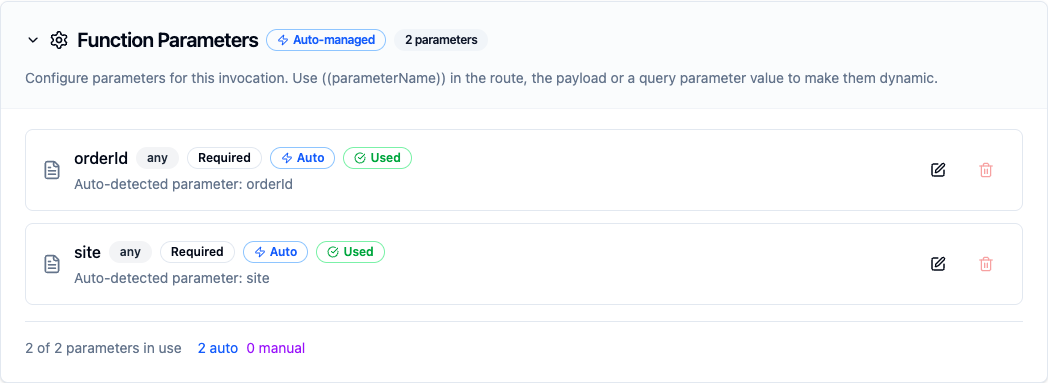
Placeholders written in the route, the payload or a query value become parameters the pipeline fills in at run time
A templated payload stays valid JSON: quote a placeholder that stands for a string ("orderId": "((orderId))") and leave one that stands for a number unquoted ("total": ((total))). A templated route is escaped segment by segment, so a value with a space reaches the function as that value.
Pipeline Integration
Each function type has a matching pipeline node. See the Azure Functions node reference for the node cards, their output shape, and how to read the result downstream.
Common Use Cases
Serverless Enrichment Mid-Pipeline
Scenario: An order pipeline needs a shipping estimate that a data-science team maintains as an Azure Function.
Invoke Configuration:
- Function Name or Route:
shipping-estimator - HTTP Method:
POST - Payload:
{
  "orderId": "((orderId))",
  "destination": "((postcode))",
  "weightKg": ((weightKg))
}
Pipeline Integration: Place the Invoke node between the order-parsing node and the write node. Read the estimate downstream with $node["Estimate Shipping"].result.payload.days. If the estimator is unavailable the node fails, so add an error branch that writes the order with a default estimate rather than dropping it.
Reading a Resource by Route
Scenario: A function serves order status on GET orders/{id}, and a pipeline needs the status of the order in each message.
Invoke Configuration:
- Function Name or Route:
orders/((orderId)) - HTTP Method:
GET - Query Parameters:
site=((site))
Pipeline Integration: The order ID and site come from the trigger data, so one node serves every order. Read the status with $node["Order Status"].result.payload.status. An order the function does not know answers 404, which fails the node; branch on the error if a missing order is expected.
Fire-and-Forget Audit Trail
Scenario: Every processed batch should be recorded in an audit store, but the recording must never slow the line down or fail the run.
Invoke Async Configuration:
- Function Name or Route:
audit-writer - Payload:
{
  "batchId": "((batchId))",
  "line": "((line))",
  "recordCount": ((recordCount))
}
Pipeline Integration: Connect the Invoke Async node to the end of the processing branch. The node returns immediately and the pipeline finishes without waiting. A failure after dispatch is only visible in the connection's logs; if the audit trail is a compliance requirement rather than a convenience, use the synchronous Invoke so a failure fails the run.
Inventory Audit of a Function App
Scenario: Operations wants a daily record of which functions an app contains, which are disabled, and which accept anonymous calls.
Function: List Functions
Pipeline Integration: Schedule a daily pipeline that runs List Functions, iterates result.functions with a ForEach node, and writes name, triggerType, authLevel and isDisabled to an audit table. A function with authLevel anonymous is one anyone who knows the URL can call.
Troubleshooting
| Symptom | Likely cause | What to do |
|---|---|---|
Invoke answers 401 "the function needs a key" | The connection has no Function Key and the function's authLevel is function | Set Function Key to a host key of the app, or to that function's own key. |
Invoke answers 401 "the Function Key was refused" | The key belongs to another app, or it is one function's key used on another function | Use a host key (App keys in the portal), which covers every function in the app. |
Invoke answers 401 "wants a Microsoft Entra ID token" | The app uses App Service Authentication, which refuses a call without a token (with 401, even when the app is set to redirect browsers to sign-in) | Set Identity and App ID URI on the connection. |
Invoke answers 401 "App Service Authentication refused the Entra ID token" | The App ID URI is not one of the app's allowed token audiences, or the app does not accept calls from this client | Compare App ID URI with the app's Authentication settings, and allow the connection's client ID if the app restricts callers. |
Test Connection: AADSTS7000215: Invalid client secret provided | Wrong Client Secret, or the secret's ID was pasted instead of its value | Copy the secret's Value from the app registration. |
Test Connection: AADSTS500011: The resource principal named api://… was not found | The App ID URI does not match any app registration in the tenant | Copy the Application ID URI from the app registration's Expose an API page. |
Invoke answers 404 | Wrong name or route, a different Route Prefix, an HTTP method the function does not accept, or the function is disabled | Check the function's route and methods in the portal (or List Functions' route and methods), and Route Prefix against host.json. |
Test Connection: ResourceNotFound | Subscription, resource group or Function App Name does not match the app | Copy the three values from the app's Overview page. |
Test Connection: AuthorizationFailed … or the scope is invalid | The identity has no role on the app, or the Management fields name a different app. When Reader is granted on the one app, Resource Manager cannot tell the identity whether another name exists, so a typo reads as this | Check the three Management values first, then grant Reader on the function app or its resource group. |
| Test Connection: "is a … resource, not a function app" | The Management fields name a web app | Point them at the function app. |
| Test Connection: "function app … is stopped" | The app is stopped | Start it in the Azure portal. |
| List Functions: "set Subscription ID, Resource Group and Function App Name" | The Management fields are empty | Fill in all three and pick an Identity. |
| Invoke Async reports success but nothing happened | The failure occurred after dispatch | Check the connection's logs for the warning. Switch to the synchronous Invoke if the pipeline must know. |
functionName: … is a URL | A full URL was given as the target | Give the function's name or route; the app is set by the connection's Function App URL. |