 Google Vertex AI (Gemini) Integration Guide
Connect to Google's Gemini models to put a language model inside a pipeline: explain an anomaly in plain language, classify an operator's free-text note into a reason code, pull part numbers and defects out of a quality report as JSON, or turn maintenance notes into embeddings for similarity search. This guide covers connection setup, function configuration, and pipeline integration.
Overview
The Vertex AI connector calls Gemini models on one of two Google APIs:
- Vertex AI — Gemini in your own Google Cloud project, billed and governed there, authenticated with a service account key or Application Default Credentials.
- Gemini API — the Gemini Developer API, authenticated with an API key from Google AI Studio.
It provides:
- Text generation with a system instruction and sampling controls (temperature, top P, output limit, thinking budget)
- Schema-constrained JSON output, parsed and delivered as structured data so downstream nodes read its fields directly
- Text embeddings with a task type and an output dimensionality
- Token counting before a costly call, at no cost
- Model discovery, which also feeds the model picker in the function form
- Templatable prompts, system instructions, text and model IDs, so one function serves every message a pipeline sees
A model answers when MaestroHub asks; it never pushes anything back. There is no trigger node. Each call runs in the pipeline that makes it.
The AI Agent node runs a full agent turn — tools, memory, a structured answer — against the model provider configured for the platform. The Vertex AI nodes make one direct, predictable model call through a connection you own: one prompt in, one answer out, billed to your Google Cloud project or API key. Use the Vertex AI nodes when you want that call, and its cost, under your own control.
Connection Configuration
Vertex AI Connection Creation Fields
1. Profile Information
| Field | Default | Description |
|---|---|---|
| Profile Name | - | A descriptive name for this connection profile (required, max 100 characters) |
| Description | - | Optional description for this connection |
2. API & Project
| Field | Default | Description |
|---|---|---|
| API | vertexai | vertexai calls Gemini on Vertex AI in your Google Cloud project. gemini_api calls the Gemini Developer API with an API key. |
| Project ID | - | The Google Cloud project Vertex AI runs and bills in. Required for Vertex AI; not used by the Gemini API. |
| Location | us-central1 | The Vertex AI location the models are called in, e.g. us-central1, europe-west4, or global. Not used by the Gemini API. |
Not every model is offered in every location, and new models usually reach global and us-central1 first. Pick the location your data-residency rules allow; if a model answers 404 NOT_FOUND there, try global or check Google's model availability table for that location.
3. Authentication
For Vertex AI:
| Field | Default | Description |
|---|---|---|
| Service Account JSON Key | - | The whole service account JSON key. Leave empty to use Application Default Credentials. |
You can authenticate in one of two ways:
Option A — Service account JSON key (explicit)
Paste the key Google issues for the service account — the whole JSON object, not a path to it. Best for self-hosted deployments where the host has no Google identity of its own. MaestroHub stores it encrypted and never returns it to the browser.
Option B — Application Default Credentials (implicit)
Leave the key empty. The Google client library then resolves credentials in its standard order:
- The
GOOGLE_APPLICATION_CREDENTIALSenvironment variable - GKE Workload Identity, when running on GKE
- The attached service account of the Compute Engine / Cloud Run host
gcloud auth application-default logincredentials, in development
This is the recommended path for GCP-hosted MaestroHub deployments — no long-lived key is stored in the connection profile.
The identity needs the Vertex AI User role (roles/aiplatform.user) in the project, and the Vertex AI API (aiplatform.googleapis.com) must be enabled there.
For the Gemini API:
| Field | Default | Description |
|---|---|---|
| API Key | - | A Gemini API key from Google AI Studio (required). Stored encrypted and never returned to the browser. |
On the Gemini API's unpaid tier, Google's terms allow it to use prompts and responses to improve its products. Check the terms that apply to your key before a pipeline sends production data through it. Vertex AI runs under your Google Cloud agreement instead.
On Vertex AI, Test Connection lists the models registered in your project and location. A wrong project ID, a disabled Vertex AI API or a missing role fails there, with Google's own message, rather than on the first pipeline run. On the Gemini API it lists one model, which proves the key.
4. Advanced
| Field | Default | Description |
|---|---|---|
| Custom API Endpoint | - | Base URL to call instead of Google's public endpoint — for Private Service Connect, an egress proxy, or a local simulator. Leave empty for Google Cloud. |
| Request Timeout | 2m | Default timeout for model calls (1s–1h). Individual functions may override it. |
On Vertex AI, a custom endpoint with no service account key is called anonymously — the shape a local simulator or an authenticating proxy needs. To reach Google through Private Service Connect, set the key as well. The connection log records the authentication mode it resolved on every connect.
Gemini 2.5 models think before they answer, and a long answer can take a minute or more. Keep the connection timeout generous and give quick classification functions a shorter override.
5. Connection Labels
| Field | Default | Description |
|---|---|---|
| Labels | - | Key-value pairs to categorize and organize this connection (max 10 labels) |
Example Labels
env: prod– Environmentproject: acme-prod– GCP projectuse: anomaly-explainer– What the connection serves
Function Builder
Creating Vertex AI Functions
Once you have a connection established, you can create reusable functions:
- Open the connection and go to its Functions tab → New Function
- Select the desired function type (Generate Content, Embed Content, Count Tokens, or List Models)
- Configure the function parameters
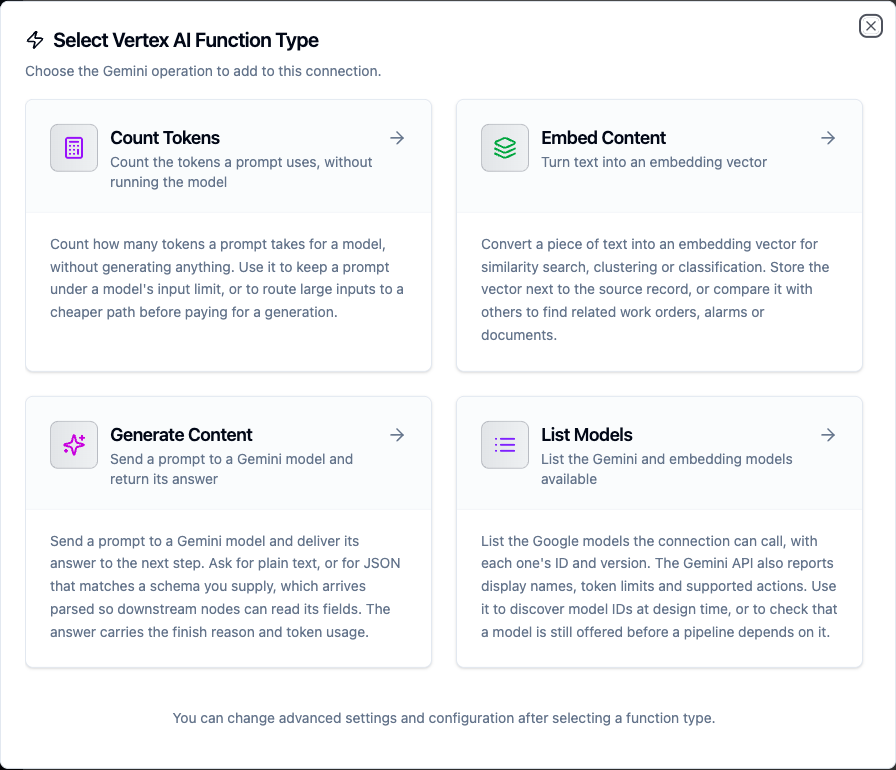
Select from four Vertex AI function types: generation, embeddings, token counting and model discovery
The Model field lists the models the connection can see — models that generate text for Generate Content and Count Tokens, embedding models for Embed Content. Switch it to Manual to type a tuned model's resource name or a ((parameter)).
A new function starts on gemini-flash-latest when the connection lists it, otherwise on the first model that fits. There is no fixed default because Google retires model IDs: when this guide was written, gemini-2.5-flash still appeared in the Gemini API's model list but was refused for new API keys with 404 NOT_FOUND.
gemini-flash-latest and gemini-pro-latest are aliases Google moves to its newest Flash and Pro models, so a function on one keeps working as models retire — and its answers can change when the alias moves. result.modelVersion says which model actually answered. Pin a versioned ID (e.g. gemini-3.8-flash) where answers must stay stable, and plan to move it before Google retires it.
Generate Content Function
Purpose: Send a prompt to a Gemini model and deliver its answer to the next step, as text or as JSON that follows a schema.
Configuration Fields
| Field | Type | Required | Default | Description |
|---|---|---|---|---|
| Model | String | Yes | - | Model ID as List Models reports it, e.g. gemini-flash-latest. A full projects/… or publishers/… resource name is used as-is, which reaches a tuned model. Supports ((parameter)) syntax. |
| System Instruction | String | No | - | Frames every answer: the model's role, tone and rules. Supports ((parameter)) syntax. |
| Prompt | String | Yes | - | The user prompt. Supports ((parameter)) syntax. |
| Response Format | Enum | No | text | text delivers the answer as a string. json asks the model for JSON and parses it. |
| Response Schema | Object | No | - | JSON Schema the answer must follow. Used only with the json format. |
| Temperature | Number | No | model default | 0–2. Lower is more repeatable; use 0 for classification. |
| Top P | Number | No | model default | 0–1. Only tokens within this cumulative probability are considered. |
| Max Output Tokens | Integer | No | model default | Upper bound on the answer (1–65536). On thinking models, thinking tokens count against it too. |
| Thinking Budget | Integer | No | model default | Tokens a thinking model may spend reasoning (-1–32768). 0 turns thinking off where the model allows it — some models refuse it with 400 INVALID_ARGUMENT; -1 lets the model decide. |
| Timeout Override | Duration | No | - | Overrides the connection-level request timeout (1s–1h, e.g. 30s). |
A field left empty is not sent, so the model's own default applies. That matters most for Temperature: an empty field is not the same as 0.
Use Cases:
- Explain an anomaly in a sensor reading in plain language
- Classify an operator's free-text downtime note into a reason code
- Extract part number, defect and severity from a quality report as JSON
With Response Format json the answer is parsed and delivered as result.json, so a downstream node reads $node["Classify Note"].result.json.reasonCode directly. Add a Response Schema to pin the shape — an enum on a field is the most reliable way to get one of a fixed set of codes back:
{
  "type": "object",
  "properties": {
    "reasonCode": { "type": "string", "enum": ["MECH", "ELEC", "MATERIAL", "OPERATOR", "OTHER"] },
    "summary": { "type": "string" }
  },
  "required": ["reasonCode", "summary"]
}
A schema with the text format is refused when the function is saved: the model would never be asked for JSON, so the schema would constrain nothing.
The node fails — so a pipeline's error branch fires — when:
- the prompt is blocked by a safety filter (
finishReasonis the block reason), - the answer is withheld (
finishReasonSAFETY,RECITATION,PROHIBITED_CONTENTand the like), - the model reaches Max Output Tokens before writing anything — usually a thinking model that spent the whole budget reasoning; raise Max Output Tokens or lower Thinking Budget,
- a JSON answer does not parse, or
- the prompt is empty after its parameters resolve — nothing is sent.
The answer fields (text, finishReason, usage) are still delivered on those failures, so the branch can read why. A partial answer cut off at the limit is still an answer: the node succeeds with finishReason MAX_TOKENS.
Quota exhaustion (429 RESOURCE_EXHAUSTED), overload (503) and network failures are classified as transient, so turning on the node's Retry on Fail setting retries them. A bad request, a missing permission and an unknown model are permanent: the same call gets the same answer.
Embed Content Function
Purpose: Turn a piece of text into an embedding vector for similarity search, clustering or classification.
Configuration Fields
| Field | Type | Required | Default | Description |
|---|---|---|---|---|
| Model | String | Yes | - | Embedding model ID as List Models reports it, e.g. gemini-embedding-001. Supports ((parameter)) syntax. |
| Text | String | Yes | - | The text to embed. Supports ((parameter)) syntax. |
| Task Type | Enum | No | model default | What the vector will be used for: RETRIEVAL_QUERY, RETRIEVAL_DOCUMENT, SEMANTIC_SIMILARITY, CLASSIFICATION, CLUSTERING, QUESTION_ANSWERING, FACT_VERIFICATION or CODE_RETRIEVAL_QUERY. |
| Output Dimensionality | Integer | No | model default | Truncate the vector to this many dimensions (1–3072), e.g. 768 to match an existing index. |
| Timeout Override | Duration | No | - | Overrides the connection-level request timeout (1s–1h). |
Use Cases:
- Embed maintenance notes to find similar past failures
- Vectorise alarm descriptions before writing them to a vector store
For search, embed the stored records with RETRIEVAL_DOCUMENT and the search text with RETRIEVAL_QUERY. Use the same model and the same dimensionality for both, or the vectors cannot be compared.
Count Tokens Function
Purpose: Count how many tokens a prompt takes for a model, without generating anything and without paying for a generation.
Configuration Fields
| Field | Type | Required | Default | Description |
|---|---|---|---|---|
| Model | String | Yes | - | Model ID whose tokenizer counts the prompt, e.g. gemini-flash-latest. Supports ((parameter)) syntax. |
| Prompt | String | Yes | - | The text to count. Supports ((parameter)) syntax. |
| Timeout | Duration | No | 30m | Bound on this single operation (1s–1h). |
Use Cases:
- Check that a batch of readings fits the model's context window
- Skip or split a generation when a prompt would exceed a token budget
List Models Function
Purpose: List the Google models the connection can call.
Configuration Fields
| Field | Type | Required | Default | Description |
|---|---|---|---|---|
| Page Size | Integer | No | 50 | Maximum models to return in this page (1–1000). |
| Page Token | String | No | - | Token from a previous call, to continue the listing. Supports ((parameter)) syntax. |
| Timeout | Duration | No | 30m | Bound on this single operation (1s–1h). |
Use Cases:
- Find the exact IDs of the models a key or project can see
- Read a model's token limits before sizing prompts (Gemini API)
Both APIs report each model's ID (the value a Model field takes) and version. The Gemini API also reports display names, input and output token limits, and supported actions; Vertex AI's model listing does not. Page Size is pushed down to the API, and a nextPageToken in the result means more models remain.
A listed model is not always a usable one: the Gemini API has listed models it refuses for new API keys. A Count Tokens or Generate Content call is the reliable check that a model works for your key.
Function Parameters
Every field marked "supports ((parameter)) syntax" can be templated, and MaestroHub detects the placeholders automatically as you type.
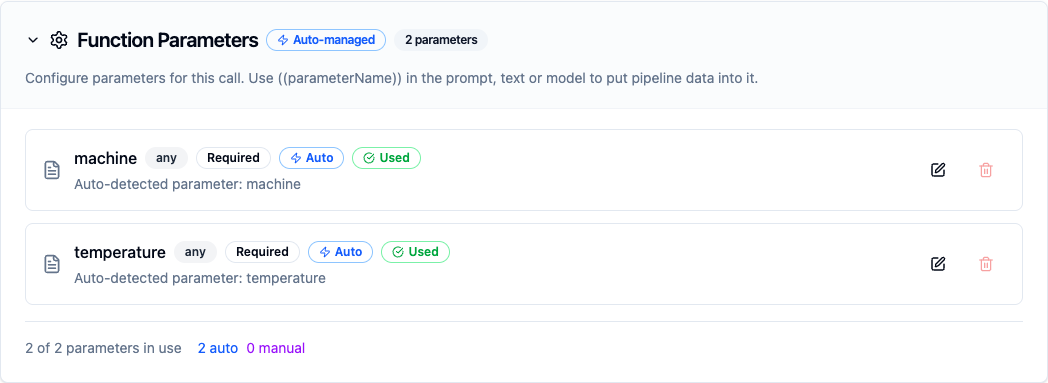
Placeholders written in the prompt become parameters the pipeline fills in at run time
Pipeline Integration
Each function type has a matching pipeline node in the AI group of the node library. See the Vertex AI node reference for the node cards, their output shape, and how to read the answer downstream.
Common Use Cases
Explain an Anomaly to the Shift Lead
Scenario: When a bearing temperature crosses its limit, the shift lead should get a two-sentence explanation, not a raw number.
Generate Content Configuration:
- Model:
gemini-flash-latest - System Instruction:
You are a reliability engineer on a stamping line. Answer in two sentences, name the most likely cause, and do not invent readings you were not given. - Prompt:
Machine ((machine)) bearing temperature is ((temperature)) °C; its 7-day baseline is ((baseline)) °C. Vibration RMS is ((vibration)) mm/s. Explain what is most likely happening. - Temperature:
0.2
Pipeline Integration: Put the node after the condition that detects the excursion, and send $node["Explain Anomaly"].result.text to Microsoft Teams or Slack. Add an error branch that sends the raw reading instead, so a blocked or failed call never swallows the alarm.
Classify Downtime Notes Into Reason Codes
Scenario: Operators type free-text downtime notes. Reporting needs one of five reason codes per stop.
Generate Content Configuration:
- Model:
gemini-flash-latest - Prompt:
Classify this downtime note: ((note)) - Response Format:
json - Response Schema: the
reasonCode/summaryschema shown under Generate Content - Temperature:
0 - Thinking Budget:
0
Pipeline Integration: Write $node["Classify Note"].result.json.reasonCode next to the stop record. Temperature 0 and no thinking keep the answer fast, cheap and repeatable.
Find Similar Past Failures
Scenario: When a work order is closed, store an embedding of its notes; when a new one opens, find the closest past work orders.
Embed Content Configuration:
- Model:
gemini-embedding-001 - Text:
((notes)) - Task Type:
RETRIEVAL_DOCUMENTfor closed orders,RETRIEVAL_QUERYfor new ones - Output Dimensionality:
768
Pipeline Integration: Write $node["Embed Notes"].result.embedding to a vector-capable store (PostgreSQL with pgvector, Elasticsearch) and query it with the new order's vector.
Guard a Large Prompt
Scenario: A shift report prompt includes every alarm of the shift, and on a bad shift it can outgrow the model's input limit.
Count Tokens Configuration:
- Model:
gemini-flash-latest - Prompt:
((report))
Pipeline Integration: Put Count Tokens before Generate Content, and route with a condition on $node["Count Report"].result.totalTokens — summarise in chunks above your budget, send it whole below.
Troubleshooting
| Symptom | Likely cause | What to do |
|---|---|---|
Test Connection fails with 403 PERMISSION_DENIED | The identity lacks the Vertex AI User role, the Vertex AI API is not enabled, or the Project ID is wrong | Grant roles/aiplatform.user on the project and enable aiplatform.googleapis.com. Check the Project ID against the key's project_id. |
Test Connection fails with API key not valid | A wrong or revoked Gemini API key | Create a new key in Google AI Studio and paste it again. |
404 NOT_FOUND naming the model | The model was retired for your key, is not offered in this location, or the ID is misspelled | Google's message names the replacement when a model was retired. Switch to it, or to gemini-flash-latest. On Vertex AI, try the global location. |
429 RESOURCE_EXHAUSTED | Quota or shared capacity is exhausted — a free-tier Gemini API key has no quota for some models at all | Turn on the node's Retry on Fail setting so the call is retried. If it persists, lower the pipeline's rate or request more quota. |
503 UNAVAILABLE, "high demand" | Google is short of capacity for that model | Transient. Turn on the node's Retry on Fail setting, or fall back to another model in an error branch. |
400 INVALID_ARGUMENT naming the Thinking Budget | The model cannot turn thinking off, so it refuses a Thinking Budget of 0 | Clear the field, set -1, or give it a positive budget. |
the model reached the output limit before answering | A thinking model spent Max Output Tokens reasoning | Raise Max Output Tokens, or set Thinking Budget lower (or 0). |
the model's answer is not valid JSON | The answer was cut off, or the prompt led the model away from JSON | Raise Max Output Tokens and add a Response Schema. The raw answer is on result.text. |
the prompt was blocked or the answer was withheld | A Google safety filter refused the prompt or the answer | Rephrase the prompt. The failure is permanent, so retrying the same prompt does not help. |
prompt is empty | The parameters the prompt references resolved to nothing | Check the upstream expressions that fill the prompt's parameters. |
credentialsJson: must be the service account JSON key itself | A file path or a truncated paste was entered | Paste the whole JSON object, including type, client_email and private_key. |