Azure Synapse Analytics Integration Guide
Connect to an Azure Synapse Analytics workspace to query its SQL pools, land pipeline output in a dedicated pool, move data between the pools and Azure Storage, and start and follow Synapse pipelines. This guide covers choosing a pool, authentication, connection setup, every function, and pipeline integration.
Overview
A Synapse workspace has two kinds of SQL pool and a pipeline service. One connection reaches one SQL pool and the workspace's pipelines:
- Query and execute T-SQL on a dedicated or serverless pool, with
((parameter))templating — includingOPENROWSETover Parquet, CSV and Delta files in the lake - Write pipeline records to a dedicated-pool table, creating or widening it to fit
- Copy Into to bulk-load CSV, Parquet or ORC files from Azure Blob Storage or ADLS Gen2
- Export To Storage to write a query result to the lake as Parquet or CSV with
CREATE EXTERNAL TABLE AS SELECT - List and describe tables, views and external tables
- Run, follow and cancel Synapse pipeline runs, and list the published pipelines
- SQL authentication or Microsoft Entra ID: service principal, managed identity, or the Azure default credential chain
Choosing a SQL pool
| Serverless SQL pool | Dedicated SQL pool | |
|---|---|---|
| What it is | Built into every workspace; queries files in the lake, billed per TB scanned | A provisioned data warehouse, billed per hour while it runs |
| Endpoint | <workspace>-ondemand.sql.azuresynapse.net | <workspace>.sql.azuresynapse.net |
| Database | master, or a database you created in the pool | The pool's name |
| Query, Execute, List / Describe Tables | Yes | Yes |
| Export To Storage (CETAS) | Yes | Yes |
| Write and Copy Into | No — the pool has no tables to load into | Yes |
| Pipeline operations | Yes | Yes |
A connection reaches one pool. To query the lake through the serverless pool and load a dedicated pool from the same pipeline, create two connections to the same workspace.
Authentication
| Method | Signs in with | Pipeline operations |
|---|---|---|
| Service principal (default) | An app registration's tenant ID, client ID and client secret | Yes |
| Managed identity | The identity of the host MaestroHub runs on; set Client ID for a user-assigned one | Yes |
| Default credential | The Azure default chain: environment variables, workload identity, managed identity, Azure CLI | Yes |
| SQL authentication | A SQL login and password | No |
The three Microsoft Entra ID methods sign in to the SQL pool and to the workspace's development endpoint, which serves the pipeline operations. A SQL login reaches only the SQL pool: the development endpoint accepts no SQL credentials, so on such a connection the pipeline functions are refused with that reason.
What an Entra ID identity needs
An Entra ID identity must exist inside the pool before it can sign in. Connected to the pool as the workspace's Microsoft Entra admin, run:
-- Serverless pool: a login in master, then a user in your database
CREATE LOGIN [my-maestrohub-app] FROM EXTERNAL PROVIDER;   -- in master
CREATE USER [my-maestrohub-app] FROM LOGIN [my-maestrohub-app];   -- in your database
ALTER ROLE db_datareader ADD MEMBER [my-maestrohub-app];

-- Dedicated pool: a user in the pool
CREATE USER [my-maestrohub-app] FROM EXTERNAL PROVIDER;
EXEC sp_addrolemember 'db_datareader', 'my-maestrohub-app';
EXEC sp_addrolemember 'db_datawriter', 'my-maestrohub-app';
Grant db_ddladmin as well if Write should create or widen tables. Copy Into needs INSERT on the table and ADMINISTER DATABASE BULK OPERATIONS, per Microsoft's COPY INTO reference; the connector was tested with an identity holding db_owner.
A serverless OPENROWSET query reads the files as the signed-in identity, so that identity also needs Storage Blob Data Reader on the storage account.
For the pipeline functions, assign the identity two Synapse RBAC roles on the workspace (Synapse Studio → Manage → Access control): Synapse Artifact User, to read and list pipelines, and Synapse Credential User, to run them with the workspace's managed identity. A role takes a minute or two to take effect after it is assigned.
Setting a service principal as the workspace's Microsoft Entra admin did not let it sign in to the serverless pool in our testing: every login failed with Login failed for user '<token-identified principal>', whether the admin was set by object ID or by application ID. Keep a person or group as the Entra admin and give the app its own login with CREATE LOGIN … FROM EXTERNAL PROVIDER, as above.
Connection Configuration
Creating an Azure Synapse Connection
Navigate to Connections → New Connection → Azure Synapse Analytics and configure the following.
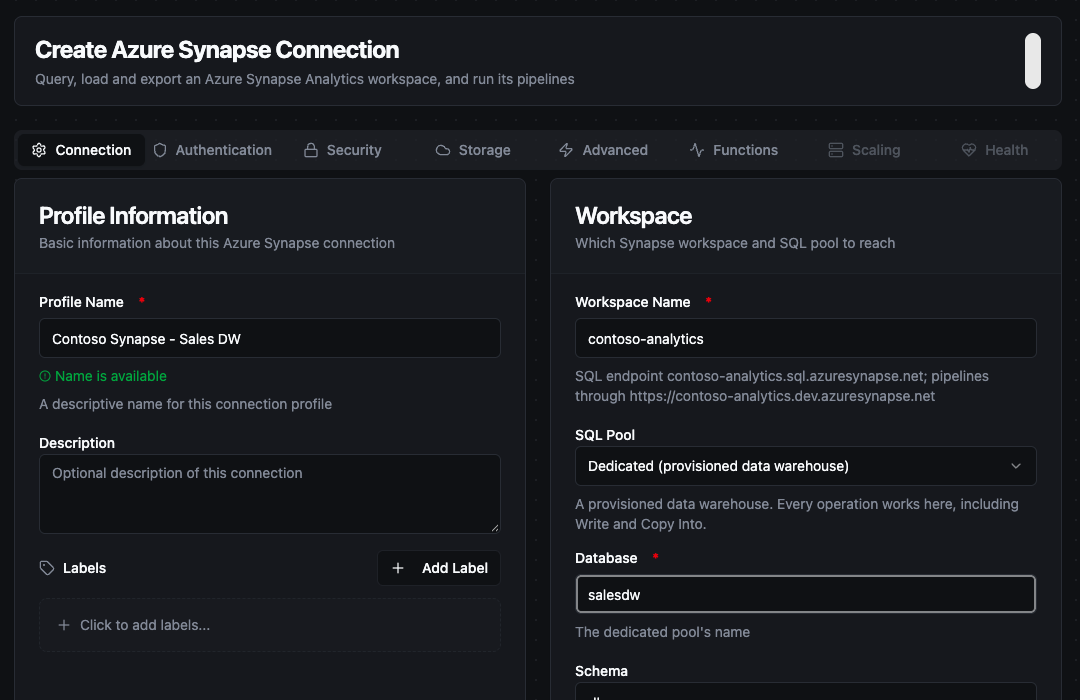
The workspace name derives both endpoints; the SQL Pool setting decides which one the connection opens
1. Profile Information
| Field | Default | Description |
|---|---|---|
| Profile Name | - | A descriptive name for this connection profile (required, max 100 characters) |
| Description | - | Optional description for this connection |
2. Workspace
| Field | Default | Description |
|---|---|---|
| Workspace Name | - | The Synapse workspace. The SQL endpoint and the development endpoint are derived from it. Required unless the SQL Endpoint Override is set |
| SQL Pool | Serverless | Serverless or Dedicated |
| Database | - | For a dedicated pool, the pool's name; for the serverless pool, master or a database created in it (required) |
| Schema | dbo | Default schema for table browsing, writes, Copy Into and Export To Storage |
3. Authentication
| Field | Default | Description |
|---|---|---|
| Authentication Method | Service principal | SQL authentication, Service principal, Managed identity or Default credential |
| Username / Password | - | The SQL login (SQL authentication only). The password is masked on edit |
| Tenant ID | - | Microsoft Entra tenant (service principal) |
| Client ID | - | The app registration's application ID (service principal), or a user-assigned identity's client ID (managed identity; leave empty for the system-assigned one) |
| Client Secret | - | The app registration's secret (service principal). Masked on edit |
4. Security
| Field | Default | Description |
|---|---|---|
| Encryption | true | TLS for the SQL connection. Azure requires it; strict uses TDS 8.0, where TLS wraps the whole session. disable exists only for a local SQL Server used for testing |
| Trust Server Certificate | Off | Accept the server certificate without verifying it. Leave off for Azure |
5. Storage
| Field | Default | Description |
|---|---|---|
| Storage Credential | Managed identity | How Copy Into authenticates to Azure Storage: the workspace's Managed identity, a SAS token, a Storage account key, or None for a public container |
| Storage Secret | - | The SAS token or account key, for those two credentials. Masked on edit |
Copy Into is executed by the SQL pool, which authenticates to storage itself. With Managed identity, grant the workspace's managed identity Storage Blob Data Reader (or Contributor) on the storage account. MaestroHub needs no storage permission of its own.
6. Advanced
| Field | Default | Description |
|---|---|---|
| SQL Endpoint Override | - | A host name that replaces the derived SQL endpoint: a private endpoint, a sovereign cloud, or a local SQL Server for testing |
| Port | 1433 | SQL endpoint port |
| Development Endpoint Override | - | A URL that replaces https://<workspace>.dev.azuresynapse.net for the pipeline functions. A plain http:// URL is treated as a local simulator and is sent no token |
| Connection Timeout | 30s | How long to wait for the SQL connection, including a paused pool waking up |
| Max Result Rows | 1000 | Maximum rows a query returns before truncating (1–100000) |
| Max Open / Idle Connections | 10 / 5 | Connection-pool sizing |
| Connection Max Lifetime / Idle Time | 900s / 300s | How long a pooled connection lives, and how long it may sit idle |
- Firewall: the workspace firewall applies to the SQL endpoints and the development endpoint alike. Allow the address MaestroHub connects from, or use a private endpoint and the overrides above.
- Row cap: a result larger than Max Result Rows is truncated, and the call's metadata says so — read
_metadata.truncatedin a pipeline. - Timeouts: each function has its own Timeout. When it expires, the statement is cancelled on the server too, so a long scan does not keep holding the pool's concurrency slot.
- Security: the password, the client secret and the storage secret are encrypted at rest and masked on edit. Leave a secret empty to keep the stored value.
Function Builder
Creating Synapse Functions
Once a connection exists, create reusable functions:
- Open the connection's Functions tab → New Function
- Choose a function type
- Configure the function and its parameters
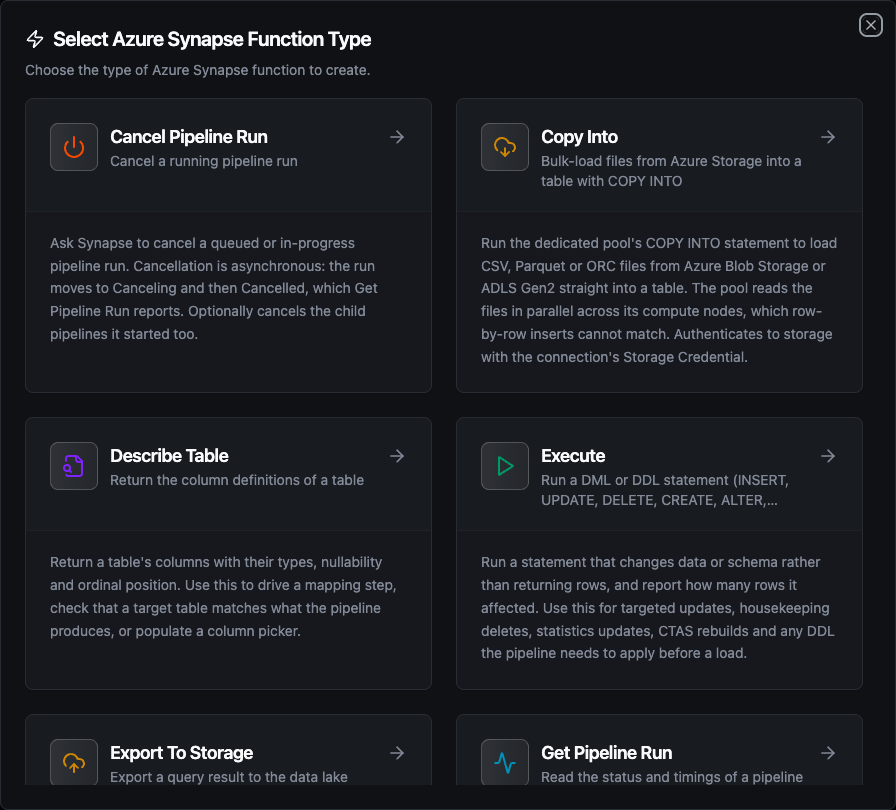
Eleven function types: seven for the SQL pool, four for pipelines
Query Function
Purpose: run a SELECT and return the rows as structured records. On the serverless pool this includes OPENROWSET over files in the lake.
| Field | Type | Required | Default | Description |
|---|---|---|---|---|
| SQL Query | String | Yes | - | T-SQL to run. Supports ((param)) templating |
| Max Rows | Number | No | connection default | Maximum rows to return (1–100000) |
| Timeout | Duration | No | 30m | Bound on this statement |
Example Configuration — the day's files in the lake, aggregated by the serverless pool:
{
  "sql": "SELECT machine_id, COUNT(*) AS readings, AVG(CAST(temp AS FLOAT)) AS avg_temp FROM OPENROWSET(BULK 'https://lake.dfs.core.windows.net/raw/readings/((day))/*.csv', FORMAT = 'CSV', PARSER_VERSION = '2.0', HEADER_ROW = TRUE) AS r GROUP BY machine_id"
}
Response Format
{
  "rows": [
    { "machine_id": "press-01", "readings": 8, "avg_temp": 40.76 }
  ],
  "rowCount": 1
}
Timestamps are delivered in UTC as RFC 3339 strings — a datetimeoffset of 10:00+03:00 arrives as 07:00:00Z — decimals as numbers, and uniqueidentifier values in their usual text form.
Execute Function
Purpose: run a statement that changes data or schema and report how many rows it affected. Use it for targeted updates, housekeeping deletes, UPDATE STATISTICS, CTAS rebuilds, and DDL a pipeline applies before a load.
| Field | Type | Required | Default | Description |
|---|---|---|---|---|
| SQL Statement | String | Yes | - | Statement to run. Supports ((param)) templating |
| Timeout | Duration | No | 30m | Bound on this statement |
Response Format
{ "rowsAffected": 3 }
rowsAffected is -1 when the statement has no row count of its own, so "matched no rows" stays distinguishable from "not a counting statement".
Write Function
Purpose: insert pipeline records into a dedicated-pool table, deriving the columns from the batch and optionally creating or widening the table to fit.
| Field | Type | Required | Default | Description |
|---|---|---|---|---|
| Table Name | String | Yes | - | Target table, in the connection's schema. Supports ((param)) templating |
| Data | Any | Yes | ((data)) | Rows to write. ((data)) takes them from the upstream node; a literal JSON array writes a fixed batch |
| Schema Hints | Object | No | - | Column types for table creation, e.g. {"note": "NVARCHAR(MAX)"} |
| Create Table If Not Exists | Boolean | No | false | Create the table on first write |
| Allow Schema Evolution | Boolean | No | inherits Create Table | Add columns when the payload carries fields the table lacks |
| Batch Size | Number | No | 500 | Rows per INSERT (1–1000); capped further so one statement binds at most 2,098 values |
| Timeout | Duration | No | 30m | Bound on this operation |
Response Format
{ "rowsInserted": 3 }
A dedicated pool accepts no multi-row VALUES list, so each batch is one INSERT … SELECT … UNION ALL SELECT … with every value bound as a parameter. A table the connector creates gets the pool's defaults: round-robin distribution and a clustered columnstore index.
Write is the right shape for pipeline output — hundreds or a few thousand rows per run. For large files already in the lake, Copy Into reads them in parallel across the pool's compute nodes, which no INSERT path matches.
Left unset, it follows Create Table If Not Exists. Turned on, a batch carrying a new field adds the column. Turned explicitly off, a batch that would need a new column is refused, naming the fields, rather than dropping them silently.
Copy Into Function
Purpose: run the dedicated pool's COPY INTO to load CSV, Parquet or ORC files from Azure Blob Storage or ADLS Gen2 into an existing table.
| Field | Type | Required | Default | Description |
|---|---|---|---|---|
| Table Name | String | Yes | - | Table to load into |
| Source URL | String | Yes | - | https://<account>.blob.core.windows.net/… or https://<account>.dfs.core.windows.net/… — a file, a folder, or a wildcard such as *.parquet |
| File Type | Enum | No | CSV | CSV, PARQUET or ORC |
| First Row | Number | No | 1 | CSV only: the first row to load in every file; 2 skips a header row |
| Field Terminator | String | No | , | CSV only: the column separator; hex notation such as 0x09 works |
| Max Errors | Number | No | 0 | Rejected rows the load tolerates before failing |
| Timeout | Duration | No | 30m | Bound on this operation |
Example Configuration
{
  "table": "sensor_archive",
  "sourceUrl": "https://lake.dfs.core.windows.net/raw/readings/((day))/*.csv",
  "fileType": "CSV",
  "firstRow": 2
}
Response Format
{ "table": "sensor_archive", "sourceUrl": "https://lake.dfs.core.windows.net/raw/readings/2026-09-28/*.csv", "rowsLoaded": 48 }
The source URL and the storage secret are the only values spliced into the statement rather than bound, because COPY INTO takes them as literals. The URL must be an Azure Storage https URL and is quoted; anything else is refused before it reaches the pool.
Export To Storage Function
Purpose: run a query and write its result to the lake as a new external table (CREATE EXTERNAL TABLE AS SELECT), without streaming the rows through MaestroHub. Works on both pools.
| Field | Type | Required | Default | Description |
|---|---|---|---|---|
| SQL Query | String | Yes | - | The SELECT whose result is exported |
| External Table Name | String | Yes | - | The external table to create over the files. It must not exist yet |
| Location | String | Yes | - | Folder under the data source to write to, e.g. exports/((month))/. It must be empty |
| External Data Source | String | Yes | - | An existing EXTERNAL DATA SOURCE pointing at the storage account |
| External File Format | String | Yes | - | An existing EXTERNAL FILE FORMAT, Parquet or delimited text |
| Timeout | Duration | No | 30m | Bound on this operation |
Response Format
{ "externalTable": "readings_2026_09", "location": "exports/2026-09/", "rowsExported": 48 }
The data source and file format are created once, by whoever administers the database:
CREATE MASTER KEY ENCRYPTION BY PASSWORD = '<a strong password>';
CREATE DATABASE SCOPED CREDENTIAL WorkspaceIdentity WITH IDENTITY = 'Managed Identity';
CREATE EXTERNAL DATA SOURCE lake WITH (LOCATION = 'https://<account>.dfs.core.windows.net/<container>', CREDENTIAL = WorkspaceIdentity);
CREATE EXTERNAL FILE FORMAT parquet_ff WITH (FORMAT_TYPE = PARQUET, DATA_COMPRESSION = 'org.apache.hadoop.io.compress.SnappyCodec');
Exporting to a location that already holds an export is refused by the pool (error 15842), so bind the location to something that changes per run.
List Tables Function
Purpose: enumerate the tables, views and external tables in a schema.
| Field | Type | Required | Default | Description |
|---|---|---|---|---|
| Schema | String | No | connection default | Schema to list |
| Name Filter | String | No | - | SQL LIKE pattern, e.g. sensor_% |
| Timeout | Duration | No | 30m | Bound on this operation |
Response Format
{
  "tables": [
    { "schema": "dbo", "name": "readings_export_2026_09", "type": "EXTERNAL TABLE" }
  ],
  "count": 1
}
type is BASE TABLE, VIEW or EXTERNAL TABLE, so a pipeline iterating tables to load into can skip the ones it cannot insert into.
Describe Table Function
Purpose: return a table's columns with their declared types and nullability, in ordinal order.
| Field | Type | Required | Default | Description |
|---|---|---|---|---|
| Table Name | String | Yes | - | Table to describe |
| Schema | String | No | connection default | Schema holding the table |
| Timeout | Duration | No | 30m | Bound on this operation |
Response Format
{
  "schema": "dbo",
  "table": "sensor_history",
  "columns": [
    { "name": "machine_id", "type": "nvarchar(4000)", "nullable": true }
  ],
  "columnCount": 1
}
Types carry their declared length and precision — nvarchar(4000), nvarchar(max), decimal(18,4) — so a mapping step can tell whether a value fits.
Run Pipeline Function
Purpose: start a run of a published Synapse pipeline and return its run ID at once, without waiting for it to finish. Pair it with Get Pipeline Run to read the outcome.
| Field | Type | Required | Default | Description |
|---|---|---|---|---|
| Pipeline Name | String | Yes | - | A pipeline published in the workspace. Supports ((param)) templating |
| Pipeline Parameters (JSON object) | String | No | - | Parameter values, e.g. {"day": "((day))"} |
| Timeout | Duration | No | 30m | Bound on the start call, not on the run |
Response Format
{ "pipelineName": "refresh_sales_mart", "runId": "a37adbaa-db2f-44fc-be75-41ad12fc86c2" }
A misspelled parameter name is not an error: the run starts, and the pipeline uses its default for the parameter you meant. Check the names against List Pipelines, which returns each pipeline's parameters.
Get Pipeline Run Function
Purpose: read one pipeline run by its run ID.
| Field | Type | Required | Default | Description |
|---|---|---|---|---|
| Run ID | String | Yes | - | The run ID Run Pipeline returned. Usually ((runId)) |
| Timeout | Duration | No | 30m | Bound on this operation |
Response Format
{
  "runId": "a37adbaa-db2f-44fc-be75-41ad12fc86c2",
  "pipelineName": "refresh_sales_mart",
  "status": "Succeeded",
  "terminal": true,
  "succeeded": true,
  "message": "",
  "runStart": "2026-09-29T15:30:52.3141191Z",
  "runEnd": "2026-09-29T15:31:19.2984313Z",
  "durationMs": 26984,
  "lastUpdated": "2026-09-29T15:31:19.2988558Z",
  "parameters": { "day": "2026-09-28" },
  "runGroupId": "a37adbaa-db2f-44fc-be75-41ad12fc86c2",
  "isLatest": true,
  "invokedBy": "Manual"
}
status is Queued, InProgress, Succeeded, Failed, Canceling or Cancelled. terminal is true once the run has stopped for good, which is what a polling loop waits for. A failed run is still a successful read: the node succeeds and message carries the reason, for example Operation on target Copy1 failed: ….
Cancel Pipeline Run Function
Purpose: ask Synapse to cancel a queued or in-progress run.
| Field | Type | Required | Default | Description |
|---|---|---|---|---|
| Run ID | String | Yes | - | The run to cancel |
| Cancel Child Runs | Boolean | No | false | Also cancel the runs of pipelines this run started |
| Timeout | Duration | No | 30m | Bound on this operation |
Response Format
{ "runId": "1b68319a-4796-4652-8d00-4b53ff4b682d", "recursive": true }
Cancelling is asynchronous: the run moves to Canceling, then Cancelled. Cancelling a run that has already finished is refused by Synapse with PipelineRunNotRunning.
List Pipelines Function
Purpose: return the pipelines published in the workspace with their parameters.
| Field | Type | Required | Default | Description |
|---|---|---|---|---|
| Max Items | Number | No | 100 | Maximum pipelines to return; the connector follows Synapse's pages until it has this many |
| Timeout | Duration | No | 30m | Bound on this operation |
Response Format
{
  "pipelines": [
    {
      "name": "refresh_sales_mart",
      "description": "Rebuilds the sales mart from the day's landed files",
      "folder": "marts",
      "parameters": { "day": { "type": "String", "defaultValue": "today" } },
      "activityCount": 3
    }
  ],
  "count": 1,
  "truncated": false
}
Using Parameters
The ((parameterName)) syntax turns a function into a dynamic, reusable building block. Parameters are auto-detected from the SQL and the other templated fields, and can be configured with:
| Configuration | Description | Example |
|---|---|---|
| Type | Data type validation | string, number, boolean, datetime, json, buffer |
| Required | Make the parameter mandatory or optional | Required / Optional |
| Default Value | Fallback when none is supplied | 2026-01-01, 1000 |
| Description | Help text | "Partition day (YYYY-MM-DD)" |
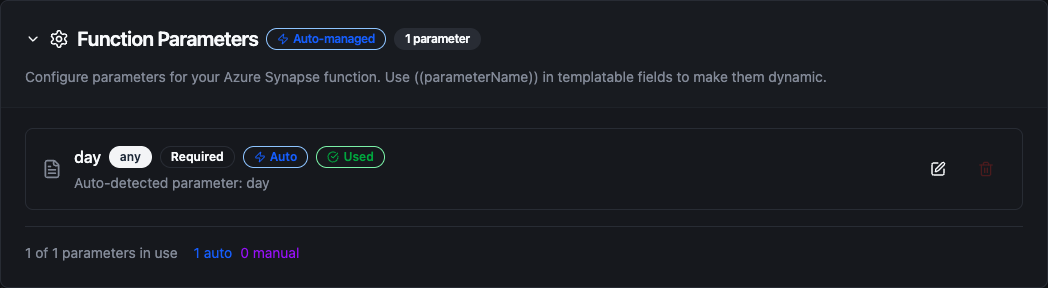
A parameter detected in a Copy Into source URL
The SQL, table name, data, source URL, external table name, location, schema, pipeline name, pipeline parameters and run ID accept ((parameter)) templating. Row values in a Write are always bound, never pasted into the statement.
Table types on write
When Create Table If Not Exists creates a table, column types come from the data or from your Schema Hints:
| Hint or value | Dedicated pool column | Why |
|---|---|---|
String, text values | NVARCHAR(4000) | Microsoft's guidance is NVARCHAR(4000) over NVARCHAR(MAX) wherever values fit. A longer value is refused as truncation (error 8152), not cut; give that field a hint of NVARCHAR(MAX) |
Float64, numbers with a fraction | FLOAT | A field is typed from the whole batch: 38.0 in one row and 38.1 in another makes it FLOAT, not BIGINT |
Int64, whole numbers | BIGINT | A later batch carrying a fraction for that column (38.1) is refused, not cut to 38. For a measurement that can arrive as 38.0, give the field a hint of Float64 |
DateTime, timestamp strings | DATETIME2 | Stored as the UTC instant — 10:00+03:00 lands as 07:00 |
Boolean | BIT | |
TEXT, NTEXT, XML, IMAGE | VARCHAR(8000), NVARCHAR(4000), NVARCHAR(4000), VARBINARY(MAX) | A dedicated pool has none of these types; the hint maps to Microsoft's documented replacement |
With the Visual Editor's structured schema, primary keys, unique constraints, foreign keys, check constraints, indexes and column comments are refused, naming each column: a dedicated pool enforces none of them. Create such a table yourself with Execute.
Pipeline Integration
Use the Synapse functions you create here as nodes in the Pipeline Designer. Drop a node on the canvas, bind its parameters to upstream outputs or constants, and configure error handling as needed.
Common patterns:
- Collect → Write: batch telemetry from the shop floor and land it in a dedicated-pool table
- Land → Copy Into: write files to ADLS Gen2 with the OneLake or Azure Blob Storage connector, then bulk-load them
- Lake → Query: aggregate the day's files with
OPENROWSETon the serverless pool, and act on the result - Run → Poll → Act: start a Synapse pipeline, loop on Get Pipeline Run until
terminalis true, then branch onsucceeded - Query → Export To Storage: hand a large extract to another system as Parquet in the lake
For the node reference, see Azure Synapse nodes. For broader orchestration patterns, see Connector Nodes.
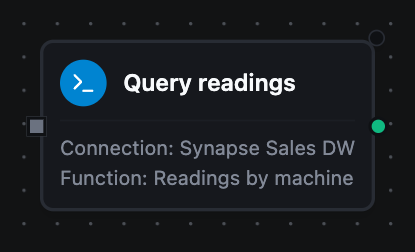
An Azure Synapse Query node with its connection and function bound
Common Use Cases
Landing OT telemetry in the warehouse
Scenario: batch sensor readings into a dedicated-pool table for Power BI.
Write Configuration:
{
  "table": "sensor_history",
  "data": "((data))",
  "createTableIfNotExists": true,
  "allowSchemaEvolution": true,
  "batchSize": 500
}
Pipeline Integration: an MQTT or OPC UA trigger feeds a buffer node, whose batch goes to the Write node. A new sensor field appears as a new column instead of being dropped.
Refreshing a mart after the day's files land
Scenario: once the day's files are in the lake, run the Synapse pipeline that rebuilds a mart, and alert if it fails.
Run Pipeline Configuration:
{ "pipelineName": "refresh_sales_mart", "pipelineParameters": "{\"day\": \"((day))\"}" }
Pipeline Integration: Run Pipeline returns the run ID; a loop around Get Pipeline Run (runId bound to $node["Run Pipeline"].result.runId) waits for terminal, and a condition node on succeeded sends the alert with message.
Querying the lake without a warehouse
Scenario: check the day's readings for out-of-range values directly in the files.
Query Configuration on a serverless connection:
{
  "sql": "SELECT machine_id, MAX(CAST(temp AS FLOAT)) AS max_temp FROM OPENROWSET(BULK 'https://lake.dfs.core.windows.net/raw/readings/((day))/*.parquet', FORMAT = 'PARQUET') AS r GROUP BY machine_id HAVING MAX(CAST(temp AS FLOAT)) > 60"
}
Pipeline Integration: no data is loaded anywhere; the serverless pool bills only the bytes it scanned.
Troubleshooting
| Symptom | Cause | What to do |
|---|---|---|
Login failed for user '<token-identified principal>' | The Entra ID identity has no login or user in the pool | Create it as shown under What an Entra ID identity needs |
Microsoft Entra ID refused the connection's credentials: AADSTS7000215: Invalid client secret provided. | The client secret is wrong or expired | Create a new secret on the app registration |
Login failed for user '<name>' with SQL authentication, when the password is right | The database named in the connection does not exist | Check the Database field: the pool's name, or a serverless database |
status 403 Forbidden: … does not have the required Synapse RBAC permission on a pipeline function | The identity lacks the Synapse RBAC roles | Assign Synapse Artifact User and Synapse Credential User; allow a minute or two |
Write needs a dedicated SQL pool | The connection points at the serverless pool | Use a connection to the dedicated pool |
COPY INTO failed: … Long cannot be cast to … Binary (error 106000) loading Parquet | The Parquet file stores a timestamp as INT64, which the dedicated pool's COPY cannot read into DATETIME2 — files written by the serverless pool's CETAS do this | Export the timestamp as text, or load that column into a BIGINT and convert |
Not able to validate external location … (404) Not Found (error 105215) | Copy Into found no files at the source URL | Check the path and the wildcard |
The first connections to a newly created pool fail with Read: EOF | The pool is still coming online | Wait a few minutes; the connection retries on its own |