 TCP Integration Guide
Plenty of shop-floor equipment speaks no protocol you can name: a label printer that takes ZPL on port 9100, a weight scale that emits one line per stable reading, a legacy controller with a bespoke ASCII command set behind a Moxa gateway. The TCP connector gives MaestroHub a byte-level client socket to those devices — you send the bytes the device expects, and read the bytes it answers with.
Overview
The TCP connector is a raw TCP client: it dials out to a device, it never listens for inbound connections. It provides:
- Three connection modes —
perCall(open, do, close),persistent(hold one socket across operations),stream(auto-connect and fire a pipeline trigger per chunk received) - Per-chunk pipeline triggers for continuous devices such as scales and barcode readers
- Byte encoding per connection or per operation:
utf8,ascii,hex,base64,bytes - Optional TLS wrapping with server-certificate or mutual-certificate authentication
- Cloud-metadata and loopback egress denial as SSRF hardening, resolved at dial time
There is no framing layer here — no length prefixes, no delimiter splitting, no checksums. Whatever your device needs around the payload, the pipeline builds on the way out and parses on the way in. A read returns whatever the socket had, which may be half a frame, one frame, or three.
Connection Modes
The Connection Mode is the single most consequential choice on the form. It decides which operations are usable and how the socket behaves between calls.
| Mode | What happens | Fits |
|---|---|---|
perCall (default) | Every operation opens a fresh socket, does its work, and closes it | Zebra label printers, one-shot commands, devices that expect a connection per job |
persistent | One socket is held across operations, reconnecting on drop | Hot-path polling, query-response sessions, devices that greet on connect |
stream | Auto-connects at instance start, holds the socket, and emits a pipeline trigger event for every chunk of bytes the device pushes | Weight scales in continuous mode, barcode readers, sensor feeds |
In perCall mode the socket is closed the instant the write drains — there is nothing left to read from. Receive refuses with tcp.receive requires connectionMode=persistent or stream (got perCall). Request still works in perCall mode because it writes and reads on the same fresh socket before closing it.
In persistent and stream mode the connection is only as alive as its held socket. When the device closes it (an idle timeout, a reboot, another client taking over), the connector releases the socket, the next health check fails, and the runtime reconnects. That takes up to about 35 seconds by default (the 30-second health check plus the reconnect worker's 5-second sweep; 36 seconds was measured for a dropped stream), or a few seconds when a function call is what found the socket dead. Until then the connection shows Reconnecting and calls fail with no held socket is open. A stream fires no trigger events in that window, and bytes the device sends before the new socket is up are lost.
Connection Configuration
Creating a TCP Connection
Navigate to Connections → New Connection → TCP. The form has six tabs: Connection, Security, Advanced, Functions, Scaling and Health. Functions, Scaling and Health unlock after the connection is saved.
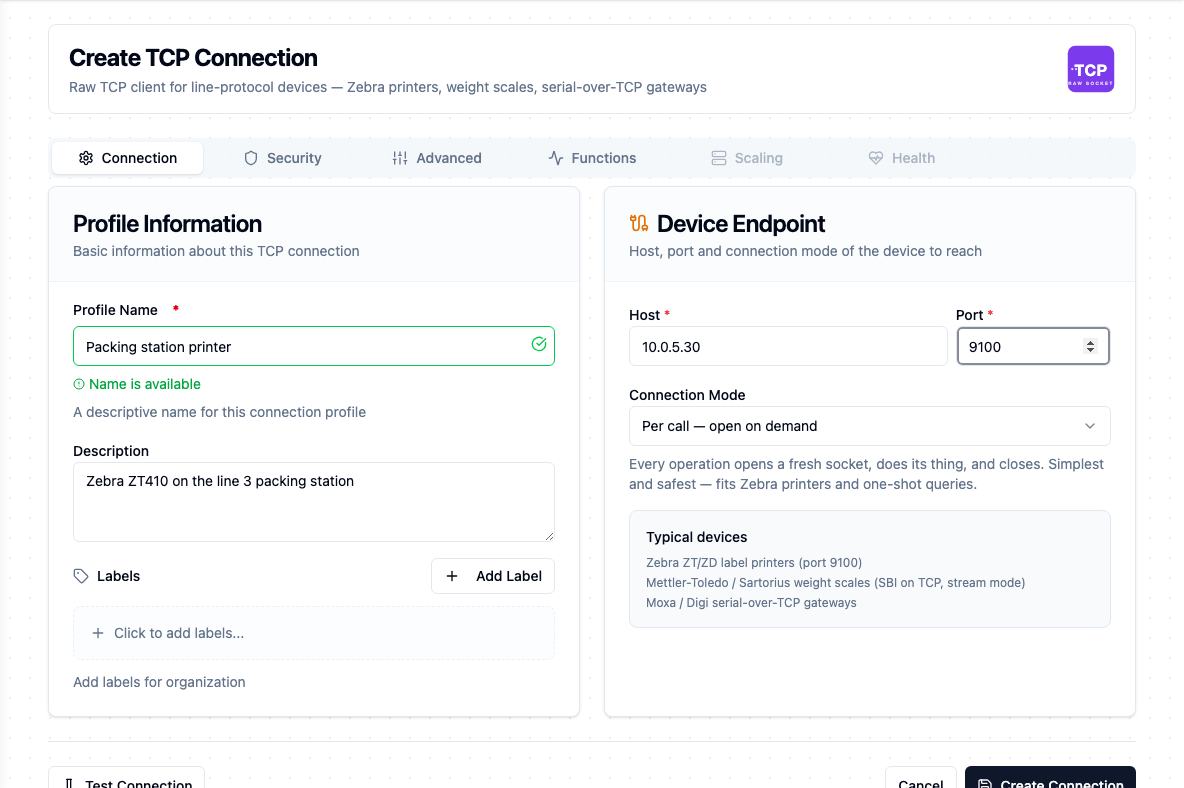
The Connection tab: profile, host and port, and the connection mode that decides how the socket is held
The configuration fields below are grouped the way the connector manifest declares them. In the form, the connection group's host/port/mode live on the Connection tab and its timeout fields on Advanced; stream, reconnect and encoding are on Advanced; security and tls are on Security.
1. Profile Information
| Field | Default | Description |
|---|---|---|
| Profile Name | — | A descriptive name for this connection profile (required, max 100 characters). Validated for uniqueness as you type. |
| Description | — | Optional description for this TCP connection |
| Labels | — | Key-value pairs to categorize the connection (max 10 labels), e.g. device: zebra-zt411, line: A |
2. Connection (connection group)
| Field | Default | Description |
|---|---|---|
| Host | — | Remote device host or IP address — required. Example: 10.0.5.30 |
| Port | — | Remote device port (1–65,535) — required. The form pre-fills 9100, the usual Zebra raw-print port. |
| Connection Mode | perCall | perCall / persistent / stream — see Connection Modes |
| Connect Timeout (seconds) | 5 | Maximum time to wait for the TCP dial to complete (1–300 s) |
| Read Timeout (seconds) | 30 | Maximum time a read call waits for bytes before timing out (1–3,600 s) |
| Write Timeout (seconds) | 10 | Maximum time a write call waits to drain bytes to the socket (1–300 s) |
| TCP Keep-Alive | true | Enable OS-level TCP keep-alive so half-open connections surface as errors rather than hanging |
3. Stream (stream group)
These fields only apply in stream mode, and the form only shows them when Connection Mode is stream.
| Field | Default | Description |
|---|---|---|
| Stream Read Buffer (bytes) | 8192 | Maximum chunk size emitted per pipeline trigger event (64–1,048,576) |
| Stream Read Timeout (milliseconds) | 1000 | How long the reader waits for more bytes before emitting the accumulated chunk (10–60,000 ms) |
| Stream Max Chunk Rate (per second) | 1000 | Cap on chunk events per second (1–100,000). Chunks above the cap are coalesced into fewer, larger events — no bytes are dropped. |
When a held socket drops, the runtime's health check reconnects it. The connector itself owns no reconnection schedule, so there is nothing to tune here.
4. Encoding (encoding group)
| Field | Default | Description |
|---|---|---|
| Default Byte Encoding | bytes | How pipeline payloads convert to and from wire bytes when the operation does not override — utf8 / ascii / hex / base64 / bytes |
Every operation carries bytes; the encoding decides how those bytes appear as a string in your pipeline.
| Encoding | Sending | Receiving |
|---|---|---|
utf8 | The string's bytes go on the wire as-is | The bytes come back as text |
ascii | Same as utf8, but a byte above 0x7F is rejected with non-ASCII byte 0x.. at index N | Same rejection applies to received bytes |
hex | The string is parsed as hex pairs (0102FF) | The bytes come back as a lowercase hex string |
base64 | The string is base64-decoded before sending | The bytes come back base64-encoded |
bytes | The string is base64-decoded before sending | The bytes come back base64-encoded |
bytes meansbytes is raw pass-through: MaestroHub makes no attempt to interpret the payload as text. Because JSON has no binary type, raw bytes travel as base64 — so on the wire bytes and base64 do exactly the same thing. Pick bytes when the payload is binary you never intend to read; pick base64 when you are deliberately exchanging base64 with a pipeline that knows it. Reach for hex or utf8/ascii only when the payload really is hex text or text — a text encoding applied to binary mangles anything that is not a valid character.
5. Security (security group)
| Field | Default | Description |
|---|---|---|
| Allow Loopback Destinations | false | Permit connections to 127.0.0.0/8 and ::1 |
| Allow Cloud-Metadata Destinations | false | Permit connections to 169.254.169.254 (AWS) and metadata.google.internal (GCP) |
A cloud instance's metadata endpoint hands out credentials to anything that asks — no authentication required. An outbound connector that a user can point at an arbitrary host is exactly the shape of an SSRF exfiltration primitive, so the metadata addresses are refused unless you deliberately opt in. Loopback is denied for a duller reason: on a MaestroHub host, 127.0.0.1 is almost never the industrial device you meant to reach, so a loopback target is usually a typo.
The check runs at dial time, not at save time, and inspects every address the host resolves to — so a hostname that later re-points at a metadata IP is caught when the socket is opened rather than against a stale answer. The well-known metadata names (169.254.169.254, fd00:ec2::254, metadata.google.internal, metadata, metadata.goog) are refused on the name alone. A DNS lookup that simply fails is not treated as an egress verdict — the dial proceeds and reports the DNS error normally.
Denials surface as tcp: destination blocked by egress policy: ... and are classified permanent: no amount of retrying will change the configuration that refused them.
6. TLS (tls group)
| Field | Default | Description |
|---|---|---|
| Use TLS | false | Wrap the TCP socket in TLS |
| Verify TLS Certificate | false | Verify the server's TLS certificate |
| TLS Server Name (SNI) | — | Server name for SNI / certificate verification. Optional; defaults to the connection Host. |
| CA Certificate (PEM) | — | Optional custom CA used to verify the server's certificate |
| Client Certificate (PEM) | — | Optional client certificate for mutual TLS (secret) |
| Client Private Key (PEM) | — | Optional client private key for mutual TLS (secret) |
The remaining TLS fields only appear once Use TLS is on. The negotiated connection is TLS 1.2 or newer. With Verify TLS Certificate on, the server certificate is checked against your CA Certificate when you supply one, and against the host trust store otherwise.
verifyTls defaults to false because industrial devices overwhelmingly ship self-signed certificates. That is a pragmatic default, not a safe one — turn it on, with a CA Certificate, for anything crossing a network you do not control.
Two cross-field rules are enforced both in the form and server-side at save:
- Configuring any TLS material (Verify TLS, Server Name, or any of the three PEM fields) while Use TLS is off is rejected:
TLS settings are configured but useTls is false — enable useTls, or clear verifyTls, tlsServerName and the certificate fields. A setting that cannot take effect fails loudly rather than being silently ignored. - Client Certificate and Client Private Key must be supplied together, or neither.
The two client PEM fields are stored encrypted and shown masked when you edit an existing connection.
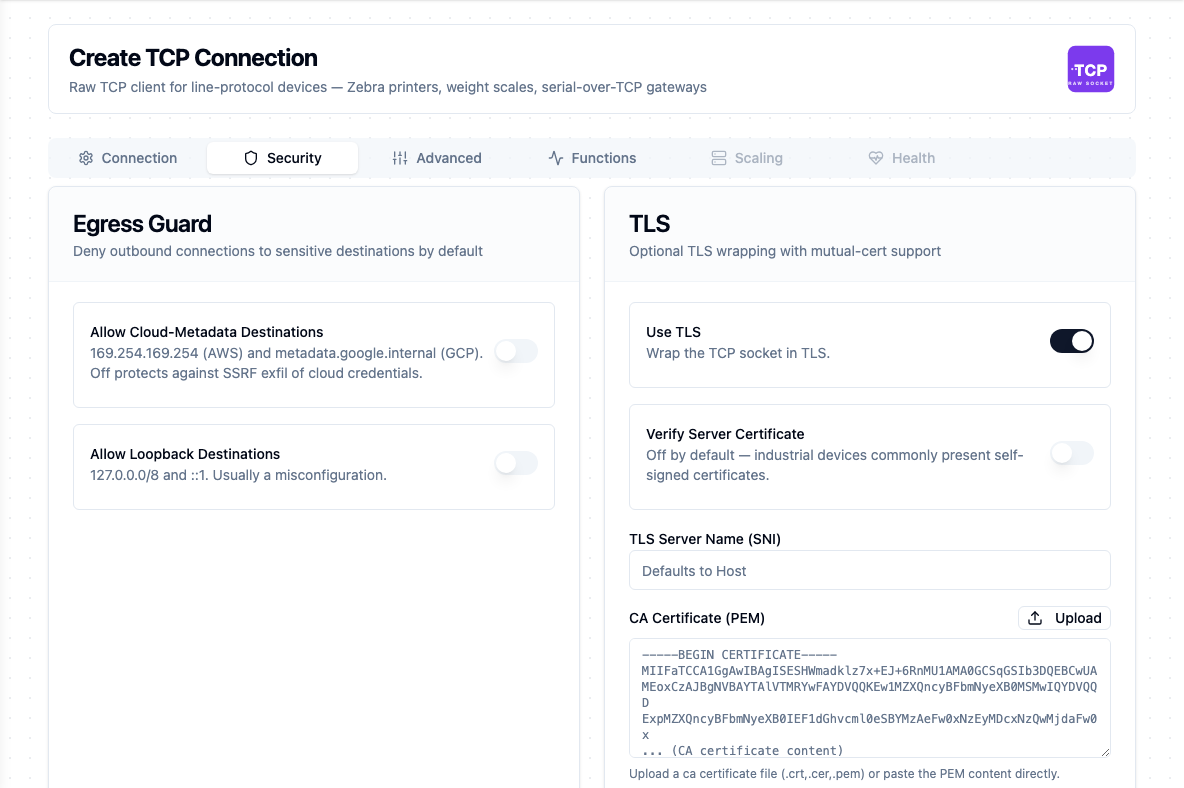
The Security tab: the egress guard switches, and the TLS fields that appear once Use TLS is on
Testing the Connection
Test Connection on the form connects with the current configuration — applying the egress policy and, if enabled, the TLS handshake — then issues the same probe the health check uses and reports its round-trip duration before disconnecting. That probe dials a fresh socket and closes it. With TLS on, it also listens for 250 ms after the handshake. Under TLS 1.3 a server that requires a client certificate rejects the client only after the client's handshake has returned, so without that wait the test would pass and the first real call would fail.
Scaling
TCP is a single-writer transport. One socket cannot be shared across replicas, and most target devices refuse concurrent client sessions, so a TCP connection is pinned to exactly one instance. The connector also serializes operations on a connection — one write in flight at a time.
Function Builder
Creating TCP Functions
After the connection is saved:
- Open the connection and go to the Functions tab
- Click New Function and pick Send, Receive, Request or Stream
- Fill the Basic tab (name, description, labels, and the operation's configuration)
- Use the Parameters tab to declare
((parameter))inputs detected in the Data field
Every operation also accepts a Timeout (requestTimeout) as a duration string such as 30s or 5m. For Send, Receive and Request it defaults to 30m and is bounded to 1 s – 1 h; the pipeline node exposes it as Timeout Override. Stream has no default — it is a long-running reader whose timing belongs to the connection lifecycle, so set it only if you want a hard cap before the reader recycles.
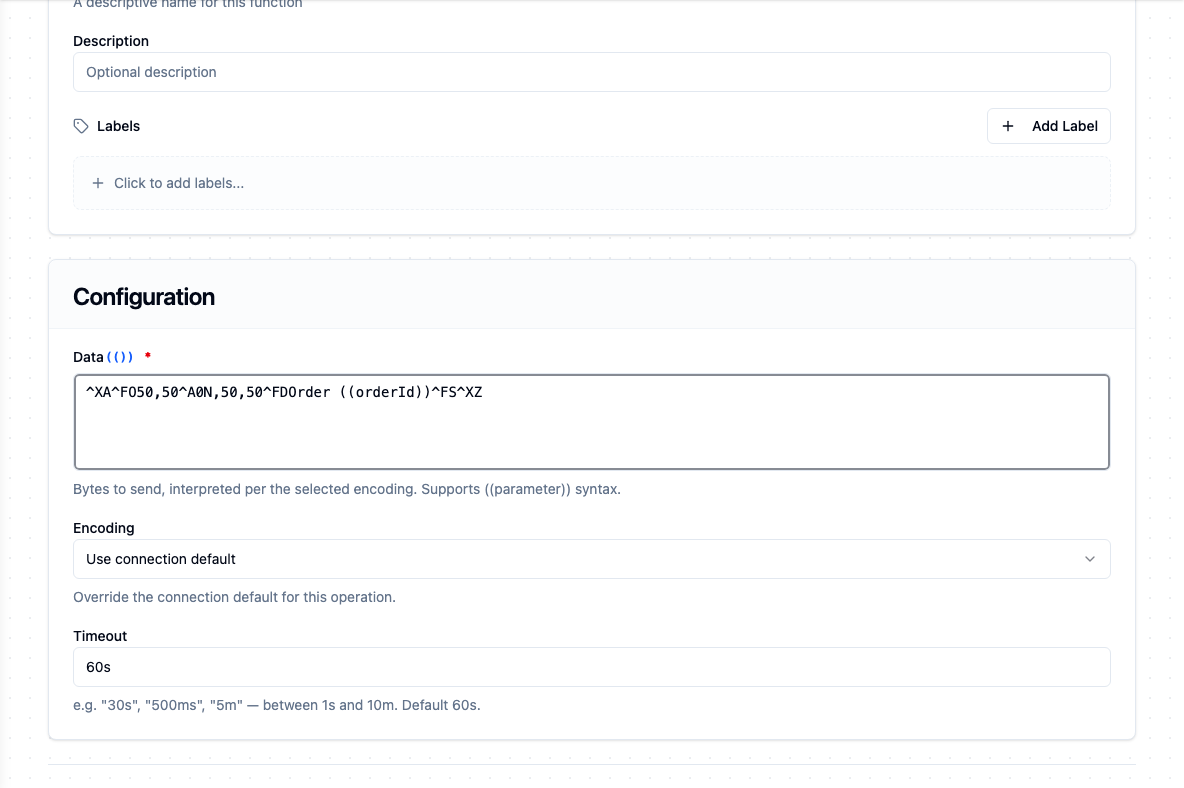
A Send function carrying a ZPL label; Data takes ((parameter)) placeholders, and Encoding and Timeout override the connection for this call
Send (tcp.send)
Purpose: Write bytes to the device and wait for the OS write buffer to drain. In perCall mode the socket is opened and closed around the write; in persistent and stream modes the held socket is reused.
| Field | Type | Required | Default | Description |
|---|---|---|---|---|
| Data | String | Yes | — | Bytes to send, interpreted per the selected encoding. Supports ((parameter)) syntax. |
| Encoding | Select | No | connection default | Override the connection's default byte encoding for this write |
| Timeout | Duration | No | 30m | Bound on this single write (1 s – 1 h) |
Example — print a ZPL label on a Zebra printer. Connection: host 10.0.5.30, port 9100, mode perCall, encoding utf8. Data:
^XA^FO50,50^A0N,50,50^FDOrder ((orderId))^FS^XZ
Other use cases: sending a scale its tare command, forwarding a formatted line-protocol frame to a Moxa or Digi serial-over-TCP gateway.
bytesWritten is not a delivery receiptIt counts what the connector handed to the kernel. TCP will retransmit and eventually surface a broken connection, but a successful write does not mean the device parsed, accepted or acted on the frame. Only a reply proves that — use Request when you need the answer.
Receive (tcp.receive)
Purpose: Read up to maxBytes from the held socket, or return fewer bytes when the read timeout elapses. Requires persistent or stream mode.
| Field | Type | Required | Default | Description |
|---|---|---|---|---|
| Max Bytes | Number | No | 4096 | Maximum number of bytes to read in this call (1–1,048,576) |
| Encoding | Select | No | connection default | How to encode the returned bytes for the pipeline |
| Timeout | Duration | No | 30m | Bound on this single read (1 s – 1 h) |
Partial reads are reported honestly rather than padded or retried — bytesRead tells you what actually arrived, and the pipeline reassembles. The closed flag surfaces a peer half-close so a pipeline can react instead of hammering a dead socket. A read that ends at the peer's close also releases the held socket, so the connection reconnects rather than reusing it.
Example — barcode reader on a persistent session. Connection mode persistent, encoding ascii, Max Bytes 256. Each call drains whatever scans have arrived since the last read; split on the reader's terminator (typically CR or CRLF) in a downstream transform.
Other use cases: reading a printer's status response after a query command, draining a device's output buffer until the peer half-closes.
Request (tcp.request)
Purpose: Write the payload, then read up to maxResponseBytes of response on the same socket. The convenience operation for query-response devices, and the usual choice.
| Field | Type | Required | Default | Description |
|---|---|---|---|---|
| Data | String | Yes | — | Bytes to send, interpreted per the selected encoding. Supports ((parameter)) syntax. |
| Max Response Bytes | Number | No | 4096 | Maximum response size to read (1–1,048,576) |
| Encoding | Select | No | connection default | Applies to both the payload sent and the response returned |
| Timeout | Duration | No | 30m | Bound on the whole write-then-read exchange (1 s – 1 h) |
This is not an application-level request/response — bytes in, bytes out. There is no correlation ID, no framing, and no guarantee the reply you read belongs to the query you wrote if the device is chatty.
If the device closes the socket without answering, Request fails with tcp.request: the peer closed the connection before replying instead of returning an empty data. The failure is transient: the runtime checks the link at once, and a retry lands on a fresh socket.
Example — query a Zebra printer's status. Connection mode perCall, encoding utf8, Data ~HS, Max Response Bytes 4096. The printer's three status lines come back in result.data.
Other use cases: polling a weight scale for one reading, asking a checkweigher for its last passed-weight sample.
Stream (tcp.stream)
Purpose: A trigger, not a callable node. In stream mode the connector auto-connects at instance start, holds the socket, and fires a pipeline trigger event for every chunk of bytes the device pushes.
Apart from the optional Timeout above, a stream has no per-function configuration. Its settings live on the connection: Stream Read Buffer, Stream Read Timeout, Stream Max Chunk Rate and Default Byte Encoding. A chunk is emitted as soon as bytes have been read and the chunk-rate cap allows, or when the stream read timeout elapses with bytes still pending; a single read is bounded by the Stream Read Buffer size.
Each event carries the encoded chunk as its payload, plus encoding, endpoint and receivedAt as metadata. There is no per-chunk framing description, because a raw TCP stream carries none.
Example — Mettler-Toledo scale in continuous mode. Connection mode stream, encoding ascii, Stream Read Timeout 1000 ms. Every weight line the scale emits becomes a pipeline execution; parse the line and publish the stable readings to the UNS.
Other use cases: ingesting each scan from a barcode reader over a held session, triggering a pipeline on any bytes arriving on a serial-over-TCP gateway.
A stream has no on-demand answer, so Test does not read from the device. It checks the function's configuration, reports whether the connection is up, and says in a note that nothing was subscribed. Chunks only flow once an enabled pipeline uses the function in a TCP Stream Trigger. The trigger also needs connectionMode=stream: subscribing from a perCall or persistent connection is rejected.
Framing is the pipeline's job
This is worth restating because it is the most common source of surprise. The connector never inspects your bytes:
- Outbound — build the complete frame the device expects (length prefix, STX/ETX, delimiter, checksum) in the Data field before it is sent.
- Inbound — a read returns whatever the socket had at that instant. On a
persistentconnection that can include a device greeting, the echo of an earlier Send, and the frame you actually wanted, all in one string. Parse for your delimiter; never assumeresult.dataholds exactly one message.
Using Parameters
The Data field on Send and Request supports ((parameterName)) placeholders. Parameters are auto-detected as you type and appear in the Parameters tab, then surface as inputs on the pipeline node.
| Configuration | Description | Example |
|---|---|---|
| Type | Coerce incoming values | string, number, boolean, json |
| Required | Force critical inputs | Required / Optional |
| Default Value | Provide a fallback at execution | 'UNKNOWN', 0 |
| Description | Document intent for other authors | "Order ID resolved from the upstream node" |
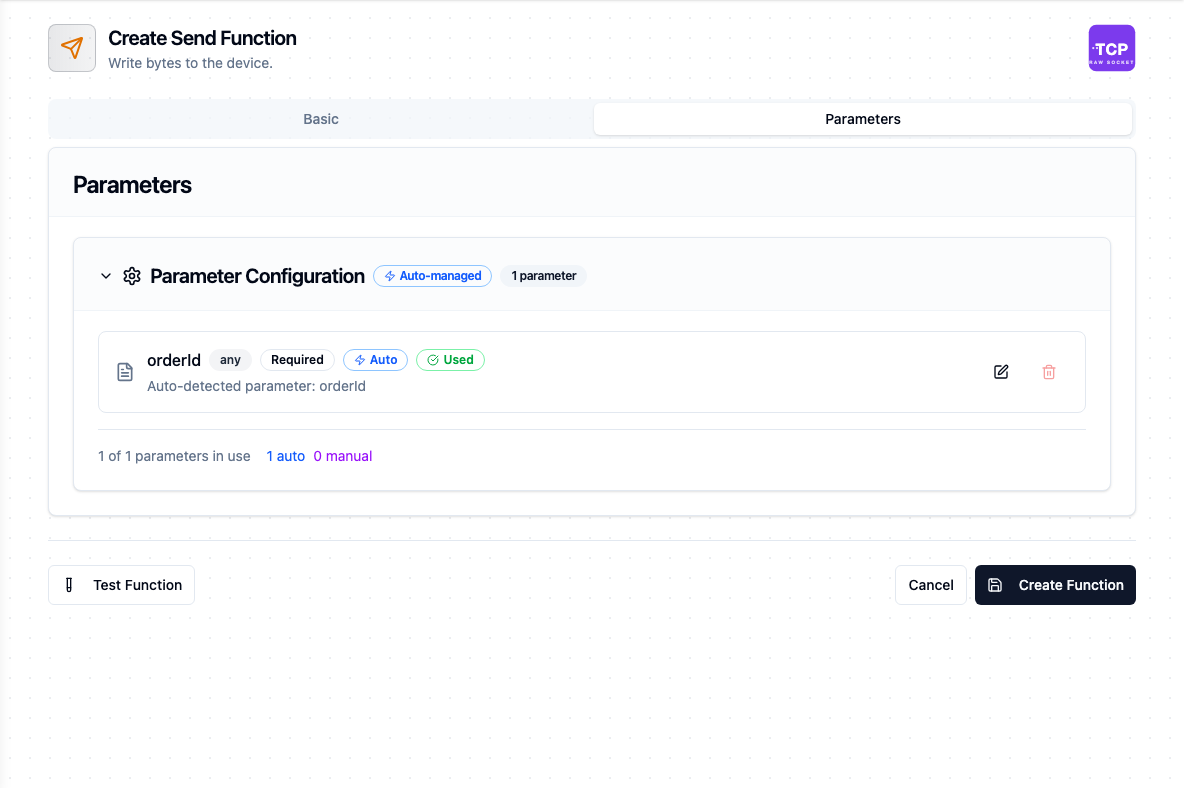
The Parameters tab picks up ((orderId)) from Data on its own
The templating engine recognises ((double parentheses)). {{ curly braces }} are stored as literal text and never substituted.
Understanding the Result
Send, Receive and Request deliver their data under result and execution facts under _metadata:
| Operation | Result fields |
|---|---|
| Send | bytesWritten |
| Receive | data, bytesRead, closed |
| Request | data, bytesWritten, bytesRead, closed |
_metadata carries method, connectionId, protocol (tcp), endpoint (the host:port spoken to) and mode (the connection mode the call ran in), alongside the standard success, durationMs and timestamp.
For the full expression reference — how to read each field from a pipeline node — see Raw TCP Nodes.
Pipeline Integration
Use the functions you build here as nodes in the Pipeline Designer: TCP Send to fire a print job or push a setpoint frame, TCP Receive to drain a buffered line, and TCP Request for any request/response command set. A tcp.stream function becomes a trigger that starts the pipeline on each chunk instead.
For the node-level field reference and error-handling behaviour, see Raw TCP Nodes. To see how TCP fits alongside other connectors in multi-step flows, see Connector Nodes.
Common Use Cases
Label Printing on Demand
A perCall connection to a Zebra printer on port 9100, with a Send function whose Data field is a ZPL template parameterised by order ID, lot and quantity. Each pipeline run opens a socket, prints, and closes — no session state to leak between jobs.
Weight Capture from a Scale
For a scale in continuous mode, a stream connection turns every emitted line into a pipeline execution; parse and publish only the stable readings. For a scale that answers a poll, a perCall Request on a schedule is simpler and puts the timing under your control.
Barcode and Scanner Ingestion
A stream connection to a fixed-mount scanner turns each scan into a trigger event. Pair with a transform that splits on the reader's terminator, then route the code to whichever downstream system owns traceability.
Legacy Serial Equipment via a Gateway
A Moxa or Digi serial-over-TCP gateway exposes an RS-232/RS-485 device on a TCP port. Use persistent mode with Request for command/response devices, and hex encoding when the protocol is binary rather than ASCII.
Troubleshooting
Connection Issues
| Symptom | Possible Cause | Solution |
|---|---|---|
tcp: destination blocked by egress policy: ... resolves to loopback IP | The host resolves to 127.0.0.0/8 or ::1 | Point at the real device address, or enable Allow Loopback Destinations if the target genuinely is on this host |
tcp: destination blocked by egress policy: ... cloud metadata | The host resolves to a cloud metadata endpoint | Almost always a misconfiguration. Only enable Allow Cloud-Metadata Destinations if you truly intend to reach it. |
connection refused / no such host / host unreachable | Device off, wrong port, or wrong address | These are classified permanent and are not retried — fix the address or bring the device up |
TLS settings are configured but useTls is false | TLS material set with Use TLS off | Enable Use TLS, or clear Verify TLS, Server Name and the certificate fields |
tlsClientCert and tlsClientKey must be provided together (or neither) | Only one half of the mTLS pair supplied | Provide both PEMs, or clear both |
TLS handshake fails (tls: / x509: error) | Wrong CA, wrong SNI, or clock skew | Classified permanent. Set TLS Server Name to the name on the certificate, or supply the matching CA. |
remote error: tls: certificate required | The server requires a client certificate (mutual TLS) and none is configured | Set Client Certificate and Client Private Key on the Security tab |
tlsCaCertPem is not a valid PEM certificate on save | The CA field holds something other than a PEM certificate | Paste the whole certificate, including the BEGIN CERTIFICATE and END CERTIFICATE lines |
| Connection drops and re-establishes repeatedly | Device closes idle sessions, or a firewall reaps them | Enable TCP Keep-Alive, or move to perCall mode so each operation brings its own socket |
Function Issues
| Symptom | Possible Cause | Solution |
|---|---|---|
tcp.receive requires connectionMode=persistent or stream (got perCall) | Receive used on a per-call connection | Switch the connection to persistent, or use Request instead so the write and read share one socket |
no held socket is open (the connection is reconnecting, or was never connected) | The device dropped the held socket and the runtime has not reconnected yet, or the connection was never started | Wait for the connection to return to Connected: the next health check reconnects it, within 30 seconds by default. The Health tab shows the last state-change reason |
Testing a Stream function shows validated, connected and a note, but no data | Expected: a stream delivers through its trigger, never on demand | Wire the function into a TCP Stream Trigger and enable the pipeline |
tcp.subscribe requires connectionMode=stream | A stream function on a non-stream connection | Set the connection's Connection Mode to stream |
hex encoding: encoding/hex: ... | The Data field is not valid hex pairs | Use an even number of hex digits and no separators, or switch encoding |
ascii encoding: non-ASCII byte 0x.. at index N | Payload contains a byte above 0x7F | Switch the operation's encoding to utf8, hex or bytes |
tcp.receive: read tcp ...: i/o timeout | Nothing arrived within the read window: the connection's Read Timeout, or the function's Timeout when that is shorter | Raise the timeout, or confirm the device actually pushes without being asked. Classified transient, so a retry is safe |
result.data holds several messages glued together | A persistent socket buffered everything since the last read | Parse for your delimiter rather than assuming one message per read |
| Stream trigger never fires | No pipeline has a trigger bound to the tcp.stream function | Chunks are only fanned out to registered subscriptions — wire the trigger into a pipeline |
| Stream stops firing after the device restarts | The device dropped the held socket and the connection is reconnecting | Wait for the next health check (30 seconds by default); the stream resumes on the new socket. Bytes the device sent in between are lost |
tcp.request: the peer closed the connection before replying | The device accepted the command and hung up without answering | Check that the command is one the device answers. On a held socket, the retry runs on a fresh one |
| Stream chunks arrive larger and less often than expected | The chunk-rate cap is coalescing them | Raise Stream Max Chunk Rate; no bytes are lost, they are batched |
Use the Test button on a saved Send, Receive or Request function to run it against the live device and inspect the result — including bytesWritten, bytesRead and the decoded data — before putting it in a pipeline. Testing a Stream function only confirms its configuration and the connection state, so validate that one by wiring it into a pipeline and watching events arrive.