AWS Glue Integration Guide
Connect to AWS Glue to run serverless ETL and read the metadata catalog the rest of your AWS analytics stack already queries. This guide covers connection setup, function configuration, and pipeline integration.
Overview
AWS Glue is a serverless ETL service with a shared metadata catalog. The connector covers three things a pipeline needs from it:
- Jobs — start an ETL job run with per-run arguments and worker overrides, then read its state, timings and error message
- Crawlers — start a crawler so newly landed data becomes queryable, then read its state and the outcome of its last crawl
- Data Catalog — browse databases, tables and full table schemas; the same catalog Athena, Redshift Spectrum and EMR read
- Flexible authentication — IAM role / instance profile / IRSA via the AWS SDK default credential chain, or static access keys
- Cross-account catalogs via an explicit Catalog ID
Glue jobs routinely run for tens of minutes and crawls for minutes. Start Job Run and Start Crawler return as soon as AWS accepts the request — they do not block until it finishes. Pair them with Get Job Run / Get Crawler in a later node to check the state, so a long run never holds a pipeline open.
Connection Configuration
Creating an AWS Glue Connection
Navigate to Connections → New Connection → AWS Glue and configure the following:
1. Profile Information
| Field | Default | Description |
|---|---|---|
| Profile Name | - | A descriptive name for this connection profile (required, max 100 characters) |
| Description | - | Optional description for this Glue connection |
2. Region & Catalog
| Field | Default | Description |
|---|---|---|
| Region | us-east-1 | AWS region holding the Glue jobs, crawlers and Data Catalog (required). Glue is regional — all three live in one region |
| Catalog ID | - | AWS account ID owning the Data Catalog. Leave empty for the account the credentials belong to; set it to read a catalog shared from another account. Must be 12 digits |
3. Authentication
| Field | Default | Description |
|---|---|---|
| Access Key ID | - | AWS Access Key ID. Masked on edit. Leave empty to use the AWS SDK default credential chain (env vars, shared config, IAM role, IRSA) |
| Secret Access Key | - | AWS Secret Access Key. Masked on edit; required when Access Key ID is set |
| Session Token | - | Session token for temporary STS credentials (optional). Masked on edit |
Leave both key fields empty and the connector uses the AWS SDK default credential chain — an instance profile on EC2, IRSA on EKS, or ~/.aws/credentials locally. There is then no long-lived secret to rotate. Setting one key without the other is rejected at save time rather than silently falling back to the chain.
4. Advanced
| Field | Default | Description |
|---|---|---|
| Custom Endpoint | - | Custom Glue endpoint URL for moto, LocalStack or another Glue-compatible service. Leave empty for AWS Glue |
| Request Timeout | 30s | Timeout for a single Glue API call (1s–1h). Bounds the API call, not the job run or crawl it starts |
| Max Retries | 3 | Retries after the first attempt for transient failures (0 = no retries, up to 10) |
IAM Permissions
The connection test calls glue:GetDatabases. Each function needs its own action:
| Function | IAM action |
|---|---|
| Start Job Run | glue:StartJobRun |
| Get Job Run | glue:GetJobRun |
| List Jobs | glue:GetJobs |
| Start Crawler | glue:StartCrawler |
| Get Crawler | glue:GetCrawler |
| List Crawlers | glue:GetCrawlers |
| List Databases | glue:GetDatabases |
| List Tables | glue:GetTables |
| Get Table | glue:GetTable |
Testing the Connection
Click Test Connection before saving. It calls GetDatabases for a single item — enough to prove the round trip, credentials and region. An empty catalog is still a successful test.
Failures name what to fix rather than echoing the SDK:
| What you see | What it means |
|---|---|
could not reach … | Wrong endpoint URL, or the service is not running |
… did not respond in time | The endpoint answered too slowly: the call hit its timeout. Check the service's load, or raise the connection's Request Timeout or the function's Timeout |
unable to resolve AWS credentials | No keys given and the default chain found none |
AWS rejected the provided credentials | The Access Key ID or Secret Access Key is wrong |
not authorized to call glue:GetDatabases | The principal is valid but lacks the permission |
Glue could not find the Data Catalog | The Catalog ID names an account whose catalog this principal cannot see |
Function Builder
Creating Glue Functions
Open a saved connection, go to the Functions tab, and click New Function. The picker shows all nine operations, grouped by what they act on:
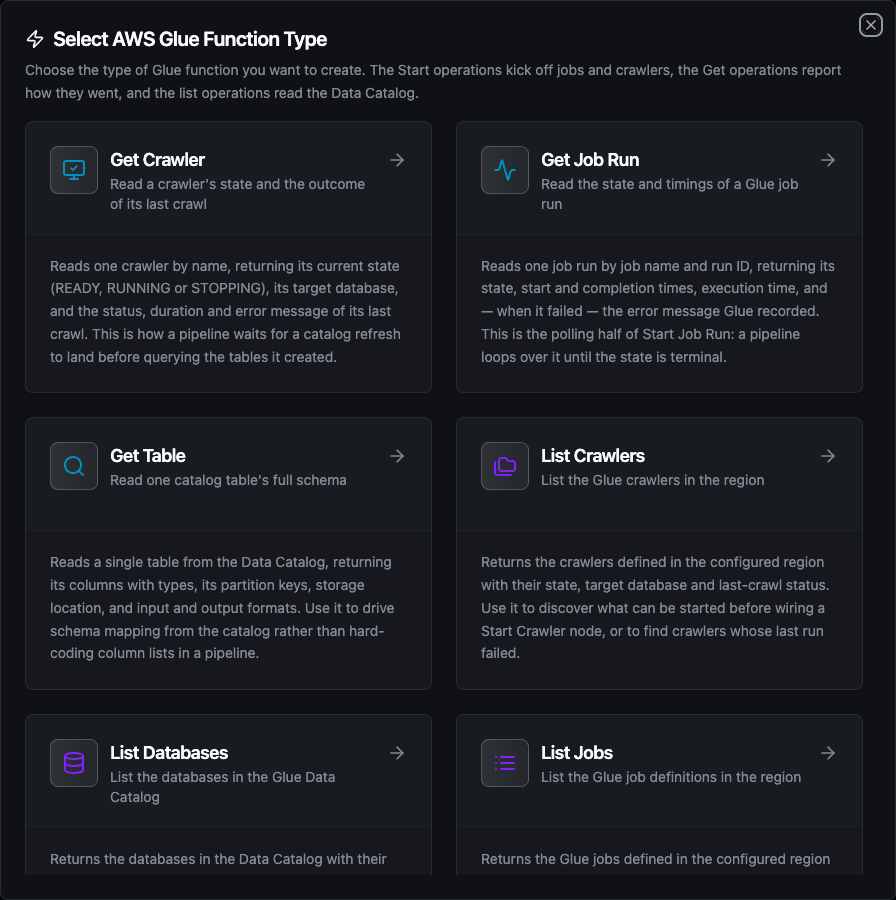
Choosing a Glue function type
Start Job Run Function
Starts a run of an existing Glue job and returns the run ID.
| Field | Required | Description |
|---|---|---|
| Job Name | Yes | Name of the Glue job to run. It must already exist in this region. Templatable |
| Job Arguments (JSON object) | No | JSON object of job arguments, merged over the job's defaults. Glue expects the -- prefix on each key, and every value must be a string. Templatable |
| Worker Type | No | Override the job's worker type for this run (G.025X, G.1X, G.2X, G.4X, G.8X, Z.2X, Standard) |
| Number of Workers | No | Override the number of workers for this run (2–1000) |
| Timeout | No | Bound on the StartJobRun API call itself |
Result:
{
  "runId": "jr_8a1f3c5e9b2d4a6f8c0e2a4b6d8f0a2c4e6b8d0f2a4c6e8b0d2f4a6c8e0b2d4f"
}
Glue takes WorkerType and NumberOfWorkers together — one without the other is an InvalidInputException at run time. Set both, or leave both empty to use the job's own settings. The form and the API both refuse a half-filled pair at save time.
{"--retries": 3} is rejected: Glue's job arguments are a string→string map, so write {"--retries": "3"}. The error names the offending key.
Get Job Run Function
Reads one job run by job name and run ID. This is the polling half of Start Job Run.
| Field | Required | Description |
|---|---|---|
| Job Name | Yes | Name of the Glue job the run belongs to. Templatable |
| Run ID | Yes | The run ID returned by Start Job Run. Templatable |
| Timeout | No | Bound on this single operation |
Result:
{
  "runId": "jr_8a1f…",
  "state": "SUCCEEDED",
  "startedOn": "2026-09-22T02:00:00Z",
  "completedOn": "2026-09-22T02:07:13Z",
  "executionTime": 433,
  "attempt": 0,
  "errorMessage": "",
  "workerType": "G.1X",
  "numberOfWorkers": 2,
  "glueVersion": "4.0"
}
errorMessage is always present and empty on a run that has not failed. completedOn is empty while the run is still going — that is how a polling loop tells a terminal state from a running one without parsing the state string.
List Jobs Function
Returns the Glue jobs defined in the region with their role, command, Glue version and worker shape.
| Field | Required | Description |
|---|---|---|
| Max Items | No | Maximum jobs to return, 1–1000 (default 100). The connector paginates in pages of 100 until the budget is met |
| Timeout | No | Bound on this single operation |
Result:
{
  "jobs": [
    {
      "name": "ot-daily-rollup",
      "description": "Daily OT rollup",
      "role": "arn:aws:iam::123456789012:role/GlueETL",
      "glueVersion": "4.0",
      "workerType": "G.1X",
      "numberOfWorkers": 2,
      "commandName": "glueetl",
      "scriptLocation": "s3://ot-scripts/rollup.py",
      "createdOn": "2026-04-02T09:12:00Z"
    }
  ],
  "count": 1,
  "nextToken": "AAAA…"
}
nextToken appears only when the item budget stopped the listing; _metadata.truncated says the same thing as a boolean.
Start Crawler Function
Starts an existing crawler so it re-reads its targets and folds any new tables or partitions into the catalog.
| Field | Required | Description |
|---|---|---|
| Crawler Name | Yes | Name of the crawler to start. It must already exist in this region. Templatable |
| Timeout | No | Bound on the StartCrawler API call itself |
Result:
{ "started": true }
Glue refuses to start a crawler that is already running, and the node reports that as a failure — but a transient one, so the run is retried rather than dead-lettered. Two pipelines refreshing the same catalog hit this routinely. Use Get Crawler to wait for READY before starting again.
Get Crawler Function
Reads one crawler by name, with the outcome of its last crawl.
| Field | Required | Description |
|---|---|---|
| Crawler Name | Yes | Name of the crawler to read. Templatable |
| Timeout | No | Bound on this single operation |
Result:
{
  "state": "READY",
  "databaseName": "ot_archive",
  "description": "Discovers new OT partitions",
  "role": "arn:aws:iam::123456789012:role/GlueCrawler",
  "crawlElapsedTime": 0,
  "lastCrawlStatus": "SUCCEEDED",
  "lastCrawlStartedOn": "2026-09-22T01:30:00Z",
  "lastCrawlErrorMessage": ""
}
The three lastCrawl* keys are always present and empty on a crawler that has never run.
List Crawlers Function
Returns the crawlers in the region with their state, target database and last-crawl status.
| Field | Required | Description |
|---|---|---|
| Max Items | No | Maximum crawlers to return, 1–1000 (default 100) |
| Timeout | No | Bound on this single operation |
Result:
{
  "crawlers": [
    {
      "name": "ot-archive-crawler",
      "state": "READY",
      "databaseName": "ot_archive",
      "description": "Discovers new OT partitions",
      "lastCrawlStatus": "SUCCEEDED",
      "lastCrawlStartedOn": "2026-09-22T01:30:00Z"
    }
  ],
  "count": 1,
  "nextToken": "AAAA…"
}
List Databases Function
Returns the databases in the Data Catalog.
| Field | Required | Description |
|---|---|---|
| Max Items | No | Maximum databases to return, 1–1000 (default 100) |
| Timeout | No | Bound on this single operation |
Result:
{
  "databases": [
    {
      "name": "ot_archive",
      "description": "Landed OT telemetry",
      "locationUri": "s3://ot-lake/archive/",
      "catalogId": "123456789012"
    }
  ],
  "count": 1,
  "nextToken": "AAAA…"
}
List Tables Function
Returns the tables in one catalog database, optionally filtered by a name pattern.
| Field | Required | Description |
|---|---|---|
| Database | Yes | Catalog database whose tables to list. Templatable |
| Name Filter | No | Glue filter pattern on the table name, e.g. readings_*. Leave empty for all. Templatable |
| Max Items | No | Maximum tables to return, 1–1000 (default 100) |
| Timeout | No | Bound on this single operation |
Result:
{
  "tables": [
    {
      "name": "readings",
      "tableType": "EXTERNAL_TABLE",
      "location": "s3://ot-lake/archive/readings/",
      "columnCount": 4,
      "partitionKeyCount": 1,
      "updateTime": "2026-09-22T01:34:00Z"
    }
  ],
  "count": 1,
  "nextToken": "AAAA…"
}
A listing carries counts rather than the columns themselves — a wide catalog would otherwise deliver thousands of column objects nobody asked for. Get Table returns the schema.
Get Table Function
Reads a single table's full schema.
| Field | Required | Description |
|---|---|---|
| Database | Yes | Catalog database the table belongs to. Templatable |
| Table | Yes | Name of the table to read. Templatable |
| Timeout | No | Bound on this single operation |
Result:
{
  "tableType": "EXTERNAL_TABLE",
  "location": "s3://ot-lake/archive/readings/",
  "inputFormat": "org.apache.hadoop.mapred.TextInputFormat",
  "outputFormat": "org.apache.hadoop.hive.ql.io.HiveIgnoreKeyTextOutputFormat",
  "columns": [
    { "name": "machine_id", "type": "string", "comment": "Line asset ID" }
  ],
  "partitionKeys": [
    { "name": "day", "type": "string", "comment": "" }
  ],
  "createTime": "2026-04-02T09:12:00Z",
  "updateTime": "2026-09-22T01:34:00Z"
}
columns and partitionKeys are always lists — empty rather than absent, so a downstream ForEach over an unpartitioned table does nothing instead of reporting source is nil.
Using Parameters
Any field marked templatable accepts ((parameterName)). Parameters are detected as you type and listed in the Function Parameters card:
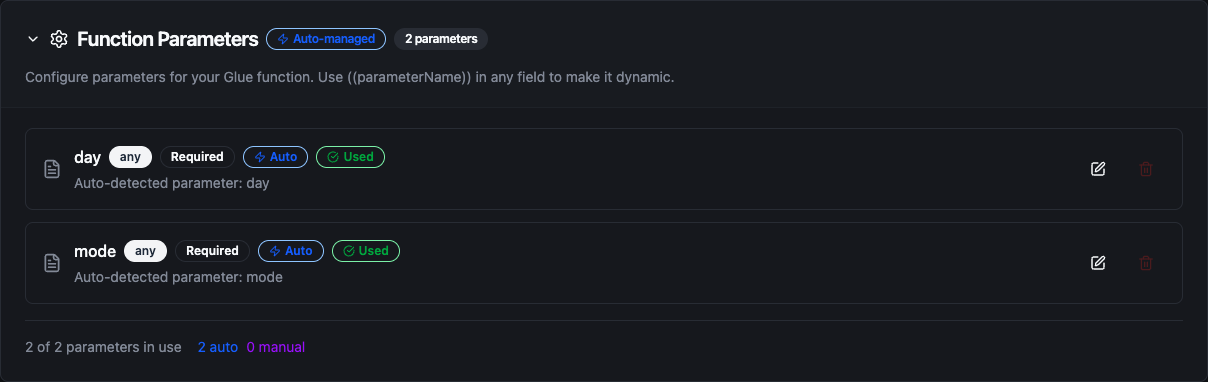
Parameters detected from ((day)) and ((mode)) in the job arguments
A pipeline supplies their values at execution time, so one Start Job Run function can serve every day of a backfill.
Pipeline Integration
Each function becomes a node in the pipeline editor under Databases. See the AWS Glue node reference for node-level configuration.
The shape that comes up most often is start → wait → read:
- Start Job Run kicks off the ETL job and emits
runId - A Delay node waits
- Get Job Run reads the state using
$node["Start Job Run"].result.runId - A Condition node branches on
state— loop back to the delay while it isRUNNING, continue onSUCCEEDED, alert onFAILED
Common Use Cases
Refreshing the catalog after landing files
A pipeline writes new partitions to S3, then Start Crawler makes them queryable. A later Get Crawler confirms the crawl succeeded before an Athena query runs against the new tables.
Nightly rollup with per-day arguments
Start Job Run with {"--day": "((day))"} runs the same job for whichever day the trigger supplies. The run ID goes into an execution log; Get Job Run reads the outcome on the next pass.
Schema-driven mapping
Get Table reads a table's columns from the catalog, and the pipeline maps them onto UNS topics — so a column added upstream flows through without a pipeline edit.
Troubleshooting
| Symptom | Cause | Fix |
|---|---|---|
Glue found no job named "X" in region … | Wrong job name, or the job lives in another region | Use List Jobs on the same connection to see what exists |
Glue found no crawler named "X" | Wrong crawler name or region | Use List Crawlers |
Glue found no table "X" in database "Y" | Wrong name, region, or Catalog ID | Use List Databases and List Tables; check the Catalog ID on the connection |
crawler "X" is already running | Another pipeline started it | Expected; the run is retried. Gate on Get Crawler reporting READY |
job "X" is already at its maximum concurrent runs | The job's concurrency limit is reached | Wait for a run to finish, or raise the limit on the job |
workerType and numberOfWorkers must be set together | Only one of the worker overrides is filled | Set both, or clear both |
value of "--x" is a number | A job argument is not a string | Quote it: {"--x": "3"} |
| Listing looks short | The Max Items budget stopped it | Raise Max Items; _metadata.truncated and nextToken say where it stopped |