 Redis Integration Guide
Connect to Redis to execute commands, publish messages, and subscribe to channels in your pipelines. This guide covers connection setup, function configuration, and pipeline integration for Redis deployments.
Overview
The Redis connector enables integration with Redis in-memory data stores, commonly used for caching, real-time messaging, session management, and IoT data buffering. It provides:
- Arbitrary command execution supporting all standard Redis commands (GET, SET, HSET, LPUSH, ZADD, and more)
- Pub/Sub publishing for broadcasting messages to channels in real-time
- Pub/Sub subscriptions with pattern-based wildcard matching for event-driven pipeline triggers
- TLS encryption with optional certificate verification for secure connections
- ACL authentication with Redis 6+ username/password support and legacy AUTH compatibility
- Database selection across all 16 Redis databases (0–15)
- Template parameters for dynamic command arguments, messages, and channel names
This connector supports Redis 5+ for command and Pub/Sub operations. ACL-based authentication (username + password) requires Redis 6+. For older versions, use password-only authentication.
Connection Configuration
Creating a Redis Connection
Navigate to Connections → New Connection → Redis and configure the following:
Redis Connection Creation Fields
1. Profile Information
| Field | Default | Description |
|---|---|---|
| Profile Name | - | A descriptive name for this connection profile (required, max 100 characters) |
| Description | - | Optional description for this Redis connection |
2. Server Configuration
| Field | Default | Description |
|---|---|---|
| Host | - | Redis server hostname or IP address – required |
| Port | 6379 | Redis server port (1–65535). Default is 6379 for standard connections, 6380 for TLS |
| Database | 0 | Redis database index (0–15). Redis supports 16 databases by default |
| Connection Timeout (sec) | 30 | Timeout for establishing the connection (1–300 seconds) |
3. Authentication
| Field | Default | Description |
|---|---|---|
| Username | - | Redis 6+ ACL username. Leave empty for legacy AUTH mode |
| Password | - | Password for Redis authentication. Masked on edit; leave empty to keep stored value |
- Redis 6+: Provide both username and password for ACL-based authentication.
- Redis 5 and older: Leave username empty and provide only the password (legacy AUTH command).
4. TLS/Security Settings
| Field | Default | Description |
|---|---|---|
| Enable TLS | false | Enable TLS/SSL encryption for the connection |
(Only displayed when Enable TLS is checked)
| Field | Default | Description |
|---|---|---|
| Skip Certificate Verification | false | Skip TLS certificate verification (not recommended for production) |
| Server Name (SNI) | - | Server name for SNI and certificate verification. Defaults to the host |
| CA Certificate | - | CA certificate (PEM) used to verify the Redis server certificate. Leave empty to verify against the system trust store |
| Client Certificate | - | Client certificate (PEM) for mutual TLS (stored as a secret) |
| Private Key | - | Client private key (PEM) for mutual TLS (stored as a secret). Must be provided together with the client certificate |
Enabling Skip Certificate Verification disables TLS certificate validation. Use only in trusted development environments, never in production. If the Redis server uses a certificate from a private CA, paste that CA into CA Certificate instead.
5. Connection Labels
| Field | Default | Description |
|---|---|---|
| Labels | - | Key-value pairs to categorize and organize this Redis connection (max 10 labels) |
Example Labels
env: prod– Environmentservice: cache– Service roleregion: us-east-1– Deployment region
- Required Fields: Profile Name and Host must be provided.
- Database Index: Redis databases are numbered 0–15. Use separate databases to isolate data for different applications or environments.
- Connection Timeout: Increase the timeout for remote or high-latency Redis deployments.
- TLS Port: When TLS is enabled, Redis conventionally uses port 6380 instead of 6379. Update the port accordingly.
Function Builder
Creating Redis Functions
Once you have a connection established, you can create reusable Redis operation functions:
- Open the connection and go to its Functions tab → New Function
- Select the desired function type (Command, Publish, or Subscribe)
- Configure the function parameters
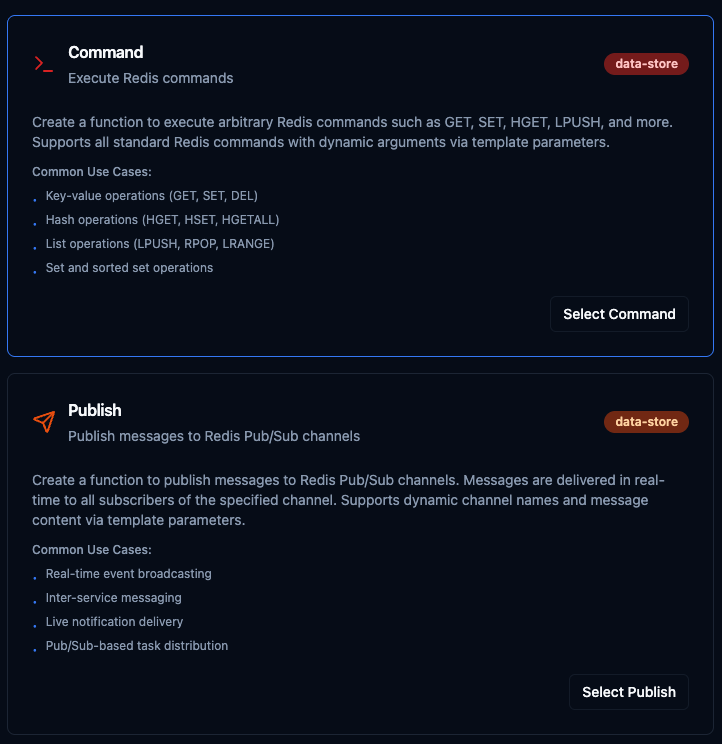
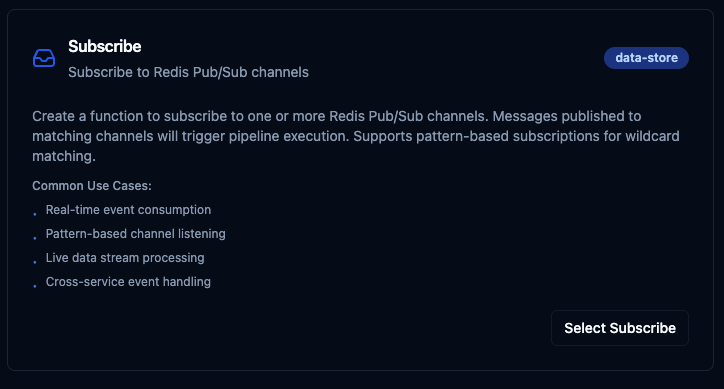
Select from three Redis function types: Command for data operations, Publish for broadcasting messages, and Subscribe for event-driven triggers
Command Function
Purpose: Execute any Redis command with dynamic arguments. Use this for key-value operations, hash manipulation, list management, set operations, and more.
Configuration Fields
| Field | Type | Required | Default | Description |
|---|---|---|---|---|
| Command | String | Yes | - | The Redis command to execute (e.g., SET, GET, HSET, LPUSH). Enter only the command name — arguments go in the field below. |
| Arguments | String | No | - | Command arguments, one per line. Supports template parameters using ((paramName)) syntax. |
Common Redis Commands
| Command | Description | Example Arguments |
|---|---|---|
SET | Set a key-value pair | mykey myvalue |
GET | Get value by key | mykey |
HSET | Set a hash field | myhash field1 value1 |
HGETALL | Get all hash fields | myhash |
LPUSH | Push to list head | mylist item1 |
LRANGE | Get list range | mylist 0 -1 |
EXPIRE | Set key TTL (seconds) | mykey 3600 |
DEL | Delete a key | mykey |
Use Cases:
- Store and retrieve sensor readings with key-value pairs
- Manage device state using hash structures
- Buffer incoming data with list operations
- Cache frequently accessed query results with TTL
Publish Function
Purpose: Publish messages to Redis Pub/Sub channels for real-time event broadcasting. Messages are delivered instantly to all subscribers listening on the specified channel.
Configuration Fields
| Field | Type | Required | Default | Description |
|---|---|---|---|---|
| Channel | String | Yes | - | The Pub/Sub channel name to publish messages to (e.g., sensor:temperature, alerts:critical). |
| Message | String | Yes | - | The message payload to publish. Can be plain text or JSON. Supports template parameters using ((paramName)) syntax. |
Channel Naming Patterns
| Pattern | Description | Example |
|---|---|---|
| Namespaced by type | Group by data category | sensor:temperature |
| Multi-level namespace | Hierarchical organization | events:user:login |
| Severity-based | Route by priority | alerts:critical |
| Inter-pipeline | Pipeline communication | pipeline:results |
Example Message Payloads
{"temperature": 23.5, "unit": "celsius", "sensor": "temp-001"}
Machine M-100 status: running
Use Cases:
- Broadcast real-time sensor events to multiple consumers
- Send inter-service notifications between pipelines
- Deliver live alerts based on threshold conditions
- Distribute task assignments across workers
Subscribe Function
Purpose: Subscribe to one or more Redis Pub/Sub channels to trigger pipeline execution when messages arrive. Supports exact channel names and glob-style pattern matching.
Configuration Fields
| Field | Type | Required | Default | Description |
|---|---|---|---|---|
| Channels | String | Yes | - | Comma-separated list of channel names to listen on. When a message is published to any of these channels, the pipeline will be triggered. |
| Use Patterns | Boolean | No | false | Enable PSUBSCRIBE for glob-style pattern matching. When enabled, use * as a wildcard in channel names. |
Subscription Examples
| Channels | Use Patterns | Matches |
|---|---|---|
sensor:data | No | Exact match on sensor:data only |
sensor:data, alerts:critical | No | Exact match on either channel |
sensor:* | Yes | sensor:data, sensor:temperature, sensor:pressure, etc. |
events:*:error | Yes | events:user:error, events:system:error, etc. |
Use Cases:
- Trigger pipelines on real-time incoming events
- Listen to multiple channels with wildcard patterns
- Process live data streams from other services
- Handle cross-service event notifications
Using Parameters
The ((parameterName)) syntax creates dynamic, reusable functions. Parameters are automatically detected from your configuration fields and can be configured with:
| Configuration | Description | Example |
|---|---|---|
| Type | Data type validation | string, number, boolean, datetime, json, buffer |
| Required | Make parameters mandatory or optional | Required / Optional |
| Default Value | Fallback value if not provided | mykey, 0, {} |
| Description | Help text for users | "Redis key name", "Message payload" |
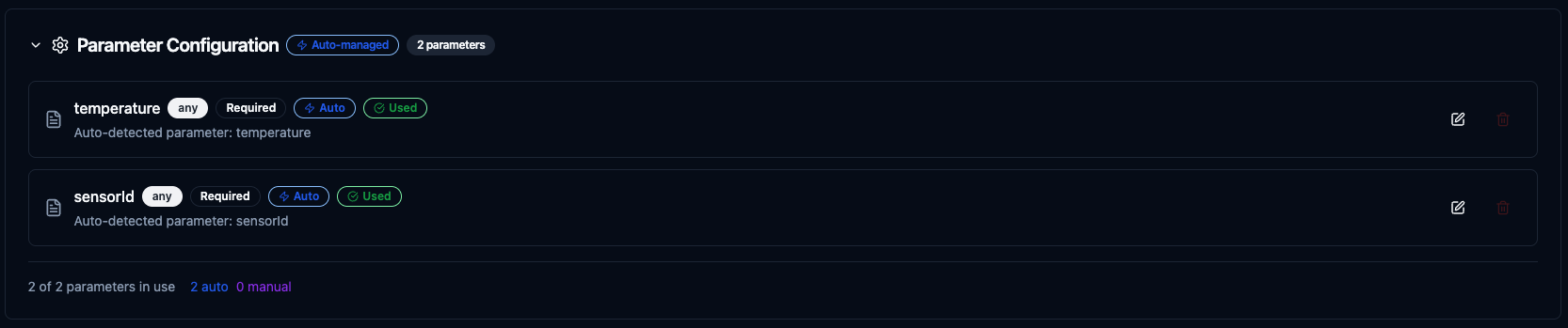
Configure dynamic parameters for Redis functions with type validation, defaults, and descriptions
Template parameters are available for Command (in arguments) and Publish (in message) functions. Subscribe functions are event-driven triggers and do not accept runtime parameters.
Pipeline Integration
Use the Redis functions you create here as nodes inside the Pipeline Designer. Drag the function node onto the canvas, bind its parameters to upstream outputs or constants, and configure error handling as needed.
Common patterns include:
- Collect → Cache: Read data from OPC UA or Modbus and store in Redis for fast access
- Subscribe → Process → Publish: React to Redis events, transform data, and broadcast results
- Query → Cache → Serve: Cache database query results in Redis to reduce load
- Event → Alert: Subscribe to Redis channels and trigger notifications via SMTP or MS Teams
For broader orchestration patterns that combine Redis with SQL, REST, MQTT, or other connector steps, see the Connector Nodes page.
Common Use Cases
Caching Sensor Data for Fast Access
Scenario: Store latest sensor readings in Redis hashes for fast retrieval by dashboards and APIs, avoiding repeated database queries.
Command Configuration:
- Command:
HSET - Arguments:
sensor:((sensorId))
temperature
((temperature))
humidity
((humidity))
timestamp
((timestamp))
Pipeline Integration: Connect after OPC UA or Modbus read nodes to continuously cache latest readings.
Real-Time Event Broadcasting
Scenario: Publish equipment status changes to a Redis Pub/Sub channel so that multiple downstream services can react in real-time.
Publish Configuration:
- Channel:
equipment:status - Message:
{"equipmentId": "((equipmentId))", "status": "((status))", "timestamp": "((timestamp))"}
Pipeline Integration: Connect after a condition node that detects state changes to broadcast only meaningful events.
Event-Driven Pipeline Triggers
Scenario: Subscribe to alert channels to trigger a notification pipeline whenever a critical event is published.
Subscribe Configuration:
- Channels:
alerts:* - Use Patterns: Yes
Pipeline Integration: Use as a pipeline trigger that listens for all alert-level messages and routes them through condition nodes to SMTP or MS Teams notification nodes.
Data Buffering with Lists
Scenario: Buffer incoming data points in a Redis list for batch processing, then pop items in bulk for efficient database writes.
Command Configuration (Push):
- Command:
LPUSH - Arguments:
buffer:((source))
((payload))
Command Configuration (Pop):
- Command:
LRANGE - Arguments:
buffer:((source))
0
99
Pipeline Integration: Use a scheduled pipeline to periodically flush the buffer into PostgreSQL or MongoDB for permanent storage.