 InfluxDB Integration Guide
Connect to InfluxDB to read and write time-series data in your pipelines. This guide covers connection setup, function configuration, and pipeline integration for InfluxDB 2.x deployments.
Overview
The InfluxDB connector enables integration with InfluxDB time-series databases, commonly used for storing metrics, telemetry, IoT data, and industrial signals. It provides:
- Flux query support for flexible time-series data retrieval with filtering and aggregation
- Line Protocol writes for efficient data ingestion with measurements, tags, and typed fields
- Secure token authentication with TLS/HTTPS support and custom CA certificates
- GZip compression and configurable timestamp precision for writes
- Template parameters for dynamic queries and writes based on runtime input
This connector is optimized for InfluxDB 2.x with its bucket/organization model and Flux query language. Support for InfluxDB 1.x and 3.x is planned for future releases.
Connection Configuration
Creating an InfluxDB Connection
Navigate to Connections → New Connection → InfluxDB and configure the following:
InfluxDB Connection Creation Fields
1. Profile Information
| Field | Default | Description |
|---|---|---|
| Profile Name | - | A descriptive name for this connection profile (required, max 100 characters) |
| Description | - | Optional description for this InfluxDB connection |
2. Connection Settings
| Field | Default | Description |
|---|---|---|
| Server URL | - | InfluxDB server URL (e.g., http://localhost:8086 or https://us-east-1-1.aws.cloud2.influxdata.com) – required |
| Organization | - | InfluxDB organization name – required. Test Connection fails if the server has no organization of that name, and List Buckets lists this organization's buckets only |
| HTTP Request Timeout (sec) | 20 | Timeout for HTTP requests to InfluxDB (1-3600 seconds) |
3. Authentication
| Field | Default | Description |
|---|---|---|
| Auth Token | - | API token for authentication – required. Masked on edit; leave empty to keep stored value |
4. TLS/Security Settings
| Field | Default | Description |
|---|---|---|
| CA Certificate | - | Custom CA certificate in PEM format for server validation |
| Skip Verify | false | Skip server certificate verification (use only for development/testing) |
Enabling Skip Verify disables TLS certificate validation. Use only in trusted development environments, never in production.
5. Write Settings
| Field | Default | Description |
|---|---|---|
| Use GZip | false | Enable GZip compression for write requests to reduce bandwidth |
| Precision | ns | Timestamp precision for writes: ns (nanoseconds), us (microseconds), ms (milliseconds), or s (seconds) |
6. Advanced Settings
| Field | Default | Description |
|---|---|---|
| Default Tags | - | Key-value pairs automatically added to all written data points (max 10 tags) |
Example Default Tags
environment: productionsource: maestrohubsite: factory-1
7. Connection Labels
| Field | Default | Description |
|---|---|---|
| Labels | - | Key-value pairs to categorize and organize this InfluxDB connection (max 10 labels) |
Example Labels
env: prod– Environmentteam: data-platform– Responsible teamregion: us-east-1– Deployment region
- Required Fields: Server URL, Organization, and Auth Token must be provided.
- Authentication: InfluxDB 2.x uses token-based authentication. Generate tokens in the InfluxDB UI under Load Data → API Tokens.
- Writes: Each write operation sends all of its points in one request and reports that request's result; the connector does not buffer points or retry a failed write itself.
- Default Tags: Useful for adding consistent metadata (e.g., source system, environment) to all data points without modifying individual writes.
Function Builder
Creating InfluxDB Functions
Once you have a connection established, you can create reusable query, write, and discovery functions:
- Open the connection and go to its Functions tab → New Function
- Select Query, Write, List Buckets, or List Measurements as the function type
- Configure the function parameters
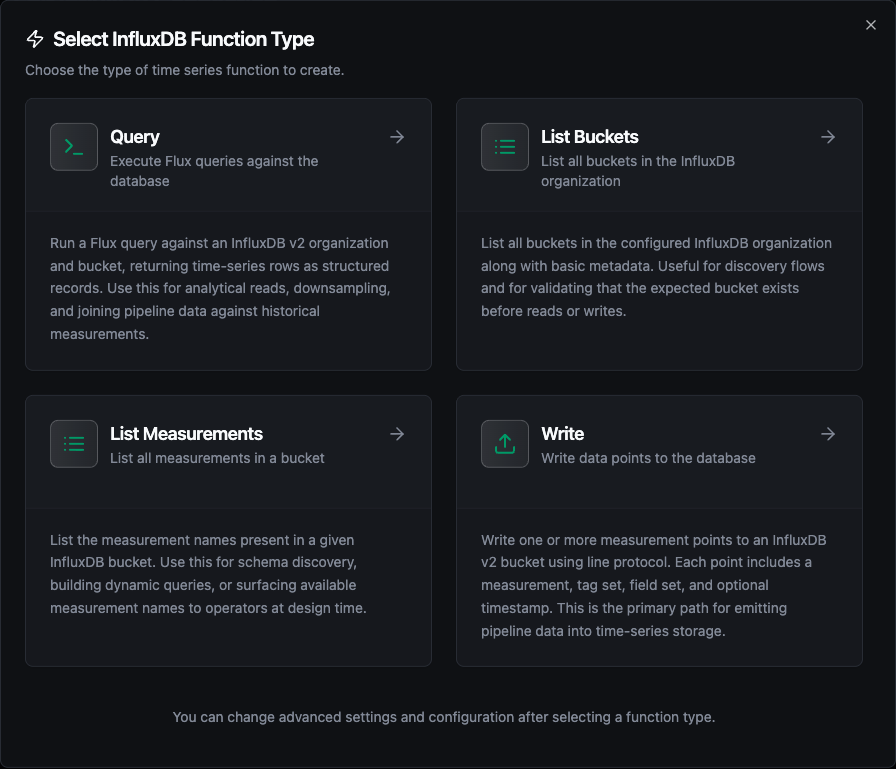
The four InfluxDB function types: Query, Write, List Buckets and List Measurements
Query Function
Purpose: Execute Flux queries against InfluxDB to retrieve time-series data. Use this for reading metrics, aggregating data, and filtering by time range or tags.
Configuration Fields
| Field | Type | Required | Default | Description |
|---|---|---|---|---|
| Flux Query | String | Yes | - | Flux query to execute. Supports template parameters using ((paramName)) syntax. |
| Timeout | Duration | No | 30m | Query execution timeout, e.g. 30s or 2m (1s–1h) |
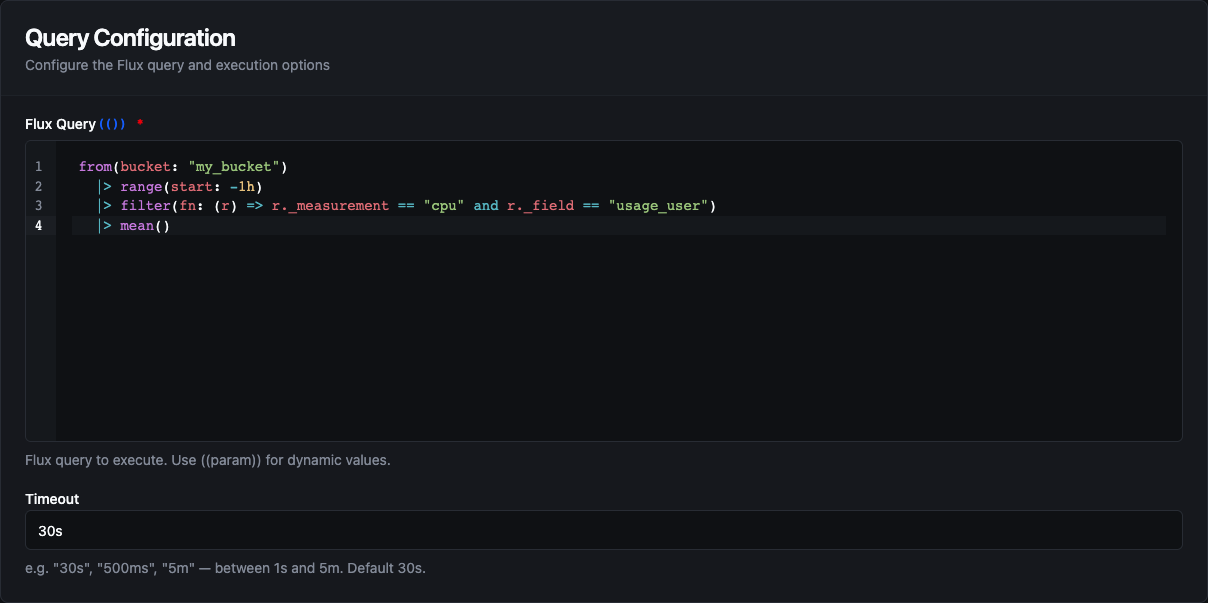
Query function configuration with the Flux query editor and timeout
Example Flux Queries
// Retrieve temperature readings from the last hour
from(bucket: "sensors")
  |> range(start: -1h)
  |> filter(fn: (r) => r._measurement == "temperature")
  |> filter(fn: (r) => r.location == "factory-1")
// Calculate hourly averages for the past 24 hours
from(bucket: "metrics")
  |> range(start: -24h)
  |> filter(fn: (r) => r._measurement == "cpu_usage")
  |> aggregateWindow(every: 1h, fn: mean)
  |> yield(name: "hourly_avg")
// Query with template parameters
from(bucket: "((bucket))")
  |> range(start: ((startTime)), stop: ((endTime)))
  |> filter(fn: (r) => r._measurement == "((measurement))")
  |> filter(fn: (r) => r.asset_id == "((assetId))")
Response Format
{
  "result": {
    "records": [
      {"_time": "2024-01-15T10:00:00Z", "_value": 23.5, "_measurement": "temperature", "_field": "value", "location": "factory-1"},
      {"_time": "2024-01-15T10:01:00Z", "_value": 23.7, "_measurement": "temperature", "_field": "value", "location": "factory-1"}
    ],
    "recordCount": 2
  }
}
A pipeline reads the rows as result.records; execution facts (success, durationMs, timestamp) arrive under _metadata, and so does the organization the query ran against, as _metadata.organization.
Use Cases:
- Retrieve sensor readings for dashboards and analytics
- Calculate aggregates (mean, max, min) over time windows
- Filter and export historical data for reporting
- Monitor equipment metrics with tag-based filtering
Write Function
Purpose: Write data points to InfluxDB using Line Protocol format. Supports explicit field type selection to ensure correct data types are stored.
Configuration Fields
| Field | Type | Required | Default | Description |
|---|---|---|---|---|
| Bucket | String | Yes | - | Target bucket for writing data. Supports template parameters. |
| Measurement | String | Yes | - | Measurement name shared by every point in the write (similar to a table name). Supports template parameters. |
| Data | JSON | Yes | - | A JSON array of points to write, one object per point. Use ((data)) to take the array from the pipeline, or enter a static array. A single object is refused; wrap it in [ ]. |
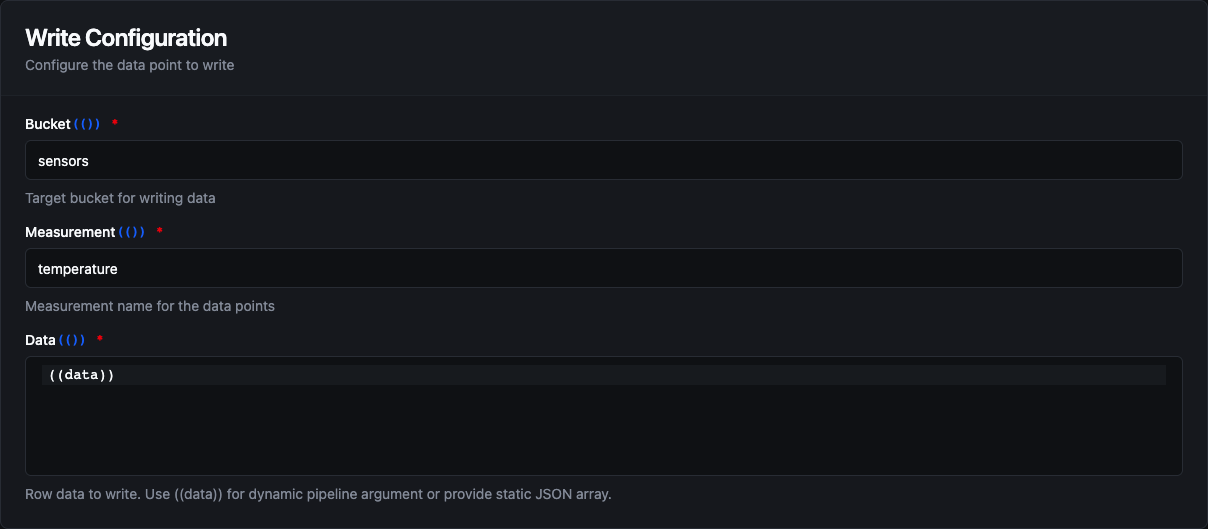
Write function configuration with bucket, measurement and the Data array
Point Formats
Each object in the Data array takes one of two forms:
- Flat — every key becomes a field, e.g.
{"temperature": 23.5, "humidity": 60}. The point has no tags and is stamped with the event time. - Structured — an object with a
fieldskey, plus optionaltagsandtimestamp:
| Property | Type | Required | Description |
|---|---|---|---|
| fields | Object or Array | Yes | Field values, either as an object ({"value": 23.5}) or as an array of { "name", "value", "type" } definitions when you want to set each field's type explicitly. |
| tags | Object | No | Key-value pairs for indexed dimensions used in filtering and grouping. Tag values are stored as strings. |
| timestamp | String/Number | No | An RFC 3339 string (e.g. 2026-09-07T08:00:00Z) or a Unix timestamp in nanoseconds. If omitted, the point is stamped with the event time. Any other value fails the write. |
Supported Field Types (for the array form of fields)
| Type | Description | Example Values |
|---|---|---|
float | 64-bit floating point number | 25.5, 3.14159, -10.0 |
integer | 64-bit signed integer | 100, -50, 0 |
uinteger | 64-bit unsigned integer | 100, 0 (no negative values) |
boolean | Boolean value | true, false |
string | UTF-8 string | "active", "sensor-01" |
Example Configuration
Bucket: sensors
Measurement: temperature
Data:
[
  {
    "tags": { "location": "factory-1", "sensor_id": "temp-001" },
    "fields": [
      { "name": "value", "value": "((temperature))", "type": "float" },
      { "name": "status", "value": "active", "type": "string" }
    ],
    "timestamp": "2026-09-07T08:00:00Z"
  },
  { "temperature": 23.7, "humidity": 60 }
]
Response Format
{
  "result": {
    "pointsWritten": 2
  }
}
The bucket, measurement and organization written to arrive under _metadata, as _metadata.bucket, _metadata.measurement and _metadata.organization.
Use Cases:
- Ingest real-time sensor data from industrial equipment
- Store production metrics and KPIs
- Log machine states and events with metadata tags
- Archive telemetry data from IoT devices
List Buckets Function
Purpose: List the buckets in the connection's organization. Use this to check that a bucket exists before reading or writing, or to pick a bucket at design time.
This function has no configuration fields; it lists every bucket in the organization set on the connection.
Response Format
{
  "result": {
    "buckets": [
      {"name": "sensors", "id": "0a1b2c3d4e5f6789", "orgID": "1a2b3c4d5e6f7089", "retentionSeconds": 2592000}
    ],
    "bucketCount": 1
  }
}
retentionSeconds is present only for buckets with a retention rule. The organization listed arrives under _metadata.organization.
List Measurements Function
Purpose: List the measurement names in a bucket, using Flux's schema.measurements(). Use this for schema discovery or to build dynamic queries.
Configuration Fields
| Field | Type | Required | Default | Description |
|---|---|---|---|---|
| Bucket | String | Yes | - | Bucket to list measurements from. Supports template parameters. |
Response Format
{
  "result": {
    "measurements": ["temperature", "humidity"],
    "measurementCount": 2
  }
}
The bucket and organization arrive under _metadata, as _metadata.bucket and _metadata.organization.
Using Parameters
The ((parameterName)) syntax creates dynamic, reusable functions. Parameters are automatically detected and can be configured with:
| Configuration | Description | Example |
|---|---|---|
| Type | Data type validation | string, number, boolean, datetime, json, buffer |
| Required | Make parameters mandatory or optional | Required / Optional |
| Default Value | Fallback value if not provided | sensors, 0, NOW() |
| Description | Help text for users | "Target bucket name", "Sensor temperature reading" |
Pipeline Integration
Use the InfluxDB query and write functions you create here as nodes inside the Pipeline Designer. Drag the function node onto the canvas, bind its parameters to upstream outputs or constants, and configure error handling as needed.
Common patterns include:
- Read → Transform → Write: Query data from InfluxDB, process it, and write results back
- Collect → Store: Gather data from OPC UA, MQTT, or Modbus and store in InfluxDB
- Query → Alert: Monitor metrics and trigger notifications based on thresholds
For broader orchestration patterns that combine InfluxDB with SQL, REST, MQTT, or other connector steps, see the Connector Nodes page.
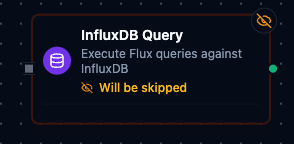
InfluxDB function node with connection, function, and parameter bindings
Common Use Cases
Storing Industrial Sensor Data
Scenario: Collect temperature, pressure, and vibration readings from manufacturing equipment and store them in InfluxDB for monitoring and analysis.
Write Configuration:
Bucket: factory-telemetry
Measurement: equipment_sensors
Data:
[
  {
    "tags": {
      "plant": "chicago",
      "line": "assembly-1",
      "machine_id": "((machineId))"
    },
    "fields": [
      { "name": "temperature", "value": "((temp))", "type": "float" },
      { "name": "pressure", "value": "((pressure))", "type": "float" },
      { "name": "vibration", "value": "((vibration))", "type": "float" },
      { "name": "running", "value": "((isRunning))", "type": "boolean" }
    ]
  }
]
Pipeline Integration: Connect after OPC UA or Modbus read nodes to continuously store equipment telemetry.
Querying for Dashboard Visualization
Scenario: Retrieve aggregated metrics for the past 24 hours to display on a real-time dashboard.
Query Configuration:
from(bucket: "factory-telemetry")
  |> range(start: -24h)
  |> filter(fn: (r) => r._measurement == "equipment_sensors")
  |> filter(fn: (r) => r.plant == "((plant))")
  |> aggregateWindow(every: 15m, fn: mean)
  |> pivot(rowKey: ["_time"], columnKey: ["_field"], valueColumn: "_value")
Pipeline Integration: Use in scheduled pipelines that feed visualization dashboards or BI tools.
Monitoring and Alerting
Scenario: Query recent sensor readings to detect anomalies and trigger alerts when values exceed thresholds.
Query Configuration:
from(bucket: "factory-telemetry")
  |> range(start: -5m)
  |> filter(fn: (r) => r._measurement == "equipment_sensors")
  |> filter(fn: (r) => r._field == "temperature")
  |> filter(fn: (r) => r._value > 85.0)
  |> count()
Pipeline Integration: Connect to conditional logic nodes that send alerts via SMTP or MS Teams when anomalies are detected.
Data Migration and Backup
Scenario: Export historical data from InfluxDB for archival or migration to another system.
Query Configuration:
from(bucket: "((sourceBucket))")
  |> range(start: ((startDate)), stop: ((endDate)))
  |> filter(fn: (r) => r._measurement == "((measurement))")
Pipeline Integration: Combine with S3 Write or SQL Insert functions to archive data to cold storage or migrate between systems.