Amazon Redshift Integration Guide
Connect to Amazon Redshift to query a cloud data warehouse, land pipeline output in it, and move data between it and S3. This guide covers choosing a transport, connection setup, function configuration, and pipeline integration.
Overview
Amazon Redshift is AWS's cloud data warehouse for BI and historical analytics. The connector covers the warehouse verbs a pipeline needs — query, execute, write — plus the two S3 bulk paths and the catalog reads that make a warehouse navigable:
- Two transports, chosen per connection: the Redshift Data API, or a direct PostgreSQL-wire connection
- Query and execute arbitrary SQL, with
((parameter))templating - Write pipeline records to a table, creating or widening it to fit
- COPY from S3 for bulk loads and UNLOAD to S3 for exports
- Browse the schemas and tables a connection can see
- Works with both provisioned clusters and Redshift Serverless
Choosing a transport
This is the first decision, and the only one that is hard to change later — the two halves of the connection form are different sets of fields.
| Redshift Data API | Direct connection | |
|---|---|---|
| How it reaches the warehouse | HTTPS to AWS, signed with IAM | PostgreSQL wire protocol, port 5439 |
| Network route to the cluster | Not needed | Required — the cluster must be reachable from this MaestroHub instance |
| Credentials | AWS IAM, plus a database user or a Secrets Manager secret | A database username and password |
| Redshift Serverless behind a private VPC | The only option | Not reachable |
| Database per statement | Yes — a function can override it | No — a session is bound to one database |
| Best for | Cloud-hosted MaestroHub, Serverless workgroups, IAM-governed estates | A self-hosted instance with network access and database credentials |
Pick Data API if you are unsure. It needs no network path to the cluster, which is the constraint that most often blocks the other one.
Every operation returns the same result shape on either transport, so a pipeline built against one keeps working if you later point it at the other. The two differences that are visible to a pipeline are listed in the table above: the per-statement database override, and what a connection needs to reach the cluster at all.
Connection Configuration
Creating an Amazon Redshift Connection
Navigate to Connections → New Connection → Amazon Redshift and configure the following.
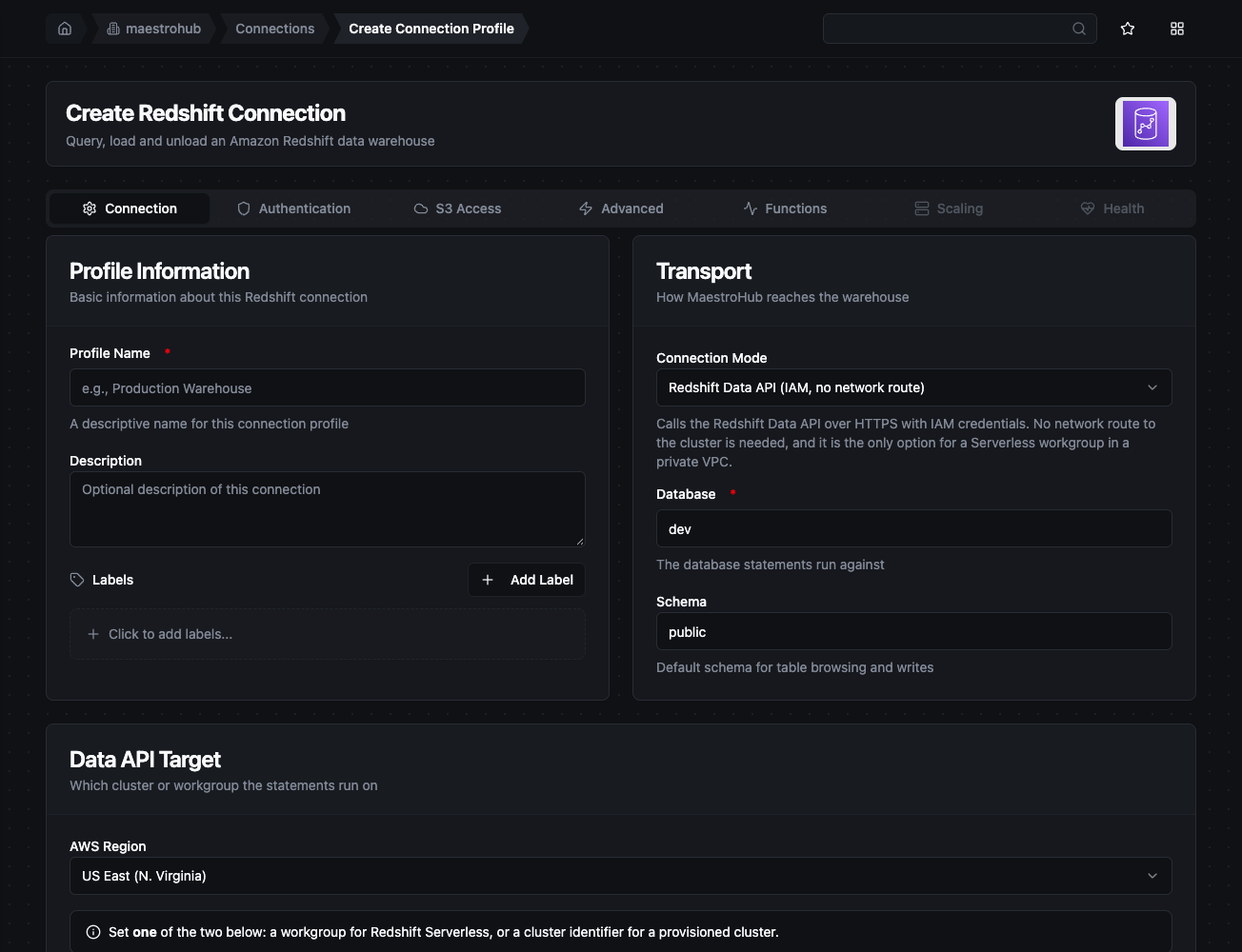
The transport selector decides which fields the rest of the form asks for
1. Profile Information
| Field | Default | Description |
|---|---|---|
| Profile Name | - | A descriptive name for this connection profile (required, max 100 characters) |
| Description | - | Optional description for this connection |
2. Transport
| Field | Default | Description |
|---|---|---|
| Connection Mode | Redshift Data API | Which transport this connection uses. Changing it changes which fields below apply |
| Database | - | The database statements run against (required) |
| Schema | public | Default schema for table browsing and writes |
3a. Data API Target — Data API mode only
| Field | Default | Description |
|---|---|---|
| AWS Region | us-east-1 | The region hosting the cluster or workgroup |
| Serverless Workgroup | - | Redshift Serverless workgroup name. Set this or Cluster Identifier, never both |
| Cluster Identifier | - | Provisioned cluster identifier. Set this or Serverless Workgroup, never both |
3b. Cluster Endpoint — direct mode only
| Field | Default | Description |
|---|---|---|
| Host | - | The cluster or workgroup endpoint hostname (required in direct mode) |
| Port | 5439 | Redshift's wire-protocol port |
4a. Authentication — Data API mode
| Field | Default | Description |
|---|---|---|
| Database User | - | Runs statements as this user using temporary IAM credentials. For a provisioned cluster, set this or a Secrets Manager ARN |
| Secrets Manager ARN | - | A secret holding the database credentials. Masked on edit |
| Access Key ID | - | AWS Access Key ID. Masked on edit. Leave empty to use the AWS SDK default credential chain (env vars, shared config, IAM role, IRSA) |
| Secret Access Key | - | AWS Secret Access Key. Masked on edit |
| Session Token | - | Session token for temporary STS credentials. Masked on edit |
On EC2/ECS/EKS, leave the key fields empty and attach an IAM role (or IRSA) — the connector picks up credentials from the AWS SDK default chain, so no AWS secret is stored in MaestroHub. The identity needs redshift-data:* and, for a provisioned cluster with a Database User, redshift:GetClusterCredentials.
4b. Authentication — direct mode
| Field | Default | Description |
|---|---|---|
| Username | - | Redshift database user (required in direct mode) |
| Password | - | Database password. Masked on edit |
| SSL Mode | require | disable, require, verify-ca, or verify-full |
| CA Certificate | - | PEM-encoded CA used to verify the server. Required for verify-ca and verify-full. Masked on edit |
require is the default because Redshift refuses plaintext connections. disable exists for a local stand-in, not for a cluster. verify-full is the setting that actually checks you are talking to your cluster and not something in the middle — it needs the Redshift CA bundle in the CA Certificate field.
5. S3 Access
| Field | Default | Description |
|---|---|---|
| Default IAM Role ARN | - | The role Redshift assumes to reach S3 during COPY and UNLOAD. Used when an operation supplies no role of its own |
COPY and UNLOAD are executed by Redshift, which assumes this role itself. The role has to be attached to the cluster or workgroup, and MaestroHub needs no S3 permission of its own for either operation. Leave this empty if you will not use them.
6. Advanced
| Field | Default | Description |
|---|---|---|
| Connection Timeout | 30s | How long to wait for the connection, or for the Data API reachability probe |
| Max Result Rows | 1000 | Maximum rows a query returns before truncating (1–100000) |
| Poll Interval (Data API) | 500ms | How often to poll statement status while waiting for one to finish |
| Custom Endpoint (Data API) | - | Point the Data API at a compatible service, for testing. Leave empty for AWS |
| Max Open / Idle Connections (direct) | 10 / 5 | Connection-pool sizing |
| Connection Max Lifetime / Idle Time (direct) | 900s / 300s | How long a pooled connection lives, and how long it may sit idle |
- Required fields: Profile Name and Database, plus Host and Username in direct mode, or a workgroup / cluster identifier in Data API mode.
- Row cap: result sets larger than Max Result Rows are truncated, and the call's metadata says so — read
_metadata.truncatedin a pipeline. - Statement timeout: set it on the function (each operation has its own Timeout field), or on the connection profile itself. The connector does not add a third control. Whichever bound applies, direct mode pushes it into the session as a server-side
statement_timeout, so a runaway query stops consuming a WLM slot rather than running on after the caller gives up, and Data API mode cancels the statement server-side when it expires. - Security: the password, the CA certificate, the AWS keys, the session token and the Secrets Manager ARN are encrypted at rest and masked on edit. Leave a secret empty to keep the stored value.
Function Builder
Creating Redshift Functions
Once a connection exists, create reusable functions:
- Open the connection and go to its Functions tab → New Function
- Choose a Redshift function type
- Configure the function parameters
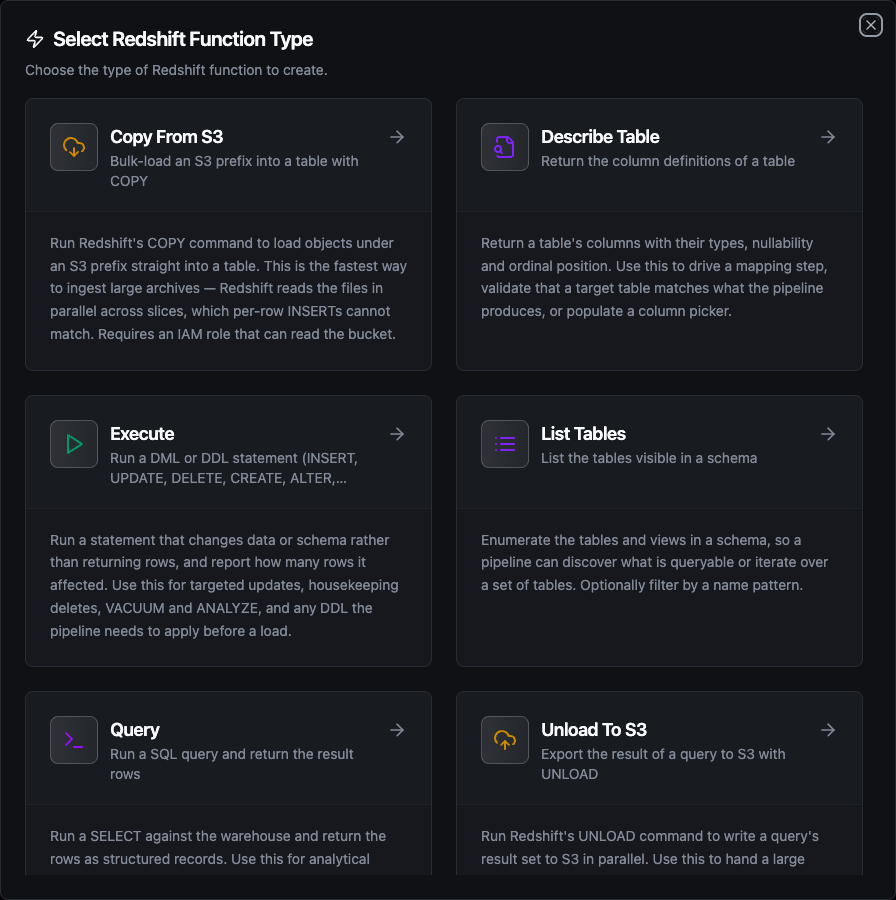
Seven function types: Query, Execute, Write, Copy From S3, Unload To S3, List Tables and Describe Table
Query Function
Purpose: run a SELECT and return the rows as structured records. This is the path for BI aggregates, historical reads, and enrichment lookups against warehouse tables.
Configuration Fields
| Field | Type | Required | Default | Description |
|---|---|---|---|---|
| SQL Query | String | Yes | - | SQL to run. Supports ((param)) templating |
| Database | String | No | connection default | Override the connection's database. Data API mode only — see the note below |
| Max Rows | Number | No | connection default | Maximum rows to return (1–100000) |
| Timeout | Duration | No | 30m | Bound on this statement |
Example Configuration
{
  "sql": "SELECT machine_id, AVG(temperature) AS avg_temp FROM sensor_history WHERE day = '((day))' GROUP BY machine_id",
  "maxRows": 5000
}
Response Format
{
  "rows": [
    { "machine_id": "press-02", "avg_temp": 42.7 }
  ],
  "rowCount": 1
}
A direct connection is bound to one database for the whole session, so a per-statement override cannot take effect. Rather than run the statement against the wrong database, the connector refuses it and names the two ways forward: a second connection for that database, or switching this one to Data API mode.
Execute Function
Purpose: run a statement that changes data or schema rather than returning rows, and report how many rows it affected. Use it for targeted updates, housekeeping deletes, VACUUM and ANALYZE, and any DDL a pipeline applies before a load.
Configuration Fields
| Field | Type | Required | Default | Description |
|---|---|---|---|---|
| SQL Statement | String | Yes | - | Statement to run. Supports ((param)) templating |
| Database | String | No | connection default | Data API mode only |
| Timeout | Duration | No | 30m | Bound on this statement |
Response Format
{ "rowsAffected": 3 }
rowsAffected is -1 when the statement type has no row count of its own — a DDL statement, for instance. That is passed through rather than flattened to 0, so "matched no rows" stays distinguishable from "not a counting statement".
Write Function
Purpose: insert pipeline records into a table, deriving the column list from the batch and optionally creating or widening the table to fit.
Configuration Fields
| Field | Type | Required | Default | Description |
|---|---|---|---|---|
| Table Name | String | Yes | - | Target table. Supports ((param)) templating |
| Data | Any | Yes | ((data)) | Rows to write. ((data)) takes them from the upstream node; a literal JSON array writes a fixed batch |
| Schema Hints | Object | No | - | Column types for table creation, e.g. {"temp": "Float64"}. Without hints the types are inferred from the data |
| Create Table If Not Exists | Boolean | No | false | Create the table on first write |
| Allow Schema Evolution | Boolean | No | inherits Create Table | Add columns when the payload carries fields the table lacks |
| Batch Size | Number | No | 500 | Rows per INSERT statement |
| Timeout | Duration | No | 30m | Bound on this operation |
Response Format
{ "rowsInserted": 3 }
Write inserts through the leader node, which is the right shape for pipeline output and the wrong one for large archives. Redshift's own guidance is to land the files in S3 and COPY them, which reads in parallel across slices. A few hundred rows per pipeline run is Write's territory; a few million is COPY's.
Left unset, it follows Create Table If Not Exists — the long-standing behaviour. Turned on, a batch carrying a new field adds the column. Turned explicitly off, a batch that would need a new column is refused, naming the fields — rather than dropping them silently, which loses data no one notices.
Copy From S3 Function
Purpose: run Redshift's COPY to load objects under an S3 prefix straight into a table.
Configuration Fields
| Field | Type | Required | Default | Description |
|---|---|---|---|---|
| Table Name | String | Yes | - | Table to load into |
| S3 URI | String | Yes | - | Prefix or object to read, e.g. s3://ot-archive/2024/06/ |
| Format | Enum | No | CSV | CSV, JSON, PARQUET or AVRO |
| IAM Role ARN | String | No | connection default | Overrides the connection's Default IAM Role ARN |
| Column List | String | No | - | Comma-separated columns, when the file layout is narrower than the table |
| Extra COPY Options | String | No | - | Clauses appended verbatim, e.g. IGNOREHEADER 1 TIMEFORMAT 'auto' |
| Timeout | Duration | No | 30m | Bound on this operation |
Example Configuration
{
  "table": "sensor_archive",
  "s3Uri": "s3://ot-archive/2024/06/",
  "format": "PARQUET",
  "iamRole": "arn:aws:iam::123456789012:role/RedshiftS3Access"
}
Response Format
{ "table": "sensor_archive", "s3Uri": "s3://ot-archive/2024/06/", "rowsLoaded": 148213 }
Unload To S3 Function
Purpose: run Redshift's UNLOAD to write a query's result set to S3 in parallel. Use it to hand a large extract to another system, or to stage data downstream without streaming every row through MaestroHub.
Configuration Fields
| Field | Type | Required | Default | Description |
|---|---|---|---|---|
| SQL Query To Export | String | Yes | - | The query whose result set is written to S3 |
| S3 Destination Prefix | String | Yes | - | Where the export is written; Redshift appends a part number per slice |
| Format | Enum | No | CSV | CSV, JSON or PARQUET — UNLOAD cannot write Avro |
| IAM Role ARN | String | No | connection default | Overrides the connection's Default IAM Role ARN |
| Parallel | Boolean | No | true | One file per slice. Off produces a single file |
| Allow Overwrite | Boolean | No | false | Overwrite existing files instead of failing |
| Extra UNLOAD Options | String | No | - | Clauses appended verbatim, e.g. GZIP MAXFILESIZE 100 MB |
| Timeout | Duration | No | 30m | Bound on this operation |
Response Format
{ "s3Uri": "s3://exports/readings_", "rowsUnloaded": 148213 }
Everything else a function takes is bound or quoted before it reaches the warehouse. The two options fields exist so you can append clauses this connector does not model, which means they are SQL by definition and are spliced in as written. They are confined to the end of the statement and refused if they contain a statement separator or a comment marker (;, --, /*), so an options field can extend the command but cannot become a second one. Treat them as you would any SQL you write yourself.
List Tables Function
Purpose: enumerate the tables and views in a schema, so a pipeline can discover what is queryable or iterate over a set of tables.
| Field | Type | Required | Default | Description |
|---|---|---|---|---|
| Schema | String | No | connection default | Schema to list |
| Name Filter | String | No | - | SQL LIKE pattern, e.g. sensor_% |
| Timeout | Duration | No | 30m | Bound on this operation |
Response Format
{
  "tables": [
    { "schema": "public", "name": "sensor_history", "type": "TABLE" }
  ],
  "count": 1
}
Describe Table Function
Purpose: return a table's columns with their types and nullability, in ordinal order. Use it to drive a mapping step, validate a target table against what the pipeline produces, or populate a column picker.
| Field | Type | Required | Default | Description |
|---|---|---|---|---|
| Table Name | String | Yes | - | Table to describe |
| Schema | String | No | connection default | Schema holding the table |
| Timeout | Duration | No | 30m | Bound on this operation |
Response Format
{
  "schema": "public",
  "table": "sensor_history",
  "columns": [
    { "name": "machine_id", "type": "character varying", "nullable": false }
  ],
  "columnCount": 1
}
Using Parameters
The ((parameterName)) syntax turns a function into a dynamic, reusable building block. Parameters are auto-detected from the SQL and the other templated fields, and can be configured with:
| Configuration | Description | Example |
|---|---|---|
| Type | Data type validation | string, number, boolean, datetime, json, buffer |
| Required | Make the parameter mandatory or optional | Required / Optional |
| Default Value | Fallback when none is supplied | 2024-01-01, 1000 |
| Description | Help text | "Partition day (YYYY-MM-DD)" |
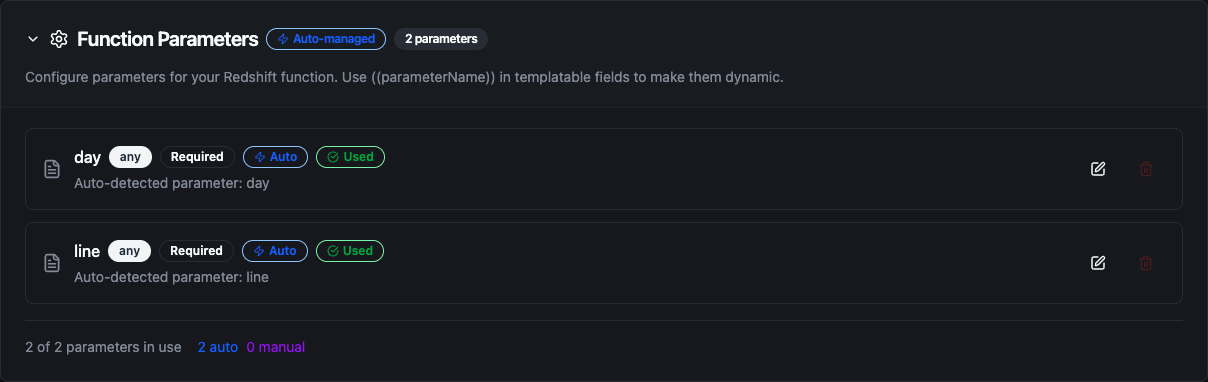
Parameters detected from the SQL and other templated fields, configured with type, requiredness and defaults
The SQL, table name, S3 URI, schema and data fields accept ((parameter)) templating. Values are supplied by upstream pipeline nodes at execution time. Row values in a Write are always bound, never pasted into the statement.
Table types on write
When Create Table If Not Exists creates a table, the column types come from the data or from your Schema Hints. Two Redshift specifics are worth knowing, because both are silent if you get them wrong:
| Hint | Redshift column | Why |
|---|---|---|
String | VARCHAR(65535) | Redshift's TEXT is an alias for VARCHAR(256) — a longer value fails the load on a column the connector itself created, so strings are created at full width |
Any | SUPER | Redshift has no JSONB; SUPER is its own shape for semi-structured values |
Float64 | DOUBLE PRECISION | |
Int64 | BIGINT | |
DateTime | TIMESTAMPTZ | |
Boolean | BOOLEAN |
Native Redshift type names (VARCHAR, DECIMAL, TIMESTAMPTZ, SUPER, VARBYTE, …) pass through unchanged when you use them in Schema Hints.
Pipeline Integration
Use the Redshift functions you create here as nodes in the Pipeline Designer. Drop a node on the canvas, bind its parameters to upstream outputs or constants, and configure error handling as needed.
Common patterns:
- Read → Transform → Act: query historical data, process the rows, and send the result to a dashboard or a notification
- Collect → Write: batch pipeline telemetry and land it in a warehouse table
- Land → COPY: write files to S3 with the S3 connector, then bulk-load them with Copy From S3
- Query → UNLOAD: export a large extract to S3 for another system to pick up
- Discover → Query: list tables, then fan a Query node out over the names
For the node reference, see Amazon Redshift nodes. For broader orchestration patterns, see Connector Nodes.
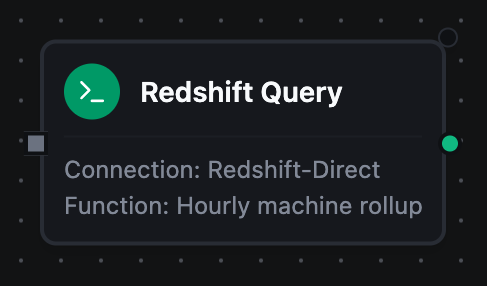
A Redshift Query node with its connection and function bound
Common Use Cases
Landing OT telemetry in the warehouse
Scenario: batch sensor readings from the shop floor into a warehouse table for BI.
Write Configuration:
{
  "table": "sensor_history",
  "data": "((data))",
  "createTableIfNotExists": true,
  "allowSchemaEvolution": true,
  "batchSize": 500
}
Pipeline Integration: an MQTT or OPC UA trigger feeds a buffer node, whose batch goes to the Write node. Schema evolution means a new sensor field appears as a new column instead of being dropped.
Bulk-loading an S3 archive
Scenario: a month of exported telemetry sits in S3 and needs to be queryable.
Copy From S3 Configuration:
{
  "table": "sensor_archive",
  "s3Uri": "s3://ot-archive/((month))/",
  "format": "PARQUET",
  "copyOptions": "COMPUPDATE OFF STATUPDATE OFF"
}
Pipeline Integration: run on a schedule with ((month)) bound to the previous month. Redshift reads the files in parallel across slices, which no INSERT path can match.
Exporting an extract for a downstream system
Scenario: hand a partner system a filtered slice of history without streaming it through MaestroHub.
Unload To S3 Configuration:
{
  "sql": "SELECT * FROM sensor_history WHERE line_id = '((line))' AND ts >= '((from))'",
  "s3Uri": "s3://exports/((line))/",
  "format": "PARQUET",
  "allowOverwrite": true
}
Pipeline Integration: the rows never enter the pipeline — Redshift writes them straight to S3, and the node returns only the destination and the row count.
Validating a target table before a load
Scenario: catch a schema drift before a write fails halfway through a batch.
Use Describe Table to read the target's columns, compare them against what the pipeline produces in a transform node, and branch to an alert when they disagree.