Amazon Kinesis Integration Guide
Connect to Amazon Kinesis Data Streams to write and read streaming records, and to consume records into event-driven pipelines. This guide covers connection setup, function configuration, and pipeline integration.
Overview
Amazon Kinesis Data Streams is a serverless, high-throughput streaming service — an AWS-native alternative to Kafka for telemetry and analytics pipelines. The connector provides:
- Put records — single (
PutRecord) or batched up to 500 (PutRecords) with a configurable partition-key strategy - Read records on demand with
LATEST/TRIM_HORIZON/AT_TIMESTAMPshard iterators - Stream consumption — a long-running consumer that fires a pipeline once per record via the Kinesis Trigger
- Stream discovery via
ListStreams - Automatic shard discovery and re-discovery across resharding
- Flexible authentication — IAM access keys or the AWS SDK default credential chain (env vars, IRSA, instance profile)
- Custom endpoint for LocalStack and AWS-compatible services
Kinesis orders records within a shard by partition key. Writes are not idempotent — a replayed PutRecord creates a duplicate — so attach a stable partition key when ordering matters. For continuous consumption use the trigger; for ad-hoc reads use the Get Records function.
Connection Configuration
Creating an Amazon Kinesis Connection
Navigate to Connections → New Connection → Amazon Kinesis and configure the following:
1. Profile Information
| Field | Default | Description |
|---|---|---|
| Profile Name | - | A descriptive name for this connection profile (required, max 100 characters) |
| Description | - | Optional description for this Kinesis connection |
2. Connection
| Field | Default | Description |
|---|---|---|
| AWS Region | us-east-1 | AWS region where the Kinesis streams live, e.g. us-east-1, eu-central-1 (required) |
3. Authentication
| Field | Default | Description |
|---|---|---|
| Access Key ID | - | AWS Access Key ID. Masked on edit. Leave empty to use the AWS SDK default credential chain (env vars, shared config, IAM role, IRSA) |
| Secret Access Key | - | AWS Secret Access Key. Required when Access Key ID is set; leave empty to use the default credential chain. Masked on edit |
| Session Token | - | Session token for temporary STS credentials (optional). Masked on edit |
On EC2/ECS/EKS, leave the key fields empty and attach an IAM role (or IRSA) — the connector picks up credentials from the AWS SDK default chain automatically, so no secrets are stored in MaestroHub. The identity needs kinesis:PutRecord*, kinesis:GetRecords, kinesis:GetShardIterator, kinesis:DescribeStream*, and kinesis:ListStreams as appropriate.
4. Endpoint
| Field | Default | Description |
|---|---|---|
| Custom Endpoint | - | Custom Kinesis endpoint URL for LocalStack or other AWS-compatible services (e.g. http://localhost:4566). Leave empty for AWS Kinesis |
5. Advanced
| Field | Default | Description |
|---|---|---|
| Request Timeout (seconds) | 30 | Upper bound on every Kinesis API call on this connection, including the connect check (1–3600). A function's Timeout Override can shorten it, not extend it. |
| Max Retries | 3 | Retries after the first attempt for transient failures such as ProvisionedThroughputExceeded (0 = no retries, up to 10) |
- Required fields: Profile Name and AWS Region. Credentials are optional when the default credential chain is available.
- Throughput: Each shard sustains 1 MB/s or 1000 records/s for writes and 2 MB/s / 5
GetRecordscalls per second for reads — batch with Put Records and tune the poll interval accordingly. - Security: Access keys and the session token are encrypted and stored securely, masked on edit. Leave a secret empty to keep the stored value.
Function Builder
Creating Kinesis Functions
Once a connection exists, create reusable record and stream functions:
- Open the connection and go to its Functions tab → New Function
- Choose a Kinesis function type
- Configure the function parameters
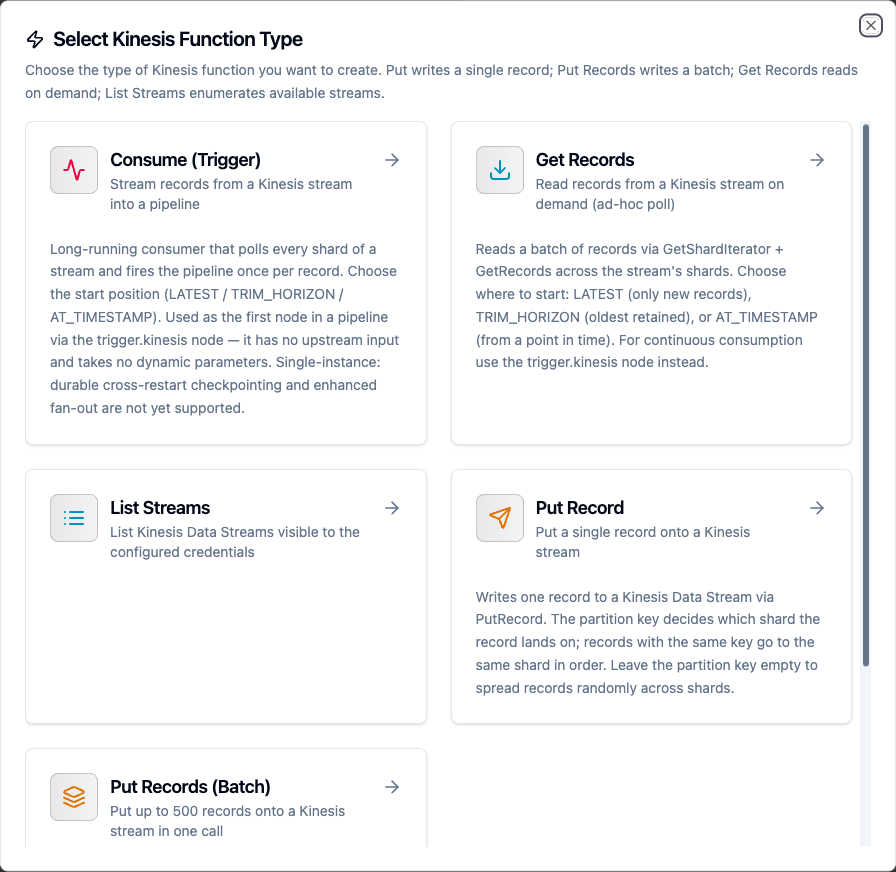
Choose from Put Record, Put Records (Batch), Get Records, List Streams, and Consume (Trigger) function types
Put Record Function
Purpose: Write one record to a Kinesis Data Stream via PutRecord. The partition key decides which shard the record lands on; records with the same key go to the same shard in order.
Configuration Fields
| Field | Type | Required | Default | Description |
|---|---|---|---|---|
| Stream Name | String | Yes | - | Name of the Kinesis Data Stream to write to. Supports ((param)) templating |
| Data | String | Yes | - | The record payload (up to 1 MB). Strings are sent as-is; objects and arrays are JSON-encoded automatically, so passing ((rowObject)) works without pre-stringifying |
| Partition Key | String | No | random | Determines the target shard. Records with the same key are ordered within a shard. Leave empty to generate a random key |
| Explicit Hash Key | String | No | - | Advanced: override the partition-key hash to target a specific shard by its hash-key range |
| Timeout Override (seconds) | Number | No | connection default | Bound on this operation (0–3600; 0 or empty uses only the connection's Request Timeout). The connection's Request Timeout still applies and the shorter one wins. |
Example Configuration
{
  "streamName": "telemetry",
  "data": "((reading))",
  "partitionKey": "((deviceId))"
}
Response Format
{
  "shardId": "shardId-000000000000",
  "sequenceNumber": "49590338...66",
  "partitionKey": "press-02"
}
Use Cases:
- Forward processed telemetry to a Kinesis stream for S3 + Athena
- Emit a per-device event keyed by device ID for ordered processing
- Bridge MQTT messages into a Kinesis analytics stream
Put Records (Batch) Function
Purpose: Write a batch of records via PutRecords (up to 500 records / 5 MB per call). Each entry carries its own partition key. PutRecords can partially fail — the result reports the failed count and per-record errors so the caller can retry only the failures.
Configuration Fields
| Field | Type | Required | Default | Description |
|---|---|---|---|---|
| Stream Name | String | Yes | - | Name of the Kinesis Data Stream to write to. Supports ((param)) templating |
| Records (JSON array) | String | Yes | - | JSON array of records. Raw payloads ([{"msg":"hello"}, {"msg":"world"}] — each object becomes one record) or envelopes ([{"data":"...","partitionKey":"..."}]) when you need to control the partition key. Max 500 entries / 5 MB total |
| Timeout Override (seconds) | Number | No | connection default | Bound on this operation. The connection's Request Timeout still applies and the shorter one wins. |
Response Format
{
  "records": [
    { "sequenceNumber": "49590338...66", "shardId": "shardId-000000000000" },
    { "errorCode": "ProvisionedThroughputExceededException", "errorMessage": "Rate exceeded" }
  ],
  "failedRecordCount": 1,
  "successCount": 1
}
Use Cases:
- Flush a buffered window of sensor readings in one call
- Bulk-load enriched events into an analytics stream
Get Records Function
Purpose: Read a batch of records on demand via GetShardIterator + GetRecords across the stream's shards. Choose where to start: LATEST (only new records), TRIM_HORIZON (oldest retained), or AT_TIMESTAMP (from a point in time). For continuous consumption use the Kinesis Trigger instead.
Configuration Fields
| Field | Type | Required | Default | Description |
|---|---|---|---|---|
| Stream Name | String | Yes | - | Name of the Kinesis Data Stream to read from. Supports ((param)) templating |
| Start Position | Enum | No | LATEST | LATEST reads only records added after the call; TRIM_HORIZON reads from the oldest retained record; AT_TIMESTAMP reads from the given timestamp |
| Start Timestamp | String | No | - | RFC3339 timestamp (e.g. 2026-01-01T00:00:00Z). Required when Start Position is AT_TIMESTAMP |
| Shard ID | String | No | all shards | Read only this shard (e.g. shardId-000000000000). Leave empty to read across all shards |
| Max Records | Number | No | 100 | Maximum total records to return (1–10000). Applied as the per-shard GetRecords limit so the read is bounded at the source |
Response Format
{
  "records": [
    {
      "shardId": "shardId-000000000000",
      "data": "{\"temperature\":42.7}",
      "partitionKey": "press-02",
      "sequenceNumber": "49590338...66"
    }
  ],
  "count": 1
}
Use Cases:
- Inspect the most recent records on a stream for debugging
- Pull a controlled batch from the start of the retention window
List Streams Function
Purpose: List the Kinesis Data Streams visible to the configured credentials. Use this to discover available streams before writing, or to audit stream inventory for a region.
Configuration Fields
| Field | Type | Required | Default | Description |
|---|---|---|---|---|
| Max Items | Number | No | 100 | Maximum number of stream names to return (1–10000). The connector paginates AWS responses internally and stops once this budget is reached |
Response Format
{
  "streams": ["telemetry", "processed-events", "audit-log"],
  "count": 3
}
Use Cases:
- Discover available streams before writing
- Audit stream inventory for a region
Consume (Trigger) Function
Purpose: A long-running consumer that polls every shard of a stream and fires the pipeline once per record. Used as the first node in a pipeline via the Kinesis Trigger — it has no upstream input and takes no dynamic parameters.
Configuration Fields
| Field | Type | Required | Default | Description |
|---|---|---|---|---|
| Stream Name | String | Yes | - | Name of the Kinesis Data Stream to consume |
| Start Position | Enum | No | LATEST | Where the consumer begins on first start: LATEST (only new records), TRIM_HORIZON (oldest retained), or AT_TIMESTAMP |
| Start Timestamp | String | No | - | RFC3339 timestamp. Required when Start Position is AT_TIMESTAMP |
| Records Per Poll | Number | No | 100 | Maximum records fetched per GetRecords call per shard (1–10000) |
| Poll Interval (ms) | Number | No | 1000 | Delay between polling rounds when a shard is caught up (200–60000). Lower = lower latency but more API calls (mind the 5 GetRecords/s per-shard limit) |
The consumer is single-instance: durable cross-restart checkpointing and enhanced fan-out are not yet supported. Without durable checkpointing, restarting the consumer re-applies the configured Start Position.
Use Cases:
- Trigger a pipeline on each telemetry record landing on a stream
- Fan Kinesis events into UNS topics in real time
Using Parameters
The ((parameterName)) syntax turns a function into a dynamic, reusable building block. Parameters are auto-detected from the stream name, payload, and other templated fields and can be configured with:
| Configuration | Description | Example |
|---|---|---|
| Type | Data type validation | string, number, boolean, datetime, json, buffer |
| Required | Make the parameter mandatory or optional | Required / Optional |
| Default Value | Fallback value if not provided | telemetry, press-02 |
| Description | Help text for users | "Target stream", "Device partition key" |
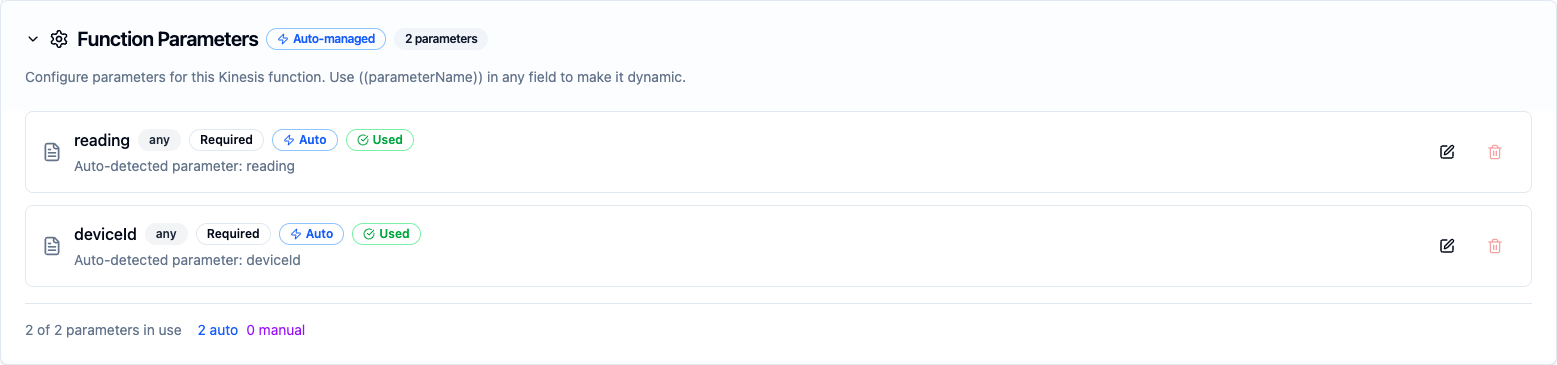
Parameters detected from the stream name, payload, and other templated fields are configured with type, requiredness, and defaults
The Put Record, Put Records, and Get Records functions accept ((parameter)) templating in the stream name, payload, partition key, and other templated fields. The Consume trigger function takes no dynamic parameters — it is configured once and runs as a pipeline trigger.
Pipeline Integration
Use the Kinesis functions you create here as nodes inside the Pipeline Designer. Drag a Put, Get Records, or List Streams node onto the canvas and bind its parameters to upstream outputs, or start a pipeline from the Kinesis Trigger to process records as they arrive.
Common patterns include:
- Collect → Put: Gather values from OPC UA, MQTT, or Modbus and stream them into Kinesis with Put Record / Put Records
- Consume → Transform → Act: Start a pipeline from the Kinesis Trigger, transform each record, and write it onward
- Discover → Read: List streams, then pull a controlled batch from one with Get Records
For broader orchestration patterns that combine Kinesis with other connector steps, see the Connector Nodes page, the Kinesis node reference, and the Kinesis Trigger.
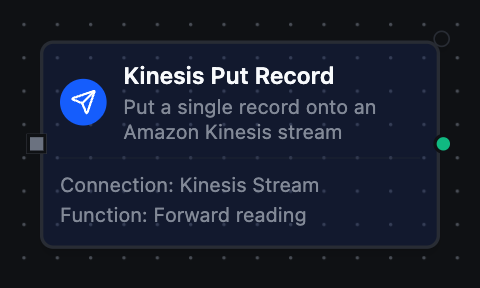
Kinesis Put Record node with connection, function, and parameter bindings
Common Use Cases
Bridging OT Telemetry into an Analytics Stream
Scenario: Forward temperature, pressure, and vibration readings from plant equipment into a Kinesis stream that feeds S3 + Athena for analytics.
Put Record Configuration:
{
  "streamName": "equipment-telemetry",
  "data": "((reading))",
  "partitionKey": "((machineId))"
}
Pipeline Integration: Connect after OPC UA or Modbus read nodes to continuously stream equipment telemetry keyed by machine.
Event-Driven Stream Processing
Scenario: Process each record landing on a Kinesis stream in real time.
Start the pipeline with the Kinesis Trigger on the source stream, transform each record, and route the result to UNS topics, a database, or another stream.
Bulk Ingestion with Partial-Failure Handling
Scenario: Flush a buffered window of readings in one call and retry only the records that failed.
Use Put Records (Batch) and branch on failedRecordCount — when non-zero, re-submit the entries whose result carries an errorCode.