 Amazon SNS Integration Guide
Connect to Amazon Simple Notification Service (SNS) to publish messages that fan out to SQS queues, Lambda functions, HTTPS endpoints, email, SMS, and mobile push subscribers. This guide covers connection setup, function configuration, and pipeline integration for SNS deployments.
Overview
The Amazon SNS connector enables integration with AWS's fully managed pub/sub messaging service, commonly used for event fan-out, alarm distribution, and cross-service notifications. It provides:
- Message publishing to Standard and FIFO SNS topics with support for ordering, deduplication, and per-protocol payloads
- Message attributes for subscription filter policies, so a single topic can route messages to the right subset of subscribers
- FIFO topic support with
MessageGroupIdfor ordered delivery andMessageDeduplicationIdfor exactly-once semantics within a 5-minute window - Topic discovery via the List Topics operation, useful for inventory and pre-publish validation
- Flexible authentication with IAM access keys or the AWS SDK default credential chain (environment variables, shared config, IRSA, instance profile)
- Custom endpoint support for LocalStack and other AWS-compatible services
- Per-publish timeout override so individual operations can deviate from the connection-level default
Amazon SNS is a fan-out service — subscribers (SQS, Lambda, HTTPS, email, SMS, mobile push) receive messages directly from AWS, not from MaestroHub. The connector publishes messages to topics; it does not consume them. If you need to react to events delivered to an SQS queue, use the Amazon SQS connector instead.
Connection Configuration
Amazon SNS Connection Creation Fields
1. Profile Information
| Field | Default | Description |
|---|---|---|
| Profile Name | - | A descriptive name for this connection profile (required, max 100 characters) |
| Description | - | Optional description for this SNS connection |
2. AWS Region
| Field | Default | Description |
|---|---|---|
| AWS Region | us-east-1 | AWS region where the SNS topics live (e.g., us-east-1, eu-central-1). Must match the region of the target topics — SNS is regional. |
A topic ARN encodes its region (e.g., arn:aws:sns:eu-central-1:...). Publishes to an ARN in a different region than the connection's AWS Region will fail. Create a separate connection per region, or use the region embedded in the ARN as your selection guide.
3. Authentication
| Field | Default | Description |
|---|---|---|
| Access Key ID | - | AWS Access Key ID. Leave empty to use the AWS SDK default credential chain (env vars, shared config, IAM role, IRSA). |
| Secret Access Key | - | AWS Secret Access Key. Required when Access Key ID is set; leave empty to use the default credential chain. |
| Session Token | - | Session token for temporary credentials (optional, used with AWS STS). |
You can authenticate the connector in one of two ways:
Option A — Static IAM access keys (explicit)
Provide an Access Key ID and Secret Access Key (and optionally a Session Token for STS-based temporary credentials). Best for self-hosted deployments where the host has no AWS identity of its own.
Option B — AWS SDK default credential chain (implicit)
Leave both Access Key ID and Secret Access Key empty. The connector then resolves credentials in the standard AWS SDK order:
- Environment variables (
AWS_ACCESS_KEY_ID,AWS_SECRET_ACCESS_KEY,AWS_SESSION_TOKEN) - Shared credentials file (
~/.aws/credentials) - IAM Roles for Service Accounts (IRSA) when running on EKS
- EC2 instance profile / ECS task role
This is the recommended path for AWS-hosted MaestroHub deployments — no long-lived keys need to be stored in the connection profile.
The Access Key ID and Secret Access Key must be set together. Setting only one is rejected at validation time. Session Token is optional and only used alongside static keys.
The IAM principal used by the connector must have:
| Operation | Required IAM Action | Scope |
|---|---|---|
| Connect / health probe | sns:ListTopics | Region-level |
| Publish | sns:Publish | The specific topic ARN(s) you publish to |
| List Topics function | sns:ListTopics | Region-level |
A minimal least-privilege policy publishes only to a known set of topic ARNs. The sns:ListTopics permission is needed for the connection's startup health probe — without it, the connection will fail to reach Connected state.
4. Custom Endpoint
| Field | Default | Description |
|---|---|---|
| Custom Endpoint | - | Custom SNS endpoint URL for LocalStack or other AWS-compatible services. Leave empty for AWS SNS. |
For local development with LocalStack, set the custom endpoint to http://localhost:4566 (or wherever LocalStack is running). When using LocalStack you must still supply an AWS Region and credentials — any non-empty values are accepted, since LocalStack does not validate them.
5. Advanced
| Field | Default | Description |
|---|---|---|
| Request Timeout (seconds) | 30 | Upper bound on every SNS API call on this connection, including the connect check (1–3600 seconds). A function's Timeout Override can shorten it, not extend it. |
| Max Retries | 3 | Retries after the first attempt for transient failures (0 = no retries, up to 10). The AWS SDK applies exponential backoff with jitter between attempts. |
6. Connection Labels
| Field | Default | Description |
|---|---|---|
| Labels | - | Key-value pairs to categorize and organize this SNS connection (max 10 labels) |
Example Labels
env: prod– Environmentteam: platform-events– Responsible teamaccount: 123456789012– AWS account ID
Function Builder
Creating Amazon SNS Functions
Once you have a connection established, you can create reusable functions:
- Open the connection and go to its Functions tab → New Function
- Select the desired function type (Publish or List Topics)
- Configure the function parameters
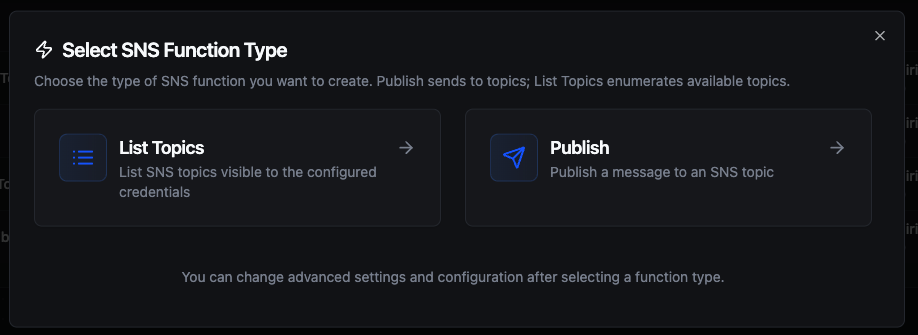
Select from two Amazon SNS function types: Publish for sending messages and List Topics for discovery
Publish Function
Purpose: Publish a message to an SNS topic for fan-out delivery to all matching subscribers. Use this for event broadcasting, alarm distribution, cross-service notifications, and IoT telemetry summaries.
Configuration Fields
| Field | Type | Required | Default | Description |
|---|---|---|---|---|
| Topic ARN | String | Yes | - | Full ARN of the SNS topic (e.g., arn:aws:sns:us-east-1:123456789012:my-topic). FIFO topics end in .fifo. Supports ((parameter)) syntax. |
| Message | String | Yes | - | Message body. With messageStructure=json, this must be a JSON object mapping protocol keys to per-protocol payloads. Supports ((parameter)) syntax. |
| Subject | String | No | - | Optional subject line (used by email subscriptions and as a message attribute). Max 100 characters, must not contain control characters. Supports ((parameter)) syntax. |
| Message Structure | Enum | No | string | string: same payload for every protocol. json: per-protocol payloads keyed by protocol name in the message body. |
| Message Attributes (JSON) | String | No | - | JSON object of message attributes (name → {dataType, stringValue}). Used by subscription filter policies. Supports ((parameter)) syntax. |
| Message Group ID | String | No* | - | Required for FIFO topics. Messages with the same group ID are delivered in order. Supports ((parameter)) syntax. |
| Message Deduplication ID | String | No | - | FIFO only. Used for 5-minute deduplication. Omit when the topic has content-based deduplication enabled. Supports ((parameter)) syntax. |
| Timeout Override | Duration | No | - | Bound on this function's calls; the connection's Request Timeout still applies and the shorter one wins. A Go duration string between 1s and 1h (e.g. 30s). Leave empty to use the connection default; 0 is not accepted. |
* Required when publishing to a FIFO topic (Topic ARN ending in .fifo).
Use Cases:
- Fan out alarm events to ops queues, on-call Lambdas, and email/SMS subscribers in one publish
- Stream IoT telemetry summaries to multiple analytics consumers
- Broadcast pipeline lifecycle events (started, succeeded, failed) to downstream systems
- Emit application events that need protocol-specific payloads (a short SMS, a verbose email, a JSON HTTPS payload)
string vs jsonstring(default): the Message field is sent verbatim to every subscriber, regardless of protocol. Simplest choice for most pipelines.json: the Message field must be a JSON object with one key per protocol you want to customize. Each protocol receives only its own payload. Thedefaultkey is required as a fallback for protocols you didn't specify.
Example json payload:
{
  "default": "Pump A1 fault — see dashboard",
  "email": "Pump A1 has reported a critical bearing temperature of 92°C at 14:32 UTC. See the dashboard for the full trend.",
  "sms": "Pump A1 fault (92°C)",
  "https": "{\"machineId\":\"A1\",\"fault\":\"bearing-temp\",\"value\":92}"
}
FIFO topic ARNs always end in .fifo. When publishing to a FIFO topic:
- Message Group ID is required — messages within the same group are delivered to subscribers in publish order.
- Message Deduplication ID provides 5-minute exactly-once semantics. Omit it only when the topic has content-based deduplication enabled — in that case SNS hashes the message body to derive the dedup key automatically.
Standard (non-FIFO) topics ignore both fields.
The messageAttributes field must be a JSON object where each value declares its dataType and value field. SNS supports String, String.Array, Number, and Binary data types.
{
  "severity": { "dataType": "String", "stringValue": "critical" },
  "site":     { "dataType": "String", "stringValue": "chicago" },
  "score":    { "dataType": "Number", "stringValue": "87" }
}
These attributes drive subscription filter policies — set them deliberately so the same topic can route to different subscriber subsets.
List Topics Function
Purpose: List the SNS topics visible to the connection's IAM principal in the configured region. Useful for topic discovery, inventory audits, and pre-publish validation of topic ARNs.
Configuration Fields
| Field | Type | Required | Default | Description |
|---|---|---|---|---|
| Max Items | Number | No | 1000 | Maximum number of topics to return (100–10000). The connector paginates AWS responses internally (up to ~100 topics per AWS call) and stops once this budget is reached. |
Use Cases:
- Audit topic inventory for a region before onboarding new pipelines
- Validate that a target Topic ARN exists before a deployment
- Build operational dashboards that summarize messaging surface area
AWS returns up to ~100 topics per ListTopics call. The connector aggregates pages internally up to your Max Items budget — you never need to drive pagination yourself. If your account has more topics than the budget, the call's metadata says so (truncated: true, read as _metadata.truncated in a pipeline) and nextToken says where it stopped.
Using Parameters
The ((parameterName)) syntax creates dynamic, reusable functions. Parameters are automatically detected from your configuration fields and can be configured with:
| Configuration | Description | Example |
|---|---|---|
| Type | Data type validation | string, number, boolean, datetime, json, buffer |
| Required | Make parameters mandatory or optional | Required / Optional |
| Default Value | Fallback value if not provided | arn:aws:sns:us-east-1:111111111111:alerts, info, {} |
| Description | Help text for users | "Target topic ARN", "Alert severity" |
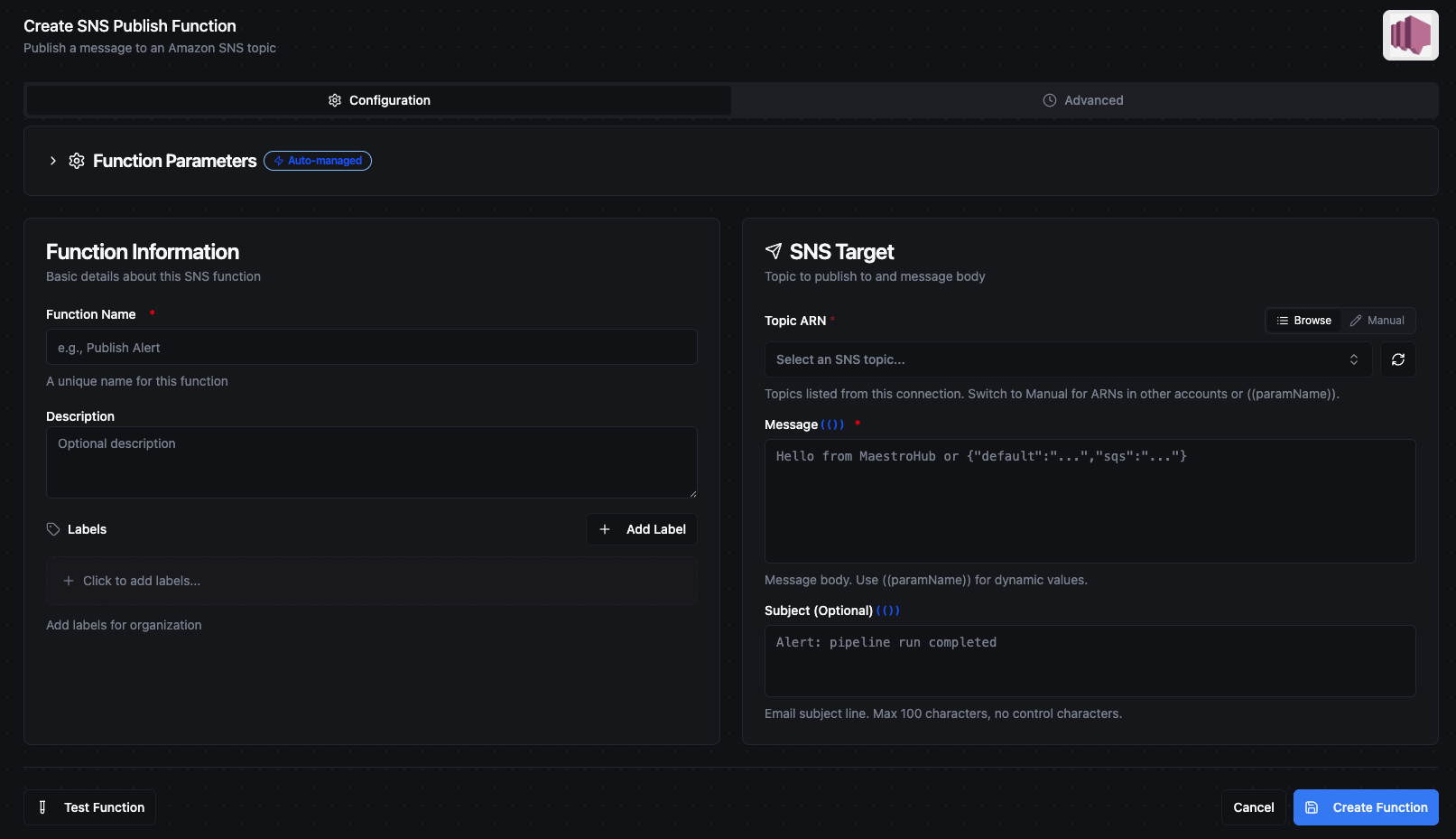
Configure dynamic parameters for Publish functions with type validation, defaults, and descriptions
Template parameters are available for Publish functions (Topic ARN, Message, Subject, Message Attributes, Message Group ID, Message Deduplication ID). The List Topics function takes only a static maxItems value — its scope is fixed at configuration time.
Pipeline Integration
Use the Amazon SNS functions you create here as nodes inside the Pipeline Designer. Drag them onto the canvas, bind parameters to upstream outputs or constants, and build event-driven fan-out flows without leaving the designer.
- Amazon SNS Publish — Publish a message to an SNS topic as a step within a running pipeline
For broader orchestration patterns that combine SNS with databases, REST, MQTT, or other connector steps, see the Connector Nodes page.
SNS itself does not deliver messages back to MaestroHub — subscribers are AWS-native (SQS, Lambda, HTTPS endpoints, email, SMS, mobile push). To consume SNS-fanned-out messages in a pipeline trigger, subscribe an SQS queue to the topic and use the Amazon SQS trigger node. To react to HTTPS webhook deliveries, use the Webhook Trigger.
Common Use Cases
Alarm Fan-Out to Ops Tooling
Scenario: A pipeline detects a critical equipment fault and needs to notify on-call engineers via SMS, page the ops Lambda for automatic remediation, and log the event to an SQS queue for downstream analytics — all from a single publish.
Publish Configuration:
- Topic ARN:
arn:aws:sns:us-east-1:123456789012:critical-alarms - Subject:
((machineId)) — ((faultType)) - Message Structure:
json - Message:
{
  "default": "((machineId)) reported ((faultType)) at ((timestamp))",
  "sms": "ALARM ((machineId)) ((faultType))",
  "lambda": "{\"machineId\":\"((machineId))\",\"fault\":\"((faultType))\",\"value\":((value))}"
}
- Message Attributes:
{
  "severity": { "dataType": "String", "stringValue": "((severity))" },
  "site":     { "dataType": "String", "stringValue": "((site))" }
}
Pipeline Integration: Connect downstream of a threshold or anomaly-detection node. Subscriber filter policies on the topic route severity=critical to SMS + Lambda, severity=warning to email only, and all severities to the SQS analytics queue.
Ordered Per-Machine Event Stream (FIFO)
Scenario: Equipment lifecycle events (started, ramped, stopped) must be delivered to downstream consumers in the order they were emitted per machine. Cross-machine ordering does not matter.
Topic: FIFO topic arn:aws:sns:us-east-1:123456789012:equipment-lifecycle.fifo
Publish Configuration:
- Topic ARN:
arn:aws:sns:us-east-1:123456789012:equipment-lifecycle.fifo - Message:
{"machineId":"((machineId))","event":"((eventType))","ts":"((timestamp))"} - Message Group ID:
((machineId))— guarantees per-machine ordering - Message Deduplication ID:
((eventId))— exactly-once within 5 minutes
Pipeline Integration: Publish from the pipeline that processes raw equipment events. SQS FIFO subscribers receive messages for the same machineId strictly in order, while different machines fan out in parallel.
Pipeline Lifecycle Notifications
Scenario: Notify operators when a critical pipeline succeeds or fails. Email subscribers want a full report; SMS subscribers want a one-line summary; an HTTPS subscriber wants a structured payload for a status page.
Publish Configuration:
- Topic ARN:
arn:aws:sns:us-east-1:123456789012:pipeline-status - Subject:
Pipeline ((pipelineName)) — ((status)) - Message Structure:
json - Message:
{
  "default": "Pipeline ((pipelineName)) finished with status ((status))",
  "email": "Pipeline ((pipelineName)) finished with status ((status)).\nRuntime: ((runtimeSec))s\nRecords processed: ((recordCount))",
  "sms": "((pipelineName)): ((status))",
  "https": "{\"pipeline\":\"((pipelineName))\",\"status\":\"((status))\",\"runtimeSec\":((runtimeSec))}"
}
Pipeline Integration: Add the Publish node to the pipeline's success and failure branches. The same topic serves operators with different preferences without duplicate publishes.
Topic Inventory Audit
Scenario: Compliance requires a periodic inventory of all SNS topics in each region, with tagged ownership metadata for review.
Function: List Topics with Max Items: 5000
Pipeline Integration: Schedule a daily pipeline that runs List Topics across each regional connection, then writes the results to an audit table (PostgreSQL, BigQuery, or S3). Combine with AWS resource-tag APIs for a complete ownership report.