 NATS Integration Guide
Use MaestroHub's NATS connector to bridge OT and IoT events into your cloud-native event mesh. NATS is the lightweight messaging fabric for edge fleets and Kubernetes-native architectures, with sub-millisecond core pub/sub and optional JetStream persistence for durable streams.
Overview
The NATS connector delivers:
- Subject-based publish/subscribe with hierarchical, dot-separated subjects and
*/>wildcards on subscribe - Queue groups for load-balanced consumption across multiple pipeline replicas
- Request/Reply patterns for synchronous RPC-style interactions
- JetStream durable consumers with explicit ack and server-side redelivery on no-ack (
AckWait) - JetStream-backed publish with broker-acknowledged sequence numbers
- Auth modes: none / username+password / token + TLS
- Auto-reconnect with configurable backoff and unlimited reconnect attempts
- Multi-server clustering via comma-separated URL list — the client discovers the rest of the cluster
- Fail-fast JetStream probe: a connection that enables JetStream but points at a server without JetStream errors immediately on save (no silent runtime timeouts)
- Payload templating with dynamic
((parameter))syntax
Connection Configuration
Creating a NATS Connection
Navigate to Connections → New Connection → NATS and fill in these details.
NATS Connection Creation Fields
1. Profile Information
| Field | Default | Description |
|---|---|---|
| Profile Name | - | A descriptive name for this connection profile (required, max 100 characters) |
| Description | - | Optional description for this NATS connection |
2. Server Configuration (Connection tab)
| Field | Type | Default | Required | Description |
|---|---|---|---|---|
| Server URLs | String | nats://localhost:4222 | Yes | Comma-separated list of NATS server URLs (e.g., nats://host1:4222,nats://host2:4222). The client discovers the rest of the cluster automatically. |
| Client Name | String | maestrohub | No | Client identifier reported to the NATS server; useful for monitoring (nats-server -m) |
Port Defaults
4222: Standard NATS client port (unencrypted or TLS)8222: HTTP monitoring endpoint (server-side)6222: Cluster routing (server-side, not client-facing)
3. JetStream (Connection tab)
| Field | Type | Default | Description |
|---|---|---|---|
| Enable JetStream | Boolean | false | Required to use JetStream-backed publish and subscribe functions. The connection probes the server at save time and rejects the connection if JetStream is not enabled on the server. |
| JetStream Domain | String | - | Optional — only set for multi-tenant or leaf-node deployments where the server is configured with a domain |
Enable JetStream when you need persistence, durable consumers, or redelivery on no-ack. Leave it off for fire-and-forget telemetry where lower latency and the at-most-once core NATS semantics are preferred. JetStream streams themselves are provisioned out of band (via the NATS CLI or operator tooling) — this connector publishes to and consumes from streams; it does not create them.
4. Authentication (Security tab)
| Field | Type | Default | Description |
|---|---|---|---|
| Auth Mode | Select | none | One of none (anonymous), userpass (username/password), or token (bearer token). NKey / JWT support is planned for a later release. |
| Username | String | - | Required when Auth Mode is userpass |
| Password | Password | - | Stored encrypted. Leave empty on edit to keep the existing value. |
| Token | Password | - | Stored encrypted. Required when Auth Mode is token. Leave empty on edit to keep the existing value. |
5. TLS/SSL (Security tab)
| Field | Type | Default | Description |
|---|---|---|---|
| Enable TLS | Boolean | false | Use TLS for the connection to the NATS server |
| Skip Certificate Verification | Boolean | false | Skip TLS certificate verification (not recommended for production) |
6. Advanced Settings (Advanced tab)
| Field | Type | Default | Validation | Description |
|---|---|---|---|---|
| Connect Timeout (seconds) | Number | 10 | 1–300 | Initial connect timeout |
| Ping Interval (seconds) | Number | 120 | 0–3600 | Liveness pings to detect dead connections. Set to 0 to disable. |
| Reconnect Wait (seconds) | Number | 2 | 0–300 | Backoff between reconnect attempts |
| Max Reconnects | Number | -1 | -1 or 0–10000 | -1 for unlimited, otherwise the maximum number of reconnect attempts before giving up |
7. Connection Labels
| Field | Default | Description |
|---|---|---|
| Labels | - | Key-value pairs to categorize and organize this NATS connection (max 10 labels) |
Example Labels
environment: production– Deployment environmentteam: edge– Responsible teamregion: eu-west-1– Geographical region
- The default URL
nats://localhost:4222works for the embedded NATS server during development. In production, point to your cluster — provide multiple URLs for HA so the client can fail over between seeds. - Defaults for ping / reconnect work for most deployments. Lower the Ping Interval if you need faster dead-connection detection; raise Reconnect Wait on flaky networks to avoid storming the broker during outages.
- Anonymous mode (
Auth Mode = none) only works if the NATS server is configured to allow unauthenticated connections. - The password and token fields are stored encrypted and displayed as masked after saving.
Function Builder
Creating NATS Functions
After the connection is configured:
- Open the connection and go to its Functions tab → New Function
- Choose Publish, Request, or Subscribe as the function type
- Configure the subject and operation-specific fields
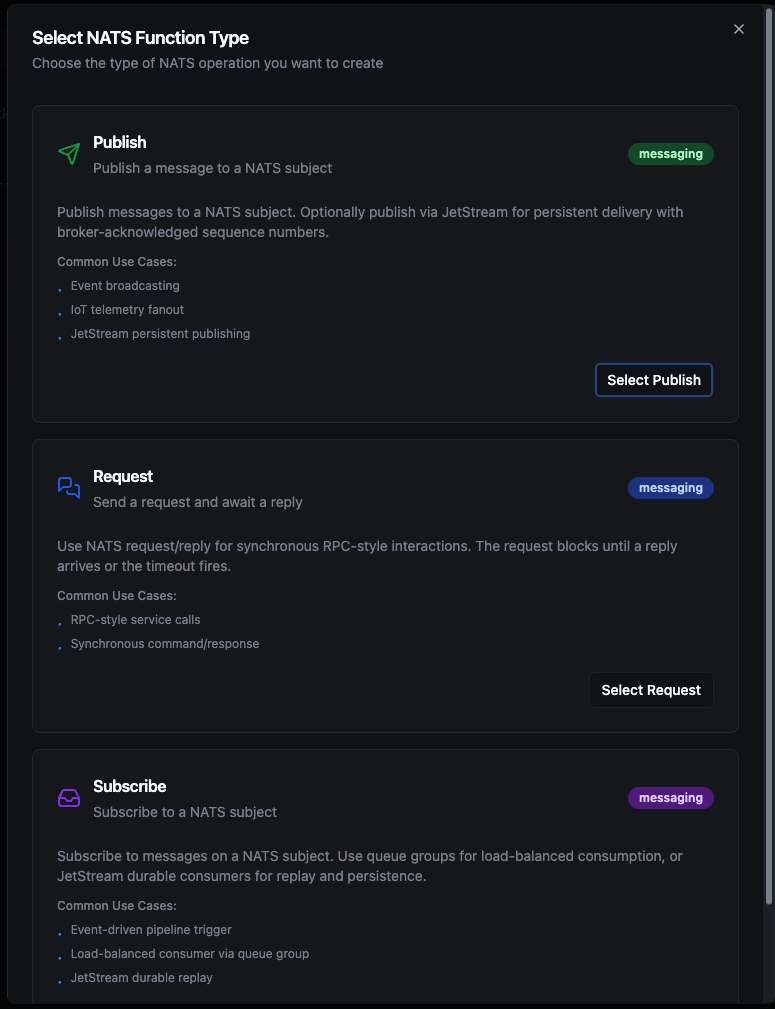
Design NATS publish, request, or subscribe functions with subject routing and templated payloads
Publish Function
Purpose: Send messages to a NATS subject. Optionally publish via JetStream for persistent delivery with broker-acknowledged sequence numbers.
Configuration Fields
| Field | Type | Required | Default | Description |
|---|---|---|---|---|
| Subject | String | Yes | - | NATS subject to publish to. Dot-separated; wildcards (*, >) are subscriber-side only. Supports ((parameter)) syntax. |
| Payload | String | Yes | - | Message payload. Supports ((parameter)) syntax for dynamic content. |
| Headers (JSON) | Object | No | - | Optional message headers as JSON. Requires NATS 2.2+ on the server. Supports ((parameter)) syntax. |
| Reply To | String | No | - | Optional reply-to subject downstream consumers can use |
| Use JetStream | Boolean | No | false | Publish via JetStream for persistent delivery. The connection's Enable JetStream toggle must be on and the target subject must belong to a JetStream stream. |
Use Cases: Event broadcasting, IoT telemetry fanout, JetStream persistent publishing
Request Function
Purpose: Send a request on a NATS subject and synchronously await a reply — RPC-style.
Configuration Fields
| Field | Type | Required | Default | Validation | Description |
|---|---|---|---|---|---|
| Subject | String | Yes | - | - | NATS subject the responder is listening on. Supports ((parameter)) syntax. |
| Payload | String | Yes | - | - | Request payload. Supports ((parameter)) syntax. |
| Timeout (ms) | Number | No | 1800000 | 1000–3600000 | Maximum time to wait for a reply before failing |
Use Cases: RPC-style service calls, synchronous IoT command/response
Subscribe Function
Purpose: Subscribe to messages on a NATS subject. Use queue groups for load-balanced consumption, or JetStream durable consumers for persistence and redelivery on no-ack. Subscribe functions drive pipeline triggers — they cannot be invoked manually.
Configuration Fields
| Field | Type | Required | Default | Validation | Description |
|---|---|---|---|---|---|
| Subject | String | Yes | - | - | Subject to subscribe to. Wildcards * (single token) and > (multi-token tail) supported. |
| Queue Group | String | No | - | - | Queue group name for load-balanced consumption across consumers. Leave empty for fanout (every consumer receives every message). |
| Use JetStream | Boolean | No | false | - | Use a JetStream durable consumer with explicit ack. Requires the connection's Enable JetStream toggle. |
| Durable Consumer Name | String | Yes if JetStream | - | - | Stable name so the server tracks progress across reconnects. Required when Use JetStream is on. |
| Ack Wait (ms) | Number | No | 30000 | 1000–600000 | JetStream: how long the server waits for an ack before redelivering the message |
| Max In-Flight | Number | No | 1 | 1–65535 | JetStream: maximum unacknowledged messages per consumer |
Use Cases: Event-driven pipeline trigger, load-balanced consumer via queue group, JetStream durable consumption with at-least-once delivery
Using Parameters
NATS publish and request functions support parameterized values via the ((parameterName)) syntax. Use parameters in the subject, payload, headers, and reply-to fields. Parameters are auto-detected from ((..)) tokens — typing ((orderId)) in the payload automatically adds orderId to the function's parameter list, which then appears as an input field on the pipeline node.
| Configuration | Description | Example |
|---|---|---|
| Type | Validate incoming pipeline data | string, number, boolean, datetime, json, buffer |
| Required | Force parameter presence | Required / Optional |
| Default Value | Provide fallback values | 'edge-01', 0, '{}' |
| Description | Document intent for other authors | "Order ID resolved from upstream node" |
The connector templating engine recognises ((double parentheses)) — {{ curly braces }} are ignored and stored as literal text. If your pipeline node shows "no configurable parameters" for a function whose fields look templated, check the brace style.
Pipeline Integration
Use the NATS connection functions you create here as nodes inside the Pipeline Designer. Drag in the NATS Publish node to emit events, the NATS Request node for synchronous RPC, or the NATS Trigger node to start pipelines automatically on incoming messages.
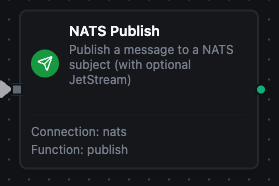
NATS Publish node with connection, function, and parameter mappings
Common Use Cases
Edge-to-Cloud Event Bridge
Subscribe to NATS subjects emitted by edge devices, transform with downstream nodes, and republish to cloud data warehouses or analytics platforms. Queue groups distribute work across MaestroHub replicas automatically.
Synchronous Device Command
Use a Request node to send a command to a device's response subject and wait for an ACK or status reply. Combine with a timeout policy at the pipeline level for graceful degradation.
JetStream Audit Trail
Enable JetStream on the connection and publish business events (orders placed, sensor alerts) to a JetStream stream. Provision the stream with retention and replication policies via the NATS CLI — the connector publishes to it and receives broker-acknowledged sequence numbers per message.
Load-Balanced Worker Pool
Multiple pipelines (or replicas of the same pipeline) subscribe to the same subject with the same queue group. NATS load-balances messages across them — each message goes to exactly one worker.
Kubernetes-Native Event Mesh
Bridge OT events from PLCs, OPC UA, and MQTT into an existing NATS-based service mesh used by the rest of your cloud-native stack. The connector pairs naturally with NATS deployments where Kafka is overkill for footprint.
Troubleshooting
"JetStream is enabled on this connection but the NATS server does not support it"
The connection has Enable JetStream turned on but the target server was started without JetStream support. Either:
- Restart the NATS server with
nats-server -js(or setjetstream: {}in the server config), or - Disable Enable JetStream on the connection and use only core NATS publish/subscribe (without
Use JetStreamon individual functions).
This check happens at save time so the misconfiguration is caught immediately rather than as a 5-second timeout on the first publish.
"durableName is required for JetStream subscriptions"
A subscribe function has Use JetStream on but the Durable Consumer Name field is empty. JetStream consumers must have a durable name so the server can track delivery progress across reconnects. Provide a stable, unique name (e.g., pipeline-orders-worker).
"no configurable parameters" on a pipeline node
The function does not contain any ((parameter)) placeholders in its templated fields. Check that you used double parentheses, not {{ }} or $variable. After editing the function, refresh the pipeline node configuration to fetch the updated parameter list.