Amazon SNS Nodes
Amazon Simple Notification Service (SNS) is AWS's fully managed pub/sub messaging service used for event fan-out, alarm distribution, and cross-service notifications. MaestroHub provides a Publish node so you can send messages to SNS topics within your pipelines.
Configuration Quick Reference
| Field | What you choose | Details |
|---|---|---|
| Parameters | Connection, Function, Function Parameters, Timeout Override | Select the connection profile, function, configure function parameters with expression support, and optionally override the per-publish timeout. |
| Settings | Description, Timeout (seconds), Retry on Timeout, Retry on Fail, On Error | Node description, maximum execution time, retry behavior on timeout or failure, and error handling strategy. All execution settings default to pipeline-level values. |
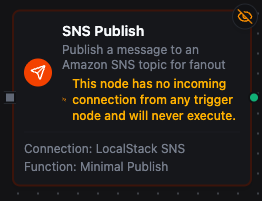
Amazon SNS Publish Node
Amazon SNS Publish Node
Publish messages to Amazon SNS topics with support for Standard and FIFO topics, message attributes for subscription filter policies, per-protocol message structures, and dynamic payload templates.
Supported Function Types:
| Function Name | Purpose | Common Use Cases |
|---|---|---|
| Publish | Send a message to an SNS topic for fan-out delivery to all matching subscribers | Alarm fan-out to SQS / Lambda / SMS, pipeline lifecycle notifications, IoT telemetry broadcast, cross-service event distribution |
How It Works
When the pipeline executes, the Publish node:
- Resolves the configured SNS connection profile and loads AWS credentials (static IAM keys or the SDK default credential chain)
- Renders all templated fields (Topic ARN, Message, Subject, Message Attributes, Message Group ID, Message Deduplication ID) against the current pipeline context
- Validates FIFO-only requirements when the Topic ARN ends in
.fifo(Message Group ID must be present) - Publishes the message to AWS SNS bounded by the connection's Request Timeout and, when set, the node's Timeout Override (the shorter one wins)
- Returns the SNS-assigned MessageId — and, for FIFO topics, the Sequence Number — so downstream nodes can correlate the publish with subscriber-side observations
Configuration
| Field | What you choose | Details |
|---|---|---|
| Connection | Amazon SNS connection profile | Select a pre-configured connection from your connection library |
| Function | Publish function | Choose an SNS Publish function that defines the topic, payload, attributes, and FIFO settings |
| Function Parameters | Message values | Configure dynamic values for Topic ARN, Message, Subject, Message Attributes, Message Group ID, and Message Deduplication ID using expressions or constants |
| Timeout Override | Per-publish timeout | Optional. Bound for this node only; the connection's Request Timeout still applies and the shorter one wins. A Go duration string between 1s and 1h (e.g. 30s). Leave empty to use the connection default; 0 is not accepted. |
For detailed function configuration options — including Message Structure (string vs json), Message Attribute formatting, and FIFO ordering semantics — see the Amazon SNS Publish Function documentation.
SNS itself does not deliver messages back to MaestroHub. To trigger a pipeline when an SNS-fanned-out message arrives, subscribe an SQS queue to the topic and use the Amazon SQS trigger node, or subscribe an HTTPS endpoint and use the Webhook Trigger.
If your Topic ARN ends in .fifo, the Message Group ID parameter is required — publishes without it will fail validation. Bind it to a stable per-entity value (e.g. ((machineId)), ((orderId))) so messages within the same group are delivered in order to subscribers.
Amazon SNS List Topics Node
List the topics visible to the configured credentials, up to the function's item budget (maxItems). The connector paginates internally.
| Function Name | Purpose | Common Use Cases |
|---|---|---|
| List Topics | Discover topics for the credentials | Topic inventory audits, resolving an ARN by name |
Output
Every SNS node delivers its data under result, and execution facts (success, functionId, durationMs, timestamp) under _metadata:
| Node | Expression | Description |
|---|---|---|
| Publish | $node["Name"].result.messageId | The id SNS assigned |
$node["Name"].result.sequenceNumber | The FIFO sequence number — present only for a FIFO topic | |
| List Topics | $node["Name"].result.topics | One object per topic: topicArn and name. $node["Name"].result.topics[0].topicArn reads the first |
$node["Name"].result.count | How many topics were listed | |
$node["Name"]._metadata.truncated | true when the item budget stopped the listing and more topics exist — a fact about the call, so it rides with the execution facts | |
$node["Name"]._metadata.method, $node["Name"]._metadata.connectionId, $node["Name"]._metadata.protocol, $node["Name"]._metadata.topicArn | The call's other facts: the operation, the connection it ran over, sns, and — on Publish — the topic it published to | |
$node["Name"].result.nextToken | Where the listing stopped — present only when _metadata.truncated is true |