RabbitMQ Nodes
RabbitMQ is a robust message broker supporting AMQP 0-9-1 with advanced exchange routing, message persistence, and competing consumers. MaestroHub provides connector nodes for publishing and consuming messages within your pipelines.
Configuration Quick Reference
| Field | What you choose | Details |
|---|---|---|
| Parameters | Connection, Function, Function Parameters, Timeout Override | Select the connection profile, function, configure function parameters with expression support, and optionally override timeout. |
| Settings | Description, Timeout (seconds), Retry on Timeout, Retry on Fail, On Error | Node description, maximum execution time, retry behavior on timeout or failure, and error handling strategy. All execution settings default to pipeline-level values. |
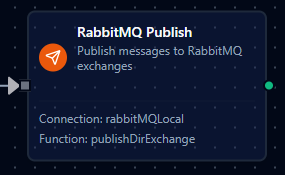
RabbitMQ Publish Node
RabbitMQ Publish Node
Publish messages to RabbitMQ exchanges for task distribution, event broadcasting, and enterprise messaging.
Supported Function Types:
| Function Name | Purpose | Common Use Cases |
|---|---|---|
| Publish | Send messages to RabbitMQ exchanges with routing keys using shared connections | Task queues, event broadcasting, topic-based routing, direct message delivery |
How It Works
When the pipeline executes, the Publish node:
- Connects to the RabbitMQ broker using the selected connection profile
- Resolves any
((parameter))placeholders in the exchange, routing key, payload, and headers - Publishes the message to the configured exchange with the specified routing key
- Returns a result containing the exchange, routing key, message size, and persistence status
Configuration
| Field | What you choose | Details |
|---|---|---|
| Connection | RabbitMQ connection profile | Select a pre-configured RabbitMQ connection from your connection library |
| Function | Publish function | Choose a RabbitMQ Publish function that defines exchange, routing key, payload, and message options |
| Function Parameters | Exchange, routing key, payload, headers | Configure dynamic values using expressions or upstream node outputs (inherited from function) |
Publish Result
On success, the node outputs:
{
  "exchange": "amq.topic",
  "routingKey": "sensor.temperature",
  "messageSize": 42,
  "persistent": true
}
For detailed function configuration options including persistence, priority, headers, and RPC fields, see the RabbitMQ Function Builder documentation.
Output
The broker's acknowledgement is delivered under result; execution facts (success, functionId, durationMs, timestamp) under _metadata. RabbitMQ Publish:
| Expression | Description |
|---|---|
$node["Name"].result.exchange | The exchange published to (empty for the default exchange) |
$node["Name"].result.routingKey | The routing key the message was published with |
$node["Name"].result.messageSize | Payload size in bytes |
$node["Name"].result.persistent | Whether the message was marked persistent |
$node["Name"]._metadata.method, $node["Name"]._metadata.connectionId, $node["Name"]._metadata.protocol | The call's own facts, on every node: the operation, the connection it ran over, rabbitmq |