RabbitMQ Nodes
RabbitMQ is a robust message broker supporting AMQP 0-9-1 with advanced exchange routing, message persistence, and competing consumers. MaestroHub provides connector nodes for publishing and consuming messages within your pipelines.
Configuration Quick Reference
| Field | What you choose | Details |
|---|---|---|
| Parameters | Connection, Function, Function Parameters, Timeout Override | Select the connection profile, function, configure function parameters with expression support, and optionally override timeout. |
| Settings | Description, Timeout (seconds), Retry on Timeout, Retry on Fail, On Error | Node description, maximum execution time, retry behavior on timeout or failure, and error handling strategy. All execution settings default to pipeline-level values. |
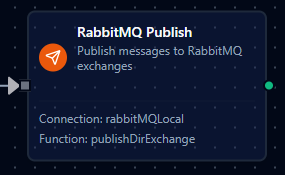
RabbitMQ Publish Node
RabbitMQ Publish Node
Publish messages to RabbitMQ exchanges for task distribution, event broadcasting, and enterprise messaging.
Supported Function Types:
| Function Name | Purpose | Common Use Cases |
|---|---|---|
| Publish | Send messages to RabbitMQ exchanges with routing keys using shared connections | Task queues, event broadcasting, topic-based routing, direct message delivery |
How It Works
When the pipeline executes, the Publish node:
- Connects to the RabbitMQ broker using the selected connection profile
- Resolves any
((parameter))placeholders in the exchange, routing key, payload, and headers - Publishes the message to the configured exchange with the specified routing key
- Returns a result containing the exchange, routing key, message size, and persistence status
Configuration
| Field | What you choose | Details |
|---|---|---|
| Connection | RabbitMQ connection profile | Select a pre-configured RabbitMQ connection from your connection library |
| Function | Publish function | Choose a RabbitMQ Publish function that defines exchange, routing key, payload, and message options |
| Function Parameters | Exchange, routing key, payload, headers | Configure dynamic values using expressions or upstream node outputs (inherited from function) |
Publish Result
On success, the node outputs:
{
  "exchange": "amq.topic",
  "routingKey": "sensor.temperature",
  "messageSize": 42,
  "persistent": true,
  "published": true
}
For detailed function configuration options including persistence, priority, headers, and RPC fields, see the RabbitMQ Function Builder documentation.