Slack Nodes
Slack is a widely adopted collaboration platform for team communication. MaestroHub integrates with it to send automated notifications, alerts, and production updates directly to Slack channels or individual users using connector nodes.
Configuration Quick Reference
| Field | What you choose | Details |
|---|---|---|
| Parameters | Connection, Function, Function Parameters, Timeout Override | Select the connection profile, function, configure function parameters with expression support, and optionally override timeout. |
| Settings | Description, Timeout (seconds), Retry on Timeout, Retry on Fail, On Error | Node description, maximum execution time, retry behavior on timeout or failure, and error handling strategy. All execution settings default to pipeline-level values. |
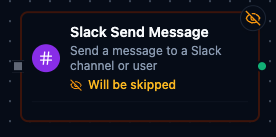
Slack Send Message Node
Slack Send Message Node
Send text messages to Slack channels or directly to users for automated notifications and team collaboration.
Supported Function Types:
| Function Name | Purpose | Common Use Cases |
|---|---|---|
| Send Message | Send notifications to Slack channels or direct messages to users | Production alerts, quality notifications, shift handover summaries, workflow status updates |
| Get Channels | List the channels the app can see | Resolving a channel id by name, auditing where the bot is a member |
| Get Users | List the workspace's users | Resolving a user id for a direct message, on-call lookups |
One node covers all three: the function you bind decides which of them runs, and which keys the result carries.
How It Works
When the pipeline executes, the Slack Send Message node:
- Connects to the Slack workspace using the selected connection profile's OAuth token
- Resolves the target recipient (channel or user) from the function configuration
- Sends the message with any configured bot customization (username, icon emoji)
- Optionally replies to a thread if a thread timestamp is provided
Configuration
| Field | What you choose | Details |
|---|---|---|
| Connection | Slack connection profile | Select a pre-configured Slack connection from your connection library |
| Function | Send Message function | Choose a Slack Send Message function that defines recipient, message content, and optional bot appearance |
| Function Parameters | Channel/User, Message Text, Bot Username, Icon Emoji, Thread Timestamp | Override function defaults with pipeline data using ((parameterName)) syntax |
For detailed function configuration options including channel/user selection, bot customization, and thread replies, see the Slack Integration Guide documentation.
Output
The Slack node delivers its data under result, and execution facts (success, functionId, durationMs, timestamp) under _metadata. Which keys appear depends on the function you bound:
| Function | Expression | Description |
|---|---|---|
| Send Message | $node["Name"].result.channel | The channel Slack posted to, as its id |
$node["Name"].result.timestamp | Slack's message ts — pass it back as Thread Timestamp to reply in thread. It is a message handle, not a clock reading | |
| Get Channels | $node["Name"].result.channels | One object per channel: id, name, isPrivate, isArchived, isMember, numMembers, plus topic and purpose when set. $node["Name"].result.channels[0].id reads the first |
| Get Users | $node["Name"].result.users | One object per non-deleted user: id, name, realName, isBot, isAdmin, isOwner, plus email, displayName and title when the profile carries them |
| all three | $node["Name"]._metadata.method, $node["Name"]._metadata.connectionId, $node["Name"]._metadata.protocol, $node["Name"]._metadata.message, $node["Name"]._metadata.count | The call's own facts: the operation, the connection it ran over, slack, a one-line note about what happened, and — for Get Channels and Get Users — how many items came back |
topic, purpose, email, displayName and title are omitted when Slack has nothing for them, rather than delivered as "". Guard with ?. or a default when you read them.