SMTP Nodes
SMTP (Simple Mail Transfer Protocol) is the standard protocol for sending emails across the internet. MaestroHub integrates with it to send automated emails with dynamic content, multiple recipients, and file attachments directly from your pipelines using connector nodes.
Configuration Quick Reference
| Field | What you choose | Details |
|---|---|---|
| Parameters | Connection, Function, Function Parameters, Timeout Override | Select the connection profile, function, configure function parameters with expression support, and optionally override timeout. |
| Settings | Description, Timeout (seconds), Retry on Timeout, Retry on Fail, On Error | Node description, maximum execution time, retry behavior on timeout or failure, and error handling strategy. All execution settings default to pipeline-level values. |
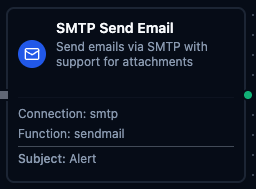
SMTP Send Email Node
SMTP Send Email Node
Send emails via SMTP with support for multiple recipients, HTML/plain text content, and file attachments for automated notifications and reporting.
Supported Function Types:
| Function Name | Purpose | Common Use Cases |
|---|---|---|
| Send Email | Send emails with dynamic content and optional attachments using SMTP connections | Alert notifications, scheduled reports, order confirmations, welcome emails |
How It Works
When the pipeline executes, the SMTP Send Email node:
- Connects to the SMTP server using the selected connection profile's credentials and TLS settings
- Resolves recipients (To, CC, BCC) from the function configuration
- Renders the email subject and body using any provided template parameters
- Attaches files if configured (Base64-encoded content with MIME type)
- Sends the email and returns the delivery status
Configuration
| Field | What you choose | Details |
|---|---|---|
| Connection | SMTP connection profile | Select a pre-configured SMTP connection from your connection library |
| Function | Send Email function | Choose an SMTP Send Email function that defines recipients, content, and attachments |
| Function Parameters | Subject, Body, Attachment Data | Override function defaults with pipeline data using ((parameterName)) syntax |
For detailed function configuration options including recipient setup, HTML/plain text bodies, attachment configuration, and template parameters, see the SMTP Integration Guide documentation.
Output
The SMTP Send Email node delivers its data under result, and execution facts (success, functionId, durationMs, timestamp) under _metadata:
| Expression | Description |
|---|---|
$node["Name"].result.messageId | A correlation handle built from the connection id and the send time |
$node["Name"].result.timestamp | When the mail was handed to the server, UTC RFC 3339 |
messageId is not the mail's Message-ID headerSMTP submission gives the client no server-assigned Message-ID back, so MaestroHub builds a local handle instead. It correlates this node's run with your pipeline's logs — it will not match what the recipient sees in the message header, and it cannot be used to look the mail up on the server.
The node succeeds when the SMTP server accepts the message. Whether the recipient's mail system later accepts, defers, or bounces it is invisible here — a bounce arrives asynchronously at the envelope sender, not at this pipeline.