Kafka Nodes
Apache Kafka is a distributed streaming platform widely used for event streaming, log aggregation, and real-time data pipelines. MaestroHub provides a Produce node so you can send messages to Kafka topics within your pipelines.
Configuration Quick Reference
| Field | What you choose | Details |
|---|---|---|
| Parameters | Connection, Function, Function Parameters, Timeout Override | Select the connection profile, function, configure function parameters with expression support, and optionally override timeout. |
| Settings | Description, Timeout (seconds), Retry on Timeout, Retry on Fail, On Error | Node description, maximum execution time, retry behavior on timeout or failure, and error handling strategy. All execution settings default to pipeline-level values. |
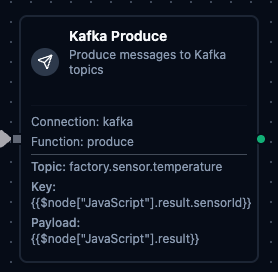
Kafka Produce Node
Kafka Produce Node
Produce messages to Kafka topics with key-based partitioning, custom headers, and dynamic payloads.
Supported Function Types:
| Function Name | Purpose | Common Use Cases |
|---|---|---|
| Produce | Send messages to Kafka topics with key, payload, headers, and optional partition targeting | Event streaming, log forwarding, data pipeline ingestion, inter-service messaging |
How It Works
When the pipeline executes, the Produce node:
- Connects to the Kafka cluster using the selected connection profile
- Serializes the message with the configured key, payload, and headers
- Sends the message to the target topic (with optional partition targeting)
- Returns delivery confirmation including partition and offset of the written message
Configuration
| Field | What you choose | Details |
|---|---|---|
| Connection | Kafka connection profile | Select a pre-configured Kafka connection from your connection library |
| Function | Produce function | Choose a Kafka Produce function that defines the topic, key, payload, and headers |
| Function Parameters | Message values | Configure dynamic values for topic, key, payload, and headers using expressions or constants |
For detailed function configuration options including partitioning strategies and header formatting, see the Kafka Produce Function documentation.
If you want to automatically start a pipeline when Kafka messages arrive (rather than produce within an already-running pipeline), use the Kafka Trigger Node instead.
Output
The broker's acknowledgement is delivered under result; execution facts (success, functionId, durationMs, timestamp) under _metadata. Kafka Produce:
| Expression | Description |
|---|---|
$node["Name"].result.topic | The topic produced to |
$node["Name"].result.partition | The partition the broker placed the record in |
$node["Name"].result.offset | The record's offset in that partition |
$node["Name"].result.messageSize | Payload size in bytes |
$node["Name"]._metadata.method, $node["Name"]._metadata.connectionId, $node["Name"]._metadata.protocol | The call's own facts, on every node: the operation, the connection it ran over, kafka |