Amazon Data Firehose Nodes
Amazon Data Firehose buffers streaming records and delivers them to Amazon S3, Redshift, OpenSearch, Splunk, Snowflake, Iceberg tables or an HTTP endpoint, with no consumers to run. MaestroHub provides two nodes that write to a delivery stream and two that inspect streams.
Configuration Quick Reference
| Field | What you choose | Details |
|---|---|---|
| Parameters | Connection, Function, Function Parameters, Timeout Override | Select the connection profile, function, configure function parameters with expression support, and optionally override the per-call timeout. |
| Settings | Description, Timeout (seconds), Retry on Timeout, Retry on Fail, On Error | Node description, maximum execution time, retry behavior on timeout or failure, and error handling strategy. All execution settings default to pipeline-level values. |
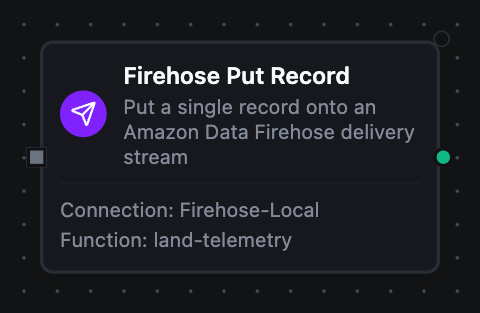
Amazon Data Firehose Put Record Node
Amazon Data Firehose Put Record Node
Write one record to a Direct PUT delivery stream. A trailing newline is added by default so records land in S3 as JSON Lines.
Supported Function Types:
| Function Name | Purpose | Common Use Cases |
|---|---|---|
| Put Record | Put one record onto a delivery stream | Telemetry into an S3 data lake, quality events into OpenSearch, rows into Redshift |
How It Works
When the pipeline executes, the Put Record node:
- Resolves the configured Firehose connection profile and loads AWS credentials (static IAM keys or the SDK default credential chain)
- Renders the templated fields (Delivery Stream, Data) against the current pipeline context
- Encodes the data: a string is sent as-is, an object or array is JSON-encoded, and a newline is appended unless Append Newline is off or the record already ends in one
- Rejects a record over 1,000 KiB before any call is made
- Calls
PutRecord, using the per-call timeout override or the connection default - Returns the record ID Firehose assigned and whether the stream encrypted it
Configuration
| Field | What you choose | Details |
|---|---|---|
| Connection | Amazon Data Firehose connection profile | Select a pre-configured connection from your connection library |
| Function | Put Record function | Choose a Firehose Put Record function that defines the delivery stream and the record |
| Function Parameters | Record values | Configure dynamic values for Delivery Stream and Data using expressions or constants |
| Timeout Override | Per-call timeout | Optional. Overrides the connection-level request timeout for this node only. A Go duration string between 1s and 1h (e.g. 30s). Leave empty to use the connection default; 0 is not accepted. |
For detailed function configuration options, including why newline delimiting is on by default, see the Amazon Data Firehose Put Record Function documentation.
When a stream is over its throughput limit, Firehose answers ServiceUnavailableException. The node treats it as transient, and the pipeline's retry settings apply. A stream that does not exist (ResourceNotFoundException) or does not accept direct writes (InvalidArgumentException, a stream fed by Kinesis or MSK) fails at once, since retrying cannot fix it.
Amazon Data Firehose Put Records (Batch) Node
Write up to 500 records in one call. Each element of the records array becomes one record.
| Function Name | Purpose | Common Use Cases |
|---|---|---|
| Put Records (Batch) | Put up to 500 records onto a delivery stream | Flushing a buffered window of readings, bulk-loading query results |
Firehose can accept some records of a batch and refuse others, and it still answers HTTP 200. The node resends only the refused records, up to the connection's Max Retries, and fails if any record is still refused after that. The per-record results go with the failure, so an On Error branch can see which records landed.
Amazon Data Firehose Describe Delivery Stream Node
Read a delivery stream's status, source, encryption and destination. Use it to gate a load on the stream being ACTIVE, or to record where data lands.
| Function Name | Purpose | Common Use Cases |
|---|---|---|
| Describe Delivery Stream | Inspect one delivery stream | Pre-load readiness checks, destination audits |
Amazon Data Firehose List Delivery Streams Node
List the delivery stream names in the connection's region, optionally only those of one source type, up to the function's item budget.
| Function Name | Purpose | Common Use Cases |
|---|---|---|
| List Delivery Streams | Discover delivery streams | Inventory audits, resolving streams for a ForEach loop |
Firehose has no API to read the records it carries. To read what a pipeline landed, query the destination, for example with the Amazon S3 or Amazon Athena connector over the delivered objects.
Output
Every Firehose node delivers its data under result, and execution facts (success, functionId, durationMs, timestamp) under _metadata:
| Node | Expression | Description |
|---|---|---|
| Put Record | $node["Name"].result.recordId | The id Firehose assigned to the record |
| Put Record, Put Records (Batch) | $node["Name"].result.encrypted | Whether server-side encryption was on for the stream |
| Put Records (Batch) | $node["Name"].result.records | One object per record, in the order submitted: recordId when it landed, errorCode and errorMessage when Firehose refused it. All three keys are always present; the ones that do not apply are empty |
$node["Name"].result.successCount | How many records landed | |
$node["Name"].result.failedPutCount | How many records Firehose still refused after the resends | |
$node["Name"]._metadata.attempts | How many PutRecordBatch calls the node made: the first send plus the resends | |
| Describe Delivery Stream | $node["Name"].result.deliveryStreamName, $node["Name"].result.deliveryStreamArn | The stream's name and ARN |
$node["Name"].result.status | ACTIVE, CREATING, DELETING, or a *_FAILED state | |
$node["Name"].result.type | Where the stream reads from: DirectPut, KinesisStreamAsSource, MSKAsSource or DatabaseAsSource | |
$node["Name"].result.sourceArn | The Kinesis data stream or MSK cluster the stream reads from; empty for DirectPut | |
$node["Name"].result.versionId | The stream's configuration version | |
$node["Name"].result.createTimestamp, $node["Name"].result.lastUpdateTimestamp | When the stream was created and last changed, in UTC; lastUpdateTimestamp is empty if it never changed | |
$node["Name"].result.encryption | Server-side encryption: status, keyType and keyArn | |
$node["Name"].result.destinations | One object per destination: destinationId, type (extended_s3, s3, redshift, opensearch, opensearch_serverless, elasticsearch, splunk, http_endpoint, snowflake, iceberg) and target, the bucket, cluster, domain, endpoint, account or catalog it delivers to | |
$node["Name"].result.failureDescription | Why the stream is in a failed state; empty otherwise | |
| List Delivery Streams | $node["Name"].result.deliveryStreams | The stream names |
$node["Name"].result.count | How many were listed | |
$node["Name"]._metadata.truncated | true when the item budget stopped the listing and more streams exist | |
| Every node | $node["Name"]._metadata.method, $node["Name"]._metadata.connectionId, $node["Name"]._metadata.protocol | The call's other facts: the operation, the connection it ran over, and firehose |
$node["Name"]._metadata.deliveryStreamName | The stream the call wrote to, on Put Record and Put Records (Batch). Describe Delivery Stream carries it in result.deliveryStreamName instead |