Amazon Data Firehose Integration Guide
Connect to Amazon Data Firehose (formerly Kinesis Data Firehose) to put records onto a delivery stream. Firehose buffers the records, batches them, optionally converts or compresses them, and delivers them to the stream's destination: Amazon S3, Amazon Redshift, Amazon OpenSearch Service, Splunk, Snowflake, Apache Iceberg tables, or an HTTP endpoint. There are no consumers to run. This guide covers connection setup, function configuration, and pipeline integration.
Overview
The connector writes into Firehose and reads the streams' configuration. It provides:
- Single-record writes with Put Record, for one reading or event per pipeline run
- Batch writes of up to 500 records per call with Put Records (Batch). When Firehose accepts some records and refuses others, the connector resends only the refused ones
- Newline delimiting, on by default, so records land in S3 as JSON Lines that Athena, Glue and Spark read directly
- Stream inspection with Describe Delivery Stream: status, source, encryption and destination
- Stream discovery with List Delivery Streams, optionally filtered by source type
- Flexible authentication with IAM access keys or the AWS SDK default credential chain (environment variables, shared config, IRSA, instance profile)
- Custom endpoint support for LocalStack and other AWS-compatible services
Firehose has no read API for the records it carries: they go to the destination, not back to a caller. To read data a pipeline has landed, use the connector for the destination, such as Amazon S3 or Amazon Athena over the delivered objects.
Both take streaming records, but they solve different problems.
- Kinesis Data Streams: you own the consumers. Records are retained and replayable, and any number of applications read them at their own pace.
- Firehose: AWS owns the consumer. Records are buffered and delivered to one destination, with no code to run and no shards to size.
Use Firehose when the goal is to land data in S3, Redshift or OpenSearch. Use Kinesis Data Streams when something has to process the stream in real time. The two combine: a Firehose stream can use a Kinesis data stream as its source.
Connection Configuration
Amazon Data Firehose Connection Creation Fields
1. Profile Information
| Field | Default | Description |
|---|---|---|
| Profile Name | - | A descriptive name for this connection profile (required, max 100 characters) |
| Description | - | Optional description for this Firehose connection |
2. AWS Region
| Field | Default | Description |
|---|---|---|
| AWS Region | us-east-1 | AWS region where the delivery streams live (e.g., us-east-1, eu-central-1). |
A delivery stream exists in one region. Create one connection per region you write into.
3. Authentication
| Field | Default | Description |
|---|---|---|
| Access Key ID | - | AWS Access Key ID. Leave empty to use the AWS SDK default credential chain (env vars, shared config, IAM role, IRSA). |
| Secret Access Key | - | AWS Secret Access Key. Required when Access Key ID is set; leave empty to use the default credential chain. |
| Session Token | - | Session token for temporary credentials (optional, used with AWS STS). |
You can authenticate the connector in one of two ways:
Option A: Static IAM access keys (explicit)
Provide an Access Key ID and Secret Access Key (and optionally a Session Token for STS-based temporary credentials). Best for self-hosted deployments where the host has no AWS identity of its own.
Option B: AWS SDK default credential chain (implicit)
Leave both Access Key ID and Secret Access Key empty. The connector then resolves credentials in the standard AWS SDK order:
- Environment variables (
AWS_ACCESS_KEY_ID,AWS_SECRET_ACCESS_KEY,AWS_SESSION_TOKEN) - Shared credentials file (
~/.aws/credentials) - IAM Roles for Service Accounts (IRSA) when running on EKS
- EC2 instance profile / ECS task role
This is the recommended path for AWS-hosted MaestroHub deployments, since no long-lived keys are stored in the connection profile.
The Access Key ID and Secret Access Key must be set together. Setting only one is rejected at validation time. Session Token is optional and only used alongside static keys.
The IAM principal used by the connector must have:
| Operation | Required IAM Action | Scope |
|---|---|---|
| Connect / health probe | firehose:ListDeliveryStreams | Region-level |
| Put Record | firehose:PutRecord | The delivery stream ARN(s) you write to |
| Put Records (Batch) | firehose:PutRecordBatch | The delivery stream ARN(s) you write to |
| Describe Delivery Stream | firehose:DescribeDeliveryStream | The delivery stream ARN(s) you inspect |
| List Delivery Streams | firehose:ListDeliveryStreams | Region-level |
Without firehose:ListDeliveryStreams the connection does not reach Connected, even if the put permissions are granted. The permissions Firehose itself needs to write to the destination (the stream's IAM role) are configured on the stream in AWS, not here.
4. Custom Endpoint
| Field | Default | Description |
|---|---|---|
| Custom Endpoint | - | Custom Firehose endpoint URL for LocalStack or other AWS-compatible services. Leave empty for AWS. |
For local development, set the custom endpoint to http://localhost:4566 (or wherever LocalStack is running) and start LocalStack with SERVICES=firehose,s3,sts,iam. LocalStack's Firehose assumes the stream's role through STS before it writes to S3, so a stream created without sts enabled accepts records and then fails to deliver them. Supply any non-empty credentials: LocalStack does not check them, but without them the AWS SDK falls through to the host credential chain and fails.
5. Advanced
| Field | Default | Description |
|---|---|---|
| Request Timeout | 30s | Default timeout for Firehose API calls (1s–1h). Individual functions may override this. |
| Max Retries | 3 | Maximum SDK retry attempts for transient failures (0–10), with exponential backoff and jitter. Put Records (Batch) also uses it as the number of times it resends the records Firehose refused. |
6. Connection Labels
| Field | Default | Description |
|---|---|---|
| Labels | - | Key-value pairs to categorize and organize this Firehose connection (max 10 labels) |
Example Labels
env: prod– Environmentservice: telemetry– Data domainaccount: 123456789012– AWS account ID
Function Builder
Creating Amazon Data Firehose Functions
Once you have a connection established, you can create reusable functions:
- Open the connection and go to its Functions tab → New Function
- Select the desired function type (Put Record, Put Records (Batch), Describe Delivery Stream, or List Delivery Streams)
- Configure the function parameters
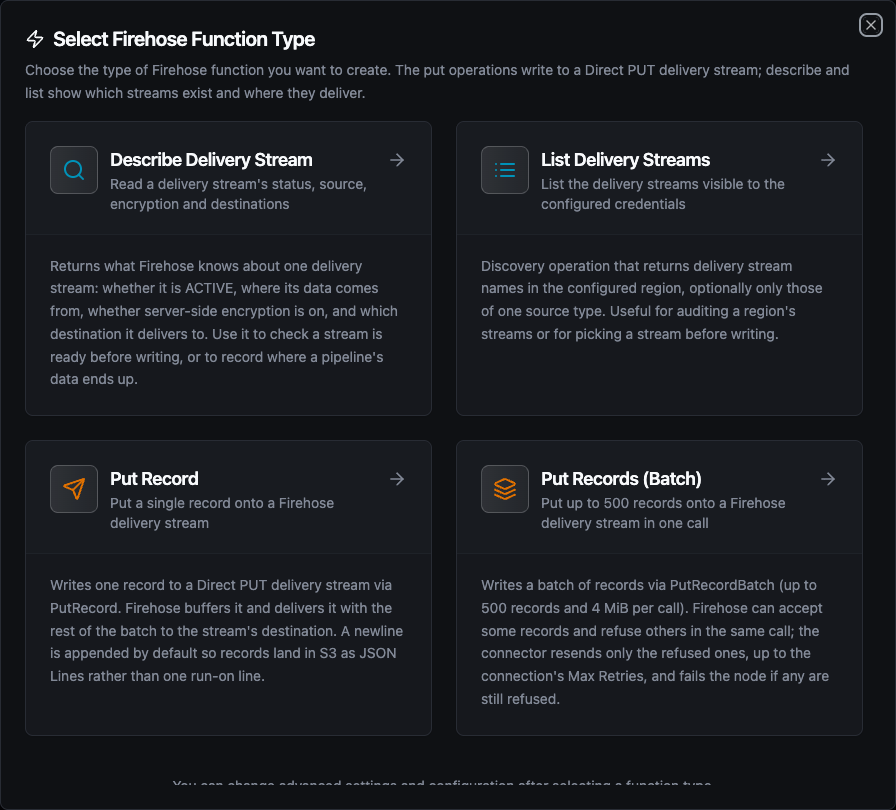
Select from four Amazon Data Firehose function types: two put operations for writing, and describe and list for inspecting streams
Put Record Function
Purpose: Write one record to a Direct PUT delivery stream. Use it when each pipeline run produces one reading, event or row.
Configuration Fields
| Field | Type | Required | Default | Description |
|---|---|---|---|---|
| Delivery Stream | String | Yes | - | Name of the Direct PUT delivery stream. Pick it from the list or switch to Manual / Name to type it. Supports ((parameter)) syntax. |
| Data | String | Yes | - | The record payload, up to 1,000 KiB. Strings are sent as-is; objects and arrays are JSON-encoded. Supports ((parameter)) syntax. |
| Append Newline | Boolean | No | true | Add a trailing newline to the record unless it already ends with one. |
| Timeout Override | Duration | No | - | Overrides the connection-level request timeout for this function. A Go duration string between 1s and 1h (e.g. 30s). Leave empty to use the connection default; 0 is not accepted. |
Example Configuration
- Delivery Stream:
telemetry-to-s3 - Data:
{"line": "((line))", "machineId": "((machineId))", "temperature": ((temperature)), "ts": "((timestamp))"}
Use Cases:
- Land processed telemetry in S3 as JSON Lines for Athena
- Stream quality events into OpenSearch for dashboards
- Feed a Redshift table without running a loader
Firehose concatenates the records in a buffer into one S3 object byte for byte. It adds no separator. Three JSON records without a delimiter land as {"a":1}{"a":2}{"a":3}, one line that Athena, Glue and most JSON readers cannot split. With Append Newline on (the default) each record ends in \n and the object is valid JSON Lines. Turn it off only when the stream's destination adds its own delimiter or needs the raw bytes, for example a CSV payload that already ends in a newline (the connector never adds a second one).
A stream whose source is a Kinesis data stream or an MSK topic reads from that source and refuses direct writes with InvalidArgumentException. The stream picker lists only Direct PUT streams for the two put functions.
Put Records (Batch) Function
Purpose: Write up to 500 records in one PutRecordBatch call. Use it when a pipeline has already collected many rows, such as a buffered window of readings or a query result, and one call per row would cost too many round trips.
Configuration Fields
| Field | Type | Required | Default | Description |
|---|---|---|---|---|
| Delivery Stream | String | Yes | - | Name of the Direct PUT delivery stream. Supports ((parameter)) syntax. |
| Records (JSON array) | String | Yes | - | JSON array; each element becomes one record. Strings are sent as-is, objects and arrays are JSON-encoded. Max 500 records, 1,000 KiB each, 4 MiB in total. Supports ((parameter)) syntax. |
| Append Newline | Boolean | No | true | Add a trailing newline to each record unless it already ends with one. |
| Timeout Override | Duration | No | - | Overrides the connection-level request timeout for this function (1s–1h). |
Example Configuration
- Delivery Stream:
telemetry-to-s3 - Records:
((rows)), bound to an upstream node's array output, or a literal:
[
  {"line": "A", "temperature": 71.2},
  {"line": "B", "temperature": 69.8}
]
Use Cases:
- Flush a buffered window of sensor readings in one call
- Bulk-load query results into an S3 data lake
Firehose answers PutRecordBatch with HTTP 200 even when it refused some of the records. The refusals arrive as per-record error codes (ServiceUnavailableException when the stream is over its throughput limit, InternalFailure otherwise). The connector:
- Resends only the refused records. Resending the whole batch would write every accepted record a second time.
- Waits with exponential backoff between resends, up to the connection's Max Retries.
- Fails the node if any record is still refused after that. The error names how many records were refused and why, and the per-record results still travel with the failure so an error branch can see which records landed.
A batch that is not a JSON array, is empty, has more than 500 records, or breaks the 1,000 KiB-per-record or 4 MiB-per-call limits is rejected when you save the function, whether through the form, the API or the MCP server. The appended newline counts towards the limits, since Firehose counts it. A templated batch (((rows))) is checked when it runs.
Describe Delivery Stream Function
Purpose: Read what Firehose knows about one delivery stream: whether it is ACTIVE, where its data comes from, whether server-side encryption is on, and which destination it delivers to.
Configuration Fields
| Field | Type | Required | Default | Description |
|---|---|---|---|---|
| Delivery Stream | String | Yes | - | Name of the delivery stream to describe. Supports ((parameter)) syntax. |
Use Cases:
- Check a stream is
ACTIVEbefore a batch load starts - Record which S3 bucket a pipeline's data lands in
- Alert when a stream's encryption or destination changes
List Delivery Streams Function
Purpose: List the delivery stream names in the configured region, optionally only those of one source type.
Configuration Fields
| Field | Type | Required | Default | Description |
|---|---|---|---|---|
| Source Type | Enum | No | All | DirectPut, KinesisStreamAsSource, MSKAsSource or DatabaseAsSource. Only DirectPut streams accept the put functions. |
| Max Items | Number | No | 100 | Maximum number of stream names to return (1–10000). |
Use Cases:
- Discover the Direct PUT streams available before writing
- Audit a region's delivery stream inventory
Max Items goes to AWS as the request limit instead of being applied after fetching everything, so a budget of 10 costs one small page. When more streams exist than the budget allows, the call's metadata says so (_metadata.truncated is true).
Using Parameters
The ((parameterName)) syntax creates dynamic, reusable functions. Parameters are automatically detected from your configuration fields and can be configured with:
| Configuration | Description | Example |
|---|---|---|
| Type | Data type validation | string, number, boolean, datetime, json, buffer |
| Required | Make parameters mandatory or optional | Required / Optional |
| Default Value | Fallback value if not provided | telemetry-to-s3, 0, [] |
| Description | Help text for users | "Target delivery stream", "Machine identifier" |
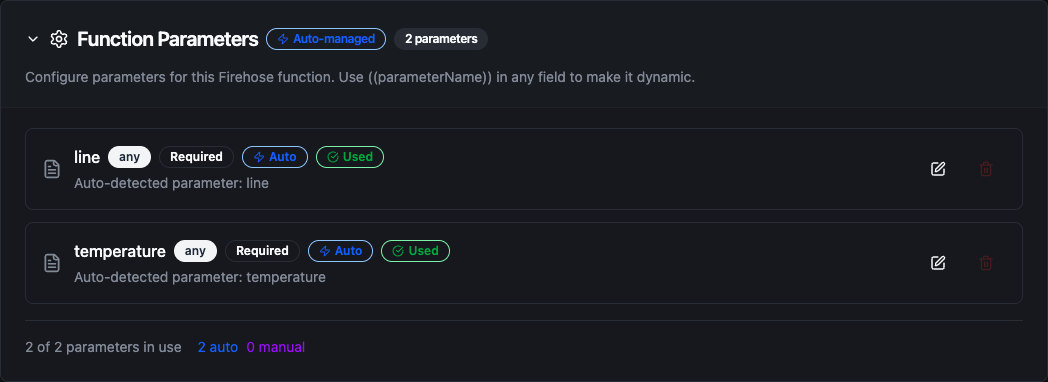
Configure dynamic parameters for Put Record functions with type validation, defaults, and descriptions
Template parameters are available for Put Record (Delivery Stream, Data), Put Records (Batch) (Delivery Stream, Records) and Describe Delivery Stream (Delivery Stream). List Delivery Streams takes static values.
Pipeline Integration
Use the Amazon Data Firehose functions you create here as nodes inside the Pipeline Designer. Place them on the canvas, bind parameters to upstream outputs or constants, and land data without leaving the designer.
- Amazon Data Firehose Nodes: Put Record, Put Records (Batch), Describe Delivery Stream and List Delivery Streams as steps within a running pipeline
For broader orchestration patterns that combine Firehose with databases, REST, MQTT, or other connector steps, see the Connector Nodes page.
Common Use Cases
Telemetry Data Lake on S3
Scenario: Machine readings arriving over MQTT should land in S3, partitioned by time, and be queryable with Athena.
Put Record Configuration:
- Delivery Stream:
telemetry-to-s3(extended S3 destination, prefixtelemetry/) - Data:
{"machineId": "((machineId))", "temperature": ((temperature)), "ts": "((ts))"} - Append Newline: on
Pipeline Integration: An MQTT trigger fires per reading, a transform node shapes it, and the Put Record node writes it. Firehose writes one object per buffer interval under telemetry/YYYY/MM/DD/HH/, and an Athena table over the prefix reads it as JSON Lines.
Batched Loads From a Historian Query
Scenario: Every five minutes, a pipeline reads the last window from a historian and loads it into Redshift.
Put Records (Batch) Configuration:
- Delivery Stream:
historian-to-redshift - Records:
((rows))
Pipeline Integration: A schedule trigger runs the query, and the Put Records (Batch) node sends up to 500 rows per call. Firehose issues the Redshift COPY itself. If Firehose refuses part of a batch, only the refused rows are resent, so a throttled minute does not duplicate the rows that already landed.
Pre-Load Readiness Check
Scenario: A nightly load should not start while its stream is being updated or has failed.
Function: Describe Delivery Stream on nightly-export
Pipeline Integration: Run Describe first, then a condition node on $node["Describe"].result.status == "ACTIVE". Only the ACTIVE branch continues to the load, and the other branch raises an alert that quotes result.failureDescription.