Amazon Athena Integration Guide
Connect to Amazon Athena to run standard SQL directly over data in Amazon S3 — no warehouse to provision. This guide covers connection setup, function configuration, and pipeline integration.
Overview
Amazon Athena is a serverless, interactive query service that runs Presto/Trino SQL over S3 data using the AWS Glue Data Catalog. The connector is read-only OLAP — ideal for querying OT archives and exports landed in S3 for pipeline backfills, batch KPI recomputation, and regulatory replay of archived telemetry. It provides:
- Synchronous queries (start → poll → fetch) that return result rows in one step
- Asynchronous queries — start a long-running query and fetch its results later by execution ID
- Catalog browsing — list databases and tables in a Glue data catalog
- Flexible authentication — IAM role / instance profile / IRSA via the AWS SDK default credential chain, or static access keys
- Configurable result location, workgroup, and query timeout
- Result encryption (SSE-S3 or SSE-KMS)
Athena provisions no infrastructure — you pay per query by data scanned. This connector executes read/analytical SQL (SELECT, SHOW, DESCRIBE); it does not write table data. Query output is written by Athena to an S3 result location and returned to the pipeline as rows.
Connection Configuration
Creating an Amazon Athena Connection
Navigate to Connections → New Connection → Amazon Athena and configure the following:
1. Profile Information
| Field | Default | Description |
|---|---|---|
| Profile Name | - | A descriptive name for this connection profile (required, max 100 characters) |
| Description | - | Optional description for this Athena connection |
2. Connection
| Field | Default | Description |
|---|---|---|
| AWS Region | us-east-1 | The AWS region where Athena and the S3 result bucket live, e.g. us-west-2, eu-central-1 (required) |
| Workgroup | primary | Athena workgroup used to run queries. Workgroup settings may enforce their own result location and encryption |
| Data Catalog | AwsDataCatalog | Name of the Glue data catalog to query and browse |
| Default Database | - | Default database (schema) for queries when one is not specified per-operation. Optional if every query qualifies its tables |
| Query Timeout (seconds) | 300 | How long to poll a synchronous query for completion before giving up (1–3600) |
3. Authentication
| Field | Default | Description |
|---|---|---|
| Access Key ID | - | AWS Access Key ID. Masked on edit. Leave empty to use the AWS SDK default credential chain (env vars, shared config, IAM role, IRSA) |
| Secret Access Key | - | AWS Secret Access Key. Masked on edit; leave empty to use the default credential chain |
| Session Token | - | Session token for temporary STS credentials (optional). Masked on edit |
On EC2/ECS/EKS, leave the key fields empty and attach an IAM role (or IRSA) — the connector picks up credentials from the AWS SDK default chain automatically, so no secrets are stored in MaestroHub. Use static access keys only when a role is not available. The identity needs athena:*Query*, glue:Get*, read access to the source S3 data, and read/write access to the result bucket (Athena writes query results there).
4. Results
| Field | Default | Description |
|---|---|---|
| S3 Result Bucket | - | S3 bucket where Athena writes query results. Leave empty to use the result location enforced by the workgroup |
| S3 Result Prefix | - | Key prefix within the result bucket for query output (e.g. athena/results/) |
5. Encryption
| Field | Default | Description |
|---|---|---|
| Result Encryption | none | Server-side encryption for results written to S3: none, SSE_S3, or SSE_KMS |
| KMS Key ID | - | AWS KMS key ARN or ID. Masked on edit. Required when Result Encryption is SSE_KMS |
(KMS Key ID is only used when Result Encryption is SSE_KMS.)
6. Advanced
| Field | Default | Description |
|---|---|---|
| Custom Endpoint | - | Custom Athena endpoint URL for testing against an Athena-compatible service (leave empty for AWS) |
| Poll Interval (ms) | 1000 | How often to poll query execution state while waiting for completion (100–10000) |
| Max Result Rows | 1000 | Maximum number of rows to return from a query before truncating (1–100000) |
- Required fields: Profile Name and AWS Region. All other fields have sensible defaults or use the workgroup / credential-chain configuration.
- Result location: Athena must have somewhere to write results. Provide an S3 Result Bucket, or rely on a workgroup that enforces one — otherwise queries fail.
- Row cap: Result sets larger than Max Result Rows are truncated; the call's metadata flags this with
truncated: true(read as_metadata.truncatedin a pipeline). - Security: Access keys, the session token, and the KMS Key ID are encrypted and stored securely, masked on edit. Leave a secret empty to keep the stored value.
Function Builder
Creating Athena Functions
Once a connection exists, create reusable query and catalog functions:
- Open the connection and go to its Functions tab → New Function
- Choose an Athena function type
- Configure the function parameters
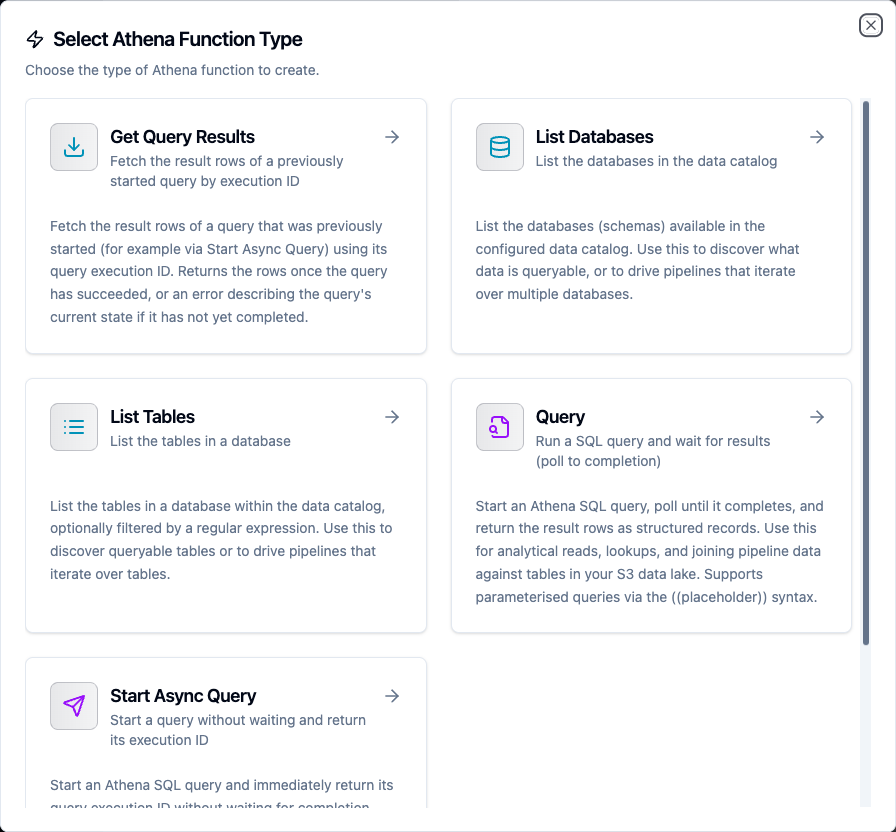
Choose from Query, Start Async Query, Get Query Results, List Databases, and List Tables function types
Query Function
Purpose: Start a SQL query, poll until it completes, and return the result rows as structured records. Use this for analytical reads, lookups, and joining pipeline data against tables in your S3 data lake.
Configuration Fields
| Field | Type | Required | Default | Description |
|---|---|---|---|---|
| SQL Query | String | Yes | - | Presto/Trino SQL statement to execute. Supports ((param)) templating |
| Database | String | No | connection default | Override the connection's default database for this query |
| Data Catalog | String | No | connection default | Override the connection's data catalog for this query |
| Max Rows | Number | No | connection default | Maximum rows to return (overrides connection setting, 1–100000) |
| Timeout (seconds) | Number | No | connection default | Poll-to-completion timeout for this query (1–3600) |
Example Configuration
{
  "sql": "SELECT machine_id, AVG(temperature) FROM readings WHERE day = '((day))' GROUP BY machine_id",
  "database": "ot_archive",
  "maxRows": 5000
}
Response Format
{
  "rows": [
    { "machine_id": "press-02", "_col1": 42.7 }
  ],
  "columns": [
    { "name": "machine_id", "type": "varchar" },
    { "name": "_col1", "type": "double" }
  ],
  "rowCount": 1
}
Use Cases:
- Query aggregated KPIs from tables in your S3 data lake
- Join live pipeline data against archived telemetry
- Backfill dashboards from historical exports
- Run parameterized analytical reads driven by upstream nodes
Start Async Query Function
Purpose: Start a SQL query and immediately return its query execution ID without waiting for completion. Pair with Get Query Results to fetch the rows once the query has finished. Use this for long-running queries where holding the pipeline open until completion is undesirable.
Configuration Fields
| Field | Type | Required | Default | Description |
|---|---|---|---|---|
| SQL Query | String | Yes | - | Presto/Trino SQL statement to start. Supports ((param)) templating |
| Database | String | No | connection default | Override the connection's default database for this query |
| Data Catalog | String | No | connection default | Override the connection's data catalog for this query |
Response Format
{
  "queryExecutionId": "a1b2c3d4-5678-90ab-cdef-EXAMPLE11111",
  "state": "QUEUED"
}
Use Cases:
- Kick off a heavy scan over a large archive without blocking the pipeline
- Fan out several async queries, then collect their results later
- Decouple query submission from result retrieval across pipeline steps
Get Query Results Function
Purpose: Fetch the result rows of a query that was previously started (for example via Start Async Query) using its query execution ID. Returns the rows once the query has succeeded, or an error describing the query's current state if it has not yet completed.
Configuration Fields
| Field | Type | Required | Default | Description |
|---|---|---|---|---|
| Query Execution ID | String | Yes | - | The query execution ID returned by Start Async Query. Supports ((param)) templating |
| Max Rows | Number | No | connection default | Maximum rows to return (overrides connection setting, 1–100000) |
Response Format
{
  "rows": [ { "machine_id": "press-02", "_col1": 42.7 } ],
  "columns": [
    { "name": "machine_id", "type": "varchar" },
    { "name": "_col1", "type": "double" }
  ],
  "rowCount": 1
}
Use Cases:
- Retrieve results for an execution ID produced earlier in the pipeline
- Poll an async query from a scheduled step until it succeeds
- Separate long query execution from downstream processing
List Databases Function
Purpose: List the databases (schemas) available in the configured data catalog. Use this to discover what data is queryable, or to drive pipelines that iterate over multiple databases.
Configuration Fields
| Field | Type | Required | Default | Description |
|---|---|---|---|---|
| Data Catalog | String | No | connection default | Override the connection's data catalog |
Response Format
{
  "databases": [
    { "name": "ot_archive", "description": "Landed OT telemetry" },
    { "name": "default", "description": "" }
  ],
  "count": 2
}
Use Cases:
- Discover available schemas before wiring a query
- Populate a database picker in a setup wizard
- Drive a loop over every database in a catalog
List Tables Function
Purpose: List the tables in a database within the data catalog, optionally filtered by a regular expression. Use this to discover queryable tables or to drive pipelines that iterate over tables.
Configuration Fields
| Field | Type | Required | Default | Description |
|---|---|---|---|---|
| Database | String | Yes | - | Database (schema) whose tables to list. Supports ((param)) templating |
| Data Catalog | String | No | connection default | Override the connection's data catalog |
| Name Filter | String | No | - | Optional regular expression to filter table names (e.g. sensor_.*) |
Response Format
{
  "tables": [
    {
      "name": "readings",
      "tableType": "EXTERNAL_TABLE",
      "columns": [
        { "name": "machine_id", "type": "varchar" },
        { "name": "temperature", "type": "double" }
      ]
    }
  ],
  "count": 1
}
Use Cases:
- Enumerate tables in a schema before querying
- Filter to a naming convention with a regex (
sensor_.*) - Drive a pipeline that iterates over matching tables
Using Parameters
The ((parameterName)) syntax turns a function into a dynamic, reusable building block. Parameters are auto-detected from your SQL and other templated fields and can be configured with:
| Configuration | Description | Example |
|---|---|---|
| Type | Data type validation | string, number, boolean, datetime, json, buffer |
| Required | Make the parameter mandatory or optional | Required / Optional |
| Default Value | Fallback value if not provided | default, 2024-01-01, 1000 |
| Description | Help text for users | "Partition day (YYYY-MM-DD)", "Target database" |

Parameters detected from the SQL and other templated fields are configured with type, requiredness, and defaults
The Query, Start Async Query, Get Query Results, and List Tables functions accept ((parameter)) templating — in the SQL, database, execution ID, and other templated fields. Parameter values are supplied by upstream pipeline nodes at execution time.
Pipeline Integration
Use the Athena functions you create here as nodes inside the Pipeline Designer. Drag the query or catalog node onto the canvas, bind its parameters to upstream outputs or constants, and configure error handling as needed.
Common patterns include:
- Query → Transform → Act: Read archived data with a Query node, process the rows, and send results to dashboards or notifications
- Start → Wait → Fetch: Kick off a heavy scan with Start Async Query, then retrieve rows later with Get Query Results
- Discover → Query: List databases and tables to discover what exists, then feed the names into a Query node
For broader orchestration patterns that combine Athena with other connector steps, see the Connector Nodes page and the Amazon Athena node reference.
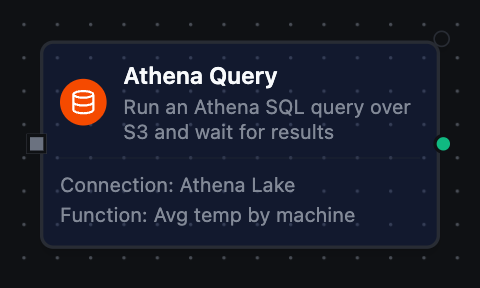
Athena query node with connection, function, and parameter bindings
Common Use Cases
Backfilling Dashboards from S3 Archives
Scenario: Recompute a KPI over historical telemetry landed in S3, without standing up a warehouse.
Query Configuration:
{
  "sql": "SELECT date_trunc('hour', ts) AS hour, AVG(value) FROM archive.equipment_readings WHERE day = '((day))' GROUP BY 1 ORDER BY 1"
}
Pipeline Integration: Run on a schedule, then push the resulting series into a dashboard or warehouse.
Long-Running Regulatory Replay
Scenario: Scan a multi-year archive for a compliance report without blocking the pipeline.
Start Async Query returns an execution ID; a later Get Query Results node (or a scheduled follow-up) fetches the rows once the scan completes.
Catalog-Driven Iteration
Scenario: Process every table matching a naming convention in a database.
Use List Tables with a Name Filter of sensor_.*, then fan out a Query node over each returned table name.