 UDP Integration Guide
UDP is the transport for equipment that announces rather than converses: syslog collectors, network monitors, discovery announcers, lightweight agents that answer a probe with a single packet. MaestroHub's UDP connector is a raw datagram client — it writes bytes to a host and port, and optionally waits for one reply. It does not interpret them.
Overview
The UDP connector provides:
- Fire-and-forget send for heartbeats and notifications
- Send-then-wait-for-one-reply request/reply for query-style devices
- Byte encoding per connection or per operation:
utf8/ascii/hex/base64/bytes - Truncation surfaced honestly when a reply exceeds the buffer
- Cloud-metadata egress deny (SSRF hardening), on by default
Reach for it when a device speaks a datagram protocol you already understand at the byte level and you need to push to it or probe it. It is a transport, not a protocol implementation — there is no MIB decoding, no syslog formatting, no discovery parsing. You supply the bytes.
If a device pushes unsolicited datagrams on its own timing, this connector cannot receive them: use TCP stream mode or a purpose-built connector instead. UDP never binds a listener.
The two shapes
| Operation | Shape | Typical use |
|---|---|---|
Send (udp.send) | Write one datagram, return immediately | Syslog lines, heartbeats, discovery announces |
Request (udp.request) | Write one datagram, wait for one reply on the same socket | Device-management queries, monitor polls, SNMP-style gets (bytes only) |
Every operation opens a fresh ephemeral source socket, does its thing, and closes. There is no session to hold, no reader loop, and no reconnect to wait for — which is why the connection's Connect and Disconnect are no-ops and the connection is always reported as up at the wire level (UDP has no handshake to fail).
Because nothing multiplexes on the same socket, per-connection concurrency is 1. The connector's scaling capability is fixed at one exclusive instance — "Raw UDP is a single-writer transport; pinning one instance per connection prevents duplicate sends on failover." Fan out at the pipeline level by using multiple connection instances.
Both operations are initiated by MaestroHub. udp.request reads exactly one reply, on the socket it just sent from, within the request timeout. Nothing else is ever received: a device that emits datagrams unprompted needs a listening transport, not this connector.
Connection Configuration
Creating a UDP Connection
Navigate to Connections → New Connection → UDP. The form is organized into six tabs: Connection, Security, Advanced, Functions, Scaling, and Health. The Scaling and Health tabs unlock after the connection is saved, and functions can only be managed once a profile exists.
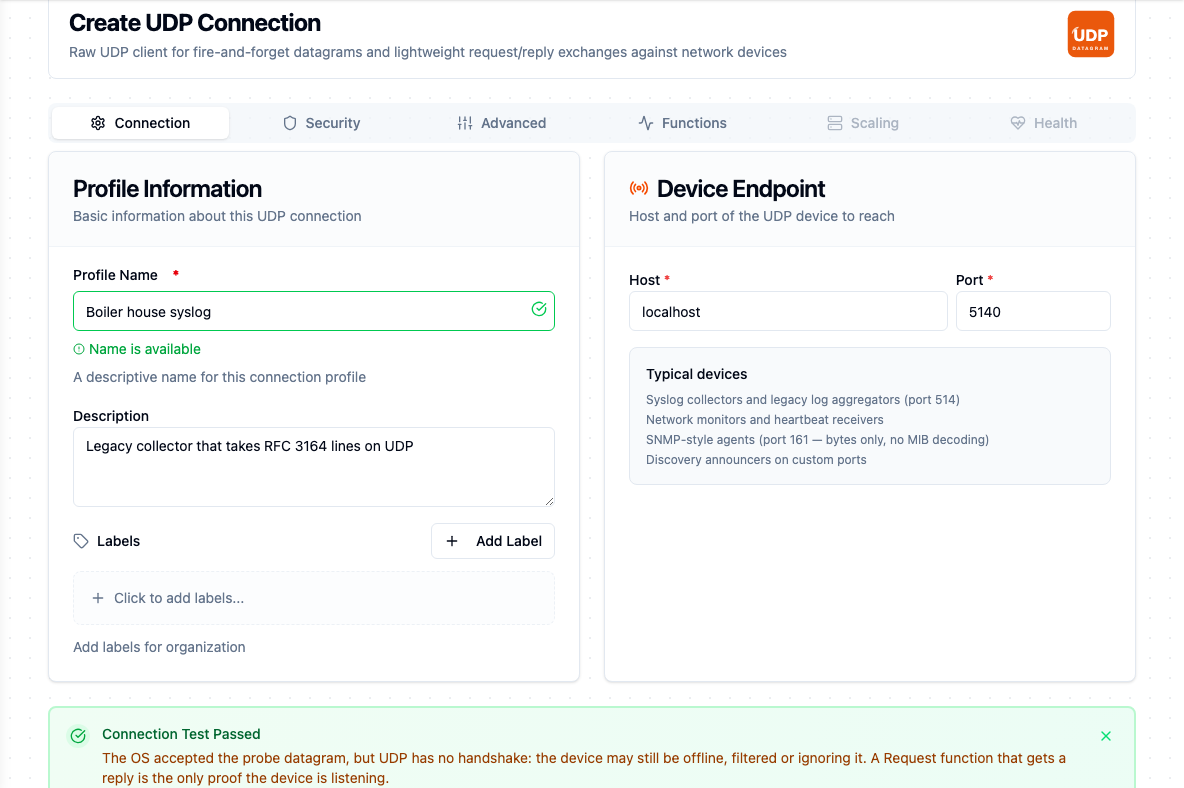
The Connection tab after Test Connection against a device that stays silent: the test passes, and the note says delivery was not proven
1. Profile Information (Connection tab)
| Field | Default | Description |
|---|---|---|
| Profile Name | — | A descriptive name for this connection profile (required, max 100 characters). Checked for uniqueness as you type. |
| Description | — | Optional description for this UDP connection |
| Labels | — | Key-value pairs to categorize the connection (max 10 labels), e.g. device: syslog, line: A |
2. Connection
The device endpoint and the deadlines and buffer that bound every operation. Host and Port sit on the Connection tab; the timeouts and buffer size sit on the Advanced tab.
| Field | Default | Description |
|---|---|---|
| Host | — | Remote device host or IP address (required). Example: 10.0.5.30 |
| Port | — | Remote device port, 1–65535 (required). The form pre-fills 9999. |
| Send Timeout (seconds) | 2 | Maximum time to wait for the OS write buffer to accept the datagram (1–300 s) |
| Request Timeout (seconds) | 10 | udp.request only: maximum time to wait for one reply on the ephemeral source socket (1–3600 s) |
| Max Datagram Bytes | 1500 | Buffer size for outgoing sends and incoming replies (64–65507) |
1500 is MTU-safe — a datagram that size crosses a typical Ethernet path without being split. Larger values invite IP fragmentation: the datagram is reassembled by the receiver only if every fragment arrives, so one lost fragment loses the whole message. UDP's absolute maximum payload is 65507 bytes.
A payload larger than Max Datagram Bytes is rejected before anything reaches the wire, as a permanent error: udp.send: payload is 2000 bytes, exceeds maxDatagramBytes=1500.
3. Encoding (Advanced tab)
| Field | Default | Description |
|---|---|---|
| Default Byte Encoding | bytes | How pipeline payloads convert to and from wire bytes when the operation does not override — utf8 / ascii / hex / base64 / bytes. bytes = raw pass-through (base64 in JSON). |
4. Security — Egress Guard (Security tab)
Both toggles are off by default, and both deny at send time rather than at save time.
| Field | Default | Description |
|---|---|---|
| Allow Loopback Destinations | false | Permit sends to 127.0.0.0/8 and ::1. Off by default — the address is almost never the intended target of an outbound industrial connector. |
| Allow Cloud-Metadata Destinations | false | Permit sends to 169.254.169.254 (AWS) and metadata.google.internal (GCP). Off by default — these endpoints return cloud credentials without authentication, so denying them by default prevents SSRF exfil. |
The check runs once per operation, not once at save. Every send resolves the configured host at the moment the datagram goes out, so a hostname that is re-pointed at a metadata address after the connection was saved is still caught. The metadata guard matches both the well-known names (metadata.google.internal, metadata, metadata.goog, 169.254.169.254, fd00:ec2::254) and any address the host resolves to.
A denial is a permanent error, phrased so the fix is obvious:
udp: destination blocked by egress policy: "169.254.169.254" resolves to a cloud metadata endpoint (SSRF hardening); set allowMetadata=true to permit
udp: destination blocked by egress policy: "localhost" resolves to loopback IP 127.0.0.1; set allowLoopback=true to permit
A DNS failure is not an egress verdict — the guard only refuses on positive identification, and lets the send report the resolution failure itself.
Testing the Connection
Test Connection on the connector form sends a probe: one zero byte from an ephemeral source socket, then a 300 ms listen on the same socket. What comes back decides the result.
| What came back | Result |
|---|---|
| A reply datagram | Passed. The device is there and answering. |
| Nothing | Passed, with a note under the result: the OS accepted the datagram, but UDP has no handshake, so the device may still be offline, filtered or ignoring it. Silence is normal for a device that only answers its own protocol. |
| An ICMP port-unreachable | Failed: nothing is listening on host:port: the host answered the probe with ICMP port unreachable. The host is up and the port is closed, so the port is wrong or the device's UDP service is not running. |
A firewall that drops packets silently makes a closed port look like the second row. Only a Request function that gets a reply proves the device is listening. The probe byte does reach the device on every test, so if a device logs or reacts to unexpected datagrams, keep that in mind before pressing the button repeatedly.
The connection's health check proves less still: it resolves the destination and opens and closes an ephemeral socket, sending nothing. A UDP connection therefore shows Connected whether or not the device is on.
Byte Encoding
Encoding is chosen on the connection (Default Byte Encoding) and can be overridden per operation. It governs both directions: how Data is converted to wire bytes before sending, and how a reply's bytes are converted back into result.data.
| Encoding | Sending | Receiving |
|---|---|---|
utf8 | The string's bytes, as-is | Bytes returned as a string |
ascii | The string's bytes, rejected if any byte exceeds 127 | Same check on the way back |
hex | Data is a hex string, decoded to bytes | Reply returned as a hex string |
base64 | Data is standard base64, decoded to bytes | Reply returned as standard base64 |
bytes | Same as base64 — the default | Same as base64 |
bytes is the default because it is lossless for arbitrary binary and needs no assumption about the device's text encoding. JSON cannot carry raw bytes, so on the wire between MaestroHub and your pipeline the value travels base64-encoded; the datagram itself carries the decoded bytes.
Encoding mismatches fail as permanent errors before anything is sent, naming the offending position: udp.send: ascii encoding: non-ASCII byte 0xc3 at index 5, or udp.request: hex encoding: encoding/hex: invalid byte ....
Function Builder
After the connection is saved, open its Functions tab and click New Function. Pick Send or Request, then fill the Basic tab (name, description, labels, configuration) and the Parameters tab.
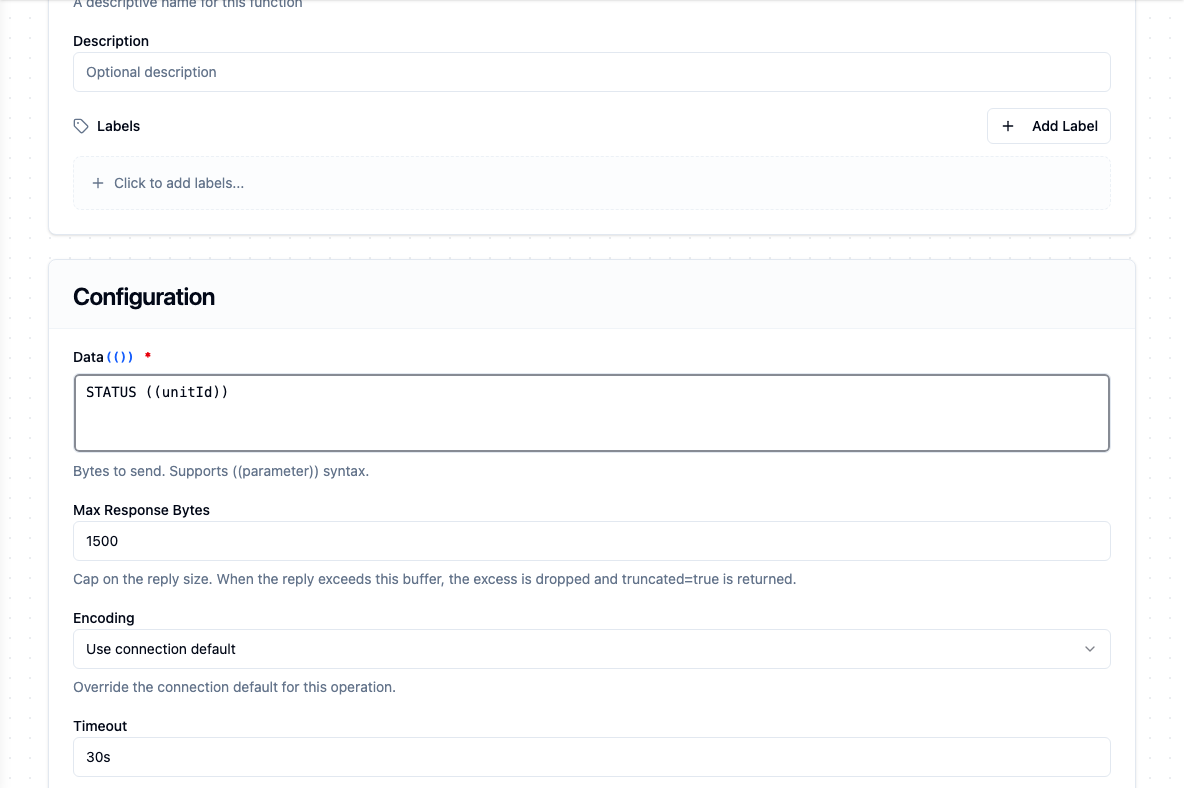
A Request function; Max Response Bytes caps the reply, and Encoding and Timeout override the connection for this call
Send (udp.send)
Purpose: Fire-and-forget datagram to the device. Opens an ephemeral source socket, writes one datagram to the configured host and port, and closes.
| Field | Type | Required | Default | Description |
|---|---|---|---|---|
| Data | String | Yes | — | Bytes to send, interpreted per the selected encoding. Supports ((parameter)) syntax. |
| Encoding | Select | No | connection default | Override the connection's default byte encoding for this send. bytes = base64-decoded before send. |
| Timeout | Duration | No | 30m | Bound on this single send, as a duration string (5s, 30s). Range 1s–1h. |
Example — a syslog line to a legacy collector on port 514:
- Encoding:
utf8 - Data:
<27>Sep 04 12:00:00 press-01: cycle aborted, guard interlock
Use Cases: send a syslog datagram to a legacy log collector; fire a heartbeat to a network monitor; push a discovery announce to a UDP-listening device.
Request (udp.request)
Purpose: Send a datagram, then wait for one reply on the same ephemeral socket. Returns the reply bytes and the address they came from. If no reply arrives within the timeout, the call surfaces a timeout error rather than blocking.
| Field | Type | Required | Default | Description |
|---|---|---|---|---|
| Data | String | Yes | — | Bytes to send, interpreted per the selected encoding. Supports ((parameter)) syntax. |
| Max Response Bytes | Number | No | 1500 | Cap on the reply size, 1–65507. When the actual reply exceeds this buffer, the excess is dropped and truncation is reported. |
| Encoding | Select | No | connection default | How to encode both the payload sent and the reply returned |
| Timeout | Duration | No | 30m | Bound on the whole send+reply exchange, as a duration string (10s, 1m). Range 1s–1h. |
Example — probing a monitor that answers a text keyword:
- Encoding:
utf8 - Data:
STATUS ((unitId)) - Max Response Bytes:
512
Use Cases: query a UDP-based device management protocol and read the response; poll a network monitor for its current state; send an SNMP-style get request to a lightweight agent (no MIB decoding — bytes only).
Using Parameters
The Data field on both function types supports ((parameterName)) placeholders. Parameters are detected from the field as you type and appear in the Parameters tab, where you set each one's type, requiredness, default, and description. At execution the pipeline node binds them, so one function serves many call sites.
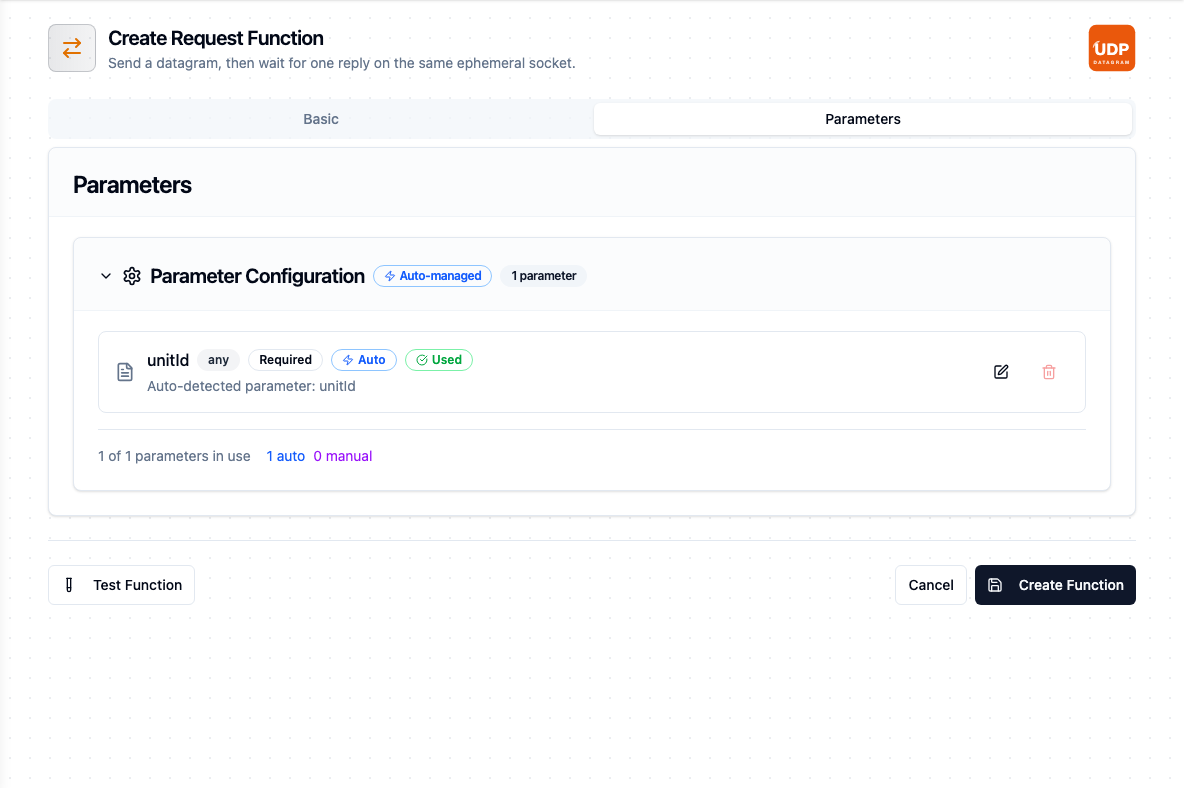
The Parameters tab picks up ((unitId)) from Data on its own
The templating engine recognises ((double parentheses)). {{ curly braces }} are stored as literal text and never substituted — if a pipeline node shows no configurable parameters for a function whose Data field looks templated, check the brace style first.
Per-call timeouts
The Timeout on a function is one layer of the deadline MaestroHub composes for every call; the pipeline, node, function, and connection layers each contribute, and the tightest bound wins. See Connection Timeouts for the full hierarchy. The connection's Send Timeout and Request Timeout bound the socket write and the reply wait respectively, and a tighter composed deadline shortens them further.
What the operations return
Both operations deliver their data under result and the call's execution facts under _metadata. Send returns only how many bytes the OS accepted:
{
  "bytesWritten": 58
}
Request adds the reply and where it came from:
{
  "data": "OK 42",
  "bytesWritten": 12,
  "bytesRead": 5,
  "sourceHost": "10.0.5.30",
  "sourcePort": 9999
}
sourceHost and sourcePort are absent when the socket could not report a source address. Alongside these, _metadata carries method, connectionId, protocol (udp), endpoint (the host:port the datagram went to) and — on Request — truncated.
For the full expression reference as used inside a pipeline, see Raw UDP Nodes.
UDP has no handshake and no acknowledgement. bytesWritten says the operating system accepted the datagram for transmission — the peer may be offline, firewalled, or silently dropping it, and the operation still reports success. If you need to know the device heard you, use Request and treat the reply as the receipt.
Any host can answer a datagram. When the reply matters, compare result.sourceHost against the address you expected before acting on result.data.
_metadata.truncatedA reply larger than Max Response Bytes is cut and _metadata.truncated is true — it is a fact about the call, so it rides with the execution facts, not with the data. Branch on it rather than parsing a half message; raising the limit, or asking the device for a smaller response, are the two real fixes. The flag reads the same on Linux, macOS and Windows: kernels disagree on how an oversize datagram is reported, and the connector normalises them to one contract.
Pipeline Integration
Use the functions you build here as nodes in the Pipeline Designer: UDP Send to emit a datagram, UDP Request to send one and read the answer. Both are write operations and both are eligible for Store & Forward, so a send issued while the network is down can be buffered and drained later.
Both operations are declared non-idempotent and unordered. A buffered send that is replayed will put a second datagram on the wire — safe for a heartbeat, not necessarily safe for a command. Enable durability only where a repeat is harmless, or make the payload carry its own de-duplication key for the device to check.
Common Use Cases
Syslog and Legacy Log Collectors
Format an event as a syslog line upstream, then Send it utf8 to the collector on port 514. Nothing to acknowledge, nothing to hold open — one datagram per event.
Heartbeats to a Network Monitor
Drive a Send from a Schedule trigger so a monitor sees MaestroHub as alive. Keep the payload small and the send timeout short; a heartbeat that queues behind a slow write buffer has already lost its meaning.
Query-Style Device Polling
Request a device that answers a probe with a single packet, on a schedule. Check result.sourceHost before trusting the answer, branch on _metadata.truncated, and size Max Response Bytes from the device's documented maximum reply.
Binary Command Datagrams
Set the encoding to hex (or bytes) and send a vendor-documented command frame from a templated Data field. The connector does no framing or interpretation — what you write is what goes on the wire.
Troubleshooting
| Symptom | Possible Cause | Solution |
|---|---|---|
destination blocked by egress policy: … resolves to loopback IP | Host resolves to 127.0.0.1 / ::1 and loopback is denied | Point at the real device address. If a local agent genuinely is the target, enable Allow Loopback Destinations. |
destination blocked by egress policy: … cloud metadata | Host resolves to a cloud metadata address | Almost always a misconfigured or re-pointed hostname. Only enable Allow Cloud-Metadata Destinations if you deliberately target that endpoint. |
nothing is listening on host:port: the host answered the probe with ICMP port unreachable | Test Connection reached the host, and nothing listens on that port | Check the port number, and that the device's UDP service is running |
payload is N bytes, exceeds maxDatagramBytes=M | Data is larger than the connection's buffer | Shorten the payload, or raise Max Datagram Bytes — accepting IP fragmentation above the path MTU. |
ascii encoding: non-ASCII byte 0x… at index N | Payload contains bytes above 127 under ascii | Switch the encoding to utf8 for text, or hex / base64 / bytes for binary. |
hex encoding: … on a save or send | Data is not valid hex under the hex encoding | Remove separators and 0x prefixes; supply an even number of hex digits. |
| Request times out, Send succeeds | The device never answered, or the reply went elsewhere | Confirm the device replies to the source port it received from. Raise Request Timeout if the device is slow; a timeout is classified transient and will be retried. |
| Reply arrives cut short | Reply larger than Max Response Bytes | _metadata.truncated is true. Raise the cap (up to 65507) or ask the device for a smaller response. |
required param 'data' is missing or not a string | The Data parameter was not bound at the node | Check the node's parameter mapping and any ((parameter)) defaults on the function. |
| Send reports success but nothing arrives | No delivery guarantee: peer offline, firewall dropping, wrong port | Verify with Request if the device answers, or check the device's own receive counters. A successful send only proves the OS accepted the bytes. |
connection refused / host unreachable on a Request | An ICMP unreachable came back from the peer or an intermediate hop | Classified permanent: the port or route is wrong, not busy. Correct the host or port. A Send to the same closed port still succeeds, because Send never reads anything back |
| Device pushes data but nothing triggers | UDP binds no listener | Unsolicited pushes need TCP stream mode or a purpose-built connector; there is no UDP subscribe. |