Google Cloud Storage Integration Guide
Use MaestroHub's Google Cloud Storage (GCS) connector to read and write objects in GCS buckets — the GCP‑native equivalent of Amazon S3. It pairs with the BigQuery and Pub/Sub connectors for a coherent GCP data path, and authenticates with either a service account JSON key or Application Default Credentials (including GKE Workload Identity). This guide covers connection setup, function authoring, and pipeline integration.
Overview
The GCS connector provides:
- Six object operations — get, put, list, delete, generate signed URL, and compose
- Pattern matching on reads with wildcards (
*,?) and regex - Flexible authentication — a service account JSON key, or Application Default Credentials / Workload Identity when the key is left empty
- Customer‑managed encryption keys (CMEK) via Cloud KMS
- V4 signed URLs for time‑limited GET/PUT sharing
- Server‑side composition of up to 32 objects into one
- Prefix‑based security boundaries and operational limits (discovery, max file size)
- Emulator support via a custom endpoint (e.g.
fake-gcs-server) for local testing
Connection Configuration
Creating a Google Cloud Storage Connection
From Connections → New Connection → Google Cloud Storage, configure the fields below.
GCS Connection Creation Fields
1. Profile Information
| Field | Default | Description |
|---|---|---|
| Profile Name | - | A descriptive name for this connection profile (required, max 100 characters) |
| Description | - | Optional description for this GCS connection |
2. Connection
| Field | Default | Description |
|---|---|---|
| Bucket Name | - | The GCS bucket name — 3–63 chars, lowercase letters, numbers, hyphens, underscores, dots (required) |
| Key Prefix | - | Optional base path prefix for all operations. Acts as a security boundary restricting access to objects within this prefix |
3. Authentication
| Field | Default | Description |
|---|---|---|
| Service Account JSON Key | - | Service account JSON key. Masked on edit; leave empty to keep stored value. Leave empty entirely to use Application Default Credentials (ADC) — e.g. GKE Workload Identity or the GOOGLE_APPLICATION_CREDENTIALS environment |
When the JSON key is empty, the connector falls back to ADC. On GKE this means Workload Identity — no secret is stored in MaestroHub, and the pod's bound service account is used. Locally, ADC resolves GOOGLE_APPLICATION_CREDENTIALS or the gcloud user credentials.
4. Encryption
| Field | Default | Description |
|---|---|---|
| KMS Key Name (CMEK) | - | Cloud KMS key for customer‑managed encryption, in the form projects/P/locations/L/keyRings/R/cryptoKeys/K. Leave empty to use Google‑managed keys |
5. Advanced
| Field | Default | Description |
|---|---|---|
| Custom Endpoint | - | Custom storage endpoint URL for emulators or private access (e.g. http://localhost:4443/storage/v1/). When set, authentication is skipped — intended for local emulators like fake-gcs-server. Leave empty for Google Cloud Storage |
| Timeout (seconds) | 30 | Timeout for GCS connection validation (5–300) |
| Discovery Limit | 2000 | Maximum number of objects to list during pattern discovery or list operations (1–100000). A pattern get fails when the listing holds more; a list stops there and reports that it was cut |
| Max File Size (MB) | 25 | Maximum file size that can be read or written (1–124) |
- Bucket validation: Must start and end with a letter or number; allowed characters are lowercase letters, numbers, hyphens, underscores, and dots.
- Security: The service account JSON key is stored encrypted and displayed as masked on edit. Leave the field empty to keep the stored value (or to use ADC).
- CMEK format: The KMS key name is validated against the
projects/…/cryptoKeys/…form when supplied. - Limits: Discovery Limit and Max File Size protect pipelines from large scans and uploads.
Function Builder
Creating GCS Functions
After saving the connection:
- Open the connection and go to its Functions tab → New Function
- Choose one of the six GCS function types (Get, Put, List, Delete, Generate Signed URL, Compose)
- Configure object keys, limits, and overrides
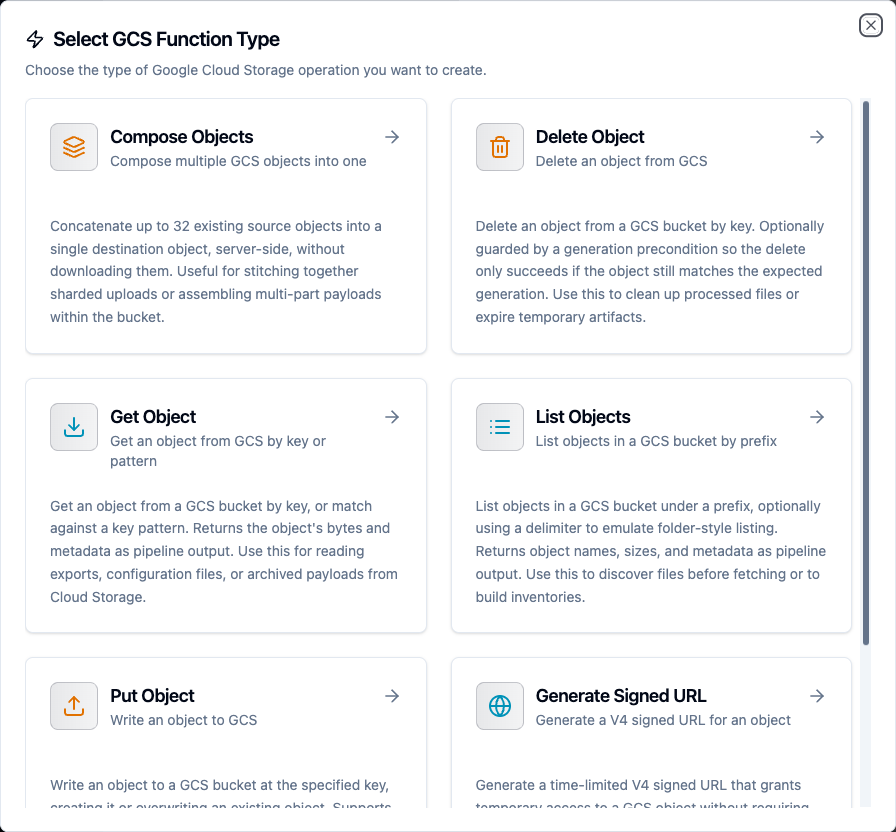
Choose from six GCS object operations — get, put, list, delete, signed URL, and compose
Get Object Function
Purpose: Retrieve one object from the configured bucket/prefix: the object at an exact key, or the one a wildcard, regex or template pattern selects. Returns the object's bytes and metadata as pipeline output.
Configuration Fields
| Field | Type | Required | Default | Description |
|---|---|---|---|---|
| Object Key | String | Yes | - | GCS object key or pattern. Supports wildcards (logs/app-*.log), regex (logs/app-2024-01-0[123].log), and templates (((date))/report.csv) |
| When Several Objects Match | Enum | No | Most recently modified | Which object a pattern returns when it matches more than one: Most recently modified (lastModified) or Last by name (name). See Which object a pattern returns |
| Timeout (ms) | Number | No | 1800000 | Operation timeout (1000–3600000) |
| Max File Size (MB) | Number | No | - | Overrides the connection setting (1–124) |
| Discovery Limit | Number | No | - | Maximum objects to list when using patterns; overrides the connection setting (1–100000). The get fails when the listing holds more |
| Generation | Number | No | - | Specific object generation to fetch (for versioned buckets) |
Example Configuration
Object Key: data/reports/((reportDate)).csv
Use Cases: Retrieve daily exports, collect the latest log partition, hydrate configuration files into pipelines.
Which object a pattern returns
The pattern decides which objects are candidates. When Several Objects Match then picks one of them:
| Option | Returns |
|---|---|
| Most recently modified (default) | The object whose content was written last — its creation time, which an overwrite renews. A change to the object's metadata or storage class (a lifecycle rule moving it to a colder class, for instance) does not count, although it moves the object's updated time. Objects written at the same instant fall back to the one whose key sorts last |
| Last by name | The object whose key sorts last as text. The whole key is compared, prefix included, so a folder name outranks everything after it |
To leave objects out, narrow the pattern: an object the pattern does not match is never returned. The result's metadata.selectedBy and metadata.matchCount say which rule picked the object and how many matched.
A pattern is searched by listing the bucket under the part of the key before its first *, ? or [, up to the last / — logs/2024/app-*.log lists logs/2024/. If that listing holds more objects than the Discovery Limit, the get fails with discovery limit exceeded instead of answering from part of the listing. Raise the limit, or put more of the fixed path before the first wildcard.
Put Object Function
Purpose: Write an object to the configured bucket/prefix, creating it or overwriting an existing object, with configurable content type, custom metadata, storage class, and CMEK.
Configuration Fields
| Field | Type | Required | Default | Description |
|---|---|---|---|---|
| Object Key | String | Yes | - | GCS object key/path for the file. Supports templates e.g. output/data_((timestamp)).json |
| Data | String | Yes | - | Content to write. Plain text or base64‑encoded (auto‑detected) |
| Content Type | String | No | - | MIME type (auto‑detected from the file extension if omitted) |
| Overwrite Existing | Boolean | No | true | If false and the object exists, a timestamped version is created |
| Storage Class | Enum | No | - | One of STANDARD, NEARLINE, COLDLINE, ARCHIVE (leave empty for the bucket default) |
| Cache-Control | String | No | - | Value for the HTTP Cache-Control header |
| Custom Metadata | Object | No | {} | Custom metadata key/value pairs |
| Timeout (ms) | Number | No | 1800000 | Operation timeout (1000–3600000) |
| Max File Size (MB) | Number | No | - | Overrides the connection setting (1–124) |
| Generate Signed URL | Boolean | No | false | Generate a V4 signed GET URL for the written object |
| Signed URL Expiry (seconds) | Number | No | 3600 | Expiry for the signed URL (60–604800) |
Example Configuration
Object Key:  exports/report_((date)).csv
Data:        ((payload))
Storage Class: NEARLINE
Use Cases: Export pipeline results, archive backups to a cold storage tier, publish artifacts and return a signed URL for external access.
List Objects Function
Purpose: List objects under a prefix, optionally using a delimiter to emulate folder‑style listing. Returns object names, sizes, and metadata as pipeline output.
Configuration Fields
| Field | Type | Required | Default | Description |
|---|---|---|---|---|
| Prefix | String | No | - | Object key prefix to list under (combined with the connection prefix). Empty lists the whole connection prefix |
| Delimiter | String | No | - | Delimiter for folder‑style listing (e.g. / to return one level). Empty for a flat recursive listing |
| Discovery Limit | Number | No | - | Maximum objects to return; overrides the connection setting (1–100000) |
| Timeout (ms) | Number | No | 1800000 | Operation timeout (1000–3600000) |
Use Cases: Discover files before fetching, build inventories, drive batch processing over a prefix.
Delete Object Function
Purpose: Delete an object by key, optionally guarded by a generation precondition so the delete only succeeds if the object still matches the expected generation.
Configuration Fields
| Field | Type | Required | Default | Description |
|---|---|---|---|---|
| Object Key | String | Yes | - | GCS object key to delete. Supports templates |
| Generation | Number | No | - | If set, only delete the object if it matches this generation (optimistic concurrency) |
| Timeout (ms) | Number | No | 1800000 | Operation timeout (1000–3600000) |
Use Cases: Clean up processed files, expire temporary artifacts, implement retention policies.
Generate Signed URL Function
Purpose: Generate a time‑limited V4 signed URL that grants temporary access to an object without requiring the caller to hold credentials. Supports GET (download) and PUT (upload).
Configuration Fields
| Field | Type | Required | Default | Description |
|---|---|---|---|---|
| Object Key | String | Yes | - | GCS object key the signed URL grants access to. Supports templates |
| HTTP Method | Enum | No | GET | GET to download, PUT to upload |
| Expiry (seconds) | Number | No | 3600 | Expiry for the signed URL (60–604800; max 7 days) |
| Timeout (ms) | Number | No | 1800000 | Operation timeout (1000–3600000) |
Signing a URL needs a service account key or the iam.serviceAccounts.signBlob permission on the connection's identity. If the connection uses pure ADC without a JSON key and without signBlob, signed‑URL generation returns a clear "requires service‑account key or IAM signBlob" error.
Use Cases: Share a report for a bounded window, issue a one‑time upload target for an external system.
Compose Objects Function
Purpose: Concatenate up to 32 existing source objects into a single destination object, server‑side, without downloading them.
Configuration Fields
| Field | Type | Required | Default | Description |
|---|---|---|---|---|
| Source Objects | String | Yes | - | Source object keys to compose, in order. Separate with commas or newlines. Maximum 32 sources |
| Destination Object | String | Yes | - | Destination object key for the composed result |
| Content Type | String | No | - | MIME type for the composed object (auto‑detected from the destination extension if omitted) |
| Timeout (ms) | Number | No | 1800000 | Operation timeout (1000–3600000) |
Example Configuration
Source Objects:      part-1.bin, part-2.bin, part-3.bin
Destination Object:  combined/((jobId)).bin
Use Cases: Stitch together sharded uploads, assemble multi‑part payloads within the bucket.
Using Parameters
Use ((parameterName)) in object keys, prefixes, content, source lists, or destinations to expose parameters for validation and runtime binding.
| Configuration | Description | Example |
|---|---|---|
| Type | Validate incoming values | string, number, boolean, datetime, json, buffer |
| Required | Enforce presence | Required / Optional |
| Default Value | Provide fallbacks | 'reports', '{}', NOW() |
| Description | Document intent | "Report date (YYYY‑MM‑DD)", "Destination object key" |
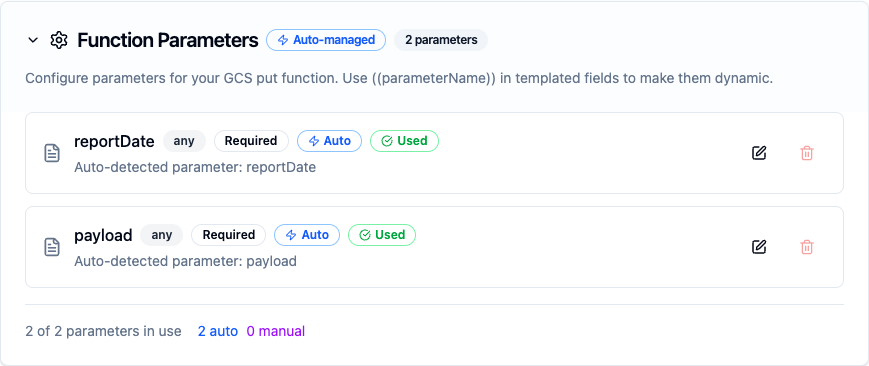
Parameter validation, defaults, and helper text for GCS object keys and payloads
All six GCS function types accept ((parameters)) — GCS is an on‑demand storage connector with no trigger/consume function, so every operation can be templated and bound to upstream pipeline values.
Pipeline Integration
Use the GCS functions you configure here as nodes inside the Pipeline Designer to move objects between systems. Drag in a Get, Put, List, Delete, Signed URL, or Compose node, bind parameters to upstream outputs or constants, and tune retries or error branches.
For broader orchestration patterns that mix GCS with SQL, REST, or MQTT steps, see the Connector Nodes page, and the Google Cloud Storage Nodes reference for per‑node output shapes.
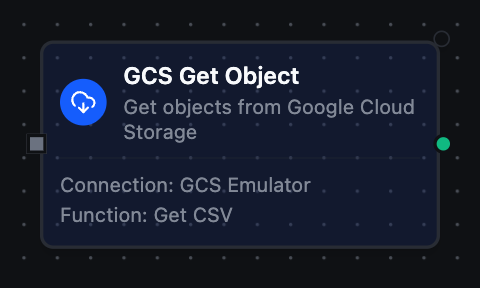
GCS Get node with connection, function, and parameter bindings
Common Use Cases
Analytics Landing Zone
Land OT/IoT payloads in GCS as the staging area for BigQuery ingestion — write objects with the Put function, then trigger downstream loads.
Backup and Archival
Store pipeline outputs to a cold storage tier (NEARLINE, COLDLINE, ARCHIVE) and delete processed sources under a retention policy.
Secure Sharing
Publish a generated report with the Put function and return a V4 signed URL for time‑limited external access — no long‑lived credentials shared.
Sharded Assembly
Collect multi‑part uploads under a prefix with List, then merge them server‑side into a single object with Compose.