Google Cloud Firestore Integration Guide
Connect to Google Cloud Firestore to read and write documents from your pipelines, and to run a pipeline the moment a document changes. This guide covers connection setup, the six function types, and pipeline integration.
Overview
Firestore is Google Cloud's serverless NoSQL document database. The connector provides:
- Document reads that fetch one document by its collection and ID
- Collection queries with field filters, ordering, projection and a limit Firestore applies
- Collection-group queries that reach every collection with the same ID, wherever it sits
- Document writes — set, update and delete — with merge and auto-generated IDs
- A real-time listener that fires a pipeline on each document change
- Plain JSON in and out, so you never hand-write Firestore's value wire format
- Full integer precision, so a 19-digit identifier survives the round trip exactly
- An emulator host for local development against
firebase emulators:start - Template parameters for dynamic collections, IDs and document bodies
One connection, one database
A Firestore connection addresses one database in one project. Every function on that connection names the collection it works with, so a single connection covers the whole database rather than one collection.
To work with a second database — a named database alongside (default), or another project — create a second connection.
Collection paths
Firestore paths alternate collection and document IDs, so a collection path always has an odd number of segments:
| Path | What it is |
|---|---|
machines | a root collection |
machines/press-1 | a document, not a collection |
plants/ankara/lines | a subcollection |
plants/ankara/lines/line-3/readings | a deeper subcollection |
The Collection field takes the whole path and the Document ID field takes a single ID. Putting a path in the Document ID field, or a document path in the Collection field, is refused by the form with the rule spelled out — Firestore's own error names neither the field nor the cause.
Connection Configuration
Creating a Firestore Connection
Navigate to Connections → New Connection → Google Cloud Firestore and configure the following.
1. Profile Information
| Field | Default | Description |
|---|---|---|
| Profile Name | - | A descriptive name for this connection profile (required, max 100 characters) |
| Description | - | Optional description for this Firestore connection |
2. Database (Connection tab)
| Field | Default | Description |
|---|---|---|
| Project ID | - | The Google Cloud project that owns the database – required |
| Database ID | (default) | The Firestore database to address. Leave as (default) unless the project has additional named databases |
3. Service Account (Security tab)
| Field | Default | Description |
|---|---|---|
| Service Account Key (JSON) | - | The contents of a service account JSON key file, pasted whole. Stored encrypted. Masked on edit; leave empty to keep the stored value |
Leave the key empty to use Application Default Credentials from the host. That is the right choice on GKE, on Cloud Run, or on a workstation signed in with gcloud auth application-default login — the connection then acts as the attached service account and there is no key to rotate.
roles/datastore.user covers every operation this connector performs, including the health check.
4. Emulator and Timeout (Advanced tab)
| Field | Default | Description |
|---|---|---|
| Emulator Host | - | host:port of a Firestore emulator. Leave empty to talk to Google Cloud |
| Timeout | 30s | Bound on the connect probe and on each health check (1s–300s) |
When Emulator Host is set, the connection talks plain, unencrypted gRPC to that address and sends no credentials — which is what the emulator expects and what makes it usable without a key. Never point it at a real database.
The field takes a bare host:port. A scheme (http://localhost:8080) or a missing port (localhost) is refused by the form, because the gRPC dial that follows fails with a message naming neither.
Local development
The emulator Google ships with the Cloud SDK is the same one firebase emulators:start runs:
gcloud emulators firestore start --host-port=0.0.0.0:8080
Then set Project ID to any value (the emulator accepts any project), leave the service account key empty, and set Emulator Host to localhost:8080.
How the health check works
Test Connection — and every later health check — runs a one-document query against a collection named maestrohub-health-probe. The collection does not need to exist: an empty result is a healthy answer, because the round trip is what proves the session is alive.
This is deliberately a query rather than a metadata call. Listing collection IDs needs the metadata permission, which a least-privilege service account may not have and which the emulator refuses outright.
Function Builder
Creating Firestore Functions
Open the connection, go to the Functions tab, and click New Function. Pick one of the six operations.
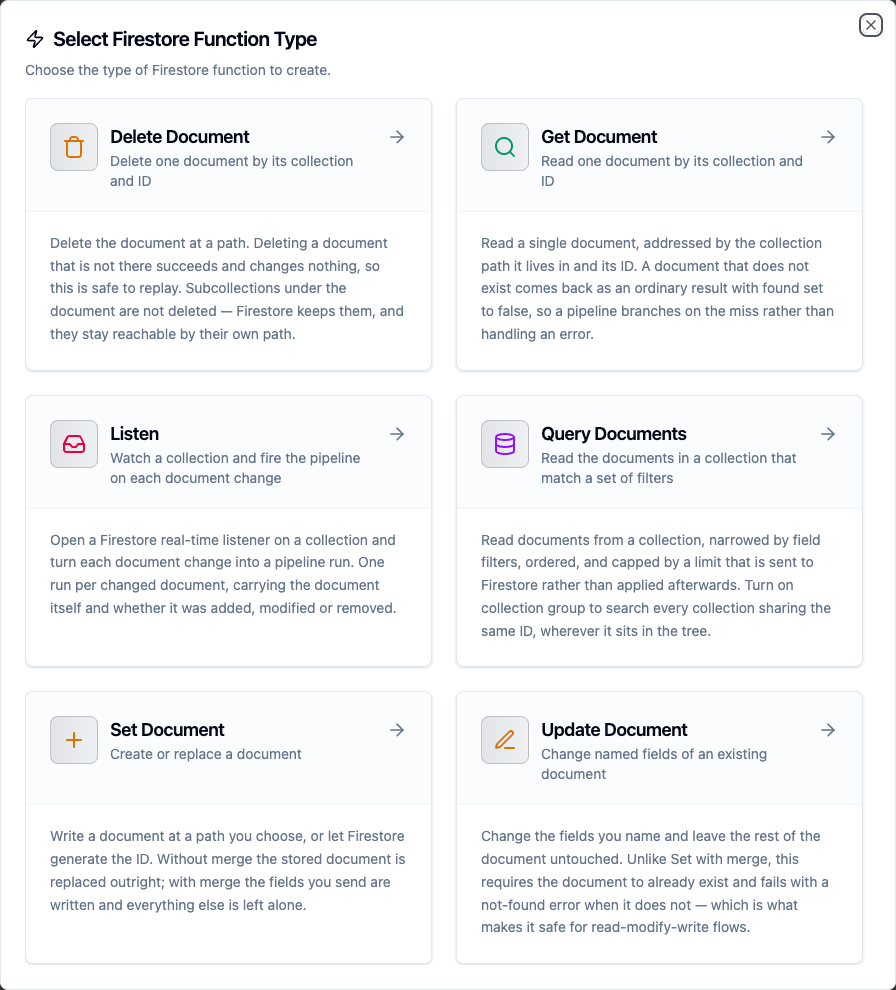
The six Firestore function types
Writing documents, updates and filters
The Document, Updates and Filters fields take plain JSON. You write what the document should contain and the connector converts it to Firestore's types:
| JSON you write | Stored as |
|---|---|
"running" | string |
21.5 | double |
42 | integer, not a double |
true | boolean |
null | null |
["a", "b"] | array |
{"code": 3} | map |
The integer/double split is real and worth knowing: Firestore stores 42 and 42.0 as different types, and a query filtering on an integer field will not match a stored double. The connector preserves what you typed, and integers keep their full range — a 19-digit identifier round-trips digit-for-digit rather than being rounded through a float.
On the way back, five Firestore types have no JSON equivalent and are converted:
| Firestore type | Delivered as |
|---|---|
| timestamp | RFC3339 UTC string, e.g. 2026-09-24T07:45:51.784Z |
| document reference | its path, e.g. machines/press-1 |
| geopoint | {"latitude": 39.92, "longitude": 32.85} |
| bytes | base64 string |
| integer | a JSON integer, at full int64 range |
The result viewer in the UI shows a 19-digit integer rounded, because JavaScript has no integer type and JSON.parse converts it to a float. The value your pipeline receives is exact — this affects the on-screen preview only.
Get Document
Read a single document by its collection and ID.
| Field | Required | Description |
|---|---|---|
| Collection | yes | Path of the collection holding the document |
| Document ID | yes | ID of the document inside that collection |
| Select Fields | no | Comma-separated field paths to return, e.g. name, status.code. Omit to return the whole document |
A document that is not there is not an error. The function succeeds with found false and a null document, so a pipeline branches on the miss rather than routing it through failure handling.
Query Documents
Read the documents in a collection that match a set of filters.
| Field | Required | Description |
|---|---|---|
| Collection | yes | Collection path, or the bare collection ID when Collection Group is on |
| Filters | no | JSON array of field filters, combined with AND |
| Collection Group | no | Search every collection with this ID anywhere in the database |
| Order By | no | Field path to sort on. Firestore falls back to document ID order when empty |
| Order Direction | no | Ascending or descending. Ignored while Order By is empty |
| Limit | no | Maximum documents to return, 1–10000 (default 100) |
| Start After | no | The cursor a previous run returned |
| Select Fields | no | Comma-separated field paths to return |
Filters are a JSON array:
[
  {"field": "status", "op": "==", "value": "running"},
  {"field": "celsius", "op": ">", "value": 80}
]
Supported operators: ==, !=, <, <=, >, >=, array-contains, array-contains-any, in, not-in. Firestore requires a composite index for some combinations and says so in the error, with a link that creates it.
The Limit is sent to Firestore, so it bounds what is read and billed rather than trimming a full result set afterwards.
Collection groups
With Collection Group off, machines/press-1/readings reads one machine's readings. With it on, readings reads every readings collection in the database — every machine's. Collection must then be the bare ID, with no slashes.
Because two documents in different parents can share an ID, every returned document carries _path alongside _id.
Paging
A page that fills to its Limit comes back with truncated true and a cursor — the path of the last document. Feed that back as the next run's Start After:
run 1: limit 100                    → cursor "machines/press-1", truncated true
run 2: limit 100, startAfter above  → cursor "machines/press-2", truncated true
run 3: limit 100, startAfter above  → truncated false, no cursor
A short page is the end of the data and carries no cursor. Resuming costs one extra point read, which buys an exact cursor: the position is the document itself, so it cannot drift the way a re-encoded field value can.
Set Document
Create or replace a document.
| Field | Required | Description |
|---|---|---|
| Collection | yes | Path of the collection to write into |
| Document ID | no | ID to write at. Leave empty and Firestore generates one |
| Document | yes | The document to write, as plain JSON |
| Merge | no | Write only the fields supplied and leave the rest intact (default off) |
Merge off replaces the document outright — fields you did not send are dropped. Merge on writes the fields you sent and leaves the others alone.
Leaving Document ID empty makes the write non-replayable: each attempt creates a new document, so a store-and-forward replay adds a second one. The generated ID comes back on the result, which is the only place the caller can learn it.
Update Document
Change named fields of an existing document.
| Field | Required | Description |
|---|---|---|
| Collection | yes | Path of the collection holding the document |
| Document ID | yes | ID of the document to update |
| Updates | yes | JSON object of field paths to new values |
A dotted key addresses a nested field: {"counts.errors": 0} sets counts.errors rather than creating a key with a dot in its name.
Unlike Set with Merge, Update requires the document to exist and fails with a not-found error when it does not. That is what makes it safe for read-modify-write flows, and the error names Set with Merge as the operation that would have worked.
Delete Document
Delete one document by its collection and ID.
| Field | Required | Description |
|---|---|---|
| Collection | yes | Path of the collection holding the document |
| Document ID | yes | ID of the document to delete |
Deleting a document that is not there succeeds and changes nothing, so this is safe to replay.
Deleting a document does not delete the subcollections under it. They stay in the database and remain reachable by their own path. Firestore has no recursive delete on the server — removing a document tree means deleting its descendants explicitly.
Listen
Watch a collection and fire a pipeline on each document change. This function is used on a Firestore trigger node, not as a pipeline step.
| Field | Required | Description |
|---|---|---|
| Collection | yes | Collection path to watch, or the bare ID when Collection Group is on |
| Filters | no | Narrow what the listener watches. Same operators as Query Documents |
| Collection Group | no | Watch every collection with this ID anywhere in the database |
| Change Types | yes | Which kinds of change fire: added, modified, removed |
| Fire For Existing Documents | no | Replay the matching collection at startup (default off) |
Each changed document is one pipeline run.
Firestore opens every listener with a snapshot of everything that already matches. Off — the default — skips that first snapshot, so only changes made from now on fire the pipeline. On replays the whole matching collection at startup, and again after any reconnect, which on a large collection is a lot of pipeline runs.
Field sentinels are not supported
Firestore's field sentinels — server timestamps, atomic increments, array union/remove and field deletes — are not available in this connector. Write an explicit value instead: a timestamp from the pipeline rather than ServerTimestamp, and a read-then-write rather than Increment.
Template Parameters
Collection, Document ID, Document, Updates, Filters, Order By, Start After and Select Fields all accept ((parameterName)) placeholders, resolved from upstream node output at run time:
Collection:  machines
Document ID: ((deviceId))
Document:    {"celsius": ((reading)), "seenAt": "((timestamp))"}
A templated value is only known at execute time, so the form defers its shape checks rather than rejecting {"celsius": ((reading))} as invalid JSON.
Pipeline Integration
Each operation appears as its own node under Database in the node library, and the listener as a Firestore Trigger. See:
- Firestore nodes — the five execution nodes and their outputs
- Firestore trigger — the real-time listener
Store-and-forward and replay safety
The three write operations can be buffered through store-and-forward. What a replay does differs per operation:
| Operation | On replay |
|---|---|
| Set with a Document ID | Lands on the same document — same end state |
| Set without a Document ID | Creates a second document, every time |
| Update | Re-applies the same field values — same end state |
| Delete | Deleting an absent document is a no-op — same end state |
Two updates to the same document must replay in their original order or the older values win, which is why Update declares per-key ordering.
Troubleshooting
| Symptom | Cause | Fix |
|---|---|---|
collection path "..." addresses a document | An even number of path segments | Move the trailing ID into the Document ID field |
documentId must be a single ID, not a path | A path in the Document ID field | Move the parent segments into Collection |
Use a bare host:port, with no http:// | A URL in Emulator Host | Drop the scheme: localhost:8080 |
The query requires an index | A filter combination Firestore cannot serve | Follow the link in the error — it creates the index |
startAfter "..." is not a document path | A cursor that is not the one a run returned | Use the cursor from the previous run's result |
| Update fails with not-found | The document does not exist | Use Set with Merge to create-or-update |
| Listener never fires | Change Types excludes the change you are making | Tick the change type you need |
Connection fails with PermissionDenied | The service account lacks Firestore access | Grant roles/datastore.user on the project |