Azure Cosmos DB Integration Guide
Connect to Azure Cosmos DB to read and write items from your pipelines, and to run a pipeline whenever an item is created or updated. This guide covers connection setup, the eight function types, and pipeline integration.
Overview
Azure Cosmos DB is Microsoft's globally distributed NoSQL database. This connector speaks its native NoSQL (Core SQL) API. To reach a Cosmos DB account through its MongoDB API instead, use the MongoDB connector.
The connector provides:
- Point reads of one item by its ID and partition key, the cheapest operation Cosmos DB offers
- Bulk reads of up to 1,000 items in one call, with the missing ones listed
- SQL queries with named parameters, a limit sent to the service, and continuation paging
- Writes — create, upsert and replace — with optimistic concurrency by ETag
- Partial updates with patch, including server-side increments
- Transactional batches of up to 100 operations on one partition, all or nothing
- A change feed trigger that runs a pipeline for each created or updated item
- The Request Units each call consumed, on every result
- Account key or Microsoft Entra ID authentication
- The Cosmos DB emulator for local development
One connection, one database
A connection addresses one database in one account. Every function names the container it works with, so a single connection covers every container in the database. To work with a second database, create a second connection.
Partition keys
Every Cosmos DB container is split by a partition key — a path such as /deviceId chosen when the container was created. An item is identified by its id and its partition key value together: two items in different partitions can share an id.
Functions that address one item take a Partition Key field. Its value follows one rule:
| You write | Partition key value |
|---|---|
press-1 | the string "press-1" |
42 | the string "42" |
[42] | the number 42 |
[true] | the boolean true |
[null] | null |
["ankara", "line-3"] | a hierarchical key with two levels |
A plain value is always a string key, because a template renders to text and cannot say otherwise. Anything else is written as a JSON array. Every result renders partition keys the same way, so a value read from one node's result passes straight into the next node's Partition Key field.
An item stored with "n": 42 lives in partition [42], not 42. Azure Cosmos DB finds nothing when you read it with the string key. The emulator is more lenient and finds it either way — so test numeric keys against Azure before relying on them.
Connection Configuration
Creating an Azure Cosmos DB Connection
Navigate to Connections → New Connection → Azure Cosmos DB and configure the following.
1. Profile Information
| Field | Default | Description |
|---|---|---|
| Profile Name | - | A descriptive name for this connection profile (required, max 100 characters) |
| Description | - | Optional description for this connection |
2. Account and Database (Connection tab)
| Field | Default | Description |
|---|---|---|
| Account Endpoint | - | The account URI from the Azure portal's Keys or Overview blade, e.g. https://my-account.documents.azure.com:443/ – required |
| Database | - | The database this connection addresses – required |
3. Authentication (Security tab)
| Field | Default | Description |
|---|---|---|
| Authentication Method | account_key | account_key, service_principal, managed_identity or default_credential |
Account key (Only displayed when the method is account_key)
| Field | Default | Description |
|---|---|---|
| Account Key | - | The primary or secondary key from the account's Keys blade. Stored encrypted |
A read-only key allows reads, queries and the change feed. Writes then fail with 401 Unauthorized.
Microsoft Entra ID (Only displayed for the three Entra ID methods)
| Field | Default | Description |
|---|---|---|
| Tenant ID | - | The directory ID. Required for service_principal |
| Client ID | - | The app registration's client ID. For managed_identity, the optional client ID of a user-assigned identity |
| Client Secret | - | The app registration's secret. service_principal only. Stored encrypted |
managed_identity uses the identity of the Azure host MaestroHub runs on. default_credential tries the environment, workload identity, managed identity and the Azure CLI in turn.
Azure roles such as Contributor manage the account but do not grant access to its data. Assign a Cosmos DB data-plane role to the identity:
- Cosmos DB Built-in Data Reader — reads, queries and the change feed
- Cosmos DB Built-in Data Contributor — everything this connector does
Data-plane roles are assigned with the Azure CLI (az cosmosdb sql role assignment create), not in the portal's Access control blade.
4. Advanced (Advanced tab)
| Field | Default | Description |
|---|---|---|
| Preferred Regions | - | Comma-separated Azure regions to read from, nearest first — West Europe, North Europe. Only matters for an account replicated to several regions |
| Connect Timeout | 30s | Bound on connecting and on each health check (1s–300s). Each operation has its own Timeout |
How the health check works
Test Connection — and every later health check — reads the database. That one call proves the endpoint answers, the credentials are accepted, and the database exists. It needs only metadata read permission, which every Cosmos DB data-plane role includes.
A database that does not exist fails the check with its name in the message.
Local development with the emulator
The Cosmos DB emulator runs the NoSQL API in a container, on Linux, macOS and Windows:
docker run -d -p 8081:8081 \
  mcr.microsoft.com/cosmosdb/linux/azure-cosmos-emulator:vnext-preview --protocol http
Then connect with:
| Field | Value |
|---|---|
| Account Endpoint | http://localhost:8081/ |
| Authentication Method | account_key |
| Account Key | C2y6yDjf5/R+ob0N8A7Cgv30VRDJIWEHLM+4QDU5DE2nQ9nDuVTqobD4b8mGGyPMbIZnqyMsEcaGQy67XIw/Jw== |
That key is the emulator's published, fixed key — the same on every install, not a secret.
The emulator accepts any account key and does not check that a partition key header matches the item. The connector checks the item's partition key itself, so writes behave the same on both — but a wrong key only fails against Azure.
Function Builder
Creating Azure Cosmos DB Functions
Open the connection, go to the Functions tab, and click New Function. Pick one of the eight operations.
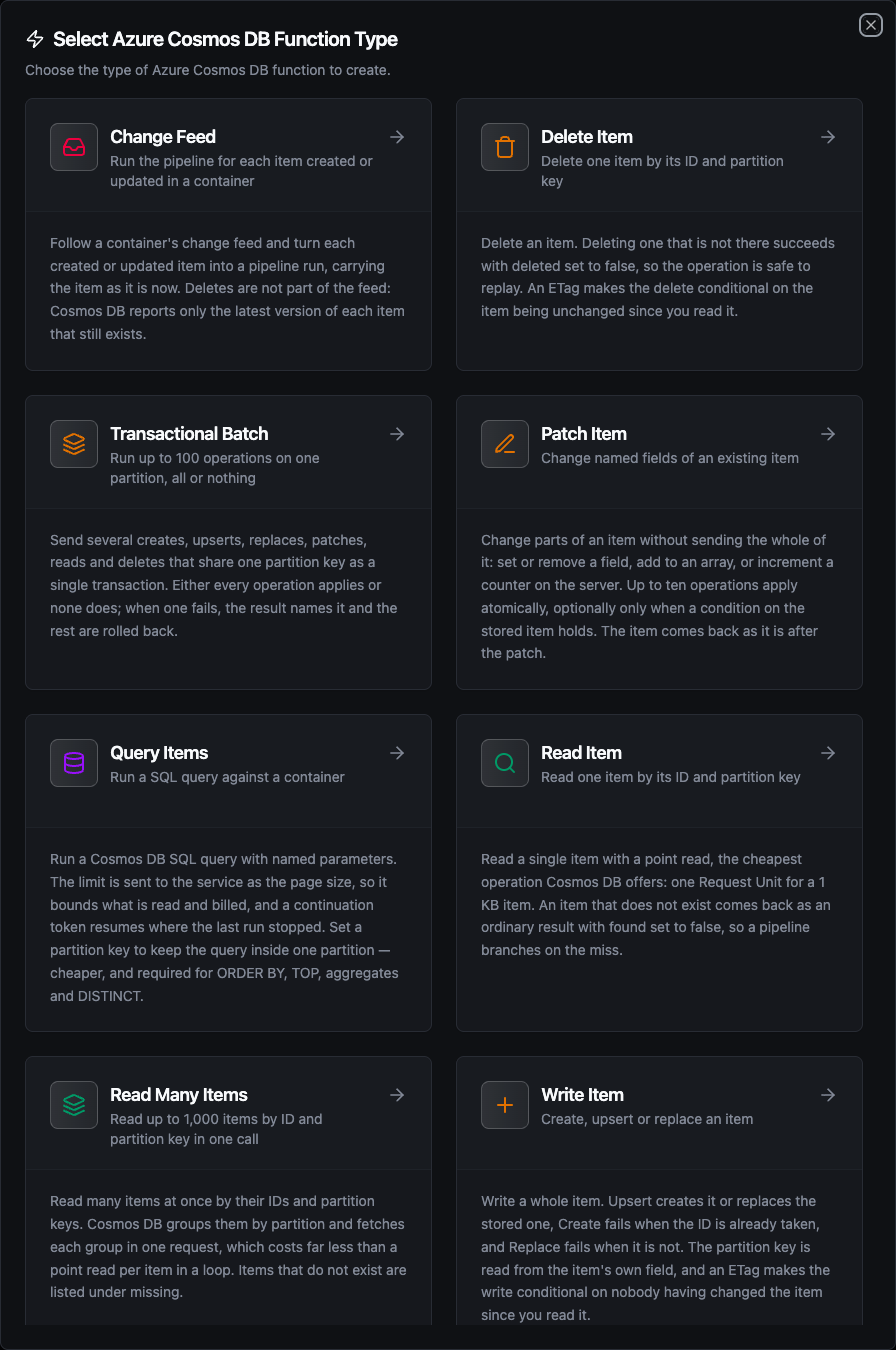
The eight Azure Cosmos DB function types
Items in and out
Items are plain JSON in both directions. On the way out, the connector:
- delivers a whole number as an integer, keeping every digit — a 19-digit identifier is not rounded through a float
- removes the resource-link properties Cosmos DB adds to every item (
_rid,_self,_attachments,_lsn), which address the item inside the service's own REST model and mean nothing to a pipeline - keeps
_etag, which the If-Match field reads, and_ts, the time the item last changed (epoch seconds)
Every result also carries requestCharge: the Request Units (RU) the call consumed. RU are what Cosmos DB bills and what its throughput limit counts. A container over its provisioned RU/s answers 429; the connector retries it up to three times, waiting as long as the service asks, and after that reports it as a retryable failure.
Read Item
Read one item by its ID and partition key.
| Field | Type | Required | Default | Description |
|---|---|---|---|---|
| Container | string | yes | - | Name of the container holding the item |
| Item ID | string | yes | - | The item's id |
| Partition Key | string | yes | - | The item's partition key — see Partition keys |
| Timeout | duration | no | 30m | Bound on this operation |
A point read is the cheapest operation Cosmos DB has: one RU for a 1 KB item. An item that does not exist is not an error — the function succeeds with found false and a null item. A container that does not exist is an error, naming the container.
Container:     machines
Item ID:       ((deviceId))
Partition Key: ((deviceId))
Read Many Items
Read up to 1,000 items by ID and partition key in one call.
| Field | Type | Required | Default | Description |
|---|---|---|---|---|
| Container | string | yes | - | Name of the container holding the items |
| Items | JSON | yes | - | Array of {"id": …, "partitionKey": …}, at most 1,000 |
| Timeout | duration | no | 30m | Bound on this operation |
[
  {"id": "press-1", "partitionKey": "press-1"},
  {"id": "press-2", "partitionKey": "press-2"},
  {"id": "line-3", "partitionKey": ["ankara", "line-3"]}
]
Cosmos DB groups the items by partition and fetches each group in one request, which costs far less than a Read Item per entry in a loop. Inside the array, partitionKey can be a JSON string, number, boolean, null, or an array for a hierarchical key.
Items that do not exist come back in missing, each as {id, partitionKey}. An ID under the wrong partition key counts as missing — it names a different item.
Query Items
Run a Cosmos DB SQL query.
| Field | Type | Required | Default | Description |
|---|---|---|---|---|
| Container | string | yes | - | Name of the container to query |
| Query | string | yes | - | A Cosmos DB SQL query, e.g. SELECT * FROM c WHERE c.deviceId = @device |
| Query Parameters | JSON | no | - | Object of parameters — {"@device": "press-1", "@min": 80} |
| Partition Key | string | no | - | Run the query inside this one partition. Leave empty to query every partition |
| Limit | integer | no | 100 | Maximum items to return, 1–10,000 |
| Continuation Token | string | no | - | Resume where a previous run stopped |
| Timeout | duration | no | 30m | Bound on this operation |
Reference values as @name parameters rather than splicing them into the query text. A parameter keeps a value from being read as SQL, and the service can reuse the query plan.
Query:            SELECT * FROM c WHERE c.deviceId = @device AND c.celsius > @limit
Query Parameters: {"@device": "((deviceId))", "@limit": 80}
The Limit is sent to Cosmos DB as the page size, so it bounds what is read and billed. A limit above 1,000 is filled over several requests, each asking only for what is still missing.
Paging
When more results may follow, the result carries a continuationToken and truncated is true. Feed the token back as the next run's Continuation Token, with the same query and partition key:
run 1: limit 100                       → continuationToken "…", truncated true
run 2: continuationToken from run 1    → continuationToken "…", truncated true
run 3: continuationToken from run 2    → truncated false, no token
Cross-partition queries
Leaving Partition Key empty runs the query across every partition. Scope it to one partition whenever you can: it is cheaper, and some SQL features need it.
The Cosmos DB Go SDK this connector uses sends queries through the Azure gateway without a client-side query engine. Across partitions, the gateway runs only simple filters and projections; a query using ORDER BY, TOP, OFFSET … LIMIT, DISTINCT, GROUP BY or an aggregate such as COUNT fails with an error that tells you to set Partition Key. Inside one partition they all work.
Write Item
Create, upsert or replace a whole item.
| Field | Type | Required | Default | Description |
|---|---|---|---|---|
| Container | string | yes | - | Name of the container to write into |
| Item | JSON | yes | - | The item. It must carry a string id and the container's partition key field |
| Mode | enum | no | upsert | upsert, create or replace |
| If-Match ETag | string | no | - | Write only if the stored item's _etag still equals this value |
| Timeout | duration | no | 30m | Bound on this operation |
| Mode | When the ID exists | When it does not |
|---|---|---|
upsert | replaces the item | creates it |
create | fails with 409 Conflict | creates it |
replace | replaces the item | fails with 404 Not Found |
The partition key is read from the item's own field — for a container partitioned on /deviceId, from item.deviceId. An item without that field is refused before anything is sent, naming the path. The result says whether the write created a new item (created true) or replaced one.
{
  "id": "((readingId))",
  "deviceId": "((deviceId))",
  "celsius": ((value)),
  "recordedAt": "((timestamp))"
}
The item is sent as you wrote it, so a large integer is not rounded on the way in either.
Optimistic concurrency
Read an item, keep its _etag, and pass it as If-Match ETag on the write. If anyone changed the item in between, the write fails with 412 Precondition Failed and nothing changes. Create ignores If-Match: there is no stored item to compare against.
Patch Item
Change parts of an existing item without sending the whole of it.
| Field | Type | Required | Default | Description |
|---|---|---|---|---|
| Container | string | yes | - | Name of the container holding the item |
| Item ID | string | yes | - | The id of the item to patch |
| Partition Key | string | yes | - | The item's partition key |
| Operations | JSON | yes | - | Array of up to 10 patch operations |
| Condition | string | no | - | Apply the patch only when the stored item matches, e.g. FROM c WHERE c.status = 'idle' |
| If-Match ETag | string | no | - | Patch only if the stored item's _etag still equals this value |
| Timeout | duration | no | 30m | Bound on this operation |
Each operation is {"op", "path", "value"}, and the path is a JSON Pointer:
| op | What it does |
|---|---|
set | Sets a field, creating it if needed |
add | Adds a field, or inserts into an array — /alarms/- appends |
replace | Replaces a field that must already exist |
remove | Removes a field. Takes no value |
incr | Adds a whole number to a numeric field, on the server |
[
  {"op": "incr", "path": "/cycles", "value": 1},
  {"op": "set", "path": "/status", "value": "((status))"},
  {"op": "add", "path": "/alarms/-", "value": "((alarmCode))"}
]
The operations apply atomically, and the result carries the item as it is after the patch — the way to read a counter's new value after an increment.
Two limits come from the Cosmos DB Go SDK, and the form refuses both with the fix spelled out:
- A value cannot be
null. The SDK drops a null value from the request. Useremoveto clear a field. - Write strings in a Condition with single quotes. The SDK does not escape the condition, so a double quote or backslash would break the request.
Delete Item
Delete one item.
| Field | Type | Required | Default | Description |
|---|---|---|---|---|
| Container | string | yes | - | Name of the container holding the item |
| Item ID | string | yes | - | The id of the item to delete |
| Partition Key | string | yes | - | The item's partition key |
| If-Match ETag | string | no | - | Delete only if the stored item's _etag still equals this value |
| Timeout | duration | no | 30m | Bound on this operation |
Deleting an item that is not there succeeds with deleted false, so the operation is safe to replay.
Transactional Batch
Run up to 100 operations on one partition as a single transaction.
| Field | Type | Required | Default | Description |
|---|---|---|---|---|
| Container | string | yes | - | Name of the container the batch writes into |
| Partition Key | string | yes | - | The partition every operation belongs to |
| Operations | JSON | yes | - | Array of up to 100 operations |
| Timeout | duration | no | 30m | Bound on this operation |
Each operation has an op and what that op needs:
| op | Needs |
|---|---|
create, upsert | item |
replace | item (and optionally id, which must match the item's) |
patch | id and patch — the same operations Patch Item takes |
read, delete | id |
Any operation can carry ifMatch.
[
  {"op": "create", "item": {"id": "((readingId))", "deviceId": "press-1", "celsius": ((value))}},
  {"op": "patch", "id": "press-1", "patch": [{"op": "incr", "path": "/readings", "value": 1}]},
  {"op": "read", "id": "press-1"}
]
Either every operation applies or none does. When one fails, the whole batch is rolled back and the function fails with the operation that caused it — operations[1] (create "r-1") failed with status 409 Conflict. Every item a batch writes must belong to the batch's partition; one that does not is refused before anything is sent.
Change Feed
Run a pipeline for each item created or updated in a container. This function is used on an Azure Cosmos DB trigger node, not as a pipeline step.
| Field | Type | Required | Default | Description |
|---|---|---|---|---|
| Container | string | yes | - | Name of the container to follow |
| Start From | enum | no | now | now fires only for changes after the trigger starts; beginning first replays every item |
| Partition Key | string | no | - | Follow only this one partition |
| Poll Interval | duration | no | 5s | How long to wait before asking again once the feed is idle (1s–5m) |
| Max Items Per Poll | integer | no | 100 | Most items fetched in one read, 1–1,000 |
| Timeout | duration | no | - | Cap on how long one follow may run. Leave empty |
The change feed reports the latest version of each item that was created or updated:
- Deletes are not reported. An item deleted before the feed is read never appears at all. To act on deletions, mark items deleted (a soft-delete field, with a TTL to remove them later) instead of deleting them.
- Rapid updates collapse. An item written twice between two reads arrives once, with its latest content.
The feed's position is kept in memory. After MaestroHub restarts, the trigger starts again from its Start From setting: now skips changes made while it was down, and beginning replays the container. For this reason the connection is exclusive — only one replica runs it, since a second would read the same feed and fire each change twice.
Using Parameters
Every field marked templatable accepts ((parameterName)) placeholders, filled from upstream node output at run time:
| Where | Example |
|---|---|
| Item ID / Partition Key | ((deviceId)) |
| Item | {"id": "((id))", "deviceId": "((deviceId))", "celsius": ((value))} |
| Query Parameters | {"@device": "((deviceId))"} |
| Operations | [{"op": "set", "path": "/status", "value": "((status))"}] |
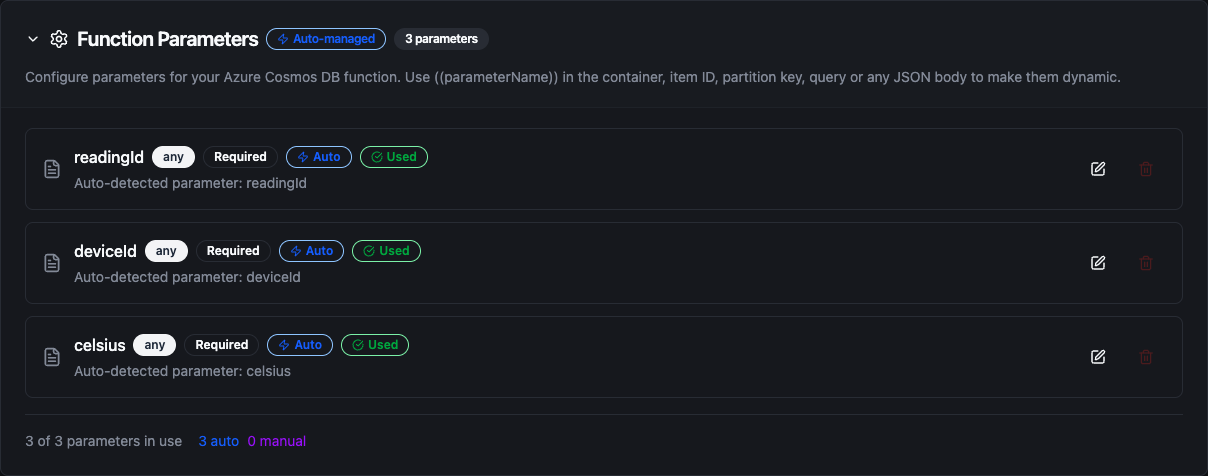
Parameters detected from ((placeholders)) in a Write Item function
A templated value is only known at run time, so the form defers its checks on fields that contain a placeholder; the same checks run on the resolved value when the function executes.
Every function type except Change Feed accepts parameters. The change feed starts a pipeline, so there is no upstream node to fill them from.
Pipeline Integration
Each execution function appears as its own node under Database in the node library, and the change feed as an Azure Cosmos DB Trigger:
- Azure Cosmos DB nodes — the seven execution nodes and their outputs
- Azure Cosmos DB trigger — the change feed trigger
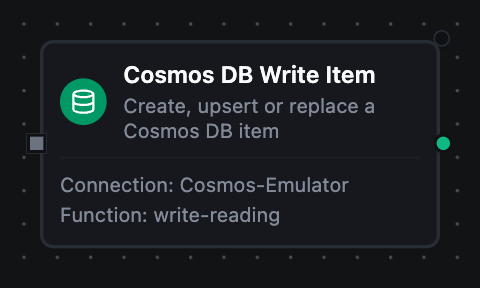
An Azure Cosmos DB Write Item node on the canvas
Common patterns:
- Store readings — an MQTT or OPC UA trigger followed by Write Item
- Enrich — a Read Item or Read Many Items lookup before a decision node
- Count and stamp — Patch Item with
incrandsetin one atomic call - Keep two items in step — a Transactional Batch that writes a reading and updates its device's summary together
Store-and-forward and replay safety
The four write operations can be buffered through store-and-forward. What a replay does differs per operation:
| Operation | On replay |
|---|---|
Write Item, upsert or replace | Writes the same body again — same end state |
Write Item, create | Fails with 409 — the first write stands |
| Patch Item | Applies again — an incr adds twice |
| Delete Item | Answers deleted false — same end state |
| Transactional Batch | Applies whole or fails whole, like the first attempt |
Patch Item is declared non-idempotent because of incr. If a patch only sets, replaces or removes fields, a replay converges on the same state.
Common Use Cases
Machine state store
Keep one item per machine, partitioned on /deviceId. An OPC UA trigger patches the machine's item with set for its status and incr for its cycle counter, and dashboards read it with Read Item.
Time-series readings
Write each reading as its own item with Write Item, partitioned by device. A scheduled pipeline runs Query Items with SELECT * FROM c WHERE c._ts > @since scoped to one device's partition to hand the latest readings to an analytics system.
Order intake
Follow an orders container with the change feed. Each new order runs a fulfilment pipeline, which writes the shipment and updates the order in one Transactional Batch.
Replicating to another system
Follow a container from the beginning once to copy it into a warehouse, then keep following to forward every later change.
Troubleshooting
| Symptom | Cause | Fix |
|---|---|---|
database "…" not found in this account | The Database field names a database that does not exist | Check the name; database names are case-sensitive |
| 401 Unauthorized on connect | A wrong account key | Copy the key again from the account's Keys blade |
| 401 Unauthorized on writes only | A read-only key | Use the primary or secondary read-write key |
| 403 Forbidden with Entra ID | The identity has no data-plane role | Assign Cosmos DB Built-in Data Contributor with az cosmosdb sql role assignment create |
container "…" not found | A typo in the Container field | Container names are case-sensitive |
item has no value at /… | The item lacks the container's partition key field | Add the field to the item |
| 409 Conflict | Create found the ID taken | Use upsert, or a new ID |
| 412 Precondition Failed | The ETag changed, or the patch condition did not match | Read the item again and retry with its new _etag |
| 413 Request Entity Too Large | An item over 2 MB | Split the item |
| 429 Too Many Requests | The container is over its RU/s | Raise the throughput, or spread the load |
| A query error mentioning cross partition | ORDER BY, TOP, DISTINCT, GROUP BY or an aggregate across partitions | Set Partition Key |
| Read Item finds nothing for a numeric key | 42 is the string key | Write the key as [42] |
| The trigger misses deletes | The change feed does not report deletes | Soft-delete with a field and a TTL |