Azure Event Hubs Integration Guide
Connect to Azure Event Hubs to send and consume events in your pipelines. This guide covers connection setup, function configuration, and pipeline integration for Event Hubs namespaces.
Overview
The Azure Event Hubs connector integrates with Microsoft's fully managed, real-time data ingestion service, commonly used for telemetry ingestion, event streaming, and analytics fan-out. It provides:
- Event production with optional partition key or explicit partition ID and custom application properties
- Batch production for high-throughput ingestion of many events in a single round-trip
- Partition inspection to retrieve partition IDs and per-partition properties (last enqueued sequence number and offset)
- Consumer group listing via the Azure management plane
- Event consumption using a partition-aware
EventProcessorwith a Blob-backed or in-memory checkpoint store, available as a pipeline trigger - SAS connection string or Microsoft Entra ID authentication — service principal, managed identity, or the default credential chain
- Template parameters for dynamic payloads, partition keys, and properties based on runtime input
Connection Configuration
Creating an Azure Event Hubs Connection
Navigate to Connections → New Connection → Azure Event Hubs and configure the following:
Azure Event Hubs Connection Creation Fields
1. Profile Information
| Field | Default | Description |
|---|---|---|
| Profile Name | - | A descriptive name for this connection profile (required, max 100 characters) |
| Description | - | Optional description for this Event Hubs connection |
2. Event Hubs Namespace
| Field | Default | Description |
|---|---|---|
| Authentication Method | connection_string | connection_string (SAS), or a Microsoft Entra ID method: service_principal, managed_identity, default_credential |
| Connection String | - | SAS connection string for the namespace or entity (secret) — required for connection_string. Masked on edit; leave empty to keep the stored value |
| Namespace Host | - | Fully qualified namespace, a bare host such as my-namespace.servicebus.windows.net — required for the Entra ID methods |
| Tenant ID | - | Microsoft Entra ID tenant (directory) ID — required for service_principal |
| Client ID | - | Application (client) ID — required for service_principal; for managed_identity, the optional client ID of a user-assigned identity |
| Client Secret | - | Client secret of the service principal (secret) — required for service_principal. Masked on edit |
| Event Hub Name | - | Name of the event hub (topic). Required, except with a connection string that includes EntityPath |
| Consumer Group | $Default | Default consumer group for consume triggers. Can be overridden per consume function |
A namespace-level SAS connection string looks like:
Endpoint=sb://<namespace>.servicebus.windows.net/;SharedAccessKeyName=<key-name>;SharedAccessKey=<key>
An entity-level string may additionally include ;EntityPath=<hub>, in which case Event Hub Name can be left empty.
The same three methods, with the same fields, are offered by every Azure connector (Azure Blob Storage, Event Hubs, OneLake):
service_principal— a registered Entra ID app with Tenant ID, Client ID, and Client Secret. The most portable choice; grant it Azure Event Hubs Data Sender and/or Data Receiver on the namespace or hub.managed_identity— for MaestroHub running on Azure (VM, AKS, Container Apps). Uses the host's assigned identity; set only the optional Client ID for a user-assigned identity.default_credential— the Azure SDK default chain (env vars, workload identity, Azure CLI). Useful for local development.
3. Checkpoint Store
The checkpoint store tracks partition offsets for consume triggers so consumption can resume after a restart.
| Field | Default | Description |
|---|---|---|
| Checkpoint Store | In-memory | Where consume-trigger partition offsets are stored: In-memory (no durability) or Azure Blob (durable, recommended) |
(Only required when Checkpoint Store is Azure Blob)
| Field | Default | Description |
|---|---|---|
| Checkpoint Blob Connection String | - | Azure Storage connection string for the Blob checkpoint store (secret) |
| Checkpoint Blob Container | - | Blob container that holds checkpoint and ownership blobs |
- In-memory: No storage account needed — ideal for quick testing. Partition offsets are lost on restart, and only one instance may consume (no cross-instance coordination).
- Azure Blob: Durable and resumable across restarts. Multiple instances load-balance partitions between them, so this is required to scale a consume trigger out.
4. Management (List Consumer Groups only)
These fields are used only by the List Consumer Groups function, which calls the Azure management plane.
| Field | Default | Description |
|---|---|---|
| Subscription ID | - | Azure subscription ID of the Event Hubs namespace |
| Resource Group | - | Resource group of the Event Hubs namespace |
| Namespace Name | - | ARM namespace resource name. If empty, it is derived from the Namespace Host or the connection string endpoint |
List Consumer Groups uses the Azure management plane (ARM), which cannot be authenticated with a SAS key. With an Entra ID method, it uses the connection's own identity (which needs Reader on the namespace). With a connection string, it falls back to an environment Azure AD credential (DefaultAzureCredential — e.g. az login or workload identity). Subscription ID and Resource Group are required either way.
5. Connection Labels
| Field | Default | Description |
|---|---|---|
| Labels | - | Key-value pairs to categorize and organize this Event Hubs connection (max 10 labels) |
- Required Fields: Profile Name, plus the Connection String (
connection_string) or the Namespace Host and Event Hub Name (Entra ID methods;service_principalalso needs Tenant ID, Client ID, and Client Secret). With a connection string, Event Hub Name is required unless the string carries anEntityPath. - Consumer Groups: The consumer group can be set at the connection level and optionally overridden per consume function.
- Scaling: Consume scaling is
sharedwith an Azure Blob checkpoint store (partitions load-balance across instances) andexclusivewith the in-memory store (a single instance).
Function Builder
Creating Azure Event Hubs Functions
Once you have a connection established, you can create reusable functions:
- Open the connection and go to its Functions tab → New Function
- Select the desired function type
- Configure the function parameters
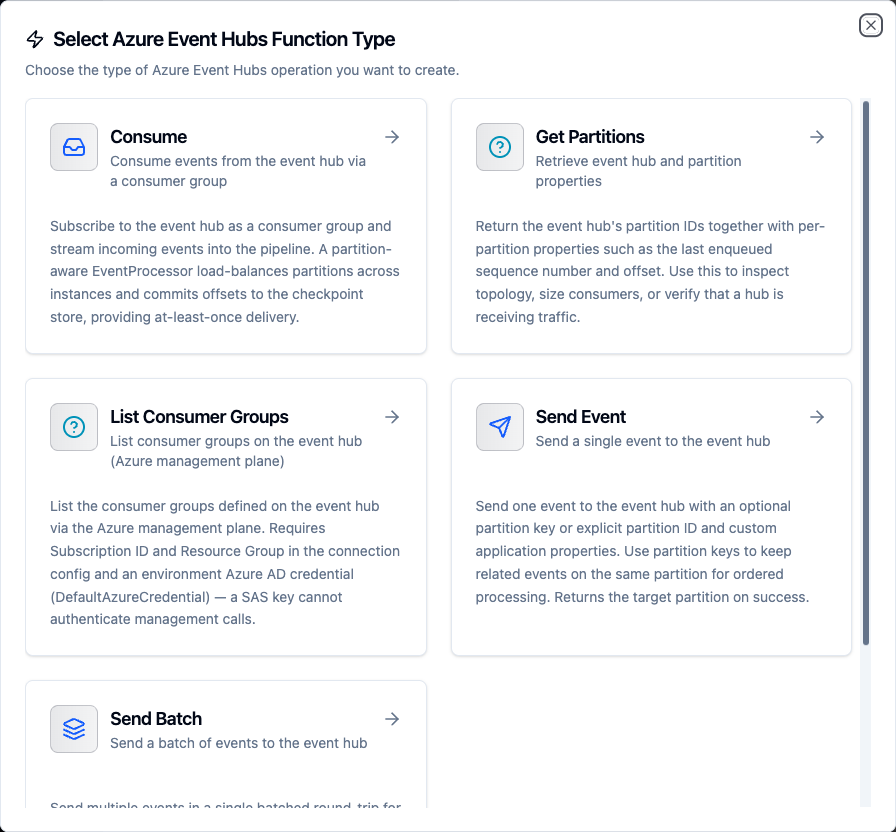
Select from five Event Hubs function types: Send Event, Send Batch, Get Partitions, List Consumer Groups, and Consume
Send Event Function
Purpose: Send a single event to the event hub with an optional partition key or explicit partition ID and custom application properties. Use this for telemetry ingestion and event streaming.
Configuration Fields
| Field | Type | Required | Default | Description |
|---|---|---|---|---|
| Payload | String | Yes | - | Event body to send (JSON or text). Supports template parameters. |
| Partition Key | String | No | - | Routing key — related events with the same key land on the same partition. Supports template parameters. |
| Partition ID | String | No | - | Explicit partition ID. Mutually exclusive with Partition Key. Supports template parameters. |
| Properties | JSON | No | - | Custom application properties for metadata propagation (e.g. {"source": "gateway"}). Supports template parameters. |
Set either a partition key or a partition ID, never both — the function returns an error if both are provided. Prefer a partition key for ordered-per-key delivery and let Event Hubs assign the partition.
Example Configuration
// Payload
{
  "temperature": ((temperature)),
  "humidity": ((humidity)),
  "timestamp": "((timestamp))",
  "source": "((deviceId))"
}

// Partition Key (keeps a device's events on one partition)
((deviceId))

// Properties
{"source": "iot-gateway", "contentType": "application/json"}
Use Cases:
- Stream sensor telemetry into an Azure-native analytics backbone
- Bridge pipelines into Azure Stream Analytics or Functions
- Publish domain events for downstream consumers
Send Batch Function
Purpose: Send multiple events in a single batched round-trip for high-throughput ingestion. Batching amortizes AMQP overhead and is the preferred path for bulk emission.
Configuration Fields
| Field | Type | Required | Default | Description |
|---|---|---|---|---|
| Events | JSON | Yes | - | Array of event bodies (strings or objects) to send as one batch. Supports template parameters. |
| Partition Key | String | No | - | Routing key applied to the whole batch — all events go to the same partition. Supports template parameters. |
Example Configuration
// Events
[
  {"sensor": "s1", "value": ((v1))},
  {"sensor": "s2", "value": ((v2))},
  {"sensor": "s3", "value": ((v3))}
]

// Partition Key
((lineId))
Use Cases:
- Bulk telemetry upload from buffered edge collectors
- Batched log shipping into Event Hubs
Get Partitions Function
Purpose: Retrieve the event hub's partition IDs together with per-partition properties such as the last enqueued sequence number and offset. Use it to inspect topology, size consumers, or verify a hub is receiving traffic.
Configuration Fields
This function takes no parameters.
Returns: the event hub name, partition count, partition IDs, and a per-partition list with isEmpty, beginningSequenceNumber, lastEnqueuedSequenceNumber, lastEnqueuedOffset, and lastEnqueuedOn.
Use Cases:
- Inspect partition count before configuring consumers
- Verify traffic by checking last-enqueued offsets
List Consumer Groups Function
Purpose: List the consumer groups defined on the event hub via the Azure management plane.
Configuration Fields
This function takes no parameters, but relies on the connection's Management fields (Subscription ID, Resource Group, and optionally Namespace Name).
This function calls ARM and needs an environment Azure AD credential plus Subscription ID and Resource Group. If those are missing it returns a clear error — a SAS key cannot authenticate management calls. It is the one function that a local Event Hubs emulator cannot exercise.
Use Cases:
- Audit consumer groups on a hub
- Discover available consumer groups before creating a consume trigger
Consume Function
Purpose: Consume events from the event hub using a consumer group. Consume functions are used as pipeline triggers to start execution when events arrive; a partition-aware EventProcessor commits offsets to the checkpoint store for at-least-once delivery.
Configuration Fields
| Field | Type | Required | Default | Description |
|---|---|---|---|---|
| Consumer Group | String | No | Connection default | Override the consumer group from connection settings. Leave empty to use the connection-level consumer group. |
| Start Position | Select | No | latest | Where to begin when no checkpoint exists: latest (new events only) or earliest (from the beginning). |
Example Configuration
// Consumer Group
analytics

// Start Position
latest
Start Position only applies the first time a partition is read (when no checkpoint exists yet). Once offsets are committed to the checkpoint store, consumption resumes from the last committed position regardless of this setting.
Use Cases:
- Trigger pipelines on incoming stream events
- Ingest real-time events into the Unified Namespace
- Drive event-driven microservice processing
Using Parameters
The ((parameterName)) syntax creates dynamic, reusable functions. Parameters are automatically detected from your configuration fields and can be configured with:
| Configuration | Description | Example |
|---|---|---|
| Type | Data type validation | string, number, boolean, datetime, json, buffer |
| Required | Make parameters mandatory or optional | Required / Optional |
| Default Value | Fallback value if not provided | 0, {}, device-1 |
| Description | Help text for users | "Device identifier", "Telemetry value" |
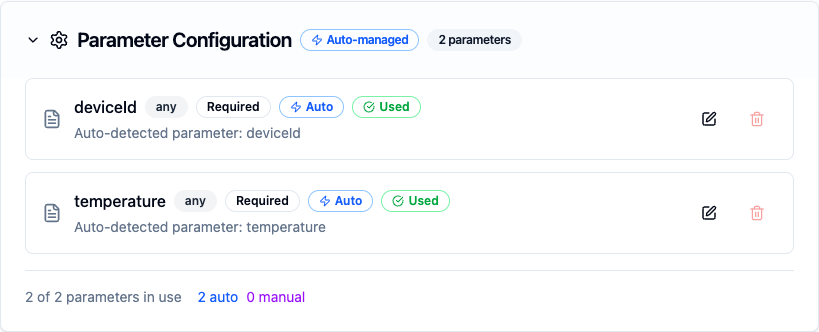
Configure dynamic parameters for Event Hubs functions with type validation, defaults, and descriptions
Template parameters are available for the Send Event and Send Batch functions (payload, partition key, and properties). Get Partitions and List Consumer Groups take no parameters, and Consume functions are event-driven triggers that do not accept runtime parameters.
Pipeline Integration
Use the Event Hubs functions you create here as nodes inside the Pipeline Designer. Drag the function node onto the canvas, bind its parameters to upstream outputs or constants, and configure error handling as needed.
Common patterns include:
- Collect → Send: Gather data from OPC UA, Modbus, or MQTT and send to an event hub
- Consume → Process → Send: Read from one hub, transform data, and write to another
- Consume → Store: Ingest events and write to the UNS, PostgreSQL, or InfluxDB
- Consume → Alert: React to stream events and trigger notifications via SMTP or MS Teams
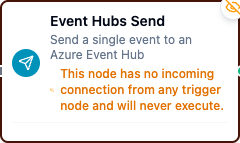
Event Hubs Send node on the pipeline canvas
For broader orchestration patterns that combine Event Hubs with SQL, REST, MQTT, or other connector steps, see the Connector Nodes page.
Common Use Cases
IoT Telemetry Ingestion
Scenario: Collect sensor readings from factory equipment and stream them to Azure Event Hubs for distributed processing by Stream Analytics and downstream consumers.
Send Configuration:
- Payload:
{
  "machineId": "((machineId))",
  "temperature": ((temperature)),
  "vibration": ((vibration)),
  "timestamp": "((timestamp))"
}
- Partition Key:
((machineId)) - Properties:
{"plant": "chicago", "line": "assembly-1"}
Pipeline Integration: Connect after OPC UA or Modbus read nodes to continuously stream equipment telemetry into Event Hubs.
Batched Log Shipping
Scenario: Buffer application logs at the edge and ship them to Event Hubs in batches for centralized aggregation.
Send Batch Configuration:
- Events:
((logBatch))
- Partition Key:
((hostname))
Pipeline Integration: Accumulate log lines with a transform or foreach node, then send them as one batch to reduce round-trips.
Stream Processing Pipeline
Scenario: Consume raw sensor events from Event Hubs, enrich them, and send processed results to a new hub.
Consume Configuration:
- Consumer Group:
sensor-enrichment - Start Position:
latest
Send Configuration (downstream):
- Payload: Transformed data from upstream processing
- Partition Key:
((sensorId))
Pipeline Integration: Chain an Event Hubs consume trigger with transform nodes and an Event Hubs send node to build a complete stream processing pipeline.
Event-Driven Notifications
Scenario: Consume alert events from Event Hubs and route them to notification channels based on severity.
Consume Configuration:
- Consumer Group:
alert-routing - Start Position:
latest
Pipeline Integration: Connect to condition nodes that route by severity — critical alerts to MS Teams, warnings to SMTP email, and informational events to the UNS for audit logging.